Buy anything from 5,000+ international stores. One checkout price. No surprise fees. Join 2M+ shoppers on Desertcart.
Desertcart purchases this item on your behalf and handles shipping, customs, and support to Greece.
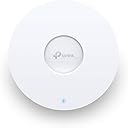
🚀 Elevate your network game with TP-Link EAP660 HD — where speed meets smart control!
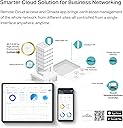
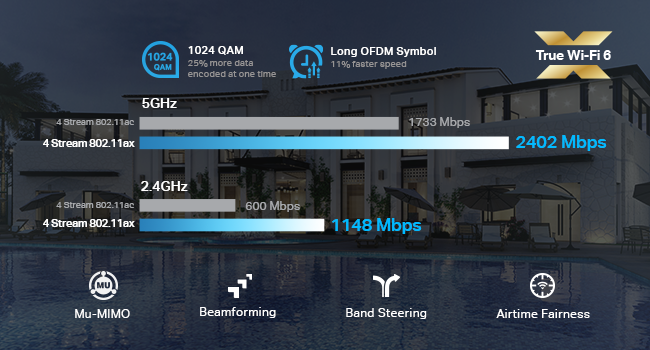
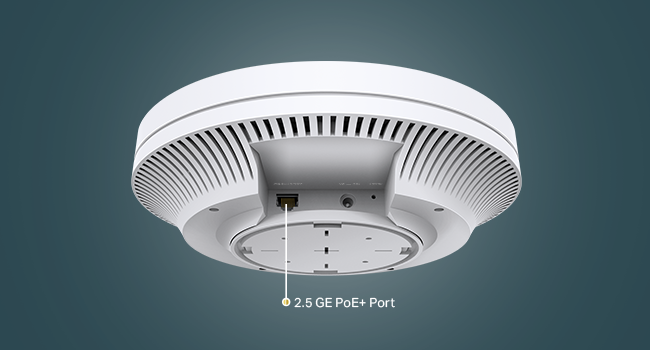
The TP-Link EAP660 HD is a Wi-Fi 6 AX3600 wireless access point designed for high-density environments, delivering ultra-fast dual-band speeds up to 3550 Mbps. Featuring 8 spatial streams, OFDMA, MU-MIMO, and a 2.5 Gbps Ethernet port with PoE+ support, it ensures exceptional multi-device performance and flexible deployment. Integrated with Omada SDN and cloud management, it offers seamless remote control and robust security with WPA3 encryption, backed by a limited lifetime warranty.


| ASIN | B08PW34WPX |
| Antenna Location | Business |
| Antenna Type | Internal |
| Best Sellers Rank | #580 in Computer Networking Wireless Access Points |
| Brand | TP-Link |
| Built-In Media | Ceiling/Wall Mounting Kits, EAP660 HD, Installation Guide, Power Adapter |
| Color | white |
| Compatible Devices | Personal Computer |
| Connectivity Protocol | ethernet, wi-fi |
| Connectivity Technology | Ethernet, Wi-Fi |
| Control Method | Remote |
| Controller Type | vera |
| Coverage | large area and high-density spaces |
| Customer Reviews | 4.6 out of 5 stars 360 Reviews |
| Data Transfer Rate | 3600 Gigabits Per Second |
| Frequency | 5 |
| Frequency Band Class | Dual-Band |
| Has Internet Connectivity | Yes |
| Has Security Updates | No |
| Is Modem Compatible | No |
| Item Dimensions L x W x H | 9.59"L x 9.59"W x 2.5"H |
| Item Type Name | Access Point |
| Item Weight | 0.88 Kilograms |
| LAN Port Bandwidth | 2500 megabits per second |
| Manufacturer | TP-Link |
| Maximum Upstream Data Transfer Rate | 2500 Megabits Per Second |
| Mfr Part Number | EAP660 HD |
| Model Name | EAP660 HD |
| Model Number | EAP660 HD |
| Number of Antennas | 2 |
| Number of Ports | 2 |
| Operating System | Omada SDN |
| Other Special Features of the Product | Access Point Mode, WPS |
| Router Network Type | Local Area Network |
| Security Protocol | WPA, WPA2, WPA3 |
| Special Feature | Access Point Mode, WPS |
| UPC | 845973089719 |
| Unit Count | 1.0 Count |
| Warranty Description | Limited Lifetime Warranty |
| Wi-Fi Generation | Wi-Fi 6 |
| Wireless Communication Standard | 802.11ac, 802.11ax, 802.11b, 802.11g, 802.11n |
| Wireless Compability | 802.11ac, 802.11ax, 802.11b, 802.11g, 802.11n |
A**.
Excellent wireless coverage,1800 sq ft home
I recently upgraded my home WiFi network with the TP-Link EAP660 HD and have been blown away by the improved speed and coverage. The WiFi 6 technology provides faster speeds and greater capacity than my previous router, and the range extender function allows me to reach areas of my home that previously had weak signals. The setup process was straightforward and the Omada app made it easy to configure and customize my network settings. The app also allows me to remotely monitor and manage my network, which is convenient when I'm away from home. The design of the TP-Link EAP660 HD is sleek and modern, and the LED indicator lights provide a helpful visual guide for diagnosing any issues with the router. The EAP660 HD also features advanced security features, including WPA3 encryption and a guest network, which gives me peace of mind when it comes to protecting my personal data. In terms of performance, I've noticed a significant improvement in both download and upload speeds, especially when multiple devices are connected to the network at once. The signal strength is also impressive, with minimal signal dropouts or interruptions. Overall, I highly recommend the TP-Link EAP660 HD for anyone looking for a high-performance, secure, and easy-to-use WiFi 6 router. It's been a game-changer for my home network!
S**R
EAP660 HD tested against Ubiquiti U6-LR
The EAP660 HD has been rock solid and has performed better than the Ubiquiti U6-LR in my testing. I performed a handful of tests to compare the two. The EAP660 HD is running firmware 1.0.6 (supposedly better than the latest for mobile devices), and the U6-LR is running the latest according to UniFi. They have been setup using the same channels, channel widths, and antenna power levels. During testing I had my nominal 28 clients connected to the AP, most of which are connected to the 2.4 ghz channel; two of these are IP cameras that continuously upload video to a (hardwired) NAS. - iperf3 on my iPhone 13 Pro in various rooms throughout our house. The performance was very similar between the two APs. It ranged between 400 and 800 mbps with an average of 650. Both achieved > 900 mbps steady when connected to my wifi6 Dell laptop and I think also my 2015 MacBook Pro. - testing ping with wifiman against google, my local nas, and the gateway (router) - both were excellent. Fluctuated between 2 and 6 ms on local devices. - bufferbloat testing via waveform’s web app - both were good. I seem to remember Bs, As, and an A+ but might not remember correctly. FYI that I’m using a Ubiquiti ER-4 as a router with smart qos enabled. This is connected to a Verizon fios 1gb symmetrical internet plan. This setup has resulted in consistent A+ scores on hardwired devices. - stability of 2 ip security cameras (and a doorbell camera) - both very solid - 3 devices doing iperf at once - this is where things got interesting. The U6-LR did a decent job of evenly distributing bandwidth between two devices. When the third was introduced it seemed to choke. The third device’s speed was very slow. The EAP660 HD handled the traffic effortlessly. - PS remote play (multiple 30-45 min sessions) - both were excellent. There were occasional blips with both, but they were few and far between, and they lasted a very short time. On one occasion with the EAP660 HD it seemed like the quality (resolution) decreased. Force quitting and restarting the app restored it to normal. - 5 devices running iperf with bandwidth limiting (25 or 50 mbps…I forget which), then playing PS remote play from my phone to my hardwired PS5 - the EAP660 HD resulted in a very playable experience. There were small hiccups here and there but overall it was good. The U6-LR on the other hand performed poorly. The remote play app wouldn’t even establish a connection to the PS5 to start remote play. It returned an error saying the connection wasn’t strong or fast enough. I also seem to recall issues even executing iperf with all 5 devices on the Ubiquiti AP, so the remote play issue may have surfaced with even less than 5. The Omada management web app isn’t as good as Unifi imo; the UX just isn’t as good, and there are some features missing. But it’s close enough. Overall I’m very impressed with the EAP660 HD. Time will tell what sort of uptime I can expect before issues arise, but Omada supports scheduled reboots, so there’s always that to fall back on.
A**R
EAP660 HD in the home
I hate that these reviews get grouped together for vastly different products, so that’s why I put the model in the subject I am not a business, and I am not using this “business grade” access point in a business setting. I am using the EAP660 HD in an oddly-shaped, second floor apartment. I am coming from the perspective of a consumer, where consumer grade equipment is often over-priced, under-spec’d, and ugly. This access point is not that. This access point is pretty big overall, but is smaller and much less offensive than my previous router-turned-access-point. Functionally, this access point is great. WPA3, WiFi 6, and the 2.5G port were all big selling points for me. The user-interface is perfectly simple, and the installation was super easy. With or without POE, this access point is as close to plug-and-play as I think you can get, with a lot of flexibility and advanced features. An access point is NOT a router. If you’re interested in my network: CM1000 -> PFSense -> Access Point. This means I have at-max, 1GB download. I pay for 900M, and when wired I normally get ~860 or so. Wireless I used to get 550Mb/s through my Asus Ac3200 to my iPhone 11. Now I get a (much more reliable) 670Mb/s to the same device. (I know, super scientific) While I have asymmetric bandwidth through my ISP, the 2.5Gb networking is great for when I want to upgrade, making this purchase a longer-term solution and less of an incremental upgrade. Also if I had any network attached storage, 2.5G to the wireless access point could be useful there too. I am not tied into the Omada ecosystem, and this just lives by itself with a 1Gb POE switch powering it. When multi-gig switches gain popularity and lower price, perhaps then I will upgrade. Only time will tell for reliability, but at this time I have zero complaints. Super solid. If I observe any issues with reliability, I will update here.
C**T
Setup is a cinch with an Omada Controller. BRIGHT blue LED.
I really wish companies would stop putting bright blue LEDs in everything. My previous access points, EAP225s, had a green LED that was a bit too bright, but a little piece of white electrical tape over it dimmed the light down to a reasonable level. The LED on this model is much brighter, and blue, which can mess with your sleep cycle. I don't want to turn the light completely off because then I can't tell if it's working, but there's no "dim" option. Overall the access points have been great. I've had no problems with devices connecting and combined with the OC200 Omada Controller, set up was incredibly simple: just plug it in and adopt the new AP. I did need to replace my network switches, however, since the previous APs used passive PoE from a power injector and this one requires proper 802.3at (PoE+). I upgraded to Omada smart switches, which combined with the controller, provides me with a wealth of information about how my network is performing and who is hogging bandwidth. This particular model has a 2.5GBASE-T port so you may actually be able to achieve the speeds that the AP is capable of, assuming you also have the proper switches, wiring, gateway, and Internet connection.
S**P
TP LINK
I really like TP link devices..I have this with the EPA 245 and the 200 cloud controller at my townhouse...Over kill for me but i like to learn and be complex...I also have these connected to a Tp link 28 poe managed switch...Now everything can be configured through the tp link cloud with the controller...This Epa 660 seems fast..I need to mount these and then i will update...Threw them up on the wall to test and once i dropped the tx power down from my Asus router for both bands the epa 245 and epa 600 came to life...My network is rock solid...I think by dropping the power to the router and using the cloud controller the access points are working the way they should...My Amcrest Wifi cameras are so fast to show up on the app now...Power house..I also have a 28 port tp link poe managed switch linked to the cloud controller to...I should of just bought the tp link business router for 60 bucks cause with these i dont need wifi comming off my router anymore....After a couple of days i noticed that the epa 660 is dropping clients...I my computer is 10 feet away and it will connect to the epa245 upstairs in the office...Weird...I am not to sure now about this unit...I dont have it mounted yet cause i am moving it around to see what is the best location.The epa 245 is performing like a champ but the 660 not so good all of a sudden...I will continue playing with the settings and update furtherJust bought another Epa 660 for my Firewalla router soon to come...I am ditching the Asus router and going to go back to the Omada setup...
M**R
Great Access Point
Running two of these EAP660 HDs for a large duplex powered from Netgear PoE switch. Controller was easy to spin up in a docker container on my Linux host and super easy to adopt/configure them. The Omada controller has feature parity, if not more compared to Ubiquiti and I find these TP Links have slightly better value and have a much longer warranty period. Even if not using the Omada controller, you can manage them from the IP address of the AP which is nice if you don't want monitoring or anything and it's more set and forget. The range is excellent on them and a good bit faster than my old AC-Pro. Roaming is seamless when clients go between them. Been running them for almost a month now and they have been super stable with no reboots. Graphs generated from the Omada controller are nice. Overall I would highly recommend this particular model or even any of their older AC ones if you want to save some money.
W**B
Excellent component of our TP-Link networked household
When I wanted to consolidate the 3 different WiFi systems on my rambling homestead, I looked at off-the-shelf systems such as Orbi. They didn't offer all of the options that TP-Link does, such as outdoor APs. The ability to control things centrally AND locally was a big selling point too. I'm pleased with having chosen TP-Link as a vendor. The signal strength of this unit is more than sufficient for the main floor of our large footprint home. Setup is straightforward; once everything is connected up to the central controller, and the basic network is configured, the rest pretty much happens on its own. Did I mention it uses PoE, woo-hoo! Plus I don't even have to think about firmware upgrades because the system takes care of them for me. Now I can wander around on any floor in the house, out in the yard, or in the garage, and never have to futz with WiFi settings. I'm a happy camper.
N**G
These are my go-to for my clients
These are workhorse devices. They work great in all of the deployments I've put them in. I have them in office environments with many walls and high density applications, I have them in restaurants and even in homes. They work great through walls, I even just installed a couple in a home in their conditioned attic space and the performance is flawless. I would absolutely recommend this device for anyone looking for superior wifi performance. On average, I see a max usage of around 400-500mbps with no interference or line of sight. Typical throughput through walls would be around 150-200mbps. Great for almost all applications. I use these with Omada hardware controllers. While it takes some effort to get the omada SDN set up and configured, once it's done it's rock solid.
J**N
Price increased?
Working good but, It was AED 660 when I purchased it in October last year.
M**.
660 HD - Great home Wi-Fi with really long reach !
I’ve tried way too many routers and wireless access points to improve on my BT home hub 2 and all have been a failure and not lived up to the hype of the advertising resulting in poor network reach and speed. I finally gave this one a go. Turned off my home hub 2 Wi-Fi but kept the router and plugged this in via Ethernet. Very easy to set up and configure. It has 8 internal aerials and runs at a good output. I now have great Wi-Fi coverage across the house on 2 floors running 2.4ghz on n-only I get 600mbps. No need to turn on the 5ghz and no need to turn in the Wi-Fi 6 as I don’t need it yet. Been running faultlessly with no drop outs and with the capacity to run hundreds of clients it copes seamlessly with the 30 or so devices in the house. Be careful which you buy - the 660hd has the best aerial configuration even compared to higher Tp link models. You can check out the full specs on the TP Link website. I’m happy with this. No more rumblings from the family about the Wi-Fi - it just works.
S**M
Very fast, great value, and easy to use interface
This EAP660 HD blows my old 2x2 EnGenius EWS357AP out of the water. I get my the full speed of my connection at two bars when my old one was half the speed at three bars. It took all of three minutes to setup, granted I had previously created an account. My only issue is that it is massive
A**R
Good WiFi 6 Performance
I can get ~ 900 Mb/s throughput on my desktop, ~700 Mb/s on my old Galaxy S10. I haven't been able to get speeds beyond 1G but the performance is still really impressive. The system is pretty simple and easy to configure.
C**E
excellent AP, great value
only thing to be prepared for: AP is large. :) Installed with Omada software controller (free download) to replace 2 unifi APs (AC-LR and NanoHD) and Unifi controller. Signal is way stronger, no comparison. From early tests I have more bandwidth with one EAP660 than 2 unifi ones. AP is WPA3, Wifi6 capable
Trustpilot
4 days ago
3 days ago