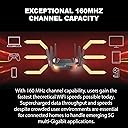
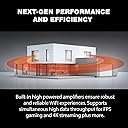
๐ Elevate your network game with D-Linkโs sleek, speedy switch!
The D-Link DGS-105 is a 5-port unmanaged gigabit Ethernet switch delivering up to 2000 Mbps data transfer speeds. Featuring a durable metal case and compact design, it offers plug-and-play simplicity ideal for professional desktops. Highly rated with a 4.6-star average and supported by a 1-year warranty, itโs a reliable choice for seamless network expansion.


| ASIN | B08DF9LGFL |
| Antenna Location | Gaming, Home |
| Antenna Type | Fixed |
| Best Sellers Rank | #403 in Computers ( See Top 100 in Computers ) #340 in Routers |
| Brand | D-Link |
| Built-In Media | Router, RJ45 cable, QIC, Quick Installation Guide, Quick Installation Guide for Voice, Power Adapter |
| Color | Black |
| Compatible Devices | Personal Computer |
| Compatible devices | Personal Computer |
| Connectivity Protocol | wi-fi |
| Connectivity Technology | Ethernet, Wi-Fi |
| Control Method | Voice |
| Controller Type | amazon_alexa |
| Coverage | Whole Home Coverage |
| Customer Reviews | 4.2 out of 5 stars 336 Reviews |
| Data Transfer Rate | 5400 Megabits Per Second |
| Frequency | 5 GHz |
| Frequency Band Class | Dual-Band |
| Frequency band class | Dual-Band |
| Global Trade Identification Number | 00790069454325 |
| Has Internet Connectivity | Yes |
| Has Security Updates | Yes |
| Is Electric | Yes |
| Is Modem Compatible | No |
| Item Dimensions L x W x H | 26.4L x 21W x 6.5H centimeters |
| Item Type Name | D-Link WiFi 6 Router AX5400 MU-MIMO Voice Control Works with Alexa Google Assistant, Dual Band Gigabit Gaming Internet Network (DIR-X5460-US) |
| Item Weight | 1.6 Pounds |
| LAN Port Bandwidth | 1000 Mbps |
| Manufacturer | D-Link Systems, Inc. |
| Maximum Upstream Data Transfer Rate | 5400 Megabits Per Second |
| Mfr Part Number | DIR-X5460-US |
| Model Name | DIR-X5460-US |
| Model Number | DIR-X5460-US |
| Model name | DIR-X5460-US |
| Number of Antennas | 6 |
| Number of Items | 1 |
| Number of Ports | 7 |
| Operating System | RouterOS |
| Other Special Features of the Product | WPS |
| Router Network Type | hybrid |
| Security Protocol | WPA2 |
| Special features | WPS |
| UPC | 790069454325 |
| Unit Count | 1 Count |
| Voltage | 240 Volts |
| Wi-Fi Generation | Wi-Fi 6 |
| Wireless Compability | 802.11ac, 802.11ax, 802.11g, 802.11n |
| Wireless communication standard | 802.11ac, 802.11ax, 802.11g, 802.11n |
M**I
Works great
๐คฉ
A**Q
ู ู ุชุงุฒ
ู ู ุชุงุฒ ุฌุฏุง ููุงุดุฎุงุต ุงูู ุจุณุชุฎุฏู ู ุงููุช ููุงูุนุงุจ
W**E
D-Link dazzles with the DIR-X5460!
I was already apart of the D-Link family as I was using the DIR-882 but when I saw the DIR-X5460 on sale for Prime day, I had to take the leap despite the upcoming release of WiFi-6E routers in the near future. This is a significant leap from my old router as it has way more horsepower top to bottom with the new Wi-Fi 6 capability. The only two Wi-Fi 6 ready devices I had available to test were my OnePlus 8 phone and a desktop Wi-Fi card I also caught on sale. It boosted my transmit speed on my phone from 866mbps to 1200 mbps! I have a ton of smart home devices and they all connected very quickly. Setup was a breeze and it even automatically updated the firmware to the latest version. I feel very little drop off switching from my desktop from a wired connection to the wireless connection . It even has cloud support to the router to accept voice commands however, I find the functionality for it to be rather buggy and cumbersome. It would be far easier to login to the router and make the needed changes on their simple to use GUI instead of using the voice features which are pretty limited to toggling the guest network status and rebooting the router. I feel I'll be able to get plenty of use out of this router as it will be awhile before Wi-Fi 6e adoption rate is high enough to want to change up from this high performing router. Do not hesitate to buy if you are in the market for another wireless router as you'll be hard pressed to find one with this much power at a reasonable price point.
R**N
Nice router
For almost 8 years, I had been using the same reliable D-Link DIR-880L router. However, when I upgraded my cable modem, the DIR-880L did not allow me to get the full speed provided by my ISP. Hence, I upgraded to the D-Link WiFi 6 Router AX5400. After receiving the new router, I downloaded the D-Link WiFi app onto my phone and scanned in the provided QR code. Everything seemed to go okay, but I did not get any internet connection after multiple attempts. Even when connecting my laptop through ethernet cable, I could not manually set up things in the configuration webpage. I called my ISP to reset the cable modem, but I still could not get internet connection between the cable modem and router. So, I hypothesized that the D-Link provided low profile (thin) ethernet cable might be faulty. I switched to a standard ethernet cable, and, that solved the whole connection issue! This is the fourth time that I have seen faulty ethernet (even brand new) cables from different suppliers through the years. So, if you have internet connection issues during setup, please try another ethernet cable! Anyway, the D-Link phone app is useful to configure separate 2.4 GHz and 5 GHz options; it seems easier to work with this app than the web-based configuration page. Now I get greatly improved speeds though out the house.
A**S
Plenty fast.
I was initially confused by setup. I am not very computer savvy. The directions would be more helpful if they had you initially connect the router to your computer via cable. You can then use your computer to complete setup if you don't want to scan the code they provide. (I couldn't get my phone to scan the code). Once I connected the router to the computer, setup was straightforward. The only other issue is with streaming. For some reason, when we try to stream Netflix on our living room TV, about 15 feet from the router with two walls in between, the signal keeps dropping. It doesn't happen with other streaming services and it doesn't happen in other rooms so I'm not certain what's going on.
R**S
Great Router
I'm gamer, I usually use ethernet wire ran through the hallway to game on pc. I replaced my ethernet wire with this router. I then bought a wifi 6 Network adapter from ASUS and it paired with it the router and its like I'm gaming on ethernet. Its no joke this is gaming grade wifi and I get 29-30 ping in online first person shooters which is basically what I was getting on ethernet. You may be able to achieve 0ping results with this router but my internet is not that good so you will have to try it yourself. ALSO - I am able to game and stream simultaneously with this router with no issues or decrease in my game's ping and I see no lag in the output stream. (For those who stream)
M**E
Very good coverage
Bought february 2021. Has been reliable with my wifi 6 adapter for the computer, I have gigabit connection which averages 700 mbps down with lan cable, and with this router I am seeing a consistent 550 mbps down, sometimes higher. Much faster than my previous AC (wifi 5) router. Covers my whole house ( single level 1300 sqft) and it reaches out to my yards without a significant drop in signal or speed. Very good router so far. My house has about 20 items connected to this router with streaming, gaming, and video security and no one has noticed any issues with upload or download speed
Trustpilot
2 weeks ago
2 months ago