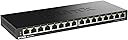
⚡ Elevate your network game—fast, silent, and effortlessly powerful!
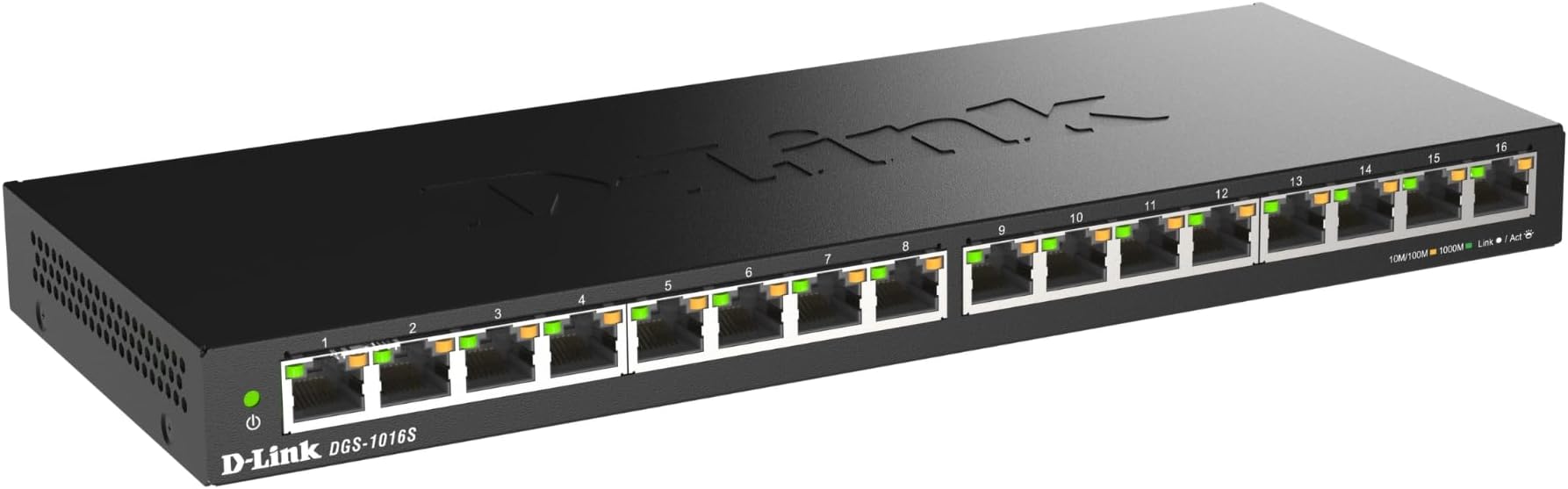
The D-Link DGS-1016S is a 16-port unmanaged Gigabit Ethernet switch featuring a slim metal chassis and fanless design for silent operation. It supports IEEE 802.3az Energy Efficient Ethernet standards with smart power-saving features like auto power reduction and cable-length detection. Ideal for home or small office setups, it offers plug-and-play convenience, QoS for traffic prioritization, and a 5-year limited warranty, ensuring reliable, high-speed wired connectivity for multiple devices.


| ASIN | B08GYJ13XG |
| Best Sellers Rank | #389 in Computer Networking Switches |
| Brand | D-Link |
| Built-In Media | 1x switch, 1x QIG, 1x power adapter |
| Case Material Type | Metal |
| Color | Black |
| Compatible Devices | Desktop |
| Current Rating | 1 Amps |
| Customer Reviews | 4.6 out of 5 stars 2,196 Reviews |
| Data Transfer Rate | 1000 Megabits Per Second |
| Global Trade Identification Number | 00790069455261 |
| Included Components | 1x switch, 1x QIG, 1x power adapter |
| Interface | RJ45 |
| Item Dimensions L x W x H | 11"L x 4.3"W x 1"H |
| Item Height | 1 inches |
| Item Type Name | Switch |
| Item Weight | 1.4 Pounds |
| Manufacturer | D-Link |
| Number of Layers | 1 |
| Number of Ports | 16 |
| Platform | Not Machine Specific |
| Product Dimensions | 11"L x 4.3"W x 1"H |
| Switch Type | Unmanaged |
| UPC | 790069455261 |
| Unit Count | 1 Count |
| Voltage | 12 Volts (DC) |
| Warranty Description | Limited Warranty |
R**H
Plug in the power, plug in the LAN cables... you're set!
Nice features for a reasonable price. Simple plug & play, nothing needs to be set, perfect "unmanaged" type switch for home networks. Seems to work quite well, displays different color lights when they sense my gigabit devices (all run at full speed with this switch), backward compatability to lower LAN speeds so also works just fine with my slower devices. Low energy consumption, handy keyhole slots for wall mount. 8 ports seems to be the right number for home setups. Not many people would ever need more than eight in the same area... four port setups will likely leave you wishing for more in the not-so-near future, the price difference is minimal. BUT... if all you need it for is to add a couple ports in the same area as your existing 4 port router, then the 4 port model would make more sense for you. I'm using this as a distribution point for my various downstairs home theater devices + a laptop in the same area. Router/office is upstairs on the other side of the house. Previously depended on wireless connections downstairs, but even with a good dual band AC wireless router things sometimes dropped connections or ran slow, now with a hard wired LAN connection via this switch those problems have been resolved. And now there's more wireless bandwith left for things like Amazon Echo's/Dot's and home automation devices. If your device can operate via both wireless and LAN, you will almost always get faster and more reliable performance using the wired LAN connection.. First one sent to me was obviously someone else's return (grrrr), some of the factory packaging was absent, so the switch and power supply went through the mail slamming against each other. Returned for replacement without ever using it, the replacement arrived quickly, was correct with shrink wrap on the outside and the rest was in place inside as it should be to prevent shipping damage.
L**E
Working well for my network
It was time to replace a very old 3com office connect 8 port gigabit switch in my basement, and since I just built a new home server, I figured i'd swap the switch now as well. The price for this was so low that I couldn't pass it up. And since I only have two devices that are on 24/7, the ability for it to power down unused ports seemed to make sense. Powerbrick comes off parallel to the prongs, so keep that in mind since that can be a problem on some power strips (or a UPS) depending on what you already have in place. This will use up two spots if they're closely spaced outlets lined up side to side, but it's a boon on a wall plug since it sticks out to the side, not up or down where it would then interfere with the other plug. Went into place just fine, easily swapped out the switches, and was able to test this one out when I finished building my new server, and had to transfer about 15 terabytes from the old one to the new one. Compared to the 3com, I am getting about 15% quicker transfers now than I had been. I"ve got my server and my media PC jumbo frame rates upped, since everything else is either game consoles or wireless so not an issue. Looks good on the shelf where the dingy old whitish/tan 3com unit was, sleeker looking as well. Was a steal for the price, and the performance is certainly better than the other more expensive ones I've used. No complaints here at all.
D**D
Great little switch - elegant packet switching
I was looking for a small, low-power, reliable little 8-port gigabit enabled switch with auto mdi/mdix.. and I found it. The unit runs very cool, is completely silent, and sits eloquently in the background. Before I purchased this, I reviewed Linksys (aka Cisco), Trendnet, HP, and a few others options for aggregate throughput, buffer RAM, power usage, etc. The Dlink DGS-1008G is right at the top of the pack with 16Gbps backplane and 11.9 million packets per second, which roughly translates to .703 Gigabits of sustained throughput, which should be around 87.875MBps (MegaBytes, not bits). Keep in mind that 1Gbps = 125MB of throughput. Not any consumer switches I have found out there that can sustain this data rate. This is one of the highest throughput switches available in 8-port consumer, with HP and Trendnet second and third (in that order). Worked perfect out of the box. I made up a few more Cat5e cables and away I went. Now if Dlink would only combine this switch with a wireless router and a WAN port!!! THAT would be awesome. Update 06-26-11: Now that I have had time to test this out, I can get about 84-85 Megabytes per second of throughput, close to the numbers i mentioned above. Tested using iperf/jperf with TCP/UDP. Make sure to set all devices to jumbo frames to get this throughput. I went into network adapter settings and changed the default packet size to 9K MTU. Changed my Synology NAS for 9K also.
N**N
Good, Reliable Switch
The switch is fine. It's just the power cord. It's as if D-Link didn't think that the outlet would be further away than 3 feet. Customer: I need a good switch for my upright network case but the power strip is on the floor. D-Link: Sucks to be you! It's not a "Deal Breaker"...but it's REALLY irritating.
S**C
Does exactly what I needed and works great.
I needed a switch to extend my network into another room in the house so I could connect another computer, a Blu-ray player, and a network attached storage hard drive to the existing network. I chose this switch because of the price, the Gigabit ethernet ports, and because I've had good experiences with D-Link hardware before. This switch does exactly what I need, does it well, and is truly "plug and play". I connected a cable from my router to the switch, then connected my other computer, my Blu-ray player, and a network attached storage hard drive to the switch. Powered up the switch and that was all I had to do. No configuration, no software to install, no settings to change. It just works. The computer has much better Internet access now (was wireless before) and the Blu-ray player now streams Netflix at noticeably higher quality (it was wireless before as well). The network attached storage hard drive is visible across all computers on the network, and the Gigabit connection on the switch, combined with the Gigabit connection on the computer and on the network drive, makes for blindingly fast backups and data transfers. There are only a few minor things that could be considered negatives. The unit's shape prevents it from being stackable, the activity lights are a bit hard to read from certain angles, and the AC adapter seems cheap. None of these prevent me from recommending this switch, though. If you need to expand your wired network to more devices than your router can allow, get this switch.
D**S
Great Switch, It just works.
I purchased this to replace an older router/switch which was freezing up the network. This had good reviews and was well priced, and I liked the power saving feature since this switch is not in demand most of the time on my network. The switch was shipped on time (although UPS did not deliver it for an extra five days due to "emergency conditions"). The switch is very simple, plug and play, and worked perfectly, and is quite fast. No more freezing up of the network. It comes with wall mounting screws, with keyhole slots on the bottom, which I like, so I can mount it on the wall and keep it out of the way, and allow it to have better air flow. I would suggest to D-link that they put a simple mounting template with it, to make it easier to space the screws properly.
T**S
Post-Order Review
Internet is integrated into my house and lifestyle, so naturally when I game I don't want to lose cause of a simple error which is; lag or rather known as "latency". While I know I can't completely cut "Mr.Lag" out of the picture myself, I know If I cut down the issues at home, that I can reduce lag/latency issues and improve experiences at home. Same can be improved for you even if its by a small 1.6 second difference. I cut mine by a whole 6.5 seconds, by upgrading my network to an all Wire cat-7e Snag-less w/shielding cable, uped my TV to a 27" LED ASUS monitor. I also suggest to find a separate home theater solution for 5.1 or 5.1/7.1 surround sound too. Yes, also for the net-heads and gamers like myself this can be a good if not a very great affordable solution. Since, I planned on upgrading my network before all this, the ISP was first, had to get something like Verizon's FiOS- an non throttle constant; full fiber-optic service. Since Verizon FiOS isn't yet available in Michigan, I hooked up with AT&T's U-verse Service with a Down of 24MBPS down and around 18MBPS UP (Its the best they have). It was simple enough, had the ATT Tech come out and run a new Data line to the "Sever" room- and yeah I got a room just for the Home network too. For most its the Basement, Living room, or Home Office option. Of course, not me so go figure cause I'm a hardcore geek. After that just bought this beauti' which will be replacing every local "hub"/switch in each networked room (4 rooms total), all hooked to the ATT U-verse "Gateway" (which is a Modem and Router yes its an encrypted 2 in 1 device) and the Servers/vice-versa. Now I said to myself "Hello FAST, Goodbye SLOW! With this all new, D-LINK 8-port GYGA-BYTE SWITCH..." It does everything I needed, couldn't ask for more at the current moment. When the order D-LINK switches (x4) get here I'll give an ownership review and pros/cons rating. Of course if this option fails, there is another brand and switch type I can use, meant for heavy duty use with local area severs in corporations. D-Link, don't fail me now. Hope this advice helps you abit, during your overhaul. "thanks amazon!"; -K. Travel
Z**N
Great Price-Works Great
I bought this switch to add several computers to my home network. These additional computers will just be folding for the Stanford University Folding@Home distributed computing project, so I wanted to turn off the wireless cards and add them to the wired network. This switch works great! It was truly plug-and-play. I set up the additional computers and had them networked in about 10 min. I paid $35 from Amazon, which is $10 cheaper than my local Fry's. For the price you can't go wrong. I was looking at some 8 port gigabit switches that were close to $100. I like that the led indicators light up green when you have a gigabit ethernet connection and amber if you have 10/100. Network speeds through this switch from a computer to a NAS have been in the >100MBps range which is very close to the max speed of a gigabit connection (1 Gbits/sec = 125 MBytes/sec). As a bonus, I was able to add my older wireless-g printer to the wired network so I can now run the router in n-only mode which significantly speeds up file transfers over the wireless network. Additionally, this switch has a feature to lower the transmit power when it detects a short cable and power down inactive ports. Saving power is always a plus! The package comes with two screws and drywall inserts for wall mounting, but I just used command strip hooks (chrome wire kind) to hang it on the wall behind my desk so I don't have to fix any holes when I move out my apartment.
Trustpilot
1 month ago
1 week ago