Desertcart purchases this item on your behalf and handles shipping, customs, and support to Greece.
๐ Elevate your WiFi game with Panda Ultra-N โ speed, security, and universal compatibility in one sleek adapter!
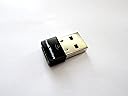
The Panda Wireless Ultra 150Mbps N USB Adapter (PAU03) is a compact, high-performance device that upgrades any compatible computer to 802.11n wireless standards. Supporting a wide range of operating systems including Windows, Mac OS, and popular Linux distributions, it delivers up to 150 Mbps data transfer speeds on 2.4GHz networks. Featuring advanced WPA2 security protocols and low power consumption, it ensures fast, secure, and efficient wireless connectivity backed by a one-year limited warranty.


| ASIN | B00762YNMG |
| Best Sellers Rank | #68,439 in Computers ( See Top 100 in Computers ) #504 in USB Computer Network Adapters |
| Brand | Panda Wireless |
| Color | black |
| Colour | black |
| Compatible Devices | Desktop, Laptop |
| Compatible Operating System Family | Windows |
| Compatible devices | Desktop, Laptop |
| Customer Reviews | 4.4 out of 5 stars 1,722 Reviews |
| Data Link Protocol | USB |
| Data Transfer Rate | 150 Megabits Per Second |
| Data link protocol | USB |
| Hardware Interface | USB |
| Hardware interface | USB |
| Item Dimensions L x W x H | 14.2L x 9.7W x 1H centimeters |
| Item Weight | 0.04 Pounds |
| Manufacturer | Panda Wireless |
| Mfr Part Number | PAU03 |
| Model Number | PAU03 |
| Product dimensions | 14.2L x 9.7W x 1H centimeters |
| Unit Count | 1.0 Count |
N**1
Thnaks
Great product, very useful ๐
T**P
perfetta
funziona perfettamente e non da problemi, con i sistemi operativi linux. l'attacchi e funziona senza installazioni ed altre cose del genere. ottima
V**N
Panda Ultra.
Expensive but it is good in use with Tails and Mac .
J**S
Buen producto
Todo bien gracias
K**Y
Works well on my old XP laptop!
I have an 11 year old Windows XP laptop which I connect to the internet via a 10 year old NetGear WG511v2 card. When I recently moved and Verizon Fios upgraded my wireless router to their latest and greatest router, all of a sudden my old laptop would not connect to my wireless network. After some frustration, tech calls, and intense Google-ing, I discovered the reason was that my old WG511v2 card did not support WPA2 network encryption, and only supported the older, less secure, WEP encryption protocol's. I was left with two options... upgrade to a wireless card that can handle WPA2, or manually switch my new router to the older WEP protocol. Sooo I tossed my old card in the trash and ordered this one which stated it works with WPA and WPA2 encryption. When it came in the mail, I installed the drivers as per the instructions on the CD it came with. I plugged in this little guy, and BOOM! I was back online within minutes. I even got a friendly email the manufacturer (through amazon) saying to contact them if I have any questions. Since set up was so easy I didnt need to call, but it was nice they did that. The only negative I have noticed thus far is signal strength. My Verizon Fios plan gives me 50Mbps/25Mbps-Upload/Download speeds. So I should be able to acheive 25Mbps since this states it can handle up to 150Mbps.. however even when I am right next to my router I get 10-15 max. This is still by far enough to browse the web, download MP3's, stream youtube, etc. However if I try to stream and browse at the same time, or while downloading MP3's, things slow down a bit. And if I am a couple rooms over or outside the signal gets even worse. I dont mind the slightly weaker signal, especially since it is a small unit and it so cheap. Plus I only use this old laptop for web-browsing and updating my iPod. All of my gaming and streaming is done on consoles or my iPad anyways. So I just needed something to connect my old dinosaur of a laptop and this did the trick. If the signal strength was better I would have given 5 stars, but all in all as long as it doesnt break, Im happy. If you want an easy, inexpensive, way to connect to networks with the latest protocols, this little adapter should do the trick. EDIT: I fixed my weak signal problem by enabling "Windows Zero Configuration" in XP. This solved my weak signal issue and now this little bad boy is giving me 70+ Mbps, which is more than enough. It also maintains good strength in adjacent rooms from where my router is. So I upped this from 4 stars to 5. Now I can keep rocking my 10+ year old XP Laptop!
Trustpilot
1 month ago
3 weeks ago