Desertcart purchases this item on your behalf and handles shipping, customs, and support to Greece.
🔌 Power, Portability & Performance — All in One Hub!
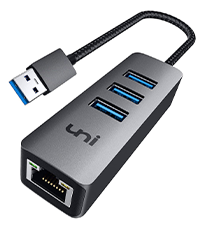
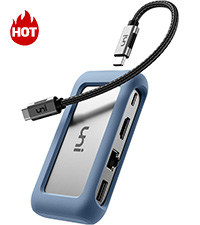
The uni USB C 8-In-1 Hub is a durable, aluminum-encased multiport adapter designed for professionals who demand reliable connectivity. Featuring 100W fast charging, 4K HDMI output, and a gigabit Ethernet port, it supports seamless data transfer at 5Gbps and broad device compatibility including MacBook Pro, iPad Pro, and Galaxy S series. Its compact form factor and robust build make it an essential accessory for efficient, wired productivity on the move.


| ASIN | B07Q6YS7W2 |
| Additional Features | Fast Charging |
| Best Sellers Rank | #80,111 in Computers ( See Top 100 in Computers ) #1,302 in USB Hubs |
| Brand | uni |
| Color | silver" or "gray |
| Colour | silver" or "gray |
| Compatible Devices | MacBook Pro 2023, Air, iPad Galaxy S24/S23, laptops, smartphones, tablets, desktops, monitors, projectors, cameras, card readers, USB flash drives, hard disk and other USB-C Thunderbolt 3 devices |
| Compatible devices | MacBook Pro 2023, Air, iPad Galaxy S24/S23, laptops, smartphones, tablets, desktops, monitors, projectors, cameras, card readers, USB flash drives, hard disk and other USB-C Thunderbolt 3 devices Compatible devices MacBook Pro 2023, Air, iPad Galaxy S24/S23, laptops, smartphones, tablets, desktops, monitors, projectors, cameras, card readers, USB flash drives, hard disk and other USB-C Thunderbolt 3 devices See more |
| Customer Reviews | 4.5 out of 5 stars 343 Reviews |
| Data Transfer Rate | 5 Gigabits Per Second |
| Enclosure Material | Aluminum |
| Hardware Interface | Ethernet, HDMI, MicroSD, USB 3.0, USB Type C |
| Hardware interface | Ethernet , HDMI , MicroSD, USB 3.0, USB Type C |
| Item Dimensions L x W x H | 10.8L x 5.7W x 2.2H centimeters |
| Manufacturer | uni |
| Mfr Part Number | unic8in1ks |
| Model Number | 27-23 |
| Number of Items | 1 |
| Number of Ports | 8 |
| Operating System | Linux, Mac OS X 10.6 Snow Leopard, Windows 10, Windows 7, Windows 8 |
| Special features | Fast Charging |
| Total USB ports | 3 |
| Total Usb Ports | 3 |
| UPC | 787446459455 |
| Unit Count | 1 Count |
N**C
Sturdy and reliable...mostly
I had bought the original version when I got my 16" MacBook Pro in 2022. Love the MBP but I normally push around files too heavy for WiFi so I miss a real Ethernet port and this seemed of fill the bill. Seemed pointless to have both the USB-C connection for data and the power cable for the MagSafe 3 connector since it's going to be plugged in almost all the time. 100w is what the MBP will take through its USB3/Thunderbolt 3 ports even when it's being juiced by its 140w power supply, so this hub is perfect. While I was transferring files from my dead 2011 MacBook Pro's SSDs onto the spiffy new M1 this hub did everything I asked of it. The setup was rock solid for a couple of years, then every couple of months my screen would dim and I'd see my charger icon said I was running on battery. If I unplugged from the hub both the cable to the Apple power supply and the USB-C cable to the MBP, then plugged them back in all was well again. Then a few months ago I suddenly started getting a pop-up alert every day or so saying "USB Accessories Disabled. Unplug the accessory using too much power to re-enable USB devices." This is odd because the only external USB device normally plugged in is this hub - which is powering the MBP. Not sure if the hub is starting to have issues, or if the MBP's original power supply is fading. I do need to investigate more. For normal users who unplug their 'book to go mobile regularly, this hub should be great. Update: 2025.09.18 Once I stopped using the Uni hub for power the "USB Accessories Disabled. Unplug the accessory using too much power to re-enable USB devices." alert stopped. Means I have both a heavy-duty USB3 cable and the light-as-a-feather Apple MagSafe cable plugged in, but say-la-vee. I got a second one for my spouse's M1 MacBook Pro too for her wired mouse and speedy Ethernet. Works great most of the time but about 1/3 of the time she has no mouse. We'd have to unplug from the Uni and plug back in before the connection was restored. It appeared the blue silicon case was pushing the host USB cable out slightly so I slipped off the case. Now it's down to about one day in five - down to the annoying but can live with it level.
J**N
Quality
It has held over time and has not failed me, the reading/writing speed is great and fits easily in my pack. The only thing is that it gets a bit warm when using the passthrough charger port, but not enough to be considered a hazard.
S**R
Super nice!
Small, sturdy, satisfyingly presice ports. It does the thing and it feels like it'll last!
O**N
USB C for power delivery only, no data
Works well, high quality build, only shortcoming is the USB C port is for power only, wont work for data
J**Q
The detachable host cable is magic
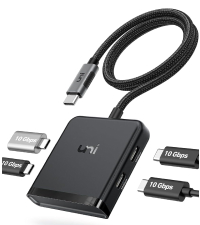
I have a lot of “7-in-1”-style USB-C dongles. Almost all models on the market have a short captive cable; this has a detachable USB-C cable, which solves one problem with the other dongles: poor strain relief eventually kills the host cable, making the dongle useless. With this one, you can replace the cable. More importantly, you can replace the short USB-C cable which comes with this hub with a much longer one. If you are using a laptop in your lap, the weight of a dongle hanging off the port — not to mention the HDMI and other cables hanging off the dongle — is both annoying and bad for the expensive USB-C port in the laptop. Better to put the hub on a side table or floor, and have only a single visible cable connecting you to power, video, network, etc. I am not sure what restrictions there are on the cable to the host. I think any “100W USB-C 10Gbps” cable under 2 meters should work. A particular company makes a Fas “piece of” Gear: 2m and 3m USB-C cables, with a right-angle connector on one end. Those connectors are great for MacBooks and tablets, and I haven’t had any problems with power or data or video. Only downside: Limited to slower video and data speeds. At 4k, this hub is limited to 30Hz on HDMI, although 1080p60 is fine. The pair of USB A 3.0 ports are limited to 5Gbps; the side with a solo USB A port is USB 2.0 — which you could claim is a feature, because USB 3 interferes with 2.4G wireless keyboard/mouse reception. Ethernet is “only” 1Gbps, but most people don’t have 2.5Gbps Ethernet yet anyway. Several family members and relatives have and use these on my recommendation. My mom was confused by a USB 7-in-1 dongle which *didn’t* have a detachable cable. If you want products with “official” detachable cables, look at “1 in, 3 out” TB4/USB4 hubs: they also support “old” USB-C video+data hosts too. You can plug one of the 7-in-1 dongles into a TB4/USB4 hub port.
Trustpilot
1 week ago
4 days ago