

Desertcart purchases this item on your behalf and handles shipping, customs, and support to Greece.
๐ Upgrade your HP LaserJet memory โ print faster, work smarter, stay ahead!
This 128MB PC100 100-pin SO-DIMM memory upgrade is fully compatible with a wide range of HP LaserJet printers, including models 1320 through 9000. Designed for easy installation and backed by a lifetime replacement warranty, it significantly enhances printing speed and efficiency, making it an essential upgrade for professionals seeking faster document processing without the premium HP price tag.
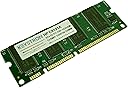
| ASIN | B00FAY6SVQ |
| Additional Features | Lightweight |
| Best Sellers Rank | #379,514 in Office Products ( See Top 100 in Office Products ) #10 in Computer Printer Memory Modules |
| Brand | Keystron |
| Compatible Devices | Printer |
| Computer Memory Size | 128 MB |
| Customer Reviews | 4.5 out of 5 stars 42 Reviews |
| Form Factor | SO-DIMM |
| Item Weight | 1 Ounces |
| Manufacturer | Keystron, LLC |
| Mfr Part Number | 4328385936 |
| Model Number | C9121A, Q9121A, Q7709A |
| Number of Pins | 100 |
| RAM Memory Technology | SDRAM |
| RAM Size | 128 MB |
| Special Feature | Lightweight |
| UPC | 609728998219 |
J**O
A no-brainer upgrade for my HP LaserJet - easy and inexpensive
This is great - I wish I'd done it earlier. After my printer was slow on a big job recently I decided to look for a memory upgrade. HP sells one for $143! This one is less than $10 including shipping and works perfectly. My printer is a LaserJet Wireless 1320 NW but the memory is listed for lots of others. Installing was simple. HP has great instructions with pictures on their web site. Step 1) turn it off and disconnect the power and cables. Step 2) open the print cartridge drawer. Step 3) Open the left side - it has clips at the top and bottom on the paper tray end and sort of swivels at the print cartridge end. Step 4) My machine only had its 16MB built in memory (leaving only 5MB for documents) so there was no DIMM to remove. Step 5) Turn the little cams that latch the DIMM in place to their open position. Step 6) Take the new DIMM out of its antistatic bag, holding it by the ends between your thumb and a finger. Touch your other hand to the metal of the printer to discharge, and push the DIMM into its slot making sure it is aligned properly. You can tell which way up it should go because the gold terminals are grouped and the slots are grouped the same way. It may not seem to go in at first because when you push it in it moves the cams into closed position and that takes a tiny shove. Step 7) Close up the printer, plug it in, turn it on and you are all set for fast printing of large or complex documents.
E**R
Brand new printer memory that works well !
Printer memory arrived promptly and was packaged well. Brand new, factory sealed anti-static bag. Within 5 minutes, my HP Laserjet 1320 was back up and running with 144MB of memory which is the maximum. After upgrade, my printer is notably faster in terms of time to print first page and the interval between printing pages.
D**1
Great memory. Works fine.
I haven't had any problems with the memory card. It came packaged well. I installed it with the printer turned off. I turned the printer on and it found the additional memory with no problem. Unfortunately, I don't know if it sped things up. I don't notice a difference so far. But I'm glad I got the product and now the printer memory is fully populated.
M**M
Excellent (if your aged slot makes good contact)
2 sticks 128MB for 2012 HP-4200 (32-bit on 64-bit WIN 7 - generic HP Universal PCL 6 driver). Quickly delivered, easily installed, HP stopped POSTing. A local service shop (Tulsa D-Tech) cleaned the chip slots to make good contact, cleaned the machine, perfect! Don't forget to reset settings mopier, storage auto (w/RAM drive), etc. 100pin 8xSAMSUNG K4S280832I-UC75 SDRAM 5.5ns 133MHz 3.3v. FYI, slot one factory chip is required - it has an 8MB flash firmware chip necessary for HP BIOS - install instructions are in your CD manual.
P**T
Works Perfecly
Works perfectly. Fit right in where it's supposed to go in the printer. When I restarted the printer it recognized that the memory was there, and now it prints faster and doesn't get hung up by a lack of available memory.
M**E
Great price, fast shipment and it works!
I had previously ordered from another seller but it did not fit correctly in the Dimm slot. I am very happy to report that this was shipped very fast and it fits perfectly and works as expected.
G**Y
Works great in my LJ 1320
The DIMM arrived promptly in a sealed anti-static bag. It was recognized by my LJ 1320 and works great.
W**M
This simple and easy to install memory boost has given our printer a ...
Our 13 year old Laserjet 2300 series printer is no longer grasping for โbreathโ as it tries to print web pages. This simple and easy to install memory boost has given our printer a longer life.
Q**H
Five Stars
Perfect product. Fits right in. Printer is faster. Should have done it long time ago. Fast delivery.
L**S
Product outdated but happy to find
Good for my 20+ year old laser printer that keeps on chuggin
Trustpilot
4 days ago
2 weeks ago