





DGS-1100-16V2
Product ID: 240266225
Details
- BrandD-Link
- ColourBlack/White
- Compatible devicescomputers
- Included componentsNetwork switch
- Number of ports16
🌿802.3az Energy Efficient Ethernet
🔌16 Gigabit RJ45 ports
🛡️VLAN & QoS for prioritized traffic
Desertcart purchases this item on your behalf and handles shipping, customs, and support to Greece.
⚡ Elevate your network game with silent power and smart control!
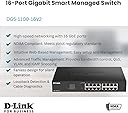
The D-Link DGS-1100-16V2 is a 16-port gigabit smart managed switch tailored for small to medium businesses. It features energy-efficient 802.3az technology, VLAN and QoS support for optimized traffic management, and a fanless design for silent operation. With easy web-based management and surveillance VLAN prioritization, it ensures reliable, high-performance networking with reduced operating costs.


| ASIN | B0876G7X18 |
| Best Sellers Rank | 7,635 in Computers & Accessories ( See Top 100 in Computers & Accessories ) 46 in Network Switches |
| Box Contents | Network switch (DGS-1100-16V2), Power cord, Product documentation |
| Brand | D-Link |
| Brand Name | D-Link |
| Case Material Type | Plastic |
| Color | Black/White |
| Colour | Black/White |
| Compatible Devices | computers, servers, network devices |
| Compatible devices | computers, servers, network devices |
| Current Rating | 0.01 Amps |
| Customer Reviews | 4.5 out of 5 stars 477 Reviews |
| Data Transfer Rate | 1000 Megabits Per Second |
| Global Trade Identification Number | 00790069451768 |
| Included components | Network switch (DGS-1100-16V2), Power cord, Product documentation |
| Interface | RJ45 |
| Item Dimensions L x W x H | 28L x 18W x 4.4H centimetres |
| Item Type Name | Network switch |
| Item Weight | 1.18 kg |
| Manufacturer | D-Link |
| Manufacturer Part Number | DGS-1100-16V2 |
| Model Number | DGS-1100-16V2 |
| Number of Items | 1 |
| Number of Ports | 16 |
| Number of ports | 16 |
| Platform | Not Machine Specific |
| Product Warranty | Limited Lifetime |
| Product dimensions | 28L x 18W x 4.4H centimetres |
| Switch Type | DIAC |
| UPC | 790069451768 790069467820 |
| Unit Count | 1.0 count |
| Upper Temperature Rating | 40 Degrees Celsius |
| Voltage | 220 Volts |
J**O
Simple layer-2 switch with nice web interface
I've used many switches from the DGS-1100 range including this -08v2, as well as: -05PD, -08P, and -24Pv2. All have a similar webUI and are easy to configure and manage, once you know the default IP is 10.90.90.90. These switches offer line-rate performance on all ports and in my experience are completely reliable and have very low power consumption. The port stats and cable test features are useful to check cabling issues. My go-to switch.
R**D
Great little switch
Easy to setup and management features are ready to use
A**S
Works as advertised - happy with it
No regrets or disappointments. Exactly what I expected. No more, no less.
G**S
Well-featured smart switch.
Metal-bodied switch which has all the spanning tree, VLAN, QOS & port monitoring & mirroring features of the similarly priced TP-Link TL-SG108E and Netgear GS108Ev3 & GS308E switches but in a slightly smaller form factor. It also has much more detailed configuration of features (IGMP, STP etc.) at per-port/per-VLAN level and additional control over dedicated management, surveillance & VoIP VLANs.
R**S
A USB-powerable managed switch at a bargain price
I wanted a small 5-port managed switch initially to monitor network traffic by mirroring the traffic to a monitoring port, and later for use with an OpenBSD-powered Raspberry Pi WireGuard client gateway (see attached pic). The latter uses VLANs to effectively add one or more Ethernet ports to the Raspberry Pi and is easier much higher performance in my experience than using USB Ethernet adaptors. I found WireGuard throughput was limited to 100Mbit/s with an Ethernet adaptor but this rose to 200Mbit/s using VLANs and the D-Link switch. It could be even higher but my Internet connection is limited to 220Mbit/s ! The switch has worked perfectly in both roles and was very easy to set up, the only gotcha being the need to reduce the default bridging VLAN1 to one port only first so as to allow ports to be allocated to the untagged VLANs. I used eth1 as the VLAN trunk link to the RPi, eth2 for the Internet connection and eth3 for the internal network. An added benefit is that the switch is 5V-powered so can be run off a multi-output USB power brick (see attached pic) with the purchase of a separate USB-to-5.5/2.1mm plug (pin +ve) cable.
G**Z
Just great 😀
Doesn't matter where you will connect, you have 100% transfer from Internet.
R**N
Good unit
It came quite quickly and so far has performed very well!
C**Y
Couldn’t get it to work
I bought this managed switch to enable me to use link aggregation on my Asustor NAS. However, I found it important impossible to access the settings as use have to use an IP Address that is nut in the normal range for the router and gave an error when entering it. Despite hours spent on the internet trying to find out how to access this different sub-net I eventually gave up and tossed the switch away. The instructions were impossible for a non-expert to follow. I am not a novice with computers and can normally figure out what needs to be done eventually with a bit of research but this completely stumped me. They should understand that, although not many non-experts will want a managed switch, there are occasions where interested amateurs want to use it for a purpose like link aggregation or a VLAN and they should make the instructions capable of being understood by someone other than an IT expert.
F**O
Prodotto professionale ricco di funzioni ma prezzo un po' alto
Ricco di funzioni consente di gestire reti anche complesse. Difficile da installare se non a rack, non ha attacchi diversi dalle staffe da rack. Un po' caro per numero di porte ed altre caratteristiche.
A**R
Good value, but saving changes can be tricky.
Not an IT expert here, but this seems quite secure and easy to set up. Just know that when you make a change in the setup GUI and click "apply", it takes effect immediately. That said, it does NOT SAVE it to flash memory until you return and hit the "save" button. So, you have to plan your changes so that you can access the switch after you make a change (e.g., if you change the device's IP or mask, be sure you can also make a corresponding change to your terminal. Otherwise, you will not be able to access the switch post-change.).
J**A
muy buen producto
muy bueno
M**.
Perfect.
Works great. Easy to setup and administer.
A**R
Works great as advertised!
It works great as advertised. nice plug and play and lots of options. The price is kinda high and the UI in the panel is similar to a 90's website. Other then that it's really good.
Trustpilot
2 weeks ago
1 month ago