
DOWNLOAD THE APP


Customer Support

Desert Online General Trading LLC
Warehouse # 7, 4th Street, Umm Ramool, Dubai, 30183, Dubai
DOWNLOAD THE APP
Customer Support
Desert Online General Trading LLC
Warehouse # 7, 4th Street, Umm Ramool, Dubai, 30183, Dubai


🚀 Upgrade your desktop WiFi game with lightning-fast, flexible connectivity!
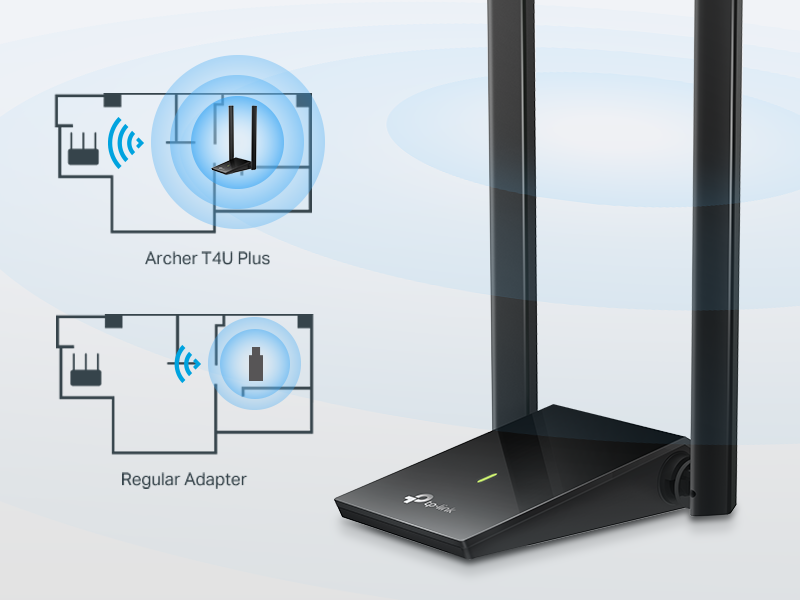
The Archer T4U Plus USB WiFi Adapter delivers AC1300 Mbps dual-band wireless speeds with 5dBi high-gain antennas, ensuring superior range and signal quality. Featuring a super-speed USB 3.0 interface, it offers up to 10x faster data transfer than USB 2.0 adapters. Compatible with Windows 11/10 and Mac OS 10.9-10.14, this sleek black adapter is designed for desktop PCs seeking reliable, high-performance wireless networking.




| Data Link Protocol | USB |
| Data Transfer Rate | 1267 Megabits Per Second |
| Compatible Devices | Desktop |
| Hardware Connectivity | USB |
| Item Weight | 2.4 ounces |
| Item Dimensions L x W x H | 3.31"L x 0.76"W x 6.15"H |
| Color | Black |
E**Z
Great performance, easy setup, and very reliable
I’m very happy with this TP-Link AC1300 USB WiFi adapter. Setup was extremely easy—plug it in, install the driver, and it worked right away. No complicated configuration at all. The speed is excellent. I immediately noticed a big improvement compared to my old WiFi adapter, especially on the 5GHz band. Streaming, video calls, and downloads are smooth and stable, with no random drops. It’s a perfect solution for desktop PCs that don’t have built-in WiFi or for upgrading an older adapter. Reliable, fast, and well worth the price. I would definitely recommend it.
C**S
Awesome little adapter
Became my go-to backup adapter. It's plug and play, making it a driverless install, as a fresh install of windows immediately recognizes it. This makes it easy to get a new computer quickly online to get on-board networking working. It's also great for computers without built-in WiFi, so when I'm visiting friends, it works very well for gaming. It being small makes it easy to keep in a bag while still having a nice long antenna for good range.
P**S
Easy Easy, no apps, no usernames, no passwords
I am not the most technically literate human. I upgraded my router to 5ghz hoping it would speed up my desktop internet...NOPE. So I did a little research and figured out my desktop only detects the older 2.4ghz signal. I bought this thing on a hope and a prayer and voila my desktop now picks up the 5ghz signal and is so much faster. All I had to do was plug it in, no apps, no usernames, no passwords. I am super pleased with the functionality and ease of set up.
T**Z
Fast and Reliable, With Minor Glitches
This adapter delivers excellent performance — my speed tests are the same as a wired connection, which is impressive for WiFi. Setup was simple, and the connection is stable most of the time. The only downside is that once or twice a day Windows doesn’t detect it for a few seconds, then it comes back. Other than that, it works great and gives true high-speed wireless.
D**D
Easy set up. Doesn't require an internet connection to install
Works well. No complaints. I am using it on a Windows 11 PC. Doesn't need an internet connection to install the drivers. After plugging in the USB cable, the drivers can be accessed by navigating to the attached device via the file explorer menu.
E**E
Disconnects are too frequent, requiring driver reinstall to fix the issue
Bought this adapter since moving to my new house. My previous house was wired pretty heavily so I didn't have to rely on wifi. I got this adapter in hopes that I wouldn't have to cable much, since wifi works for all other devices in the house. At first everything seemed fine. I've used this adapter for my PC for ~4 months now, but over the last week, the disconnects started happening. When first connecting the device to my PC, it connects as a USB drive, and the install app for the driver is on the unit. This is actually pretty brilliant, since having to download a driver on a PC that doesn't have a network card can be challenging, if not impossible, unless you have another PC handy. The install goes really quick and installs v2.0.2.0 of the driver. The PC that I installed this on is ~8 feet from the wifi router. Signal is good between the unit and the router...when it's connected. The challenge I've had is that recently, the unit frequently just disappears from my devices. Occasionally, just unplugging and replugging the device gets it to show up and reconnect, but more often, I have to completely uninstall the driver, reboot my PC, reinstall the driver, then reconnect the adapter to my wifi. I've tried changing some adapter settings related to power management and that doesn't seem to make any difference. I tried different driver versions from the TP-Link support site, and I get the same behavior. I was having an even odder issue where when i tried to do any kind of high-bandwidth usage, like transferring files, or using a remote desktop tool (TightVNC), that would cause the adapter to just disappear again. That seems to have stopped after multiple reinstalls, but the disconnects continue. I've read a number of posts in forums about having to change a number of different settings on my wifi router, but to be honest, I shouldn't have to do that. I've got ~40 devices connected in my house, from smarthubs, to Amazon FireTV devices, to laptops and PCs, and a couple of Raspberry Pi units, and NONE of them required any changes on the router side. I've also seen some people compliment the "speed" of this device, but I'm not impressed. I have gigabit fiber internet, so I am not limited by bandwidth. Using other wireless devices in the house, I average ~400+Mbps download and ~330Mbps upload. The attached screenshot shows what I get when I run this with the TP-Link adapter. I ran the test several times just to make sure it wasn't an issue with any single test and the results average right around this 231Mbps mark download. The upload speed is on par with the other devices, but the download speed is just horrible, by comparison. This is really secondary to the disconnect issue though. 230Mbps isn't bad, in general, for most tasks, including streaming, so it's just by comparison to other devices that the lack of throughput shows. Lesson learned and money wasted. Still haven't decided whether to purchase another wireless adapter or to go ahead and just run the cable, but I wanted to make sure to warn others about the frequent disconnects. That has been a major pain in the butt. It's quite possible that I just got a flaky unit, but just know that this is an issue.
M**K
Works great, even on USB 2.0!
My computer is about 20 feet from my router , blocked by one wall. The on-board wi-fi running an Ookla speedtest would sometimes be as little as 5 Mbs (my service is for 50Mbs). With this adapter I am getting consistent 50 to 60 Mbs. ONE NOTE: AT first, it would not connect and the company's videos didn't address this issue - I had to call their tech support (which is excellent, by the way). They had me do the following: Open a Command Prompt (WIN key + R) and type in NCPA.CPL which opens a list of connections. First, right-click to disable the onboard wi-fi. Then right-click on the TP-Link adapter and connect it. Finally, click the wifi icon in the system tray and connect as usual.
S**R
Quick fix and super fast!
Bought a new laptop and the wifi wasn't consistently strong after a few weeks. Updated drivers, reset networks, etc. and finally determined it is probably a faulty wireless network card in the laptop - of course, this was a couple of days after my return window. Sigh. I am not comfortable trying to open my laptop to replace it (10 years ago it was much easier.) I could invoke the warranty but that would require sending in my laptop for servicing and who knows how long that would take. Figured that for the short term I would use an exterior wireless adapter attached to my docking station. This was super easy to set up and ran an internet test speed: 319.4 Mbps download and 157.4 Mbps upload. Blazing fast! I think my short term solution is now permanent!
Trustpilot
2 months ago
1 week ago