Buy anything from 5,000+ international stores. One checkout price. No surprise fees. Join 2M+ shoppers on Desertcart.
Desertcart purchases this item on your behalf and handles shipping, customs, and support to Greece.
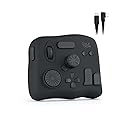
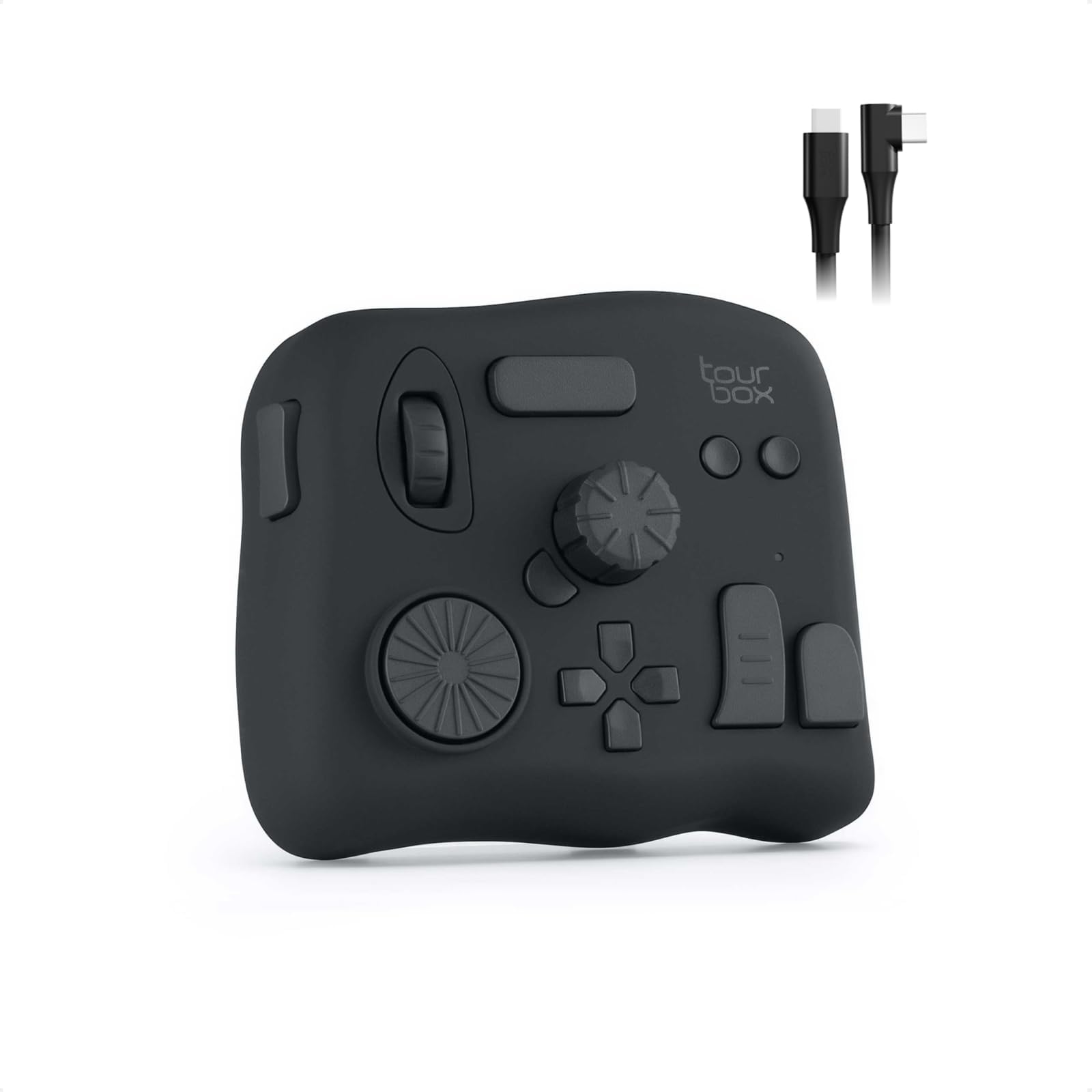
🎬 Edit smarter, not harder — unlock pro-level speed and control with TourBox NEO!
The TourBox NEO is a wired, zero-latency editing controller designed for macOS and Windows users. It features fully customizable buttons, dials, and scroll wheels optimized for photo editing, illustration, and video color grading. Compatible with over a dozen major creative software platforms, it boosts productivity by streamlining complex shortcuts into intuitive, tactile controls. Built with durable materials and backed by a 1-year warranty, it’s the essential tool for professionals seeking faster, smoother creative workflows.


| ASIN | B08HCV1JGB |
| Active Surface Area | The combined area of buttons, dials, scroll wheels, knobs, and function buttons |
| Additional Features | Full customization of complex shortcuts, Native integration & macro support, Over 150 actions & hundreds of commands in 1 preset, Upgrade to a 14-key bigger ergonomic layout, Windows & macOS compatible (USB-C) |
| Best Sellers Rank | #725 in Computer Keyboards |
| Brand | TOUR BOX |
| Built-In Media | Quick Start Guide, TourBox NEO (Device), TourBoxConsole Software, USB Cable |
| Color | Device Only |
| Compatible Devices | Desktop, Laptop, Mac, PC, Win Tablet |
| Connectivity Technology | USB |
| Customer Reviews | 4.6 out of 5 stars 986 Reviews |
| Display Type | Digital Analogue |
| Item Dimensions L x W | 3.98"L x 4.57"W |
| Item Weight | 370 Grams |
| Manufacturer | TourBox Tech Inc. |
| Mfr Part Number | TBG_H_L_N |
| Model Name | NEO |
| Model Number | TourBox NEO AMTBG_H_L_N |
| Operating System | Windows, macOS |
| Special Feature | Full customization of complex shortcuts, Native integration & macro support, Over 150 actions & hundreds of commands in 1 preset, Upgrade to a 14-key bigger ergonomic layout, Windows & macOS compatible (USB-C) Special Feature Full customization of complex shortcuts, Native integration & macro support, Over 150 actions & hundreds of commands in 1 preset, Upgrade to a 14-key bigger ergonomic layout, Windows & macOS compatible (USB-C) See more |
| Specific Uses For Product | Designing, Drawing, Editing |
| Target Audience | Teacher |
| UPC | 860003996218 |
| Unit Count | 1.0 Count |
| Warranty Description | 1 Year Manufacturer |
W**T
I love this thing!
The tourbox is a solid device that helps me save time during video editing in Adobe Premier Pro. Once you get the muscle memory down basic functions like zooming in and out of the time line etc is efficient and effortless. I’m very satisfied with the overall quality of the device, the buttons and wheels functions as you would expect and after thousands of clicks and spins it still operates flawlessly. The software is easy to use and you can edit how you want each button to function or you can just use the pre made button configurations for several of the popular editing programs out there. Yes it came with a pre made setup for Adobe Premier Pro. The soft ware will also place a little widget (clickable area) that emulates the 4 of the buttons on the device. Neat. I love this device, I usually release 5 videos per week on YouTube each of whic are typically 10 to 15 minutes. That’s tons of scrolling, trimming etc I can’t imagine editing without this device. I would purchase another without hesitation if I needed to. The tourbox doesn’t have all the fancy buttons and appearance of some of its competitors devices, I can confirm it won’t make you a cup of coffee, but It will make your work flow more efficient and is a joy to use because it works! I love it!
C**H
A good option in tandem with Wacom tablets!!!!
This is a great product for photo editing. I was looking for loopdeck products with shortcuts i could use with photoshop, On1, Lightrooom for editing images. I ran accross this product an the reviews were good. I have to admit I was a bit sceptic and thought is would be another cheap product. But after researching all my options, this seemed to beed a really good option. This product is made of good quality parts and has a confident feel to its operation. it is very customizable with many options for various SW programs. It works well with the complement of a Wacom tablet. There is a slight learning curve to train your hands to work with these buttons. But the positive feel of the buttons will ensure a short journey for memorizing locations. The unit has enough weight to keep it stable in its position with rubber feet. The Jog wheels are nice and smooth with feedback notches and rubberized surface for a pleasing feel to your hands. Only one complaint that I have is that it is a little thick. If it was a little flatter, It would not be so difficult on your hand after hours of use. Over All... I think this is a great product over many more expensive and more complicated products out there.
C**A
Excelent
Excelent
C**A
Lots of buttons saved my wrist
I edit in Final Cut Pro on my MacBook Pro M1. I found myself using the touchpad to zoom-in on the timeline which was causing a lot of strain in my wrist. Build - As others note, very solid. It has heft to it which keeps it from slipping. This is important when using the side button. The finish of the device is like a soft rubber. It feels good and it’s comfortable but this material doesn’t seem like it will clean that well. Buttons and wheels: nice solid click. The turbos is meant to be used in your left hand while you mouse with your right. There is no mode for those who mouse with their left and would use this with their right. I mouse with my left due to some RSI issues so I use the Tourbox eith the right. It’s not the biggest issue but you can tell that button placement was optimized for the other hand. I spent some time re-mapping some buttons to make it easier to use with my right hand, and so far so good. I would appreciate a side button on the lower right side (diagonally across from the left side button). Button mapping - software is easy to use and for me going right away. You click the button you want to check, you wipl see what it’s currently assigned to and then a list of commands specific to your application. I was doing a lot of masking and position changes on those masks. I used the main wheel to scrub through the timeline slowly while I used the mouse to drag the mask around to set keys. I would then use the horizontal scoop bar to zoom in and out. I also remapped some buttons for blade all clips, keystones, deleting and play. Overall I really like the product. If you are in a NLE or photoshop all day this would be a must. I’m a hobbyist and I found this valuable just to save my wrists.
R**T
Ergonomic and Convenient
Has completely streamlined my editing of photos and videos significantly! I’ll probably get the Bluetooth one in the future to free up a usb port on the computer, but it’s been amazing! It’s super ergonomic and it is comfortable in the hand. Having the ability to edit the hot keys to do things exactly as you want it sweet!
B**S
I've tried plenty editing controllers, this is the best!
Please accept my apologies in advance for this long review. I have much to say, and I hope it will help you avoid some of my false starts. I’m a big fan of using hardware interfaces (control surfaces) with creative apps like Photoshop and Premier Pro. Making adjustments while focusing on the screen makes editing more enjoyable and much faster. I’ve used several different devices before this Tourbox. In each case, the time savings justified buying the device after a few hours of use. I eventually re-bought a Tourbox ("re-bought" is a mystery that will be solved if you read to the end) after Logitech abruptly announced ending support for their products. Without the announcement, I probably would have continued to use the Loupedeck, but now I’m grateful for the motivation to change! The Tourbox is, by far, the best control surface I’ve used. The controls are less “fiddley” than my Loupedeck Live or, for that matter any of the devices I’ve used. It’s also more compact than either my old Loupedeck+ or even older Behringer X-Touch Mini Universal USB Controller . It can sit comfortably next to my keyboard rather than taking up half my desk. Installation was truly plug-and-play. With the other devices I’ve used, I had to install plug-ins and connectors with many of the apps I was using. With the Tourbox, either they weren’t needed, or it was done for me. All I know is that I could use it with apps like Lightroom, Photoshop, and Adobe Premier Pro immediately after plugging it in. The Tourbox device is both compact, about 4” x 4-1/4” x 1-1/2” and massive, around 3/4 lbs. It sits firmly on its four silicon fee. That is in sharp contrast to my Loupedeck Live , which would slide around almost on its own. An added benefit is that the button/knob placement allows me to use it one-handed, without taking my eyes off the screen. It comes preconfigured with presets for the apps I frequently use. And, I can change any of the controls easily if I choose. For example, I’ve set the same knob to adjust volume and mute with a press across all apps. I’ve also assigned another knob to allow me to jog through audio/video playback or pause/resume with a press, regardless of what app is currently playing the media. By way of history, I’ve been using control surfaces for media content creation for about 15 years. I started “on the cheap” trying to repurpose multi-button mice by programming keyboard shortcuts myself. I soon realized that for media manipulation, some form of variable control, things like knobs or slicers, was needed. Still trying to save money, I bought a Behringer X-Touch Mini Universal USB Controller . It wasn’t bad, and profiles were already developed for some popular applications. My next “move” was to get something purpose-built. So, in 2019 I bought two devices, a Loupedeck+ and, wait for it…, a Tourbox Neo. I was drawn in by the vast swath of knobs and switches provided by the Loupdeck, so I kept it and returned the Tourbox. The Loupdeck+ worked well for a few years, right up until it didn’t. The software started to fail. Also, what started as a set of impressive, dedicated controls became annoying as applications evolved. Next came the Loupedeck Live . I figured that the digital display would allow the device to keep pace with application changes. However, the downsides were a lack of differentiation between controls; I couldn’t operate the thing by touch, and the tiny knobs were a bit too fiddly. I would like to think that I’ve benefited (matured?) from my years of experience. Now I see the (relatively) few buttons/knobs on the Tourbox as a benefit. Each has a unique shape, and I can run everything without taking my eyes off the screen. They also provide a mechanism where the controls, individually or in combination, can perform hundreds of functions. Finally, there is a well-thought-out on-screen display of current control settings if I need a reference. Over time, that need disappears, and you can remove the display anytime.
J**N
Takes some getting used to, but worth it
I've used a few speed editors before. This one was an impulse purchase that I let sit for a couple years. One day I decided to bust it out and set it up. I told myself I'd spend a day using it and if I hated it, I'd put it on Ebay. I'm glad I did. By the end of the day I'd gotten used to using it. I'm not exageratting when I say if you spend a couple hours with it, it will improve your editing speed. I used this with Camtasia and Premeire, and it works great. For me the only reason I use these things is speed, and this product makes me edit faster. Period. Once you get the muscle memory down it's a huge boost. It's also very easy to program and set up, which is an advantage over similar products that are complicated and clunky. Get it. Spend a few hours with it, and enjoy the benefits.
O**O
Extremely useful for accelerating photo culling in Adobe Lightroom Classic on the desktop
The Tourbox NEO has helped me greatly accelerate my photo culling in Adobe Lightroom Classic on my desktop using the "Compare" tool in Lightroom. I have reduced my culling times by at least half. I created macros assigned to specific Tourbox controls using the Tourbox Console to toggle either "accept" or "reject" for the "Select" and "Candidate" photos being compared, and also macros for the "Make Select" and other controls on the "Compare" window. The only slight drawback with this scheme is that this scheme depends on you keeping the Lightroom window sized to exactly how you recorded the mouseclicks when you create the macro, because the Tourbox Console records the X, Y coordinates of your mouse and mouse-clicks. Just make sure you keep your Lightroom window size and layout identical everytime and it works.
C**N
Satisfecho con el equipo
Buen producto
E**I
منتج جبار للمحترفين
افظل جهاز تحكمي ومريح عملا هو هذا الجهاز الجبار ، افادني كبرامج الرسم ، اشترها ولا تترددوا
A**9
"TourBox NEO Quick Key Tools: A Helpful Shortcut Device for Creators, but with a Few Cons"
I recently purchased the TourBox NEO Quick Key Tools for Creators and I am blown away by how much it has improved my workflow. With its 14 customizable shortcut keys, I can easily access my most-used tools and functions, saving me time and increasing my productivity. The TourBox NEO also offers over 100 customization options, allowing me to fine-tune the device to fit my specific needs. The software interface is user-friendly and intuitive, making it easy to set up and customize. One of the things I love most about the TourBox NEO is its compact size. It's small enough to fit comfortably on my desk without taking up too much space, but still provides all the functionality I need as a content creator. Overall, I highly recommend the TourBox NEO Quick Key Tools for Creators to anyone looking for a reliable and efficient way to streamline their workflow. It's a game-changer for anyone who wants to work faster and more efficiently. Cons - While the TourBox NEO offers a lot of customization options for creators, there are some cons that potential buyers should be aware of before making a purchase. Firstly, the device can take some time to set up and get used to. The customization options are extensive, but this can also make it overwhelming for some users. The device can also be bulky and take up a significant amount of desk space, which may be an issue for those with limited workspace. Additionally, the TourBox NEO may not be compatible with all software programs, which limits its versatility for certain creators. Some users have also reported issues with the device not functioning properly or disconnecting from the computer. Overall, while the TourBox NEO offers many customization options for creators, it may not be the best fit for everyone. Potential buyers should consider their workspace limitations and software compatibility before making a purchase.
B**Z
Superou minhas expectativas
Comprei o TourBox Neo como uma alternativa mais barata ao SpeedEditor do Davinci Resolve. Mas estava preocupado se ele seria capaz de cumprir bem essa tarefa. E depois que consegui configurá-lo corretamente, ele não só conseguiu, como superou minhas expectativas! Ele é altamente personalizável através do software TourBox Console, permitindo a configuração de atalhos simples (com 4 opções de atuação) e também a combinação de teclas, mas principalmente possibilitando um ajuste fino (com 3 níveis de intensidade do Scroll, do Knob e do Dial), funcionando muito bem no Davinci Resolve, seja para navegar nas Timelines frame a frame ou um para um movimento mais acelerado, e ele consegue fazer isso de maneira fluida e natural. Ele também é capaz de exibir um HUD em overlay exibindo os atalhos configurados caso seja necessário. O tamanho é compacto, e o design é versátil, e o acabamento é agradável, podendo ser utilizado tanto com a mão esquerda quanto com a direita conforme a preferência. Além disso ele tem a vantagem de poder ser utilizado em diversos cenários não se limitando ao programa A, B ou C, e ainda tem a opção de alternar entre perfis automaticamente. Recomendo utilizar com um apoio de pulso para ficar nivelado e mais confortável para longos períodos de uso. Obs: estou utilizando no Win11 v.24H2 e a versão do TourBox Console é a v5.7.4 Pontos Negativos: os cliques não são silenciosos e são um pouco duros, mas nada demais. esse modelo não possui Bluetooth, ficando limitado a utilização com fio.
S**G
Hervorragend geeignet für DCS Flugsimulator
Habe mir das Teil gekauft, weil ich weder an der Tastatur, noch am Hotas Warthog (Joystick/Schubregler) Drehregler habe. Installieren ist problemlos und das Programm öffnet sofort in Deutsch. Die Belegung der Drehregler und Tasten ist simpel und selbsterklärend. Einsatzmöglichkeiten nahezu unbegrenzt: Höhenmesser einstellen, Beleuchtung des Cockpits, Lautstärke der Funkgeräte, Reichweite des Radars etc. Es gibt 3 Einstellungen für die Feinheit Drehregler. Falls man eine feinere oder gröbere Einstellung wünscht. Für die Höhenmesser in der A-10 und Hornet lässt sich der Luftdruck so präzise einstellen. Durch unterschiedliche Formen der Drehregler und Tasten ist das Gerät auch blind zu bedienen. Also ideal geeignet, wenn man den Feind nicht aus den Augen verlieren darf….. Eine ideale Ergänzung zum Elgato Stream Deck!
Trustpilot
3 days ago
1 month ago