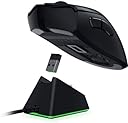
🎮 Own the game with precision, speed, and freedom.
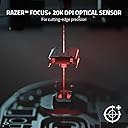
The Razer DeathAdder V2 Pro is a premium wireless gaming mouse engineered for professionals seeking top-tier performance. Featuring ultra-fast 0.2ms optical switches rated for 70 million clicks, a cutting-edge 20K DPI Focus+ sensor for pixel-precise tracking, and up to 70 hours of battery life on Razer HyperSpeed wireless mode, it delivers seamless, lag-free gameplay. Its ergonomic 88g design ensures comfort during extended sessions, while versatile connectivity options (HyperSpeed wireless, Bluetooth, wired) provide unmatched flexibility for any setup.


| ASIN | B08GCQ5TBJ |
| Antenna Location | Play |
| Are Batteries Included? | Yes |
| Are Batteries Required | No |
| Battery Average Life | 6 months |
| Best Sellers Rank | 38,150 in Computers & Accessories ( See Top 100 in Computers & Accessories ) 281 in PC Gaming Mice 820 in Mice |
| Box Contents | Camera Body |
| Brand | Razer |
| Brand Name | Razer |
| Button Quantity | 8 |
| Colour | Black |
| Compatible Devices | Gaming Console, Personal Computer, game console |
| Connectivity technology | Bluetooth |
| Customer Reviews | 4.4 out of 5 stars 1,705 Reviews |
| Enclosure Material | Plastic |
| Global Trade Identification Number | 08886419332992 |
| Hand Orientation | Right |
| Hardware Platform | PC |
| Item Dimensions L x W | 12.7L x 6.2W centimetres |
| Item Type Name | Razer |
| Item Weight | 134 Grams |
| Manufacturer | Razer |
| Manufacturer Part Number | RZ01-03350100-R3G1 |
| Model Name | 93xx2 |
| Model Number | RZ01-03350100-R3G1 |
| Mouse Maximum Sensitivity | 20000 Dots per Inch |
| Movement Detection | Optical |
| Movement detection technology | Optical |
| Network Connectivity Technology | Bluetooth |
| Number of Batteries | 1 A batteries required. (included) |
| Number of buttons | 8 |
| Operating System | Chrome OS |
| Pattern | Single |
| Power Source | Battery Powered |
| Product Features | Ergonomic Design |
| Product Finish Type | Glossy |
| Product Warranty | 24 |
| Range | 10 |
| Special feature | Ergonomic Design |
| Style Name | DeathAdder V2 Pro |
| Theme | Video Game |
A**R
Great mouse
I've always loved the ergonomics of the deathadder mice so when my old Corsair wired mouse was looking a bit worse for wear I figured a wireless deathadder would be the way to go. So far I'm very pleased. Battery life seems decent at 4-5 days with the dongle. I haven't used it consistently with bluetooth so am not sure how it would fare using that. Charging is quick and the cable provided is a good length. The only slight negative is the shape of the charging port means you need a small cable if not using the provided one and it's mini USB and should really be USB C in this day and age. The ergonomics are superb though that's a very subjective matter so what's good for me won't be for all. Buttons have a good feel and it feels like it will last a good few years. The DPI adjustment works well and it feels good for gaming as well as general productivity.
S**0
Tried other mice...Came back to this.
A little history of mice I have used/tried... SteelSeries Aerox 3 - Too light, felt cheap, not good side buttons, didn't like it. SteelSeries Prime Wireless - Nearly ideal, but side button placement spoiled it. Logitech MX Master 3 - Just, no. Kone Pro Air - Good mouse, but again, side button placement spoiled it. Razer Naga - What was I thinking? No. Logitech G903 - This was a good one, but the mouse clicks didn't feel as good as the Razer. So that brings me to the review, the Razer Deathadder V2 Pro - an excellent mouse, it's ideal because I use it for PC & Mac, when I want to use it on my Mac I just switch it to Bluetooth mode, and then for PC, back to Wireless mode. I am not a super-fussy DPI switcher, from memory my Windows DPI is about 1400 or so, so not exactly speedy or slow - but inbetween. I play COD & C&C games, and this mouse works well. Hand size is fairly large, and have had no issues with reaching all the buttons comfortably. Not fussed about the RGB element, it's there, but...Blah. Brilliant mouse, recommended, and hope this helps!
H**R
Absolutely fantastic.
Extremely happy with this mouse. I’ve owned a deathadder elite for the last 3 or so years and it was great so I wasn’t sure if it would be worth trying this. But it’s absolutely incredible. It’s lighter than the elite which makes moving the mouse quickly for fast swift movements better, the clicks are just as good and the wireless makes it more comfortable than the elite. To conclude this mouse is definitely an upgrade on the elite and is better for gaming. It’s worth the money. I also like tried the razer viper ultimate a few months ago which was too small, the clicks started squeaking after about 2-3 weeks so I sent it back for a full refund. I feel like the deathadder V2 Pro will last for a long time just like my old elite did. I’d 100% recommend trying the Razer Deathadder V2 Pro mouse if you’re looking for a new one.
N**N
Freezing problems
Terrible, every few seconds the mouse will freeze and I will be unable to do anything for a few seconds. This gets extremely infuriating especially during gun fights where it seems to happen the most. This happens on every single computer I use this mouse in specific. Do not buy if you want something actually good!
R**T
Excellent mouse but the charging base really should be included
Ergonomically excellent for me (male with average sized hands). Battery lasts a few days of near full time use. Nice and light. I just leave the cable attached to my keyboard USB and plug in overnight to charge. However, the base station, which is really only a USB plug, wire, a couple of contacts and some plastic is not include and costs ÂŁ65 separately. This is just ridiculous as I doubt it's worth a tenner at full retail price! I'm just sticking with the supplied cable and the extra 2 or 3 seconds it takes to plug it in a couple of times a week!
K**L
Fantastic upgrade!!!!!
Before i start this review ill say im no Razer fanboy, over the last 7 - 8 years ive used a variety of mice over the years from a whole plethora of companies, i landed on the OG razer Deathadder a good few years ago, and i fell in love, having a right handed mouse with what i feel is perfectly placed thumb buttons it was perfect for me from weight to size for my larger then average hands, that first mouse sadly died on me after a while of extensive use from FPS games to MMORPG'S, once i laid that to rest i instantly ordered the newer version the Razer Deathadder Elite and it was the perfection of the first mouse but newer, updated. again no complaints other then the middle mouse wheel didnt last as long as the rest of the mouse but again this is down to extensive mouse use while gaming, about 7 days ago i was randomly scrolling YouTube and came across a review of the new Razer Deathadder v2 Pro wireless!! instantly i thought its time to buy a new mouse, 2 days later i had my order placed and awaited the arrival, as soon as i got it delivered 2 days later i wasted no time setting this up, thankfully coming from a previous version of the Razer Deathadder i instantly felt comfortable and didn't have to worry about getting used to a new mouse. with the benefit of no wire! it was honestly a much needed upgrade. this mouse is perfect for people who are right handed. i can not be happier with this purchase. if you have been considering this mouse, i highly recommend it.
S**A
Amazing gaming mouse
Amazing product, since 2011 when i start gaming on the computer that the first mouse i used and i will ever use , very practical, very comfortable its exactly what you need on a mouse
B**I
Nostalgia
I love this mouse, I would rate it 10. If you ever had a deathadder. Then getting it wireless is a dream. I am not sure how they work out the battery life of wireless mice, but I haven't charged it since I bought it. I work 8 hours a day and then game most days. I've had it for a week... So not sure how long it is meant to last, but seeming to be doing a great job so far. My hands are not big. I'd say they on the smaller size, but then again I wouldn't know the average size hand.. This mouse is just the best quality and feel of any mouse I have tried. I'm comparing it to the g903 as well as the g503 (the logitech mouse) I think those are the ones I had. Just a quality mouse. So iconic and the fact it is wireless is everything to me. I'd highly recommend this mouse for anyone looking for a wireless mouse and loves the most iconic mouse made.
C**D
Sehr gute ergonomische Maus ohne Kabel
Die Razer Deathadder V2 Pro ist mein aller erstes Produkt aus dem Hause Razer. Nachdem ich nun 10 Jahre die kabelgebundene Maus von Anker genutzt habe und diese nun das sogenannte ,,Doppel-Klick“ Problem hat (nach 10 Jahren ist das schon sehr stolz), war ich gezwungen, eine neue Maus zu kaufen. Auswahl bestand zwischen Razer und Logitech. Beide Hersteller bieten hervorragende Mäuse, sowohl ergonomisch als auch von der Qualität. Ich laß unglaublich viele Rezensionen zur Logitech G903 Lightspeed. Diese fielen gemischt aus: sowohl die Ergonomie als auch die Reaktion und Akkulaufzeit wurden gelobt, sodass ich anfangs diese Maus bestellt habe. Leider ist die Maus bereits nach 2 Tagen defekt gewesen: Mausrad reagierte nicht mehr zuverlässig, beim Betätigen der linken Maustaste wurde der Klick zweimal erkannt (Doppel-Klick Problem) und die Tasten wackelten unglaublich stark, was ich schon sehr ungewöhnlich fand, insbesondere von Logitech. Ergonomisch und optisch ist die Maus definitiv super, keine Frage. Von der Qualität hat mich diese Maus dann doch sehr enttäuscht. Ging also wieder zurück! Nun zur Deathadder V2 Pro: Ich war skeptisch, ob Razer meine Erwartungen erfüllen kann. Ich muss gestehen: das tut sie bis jetzt. Die Razer Deathadder V2 Pro wurde sofort erkannt. Diese Maus kann man sowohl im Bluetooth Modus als auch im Hyperspeed Modus mit dem USB-Dongle nutzen. Der Akku hält bei mir etwa im Hyperspeed Modus 1 Woche. Ich bin jeden Tag auf meinen Rechner angewiesen, daher konnte ich den Akkuverbrauch gut beobachten. Bis jetzt musste ich die Maus lediglich 2 mal aufladen. Auch das hat problemlos mit dem mitgelieferten USB-Kabel geklappt: einfach anstecken und paar Stunden abwarten. Die Maus kann man dann trotzdem weiternutzen, während die Maus geladen wird. Sehr schön! Genutzt wird die Maus ausschließlich auf meinem Mac. Ich nutze auch die Seitentasten für Mission Control und andere Gesten zum Arbeiten und es ist wirklich sehr angenehm. Die Maus reagiert so schnell wie als würde man sie mit Kabel nutzen. Das Razer Symbol auf der Maus leuchtet in allen möglichen Farben. Die Software nutze ich persönlich nicht. Man kann zwar damit viele Einstellungen vornehmen, brauche ich jedoch nicht unbedingt. Mir gefällt die Standard Konfiguration sehr. Auch die Verarbeitung und der Komfort machen das Arbeiten für mich so angenehm wie möglich. Zum Spielen habe ich sie nicht genutzt, kann mir aber gut vorstellen, dass sie dazu bestens geeignet ist. Außerdem kann man im oberen Bereich der Maus die DPI einstellen. Das erhöht nochmal die Geschwindigkeit der Maus, die bei jedem individuell ist: eine:r mag es lieber langsamer, andere schneller. Mit der Software könnte man auch Profile erstellen und zwischen diesen Profilen wechseln, etwa fürs arbeiten und spielen. Was mir auch gegenüber meiner alten Maus aufgefallen ist, ist das sehr niedrige Gewicht, was bei der Nutzung deutlich auffällt. Diese Leichtigkeit macht sich im Laufe der Zeit bemerkbar und entlastet das Handgelenk. Phänomenal! Kleiner Kritikpunkt, die aber an der Wertung nichts großartiges ändert: es wird zwar angezeigt, wann der Akku der Maus aufgeladen werden muss (Maus leuchtet dann ausschließlich rot), es wird jedoch nicht angezeigt, wann dieser Akku voll aufgeladen ist. Hier müsste man dann tatsächlich die Software installieren oder eine Docking Station von Razer zulegen. Die Deathadder V2 Pro hat nämlich unterhalb zwei Kontakte, mit der die Maus mit dem Dock verbunden werden kann. Dort soll dann der Akkustand der Maus angezeigt werden. Wer nicht unbedingt mit dem Kabel aufladen möchte, könnte überlegen, ob die Anschaffung einer Docking Station Sinn macht. Dann ist man auch für die Zukunft gut ausgerüstet. Stört mich jetzt nicht sehr, ist mir aber doch bei der Maus aufgefallen, ändert jedoch wie bereits oben erwähnt an der Wertung nichts. Fazit: Hoffentlich hält die Maus so lange wie möglich, denn ich bin von dieser Maus mehr als begeistert: Ergonomie, Funktionen, Komfort (Gewicht) und kabellose Freiheit machen das Arbeiten mit der Maus sehr angenehm. Die Maus kann sowohl mit USB als auch drahtlos mit Bluetooth über den USB-Dongle genutzt werden. Über USB hält der Akku auch etwas länger. Wer eine ergonomische, leichte und kabellose Maus sowohl zum Arbeiten als auch zum Spielen sucht, dem kann ich diese Maus sehr ans Herzen legen. Zusammen mit der Docking Station wäre man für die Zukunft sehr gut ausgerüstet. Hiermit bestätige ich auch, dass man die Maus AUCH auf dem Mac gut nutzen kann. Die Tasten können in den Systemeinstellungen problemlos belegt werden, was das Arbeiten beispielsweise auch mit Video Schnitt erleichtert. Einfach USB-Dongle an den Mac klemmen, Maus einschalten (den Regler nach unten schieben) oder via Bluetooth verbinden (Regler dann nach ganz oben schieben) und das war’s. Die Software ist nicht notwendig, es sei denn, man möchte die Maus individuell konfigurieren. Alles einfach und komfortable. Und das zählt doch! Somit vergebe ich für diese Maus von Razer ganze 5 Sterne! Hoffentlich konnte ich vielen hier bei der Kaufentscheidung behilflich sind! P.S.: Wenn man die Deathadder von der Ergonomie nicht mag, würde ich mir mal die Viper anschauen. Die ist ebenfalls sehr gut und wird sogar im Bundle mit der Docking Station angeboten. Dann hätte man die Maus zusammen mit der Station. Die Deathadder V2 Pro kostet nämlich alleine knapp 100€, was für eine Maus recht viel ist. Für Personen, die eine sehr lange Akkulaufzeit benötigen, würde ich zur Razer Basilisk X Hyperspeed greifen. Das Symbol auf der Maus leuchtet zwar gar nicht, soll aber dazu dienen, die bestmögliche Akkulaufzeit zu bieten. Bitte vorher aber mal im Laden ausprobieren und schauen, ob man mit dem Gewicht und der Größe zurecht kommt. Preislich wäre diese kabellose Basilisk am günstigsten! Mit Beleuchtung wäre dann die Basilisk Ultimate das Maximum, was Razer mit der Basilisk Reihe zu bieten hat! Mit freundlichen Grüßen ChaosLeopard
A**K
RatĂłn TOP
RatĂłn increĂble, 0 pegas. Materiales, acabado, tacto, ergonomĂa, peso (88 gramos, solo 4 gramos más que su homĂłlogo con cable), baterĂa, sensor (hasta 20,000 DPI, de locura), switches Ăłpticos...la sensaciĂłn es muy buena desde el primer momento. La luz led del logo (totalmente configurable) le da un bonito toque. Para mĂ es un acierto que solo tenga el led del logo y no abusen de ellos poniendo leds por todos lados, porque recordemos que se trata de ratĂłn inalámbrico y hacer eso lastrarĂa mucho la autonomĂa de la baterĂa. Que ese es otro tema a tratar, la baterĂa. Hay dos tipos de ratones inalámbricos: a pilas o a baterĂa. Las pilas tienen la ventaja de durar mucho más y despreocuparte hasta tener que cambiarla. Las baterĂas duran menos pero se recargan cĂłmodamente con cable y te despreocupas de tener una pila a mano siempre. Pues bien dentro del grupo de ratones gaming de baterĂa, este modelo Razer Deathadder v2 pro es de los que más duraciĂłn de baterĂa tiene, un puntazo la verdad ya que una de las cosas que buscaba era una buena autonomĂa con baterĂa recargable (os aseguro que estarĂ©is sin cargarlo muchos dĂas, aĂşn usándolo con el modo 2,4 GHz). Mencionar tambiĂ©n que al tener switches Ăłpticos os podĂ©is despreocupar del tan temido problema de los "doble clicks", cosa que tambiĂ©n iba buscando. Por Ăşltimo decir que querĂa tener un ratĂłn que me permitiese asignar cierto nĂşmero de teclas en los botones, cometido que este ratĂłn tambiĂ©n cumple con creces. Iba buscando un ratĂłn que tuviese al menos 6 botones asignables a teclas. A simple vista este ratĂłn contaba son 5 asignables (sin contar click izquierdo, click derecho y el botĂłn que está debajo del ratĂłn para cambiar de perfil): los dos laterales, los dos superiores, y el click de la rueda. Pues bien, esto no ha sido problema ya que se puede asignar un botĂłn como "Razer Hypershift" (un botĂłn "comodĂn" cuya pulsaciĂłn combinada con el resto de botones hace que estos tengan un segundo uso, como puede ser en el teclado la tecla "shift"), lo que aumenta la cantidad de teclas asignables por encima de 6. Creo que ya lo he dejado claro, pero por si acaso lo remarco antes de finalizar mi opiniĂłn. Si buscas un ratĂłn inalámbrico, recomiendo sin duda alguna este modelo Razer DeathAdder V2 Pro, una maravilla.
T**Y
Une souris gaming sans fil performante, confortable et polyvalente
Je suis un grand fan de la gamme DeathAdder de Razer, et je n’ai pas été déçu par cette version V2 Pro qui offre une expérience sans fil de qualité. Cette souris est ergonomique, légère et précise, et elle dispose de plusieurs modes de connexion pour s’adapter à différents usages. Le design de la souris est fidèle à celui des précédentes DeathAdder, avec une forme incurvée qui épouse bien la paume de la main. La souris est recouverte d’un revêtement mat agréable au toucher, et les tranches sont dotées de grips en caoutchouc qui assurent une bonne prise en main. Les boutons sont larges et réactifs, grâce aux interrupteurs optiques de Razer qui évitent les clics involontaires. La molette est crantée et silencieuse, et les deux boutons latéraux sont facilement accessibles. La souris dispose également de deux nouveaux boutons sous la molette, qui permettent de changer le mode de connexion ou le niveau de DPI à la volée. La souris intègre le capteur optique Focus+ de Razer, qui offre une résolution maximale de 20000 DPI et une précision de 99,6 %. Le capteur est très réactif et ne décroche pas, même lors des mouvements rapides. Il est possible de régler le DPI entre 100 et 20000 par paliers de 50, ainsi que la sensibilité, l’accélération et le calibrage du tapis via le logiciel Razer Synapse. La grande force de cette souris est sa technologie sans fil HyperSpeed, qui promet une latence réduite au minimum et une autonomie optimisée. Selon Razer, cette technologie est 25 % plus rapide que les autres technologies sans fil du marché. Je n’ai pas pu vérifier ce chiffre, mais je peux dire que je n’ai ressenti aucune différence entre le mode sans fil et le mode filaire en termes de performance. La souris se connecte via un dongle USB qui se range sous la souris lorsqu’on ne l’utilise pas. L’autonomie annoncée est de 70 heures en mode HyperSpeed, ce qui est très correct pour une souris gaming sans fil. La souris dispose également d’un mode Bluetooth, qui permet de l’utiliser avec d’autres appareils comme un ordinateur portable ou un smartphone. Ce mode est moins réactif que le mode HyperSpeed, mais il consomme moins de batterie (120 heures annoncées) et il peut être pratique pour un usage bureautique ou multimédia. Il suffit d’appuyer sur le bouton sous la molette pour passer d’un mode à l’autre. La souris se recharge via un câble USB-C fourni, qui se branche sur le devant de la souris. Le câble est souple et tressé, et il permet de continuer à jouer pendant la charge. Il faut compter environ 4 heures pour une charge complète. La souris dispose également d’un indicateur lumineux qui change de couleur en fonction du niveau de batterie. La souris est compatible avec l’éclairage RGB Chroma de Razer, qui permet de personnaliser les couleurs et les effets lumineux sur le logo et la molette. On peut choisir parmi 16,8 millions de couleurs et synchroniser l’éclairage avec d’autres périphériques Razer via le logiciel Synapse. L’éclairage RGB consomme un peu plus de batterie, mais il est possible de le désactiver si on le souhaite. En conclusion, je suis très satisfait de cette souris gaming sans fil Razer DeathAdder V2 Pro, qui offre une excellente performance, un grand confort et une bonne polyvalence. Je la recommande à tous les joueurs qui cherchent une souris sans fil fiable, ergonomique et personnalisable.
V**O
Comodo, attenzione alla connettivitĂ
Costoso, ma la qualità si paga. Ho avuto un piccolo conveniente con il primo acquisto che a quanto pare presentava un difetto di fabbrica. I click sembravano diversi, il tasto destro del mouse sembrava quasi fare un doppio click e delle volte mi ritrovavo a cliccare due volte. Il problema è stato risolto dopo averlo cambiato. La connettività sembra funzionare bene, ma ho avuto dei problemi di connessione ultimamente. Se si ripresenterà potrei valutare di restituirlo. Il prodotto è ovviamente costoso ma molto molto bello. La batteria va caricata ogni 3 giorni per chi ne fa un uso continuo.
J**B
very good mouse
I know this model for years - owned older cable versions few times. I like it very much, works very well with my little bit bigger hand.
Trustpilot
2 weeks ago
2 months ago