🦾 Elevate your workspace with precision, power, and panache!
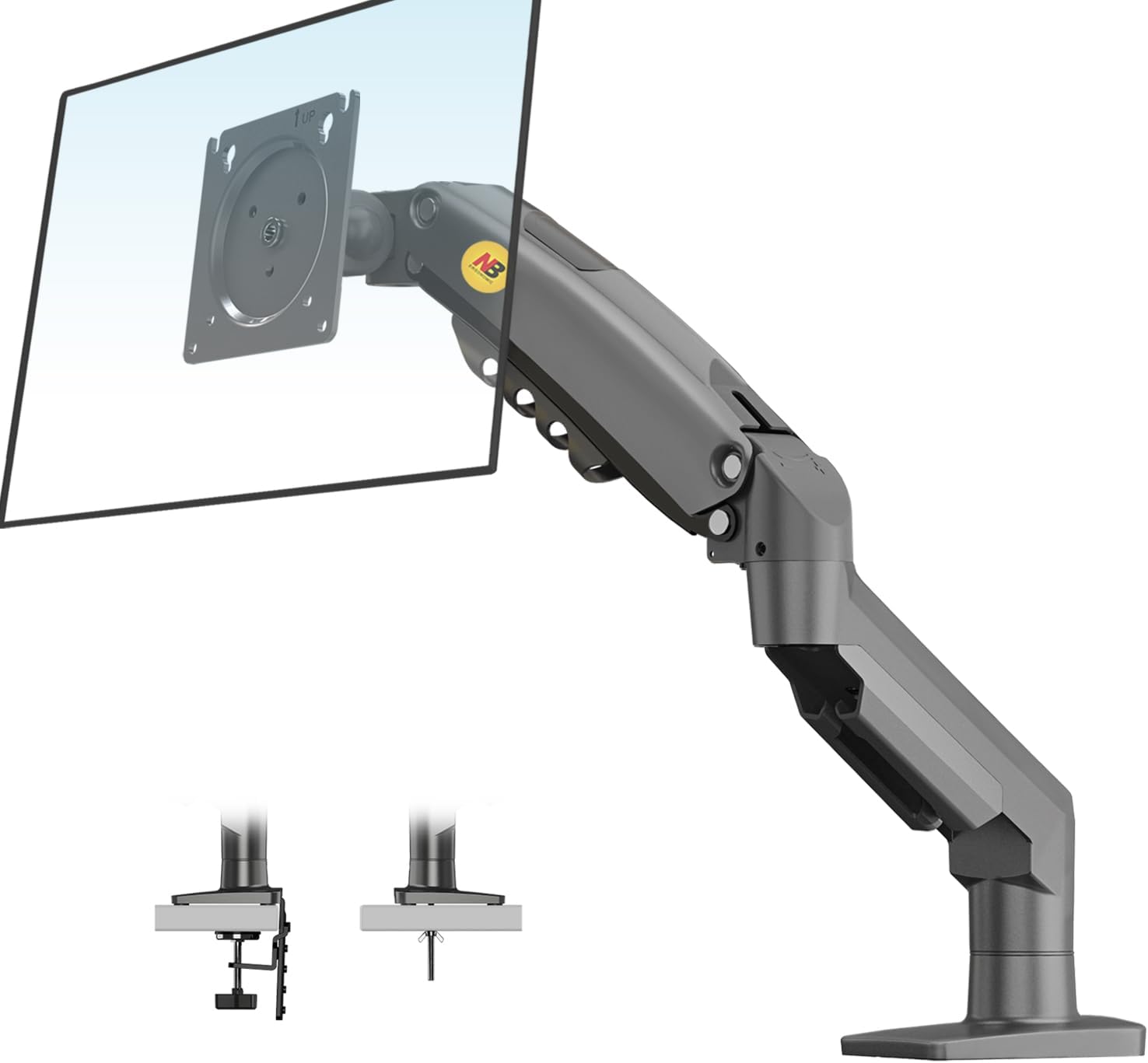
The NB North Bayou Monitor Mount F80 is a premium aluminum desk mount designed for 17-30" monitors weighing up to 19.8 lbs. Featuring full-motion articulation with 360° rotation, ±90° swivel, and -30° to +85° tilt, it offers unparalleled ergonomic customization. Built with automotive-grade gas springs tested for over 20,000 movements, it guarantees long-lasting stability. Easy to install with C-clamp or grommet options and integrated cable management, this mount transforms any workspace into a sleek, comfortable productivity hub.


| ASIN | B01AI2YGK4 |
| Best Sellers Rank | #146 in Computer Monitor Arms |
| Brand | NB North Bayou |
| Color | Grey Black |
| Compatible Devices | Monitor |
| Customer Reviews | 4.6 out of 5 stars 22,460 Reviews |
| EU Spare Part Availability Duration | 5 Years |
| Enclosure Material | Aluminum |
| Item Weight | 2.1 Kilograms |
| Manufacturer | KUNSHAN HONGJIE ELECTRONICS CO., LTD |
| Material | Aluminum |
| Maximum Tilt Angle | 85 Degrees |
| Maximum-Supported Screen Size | 27 Inches |
| Minimum-Supported Screen Size | 17 Inches |
| Mounting Type | Tabletop Mount |
| Movement Type | Articulating |
| Warranty Description | 3 year |
B**Y
Fabulous computer monitor arm
This monitor arm works great and is an excellent value! I have the two arm model and also a single arm model, and the quality of both is fabulous. Installation is super easy, the cord management is a nice touch, and it is very easy to adjust the monitors in terms of angle or height or orientation. I really love how I can quickly rotate a monitor 90° and use it as a portrait display for certain types of documents. The only thing I'm not a huge fan of with the arms is I wish the design was such that it would allow the upward height range to be greater. At maximum height, you can have the monitor be roughly 10.2 in above the work surface, which I find to be the perfect eye level for my desk height and chair height, but I wish I could have the monitors sit another 4 or 5 in higher so there's more room for my cats to walk around the desk and underneath the monitors. All in all, don't sleep on these arms, they are a great purchase!
J**©
The best monitor mount I've ever purchased in my life
I rarely write reviews, not because I don't care about it, but because most of the products I buy are generally "OKay" even when they are 4 or 5 stars. Notwithstanding, I am absolutely impressed with everything related to this monitor stand/arm. Truly one of the few products you will ever find that appears to have been designed by engineers that actually use and care about it! In a nutshell, it is Incredible strongly and impressively easy to assemble. A person with one hand can put it together with no struggle. I've mounted it with an ultra-widescreen 16:9 monitor from LG, which is not exactly light but is bulky due to its natural dimension. After having it settled, I ended up finding myself like a kid playing with the monitor, moving it around and around, almost disbelieving how much mobility it gained despite the desk being against a wall. But it is true. I can now move the monitor to incredible positions and angles, including back and forward, and it simply stays where I leave it. NO SHAKING!!! If you can imagine those robotic arms from a Transformers movie... Well, it is how it feels like. Beyond its strongness and mobility, the design is gorgeous and it is noticeable the incredible attention to all details. The cable holders are no simple pieces of cheap snapping plastic like most stands offer, it is a true conduit that can hold the cables while keeping them free for the arm movements. If it wasn't enough, the stand can be mounted in the edge of the table or through a whole, so it will virtually fulfill any requirement. The documentation is also very decent. It comes folded like a map, but it is impressed in glossy paper and well descriptive, including detailed pictures and written in English. Finally, the packaging is also something to clap about, and it brings some different size screws for the monitor mount (which most stands and arms simply seem to forget users will need). Bottom line is, if I could shake the hands of the people responsible for this product, I truly would. Sadly, it is hard to find this sort of quality nowadays, and this stand is one of a kind. It easily worths 5x the advertised value, making it the best deal ever! I am buying more, and most likely I will replace all the ones I have soon. BTW, I just found the same product in a dual-head version and it looks out of this world. I strongly recommend this product.
C**C
A Must-Have for Enhanced Workspace Ergonomics
I recently purchased the NB North Bayou Monitor Desk Mount Stand, specifically the Full Motion Swivel Monitor Arm with Gas Spring for 17-30'' Computer Monitors, and it has transformed my workspace in ways I couldn't have imagined. As someone who spends long hours in front of the computer, this product has been a game-changer for both my comfort and productivity. The first thing that struck me about the NB North Bayou F80 is its impressive build quality. The construction is sturdy and solid, assuring me that my monitor is in safe hands. The high-quality materials used in its production provide a premium look and feel that complements my workspace beautifully. The installation process was surprisingly straightforward. The package came with clear, easy-to-follow instructions and all the necessary hardware. I was able to mount my 27'' monitor without any hiccups. The VESA plate design is versatile, accommodating various monitor sizes and weight capacities, making it suitable for a wide range of setups. The gas spring mechanism is a standout feature of this monitor arm. Adjusting the monitor's height and tilt is incredibly smooth, and it stays in place without any drooping. This level of adjustability has significantly reduced strain on my neck and eyes, allowing me to find the perfect viewing angle. The full swivel and 360-degree rotation capabilities also come in handy, allowing for easy screen sharing with colleagues or collaborators. One thing I love about the F80 is its ability to free up valuable desk space. I've gained more surface area for other essentials, and the cable management system keeps everything looking neat and organized. The clamp design is secure and reliable, ensuring my monitor stays put even during vigorous typing and desk movements. This monitor arm has transformed the way I work, providing a comfortable and ergonomic setup that has positively impacted my productivity and well-being. The price point for the F80 is competitive, especially considering the quality and functionality it offers. It's a valuable investment that will benefit anyone spending long hours in front of their computer. In conclusion, the NB North Bayou Monitor Desk Mount Stand F80 is a fantastic addition to any workspace. Its build quality, ease of installation, gas spring adjustability, and space-saving design make it a top-tier product for enhancing ergonomic comfort. I can't recommend it enough for anyone looking to improve their workstation setup. This purchase has truly been a game-changer for me, and I'm sure it will be for you too!
N**N
An extremely durable and affordable monitor arm
The North Bayou single monitor arm is an EXTREMELY durable monitor arm and it's pretty high quality. The tilt function is easy to use, it has great fluid mobility, I would've preferred if they sold a black version of these arms, but when I purchased these, they only had 1 option for the color at that was "dark charcoal" or something like that. Other than that, the monitor arm looks great and even has spots for managing your monitor cables. It functions exactly the way I need it to. I'm giving it 4 stars though because although the entire mount is easy to move around and is very fluid, when it comes to rotating the mounting plate is where I run into issues. I don't know if it's just with my specific arms, but the I find that it takes A LOT of forced in order to rotate the the plates on the arms so I can have my one monitor vertical instead of horizontal. I didn't see anything in the instructions manual as far as a screw to loosen to allow it to rotate easier so maybe that's just by design. Other than that, these monitor arms are amazing, durable, and has plenty of mobility. I would highly reccomemd these arms for anyone who wants to clear up some space on their desk if you have more than 1 monitor.
T**A
Amazing robust quality
So for my main 32” monitor that weighs 25lbs, I purchased a heavy duty version of the North Bayou monitor arm (listed as supporting up to 33lbs) and it far exceeded my expectations in solid construction and quality. For my second side monitor which is 27” and weighs roughly 12lbs, I opted for this smaller version which lists up to 19lbs capacity. Out of the box, this arm is quite smaller than the heavy duty version. Still, it had a decent weight to it and the same solid construction. One thing to note is that the current photos of the product kind of make it look like a dark grayish color but it’s actually a matte black. Anyway, the clamp and arm pieces are easy to assemble. The back VESA mount has a slightly different install method as the heavy duty version but both of the designs are super easy to assemble by yourself. The adjustments in tilt and rotation are generally easy to tweak and movement is solid. No complaints, but I will say that the heavy duty version does have a slightly more premium overall feel. Not to say this one is bad though, it’s still great and I would definitely purchase again. I would say stop spending double or triple the price for other mounts. These North Bayou monitor arms are some of the best quality mounts I’ve used. Highly recommended.
A**W
Great price and works great!
Excellent arm for a smaller monitor. I purchased this for my son's setup, it's clamped onto his sit/stand desk and holds a 27" monitor. It's firm and can be adjusted in terms of how hard it is to adjust up and down. Installation was so easy, the unit comes with all the necessary hardware and easy to follow instructions- so easy a cave person could do it! I've been pleased with the performance of this monitor arm and even more so with the price which was perfect! The unit feels sturdy and doesn't seem to wobbly a whole lot.
C**S
Great Product!!
A big thank you to Nathan C. for his very informative comic posted in the reviews. Without it's guidance, I definitely would have given myself a good whack in the face when opening the velcro strap. This thing springs out extremely quickly, like a flailing toddler arm made of steel. I went the whole "let's drill a hole into my wood furniture" route to mount this beast. I suggest having an extra person assist you if you do this. Not to drill the hole, they would just be in the way, although I suppose you could have them on hand with a fire extinguisher if you do what I did and just drill the hole in a wooden table in a closed room next to some nice flammable paper. On the upside my room smelled like a fresh outdoor campfire for a while. Anyway, once you have drilled a hole, realized it was too close to the edge for your liking, and drilled another one about an inch further up, you can now commence bolting the thing down. This is where that other person comes in handy. Have them set down the fire extinguisher, and choose whether you want them to hold the arm upright on the table, or hunch down under the desk to put the faceplate and wingnut on the bolt. If they are shorter than you and can say the word "wingnut" without giggling like a madman, I suggest you have them do this so you can keep the arm aligned with the desk and not off-kilter like a psychopath who doesn't care how their monitor feng shui is balanced. Anyway, once they slide the faceplate on and have the wingnut (heh) tight as possible, bend down and forcefully shove them out of the way. They aren't needed anymore. Double check that the faceplate is flush with the desk, and go ahead and give that wingnut one or two more twists that you can probably force into it since your helper was probably cajoled into this and has the strength of a feeble child. Go ahead and play around with the movement of the arm, and once you are satisfied that you understand the range of motion this thing has, slap your monitor on there with the screws provided. Sheepishly call back that other person you rudely pushed out of the way earlier, and have them hold the monitor at a close enough approximation so you can struggle with getting the tiny bolts aligned to their holes. Personally I started at the bottom holes, because I usually do for other tasks; and after I did the top ones it didn't look like it was laying properly so I removed them and started from the bottom. Now, we're here with a fully attached monitor screen, what's next? Unless you are an absolute madlad you probably need to connect the cords at this point. If you did all this with the cords connected, you have problems and you should seek help. Anyway, this device comes with not one, but TWO cages for your cords, lest they become unruly and try to escape. The one on top just needs a simple tug on the side that isn't attached and you can simply slide your cords into this cosy nook. The bottom arm is the final boss of this thing. There are two holes just on the underside of this arm. One is a decoy to trick you and take damage intended for the actual hole. The important hole has a screw inside, but this puppy is NESTLED in there. Now that you have the thing bolted to the desk, there is no great way to access this screw visually without the aid of a mirror. Locate the smallest mirror in your home, or break an existing one and grab a shard, and slide it under the arm, so that you might be able to determine which hole houses The Only Screw That Matters™. Rummage around in your tool box and locate a short enough screwdriver (Phillips) that can rummage around in these holes without banging into the desk and nicking the heck out of it multiple times. After a good, sweaty 15 minutes of trying to visually locate and extract the screw from it's home, becoming enraged and throwing the screwdriver across the room a few times, you should now only have about 5 more minutes before it pops out, seemingly of it's own volition. Now, squeeze, the plastic housing on the arm, and after about 5 minutes of feeling that it's about to come off, it finally will. Now, you can tuck those rebellious cords into this bottom prison. At this point you will realize that your previously well-functioning 6 foot HDMI cord is now entirely too short, since you mounted the screen waaay off to the side so you can have more room on your desk for other things, like additional screens. Rummage around in your drawers for a while until you will a longer cord into existence, or break down and buy an additional cord. I overcompensated, as I do, and bought a 15 foot cord, and now my swivel mount arm can transcend all earthly dimensions with it's range of motion, but now I have about 5 extra feet of cordage haphazardly shoved behind my desk in a tangled mess. I really should have bought the 10 foot cord. Now you can slide your new cord into it's housing and fully enjoy moving your screen around five-thousand seven-hundred and forty-eight times until you find the perfect angle, which you will inevitably lose when you try to show someone else how cool your new monitor arm is. I don't personally like their big yellow logo on the side and base, so I covered it with a piece of black tape that reasonably camouflages itself to the base, but I might put a completely different logo there in the future to trick my friends into thinking some other completely random company made it. Like hey, check out my CoverGirl monitor arm, I bet you didn't think they made those, did you. I mean they don't, but you might be able to trick them for a while and maybe they'll made some kind of social media post about it, and then you can pop up like "A-HA! You've been bamboozled!" Anyway, I recommend this swivel mounted arm, it's pretty cool.
R**N
Buy this thing!!!
I don't typically write reviews. But I love this thing! I'm a design engineer by trade and pretty critical of stuff poorly made. I can't think of a thing I would change in this design. It goes together easily. You adjust it one time to balance the weight of your monitor... in my case a TLC tv. You clamp it to the table/desk you wish to use it on and Bob's your uncle! And bonus... it comes apart to put back in a well-thought-out box for transport to a new location. Something I do on occasion. My application was a TV stand / monitor. I mounted a mini PC, USB expansion strip, 2 terabyte SSD and bluetooth sender to the back of my 34" TV. It serves as a computer / TV with a thousand plus movies stored on the drive. The monitor stand allows me to position the TV for all viewing angles and it works like a charm. I move it around for movie night with the grand children or playing video games with the guys around the kitchen table. The monitor stand ROCKS! Buy it! And keep the box it came in!
Trustpilot
3 weeks ago
2 weeks ago