Desertcart purchases this item on your behalf and handles shipping, customs, and support to Greece.
🔄 Bridge the gap between old-school storage and modern speed!
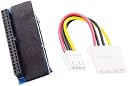
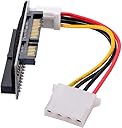
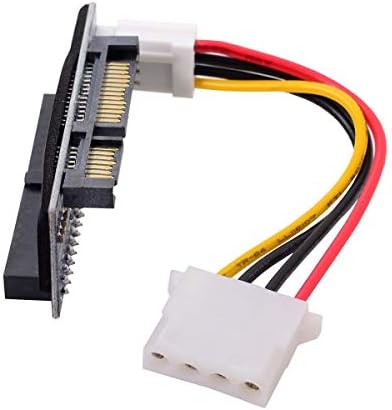
The Cablecc IDE/PATA 40Pin to SATA Female Converter Adapter effortlessly converts 3.5" IDE hard drives up to 1000GB to SATA interface, supporting IDE transfer rates up to 133MB/s. It requires no extra power or drivers, offering plug-and-play convenience compatible with a wide range of operating systems from DOS to Windows 7 and Linux. Ideal for professionals upgrading legacy systems or accessing vintage data with modern hardware.


| ASIN | B081YP2S5R |
| Best Sellers Rank | 37,123 in Computers & Accessories ( See Top 100 in Computers & Accessories ) 215 in SATA Cables |
| Brand | cablecc |
| Cable Length | 3.5 Inches |
| Cable Type | SATA |
| Cable type | SATA |
| Colour | Blue IDE/PATA 40Pin Disk to SATA |
| Compatible Devices | [Personal Computer, Laptop, Server, SSD, 3.5" Hard Disk Drive] |
| Compatible Phone Models | No Compatible Phone Models |
| Compatible devices | [Personal Computer, Laptop, Server, SSD, 3.5" Hard Disk Drive] |
| Compatible phone models | No Compatible Phone Models |
| Connectivity Technology | SATA |
| Connector Gender | Female |
| Connector Type | SATA |
| Connector type | SATA |
| Country Of Origin | China |
| Customer Package Type | Standard |
| Customer Reviews | 3.9 out of 5 stars 1,957 Reviews |
| Data Transfer Rate | 133 Megabits Per Second |
| Ethernet Cable Category | Cat 5 |
| Frequency | 4.13 MHz |
| Indoor Outdoor Usage | Indoor |
| Item Shape | Round |
| Item Weight | 0.01 Kilograms |
| Manufacturer | cablecc |
| Manufacturer Part Number | EP-096 |
| Model Name | 40Pin Disk to SATA Female Converter Adapter PCBA |
| Model Number | EP-096 |
| Number of Items | 1 |
| Number of Pins | 7 |
| Other Special Features of the Product | Data Transfer |
| Recommended Uses For Product | converting IDE drives to SATA |
| Special feature | Data Transfer |
| Specification Met | RoHS |
| Unit Count | 1.0 count |
C**N
Great! Make sure you have your settings and jumpers correct though!
I needed this to check and securely wipe an old hard drive that I had found in my loft. Worked like a charm! It comes with no instructions, so you need to be aware of a few things to ensure that this will work: 1. Your BIOS SATA settings may need to be switched to IDE mode. My BIOS did not have this option - AHCI worked fine. 2. My computer did not recognise the drive until I enabled the SATA Hot-Plug option in the BIOS. 3. Make sure the drive jumpers are correct - it will only work with the drive set to Master. I had mine set to Cable Select and it didn't work until I changed it.
D**S
Cablecc IDE/PATA 40Pin Disk to SATA Female Converter Adapter PCBA for Desktop & 3.5" Hard Drive
This Cablecc IDE/PATA 40Pin Disk to SATA Female Converter Adapter PCBA for Desktop & 3.5" Hard Drive arrived quite a while ago. Only tried it out the other day 07-09-2021. For some reason it does not work inside my PC Tower. Not even with the extra power cable attached. BUT! it does work via my MagicBridge External connections. I wanted it to work inside my PC Tower, Not outside as an External. So I'll only give it 3 stars for that.
K**K
Product worked ok, but inadequate packaging caused damage.
The little board fit well into a well-aged IDE dvd+R drive, and was able to read some discs: data cdrom, music, pre2000 dvds (expected given the drives age). Have some old old IDE HDDS to try it out on later. Might be able to recover some long lost data from them. Note: The sata data & power connectors are flipped 180deg (inverted & swapped), compared to a standard sata drive. Not a big problem. The small loop cable included was a bit short & difficult to fit. I recommend installing the board & cable loop onto the IDE drive *before* installing the drive into the PC case. Would be very fiddly to do it the other way round. Be careful not to put too much strain on the board + connectors from the sata leads, I suggest cable tie them to the case nearby so that they won't drag on the adapter board. -1 star due to the inadequate packaging. Arrived in a small plastic bag (not anti-static), inside a standard amazon flat cardboard wallet. Not good. This caused some damage to the power prongs on the board: one pin was notably bent at an angle away from the other 3 pins. It had also punctured through both the plastic bag and the cardboard wallet, prior to delivery. Fortunaely I was still able to carefully bend it back almost into shape & carefully attach the power loop cable. The board seemed intact & appears to work ok. YMMV though.
T**6
Did not work for me.
I bought it to use on an outdated IDE internal DVD drive. Did not work. The power indicator on the drive came on but there was no communication to the PC. It may work on an IDE hard drive but I have not tried it.
M**H
Just the job if you need to use a parallel connected drive with a SATA motherboard
I was decomissioning an old computer with a relatively high capacity (320GB) parallel ATA drive (3 1/2 inch "desktop size). I wanted to be able to read the drive in another computer which only had SATA drive connections available. For a few pounds this did the job. Plug in the adaptor in to the large socket on the drive, power the drive using the small included lead and then connect power and the SATA connection as you would for a SATA drive. One subtle point to note. I found that compared to a real SATA drive the adapted drive was "the other way up" (so the PCB was up rather than down) making SATA power and data leads work but beyond that I had no problems using the drive. All in all, excellent. Given the value of a 320GB drive, in pure storage terms it is probably better to just buy a new drive but I wanted the ability to read the old drive. My (Seagate) drive had what looked like a plastic enclosure (metal top plate) and so there were no "shorting" risks. The adaptor also has a mm or two gap to the drive when plugged in but I would probably look for something insulating if I was using a fully metal enclosed drive.
A**Y
value for money
handy if you want to use an older device
R**S
working!
I had an old computer with some SATA drives, and I needed to get data from my old PATA. The adapter did the trick, and I was able to see the 3 hard drives (PATA as slave). I just write this review because I read in other comments that the PATA drive had to be only drive connected, but that is not the case.
A**A
Poorly designed
I like that there is such an affordable way to convert the old hard disk drive, but the problem with this is that the power plug from the board, stops you plugging in the converter into the hdd port! So it is useless.
S**N
Works fine on old IDE motherboard
If you're trying to re-use your old IDE DVD burners to save yourself the $25 to $30 for a new SATA DVD burner when moving to a new motherboard with only SATA and no PATA IDE (ribbon cable connectors), these adapters will do the job for about 1/3rd the cost of a new burner. Or, if you'd like to switch your BIOS IDE settings over to "SATA -AHCI" instead of "Legacy IDE" or "Native IDE" for newer versions of Windows, these work perfectly. I tested on an old Gigabyte GA-MA790FX-DQ6 DDR2 motherboard running an old Athlon 64 x 2 from back around 2010, now running Win10 Pro 22H2. The motherboard has the old original PATA IDE (Parallel ATA IDE) using ribbon cables, and the old, original version of SATA running at 3GB/s .... ....IDE DVD burner drives installed were the LiteOn DH20A4H and the Sony / OptiArc AD-7200A....with jumper set to MASTER on both of them. ...Tested compatibility and burn speeds with and without SATA adapter installed, using free Nero DiscSpeed test utility, and found burn speeds virtually identicle on both drives, and regardless of BIOS IDE settings : "Legacy IDE" "Native IDE'" or "SATA to AHCI," and left BIOS set to "SATA to AHCI" since Windows since Win7? prefers it. This Win10 installation was originally done in "Native IDE" BIOS mode, so Win10 required one or two restarts after switching BIOS mode to AHCI while it loaded AHCI drivers...but finally came up and running fine. I also noticed a minor point ...with BIOS IDE set to "SATA to AHCI" mode, Win10 seemed to boot faster.... ....and another minor point, the adapters are not mechanically held onto the drives by anything but the adapter, and with all those cables and power hanging off of them, seemed shaky/delicate, so I think I'm going to dab a little hot glue between the adapter and the back of the drives to hold the board on there better and make them stronger. There's also NO printed documentation with each adapter. I tried skipping using the power jumper from adapter to drive, just plugging directly into drive from power supply, instead of SATA power to the adapter, but that did not work....I'm kind of surprised board can pass enough power through it, to the drive, to run it. As for older reports / reviews of poor quality workmanship of the circuit boards, I looked both that I ordered over closely with a magnifying glass before plugging them in and powering up, and found no poor solder, no short-circuits, and no broken power connector or bent pins, despite receiving both in small, unpadded plastic bags....lucky I guess ? They did also have a strip of black foam insulating tape on the back of each board where it goes up against the sheet metal of the back of the DVD burner when plugged in....so make sure that tape is intact and adhering well to the board when you first receive the adapter. I've read that the burning laser diode in CD/DVD burners has a limited lifespan and will burn out or weaken eventually, so I wonder if it's "false economy" to be buying these adapters for old drives I've had for years, instead of just buying new drives for ~$25, but admittedly these adapters do work well to switch over to SATA....So, if you need 'em, they'll do fine.
J**A
Excelente Adaptador
Muy funcional y ergonómico.
E**.
El acople entre las piezas es bastante bueno.
Funciona bien. El acople entre las piezas es perfecto. El lector/grabador funciona muy bien. Un gran producto.
S**.
Funktioniert
Mit dem Adapter ist es mir ohne Probleme gelungen eine altersschwache IDE-Festplatte auf eine moderne SSD zu klonen. Die alte Festplatte funktionierte damit auch an einer Dockingstation, die über USB am PC angeschlossen war und wurde ohne weitere Schwierigkeiten von Windows erkannt. Sehr gute Qualität und 1-Tages Lieferung.
R**T
Works well with optical drives too
I ordered this item to connect an old, but very special CD-ROM drive with an IDE interface to a more modern computer and it works perfectly: The drive is recognized as an optical drive and works perfectly. Do not forget to set you’re drive’s jumper to ‘Master’, or it won’t work properly. I’m subtracting one star because one of the power wires came out of the Molex connector. I could have returned it for a replacement, but I chose the quicker way and fixed it myself.
Trustpilot
2 days ago
2 weeks ago