Desertcart purchases this item on your behalf and handles shipping, customs, and support to Greece.
โ๏ธ Elevate your iPad experienceโwrite, draw, and create like never before!
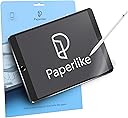
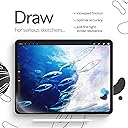
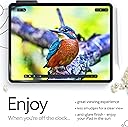
Paperlike 2.0 is a premium matte screen protector designed specifically for the iPad 10.2". Featuring advanced Nanodots technology, it delivers a natural paper-like texture that enhances drawing and writing precision. With 2H hardness, water repellency, anti-fingerprint, and anti-glare properties, it protects your screen while maintaining exceptional clarity and touch sensitivity. The package includes two protectors plus all necessary tools for a flawless, bubble-free installation.


| Asin | B082477LSX |
| Date First Available | November 28, 2019 |
| Item Model Number | Paperlike 2.0 |
| Label | Paperlike |
| Manufacturer | Paperlike |
| Product Dimensions | 9.37 x 0.12 x 9.37 inches; 0.71 ounces |
User
A great feeling screen protector
I decided to purchase this after reading some of the reviews, including the few that were not all positive. The negatives seem to be related to the screen protector getting scratched (best review stated they had been using for 4 months) and the screen protector being a pain to apply. I have only had this for a single day so far and if the longevity is better/worse/different than the reviewer noting that they made it 4 months, Iโll update this review. As far as applying, this was no harder than any other protector that Iโve applied to an iPad or phone. I would recommend that you take your time, watch the video, and ensure that the screen is completely free of any dust. I donโt find applying screen protectors to something as large as an iPad to be extremely easy, but if following the instructions here, it wasnโt hard and turned out as I hoped.From a use perspective, I can say this thing is leaps and bounds better than what Iโve tried in the past. Itโs very smooth to write on, but not as smooth as glass. Iโve tried some cheaper alternatives and they felt like I was writing on a very fine grit sandpaper. This doesnโt feel that way at all. I suspect this impacts the longevity. On that note, Iโm expecting 3-6 months before I have to use the second one of these that came with my purchase. I will be using this mainly for taking notes electronically, however I may do the occasional drawing. I donโt like the feeling of writing directly on the glass and this screen protector seems to be about as close to paper as Iโve found. If you are like me and do not like writing on glass, I would recommend this. I do feel itโs a bit expensive (about double what I payed for a protector that did not feel good), but I feel like the extra is well worth it.
User
Brilliant, but painful to install flawlessly
Having to focus painstakingly hard on a perfectly flawless lint-free screen during the application is utterly nerve-racking, but once it has been applied (and if you get it >just< right), the PaperLike screen protector is a fantastic product that delivers a great paper-like feel.Definitely worth the cost, but losing the first of two covers due to two (2) super-tiny (nearly-invisible) pieces of lint (from the black cloth PaperLike provided) was heart-wrenching.Two thumbs up from me, but I strongly recommend having someone else around to examine and confirm the screen is perfectly free of any lint (no matter how tiny) before applying the screen protector.To the PaperLike QA Staffโฆ I very strongly recommend that the cleaning cloth provided in the package be of a different color than black. A bright colored cloth, very easily seen (no matter how tiny it is) against the black screen would have saved me from losing my first cover the first time I installed the screen protector.(2x Updates 24 July 2022)1. I was contacted by the PaperLike QC Team about my experience. Once I explained more detail about the lint from the black cloth provided in the package and provided evidence, their Representative chose to send me a replacement package, so hats off to their quality management team for doing their due diligence and sorting out my loss.2. Iโve been using my PaperLike screen for a couple weeks now. It does exactly what they say it will do, providing the closest feel Iโve ever experienced using similar paper-like screen protectors. Iโm an avid note-taker and have tried most other products on the market. None of them even come close to the PaperLike screen.I highly recommend this product to anyone who wishes to use their iPad Pro (or similar) for any handwritten notes or for drawing.Best regards,Frank
User
A great protector for artists and note takers
*Note: these are my very early impressions*I was extremely skeptical of this concept. A matte screen is a matte screen and will offer the same texturing as any other (and for $35 no less)-...or so I thought.The package includes 2 protectors with cutouts around the camera and sensors, and ample space along the edge to accommodate iPad cases. Also included were 2 sets of stickers for installation, wet wipes and a microfiber cloth.The short of it: Yes this screen protector does vastly improve the feeling of drawing and writing experience in contrast to both glass and regular matte screen protectors. If I were to give a material comparison, I wouldnโt say it feels like paper so much as pencil on a soft rubber surface, or perhaps like if you were drawing with oil pastels. Itโs quite smooth to the touch (considering it is a textured surface) and I donโt think it will collect oils or fingerprints like a glass screen would. As matte protectors go, this doesnโt really help all that much with glare or reflection, and if that is your main concern, Iโd look elsewhere.Color distortion is negligible, however my 2 complaints would be:1) This thing costs a lot of money. Maybe it is justified, and I know there are a lot of ripoffs which detract from sales to the original paperlike brand, but thereโs no getting around the fact that this is expensive.2) Installation. Yes their instructions are very clear, but I really think this should be a wet application product as it would reduce chances for dust and air bubbles. As it stands, after thorough cleaning and isolation from a โdusty environmentโ, on my first try the static pulled a dog hair (which I managed to remove) and trapped 2 specks of dust (which I probably canโt remove), which form small, and relatively insignificant bubbles around them.All said and done, who is this for and should you buy it?-This is for people who own an Apple Pencil and draw or write often using their iPad-If you are one of the above, then YES! This is so much better than any other digital surface Iโve worked with. I wish my Cintiq Pro felt like this. This is definitely worth considering.
User
Be very careful while installing
Installation is quite the delicate and tedious process. I'm glad they give you two of them but my plan was to use them at different times, not to have one as a backup in case I messed up installing the first.The guide on installation is easy to follow and I did it mostly right but I did end up with two small bubbles which I can sometimes notice when looking at the screen. It doesn't ruin the experience or get in the way of using the touch screen at all regardless of whether I'm using my finger or the Apple Pencil.It does feel like paper which is cool but sometimes it actually feels quite smooth. The longer you use it the more it will wear down and you will eventually get smooth spots which are still rougher than the screen itself but smooth compared to when its new. I wanted this because drawing on the iPad without something like this feels unnatural and it's far too easy to slide my pencil across the screen and have far less control over delicate strokes. With Paperlike it feels much more like paper and the resistance allows you to feel enough feedback to really feel as though you're interacting with the medium that the app you're running is emulating. It feels like pencil on paper or paint brush on canvas. It's great.One thing they don't tell you is that it's great for reading books on iPad as well. When turning pages I really feel more like I'm reading a paper book than a digital one. I've always preferred paper and analog tools but I'm more likely to buy and read digital books now with the Paperlike screen protector on my iPad.It's easy to clean. You just take the same sort of cloth you'd use to clean your iPad's naked screen and use it on the Paperlike. Yes, you will get fingerprints on your screen if you touch it with your hands just like using the normal screen so you have to clean it periodically.The Paperlike does dim the screen and dull the colors just a tiny bit but unless your work demands absolute perfection when it comes to color accuracy or you're some superhuman that can't handle a negligible change in brightness/color then you won't notice it unless you're specifically looking for it.I'm glad it comes with two because eventually the first will wear out and I'll need to apply another and the second time I'll hopefully learn from the mistakes I made with the first and make sure there are no small bubbles that end up under the screen. But like I said, even if you do end up with a couple small bubbles you'll most likely be able to live with it and in most cases it isn't worth removing the Paperlike and reapplying a new one. The difference is negligible.
User
Amazing Product - Be Very Careful in Application
About the product itself: It's AMAZING.I've been using my iPad as a planner, note keeper, goal tracker, and practically everything else for a long time. I didn't think this would have that big of an impact on me. But I wanted to try anyway.And I'm glad I did!My penmanship is so much better now, it's easier to write (not so slippery), and it's a joy to do! I am so thankful for this product and I will be purchasing many more in the future.Onto the one negative I found. This review would have been a 4 star if it hadn't been for Paperlike's awesome customer service. (Not because of the product, but because of the difficulty of installation.)I received my Paperlike screen protectors and followed all the steps to a T on the first one. I watched the video carefully and did exactly as I was supposed to. It wasn't good enough. I had bubbles and when I pulled the final piece off to reveal the Paperlike screen protector, the dang thing came completely off.Needless to say, I was not thrilled.I applied the second one with slightly better results (less bubbles but still a few) and this time, the Paperlike screen protector stayed on.At the end of the instructional video, they say to reach out to customer service if you have any problems. So I did. And they sent me an entirely new set for free. (That's not what I was looking to get, but it was a nice surprise.)
User
Works amazing with Procreate
I am a Graphic Designer, Digital Painter, and also run a YouTube channel all from Procreate.100% of my professional work is done on the Ipad including painting, drawing, web design, and more.I have owned an Ipad for years and the complaint from day one was the slick and easily dirtied screen. I installed PaperLike on my Ipad over the weekend with hesitation after reading mixed reviews. Here are the pros and cons:CONS1. Semi hard to install, had to have my husband help.2. Any and I mean ANY fleck of dust or crumbs etc WILL LEAVE A BUBBLE. You are given tools and a tutorial, use them and you will have zero problems!3. It took both my apple pencil and my fiberoptic brush a good few minutes to adjust. Dont freak out, just keep using your stylus in various forms to acclimate it.4. As you can see from the photos the PaperLike is definitely starting to wear and scratch. I figured as much since it is like โpaperโ it hasnt messed with my work but we will see what happens on the long run.PROS1. It feels amazing! The sound, texture, the matte screen finish. Amazing for video tutorials as the screen doesnโt glare back at you or throw a reflection.2. The level of detail on my screen is absolutely perfect if not better. I definitely see my clarity and texture with paintings more easily.3. This would be great for all artists bridging the digital and traditional material gap, especially those that need that feel of a canvas!4. My screen feels very protected, it fit like a glove, and the look and feel of it is incredible.
User
EXPENSIVE, USELESS, simply a TORTURE, plus RUIN the color on iPad Pro 2021 XDR display
I was originally excited to install the screen protector because I saw loads of recommendations from Youtubers who essentially said PaperLike changed their lives, turned iPad into another machine, etc. etc. I immediately ordered one from Amazon since the Youtubers seemed to know a lot about iPad.. However I was totally misguided.TOO EXPENSIVE:I thought $20 for one screen protector would be okay since it might has preimum quality compared to cheaper brands. But I didn't take into account that I would have to toss one of the protector to the trash due to the difficulty of installing the protector (more on this later). So it would be $40 for 1 which is a ridiculous price. BEWARE and consider the possibility that you would ruin at least one (or both) of the protectors...RUIN the display quality:With the protector on, the screen comes with a matte texture and it refracts the light from the display, essentially mixing the RGB pixels to a bad effect. The color white is no longer white but is kind of a dizzy mixture of red, green and blue, and the same applies to other colors. The overall effect is that the color no longer seems as authentic as without the screen protector, which makes multi-media use a worse experience. I am very sensitive to this as I have been trying out multiple monitors with different specs, and I am confident that the XDR display is much better without the protector.NOTHING SPECIAL about Paper-like:Texture of the protector is nice, but it is just of average quality and nothing close to "paper-like". It's more of a marketing gimmick and nothing new: I have used such protectors (for iPhone) that costs less than $3 back in 2015 and I didn't know it would be renamed to "Paper-like" and allowed those merchants to make money out of the renaming.. This is just ridiculous.TORTURING installation:Finally, the installation is just a torture. I spent 40 mins making the first attempt and could not remove the dust trapped under the protector. I tried to remove it by partially lifting the protector, and I succeeded in removing the dust but introduced myriads of other dusts. At the end I had to remove it and toss it in the trash and start all over again. Then I spent another half hour trying to remove all dusts before applying the protector, and at the end I decided to give up on getting rid of one final dust.CONCLUSION: DON'T BUY, or buy a CHEAPER oneAs the protector messes up with the colors on the screen, I probably won't bare it for long and will very likely to tear it off my screen soon. But if I do so I'd spent $40 just to waste an hour or so and buy myself a torture. The only thing that might be of value to me was the dry cloth that I might use to remove dirts from the screen in the future..
User
The installation is incredibly difficult...
For drawing with the Apple Pencil and Procreate, the Paperlike surface is a vast improvement over plain old smudgy, slippery glass. It's akin to a medium-tooth drawing paper. It's very smooth with just enough texture to give you some control.It definitely adds a noticeable diffusion to the screen but the Retina display on my iPad pro is so bright that I do not mind bringing it down a touch. If you export your art to another device, you might notice some color deviations but it's nothing too drastic. You are probably not likely to be proofing colors on this for an exacting printing job.The installation is a big problem. There's an install video that seems fairly helpful. The installation process is well thought out and there are a bunch of screen wipes and stickers to guide you through the process. Cleaning your screen is of paramount importance but it's not all that easy. Any bits of dust or smudges will be major annoyances if they get trapped under the Paperlike.But getting all the tiny bubbles out is an almost impossible task. It's the final step before you remove the protective film and start drawing. Once you have removed all the bubbles and peel away the protective film, you can see all the bubbles that you missed - but while dragging across the Paperlike surface (without the protective film on), it's easy to scratch the surface enough to make you start all over from the beginning.That's probably one of the reasons the kit comes with two Paperlike screen protectors. Even under a bright work light, I missed a bunch of bubbles. I'm going to work with it for a few days and see how annoying the bubbles are before trying to install the extra screen protector.But $40 is a steep price for something that is far from a sure thing. I'm pretty adept with precise mechanical tasks and I found it pretty difficult. For someone not comfortable dealing with DIY assembly, I suspect installing Paperlike will be very frustrating.
User
้ฉๅบฆใชใถใฉใคใใ็กใใชใฃใฆใใใๆฌ็ชใ
ใฟใคใใซ้ใใงใใใถใฉใคใ็กใใชใฃใๅพใฎใใฃใซใ ใฎ้ฉๅบฆใชๆฉๆฆๆใๅฅฝใใงใๅคใใใซไฝฟใฃใฆใใใใผใใผใฉใคใฏใใ็กใใฆใใใใฃใซใ ใฎๅ่ณชใ้ซใใฎใ่ฏใใงใใ
User
The good'old Paperlike
Caution: If you value absolute viewing quality over anything else, don't use Paperlike.This screen protector is less of a "protector" and more about enhancing the writing experience as well as touch screen experience in certain scenarios. I personally use my iPad Mini has a gaming iPad for rhythm games and this screen protector is excellent in reducing screen glare as well as improving the sliding operations. The stock screen catches your fingers when sliding and can be very frustrating in some situations.The writing experience is just up there with the iPad Pro. I don't write on the Mini but coming from the Pro I'd say this is one of the best screen protector you can buy for that purpose. It's also Amazon Prime eligible unlike some other better-reviewed brands to whom apparently only the US is a country that exists.
User
ุฌู ูู
ูู ุง ูู ุงููุตู
User
Game Changer
Excellent product - i use it on my 9th gen iPad. Especially good on note taking apps such as Goodnotes. However, does need some โbreak-inโ time because right out of the box it is a bit too sticky
User
Game changer
After using it for more than a week, I have to say that it has really helped me to take notes in my ipad, as I now feel that my pen is a bit more grippy and not so slippery anymore.
Trustpilot
2 weeks ago
3 weeks ago