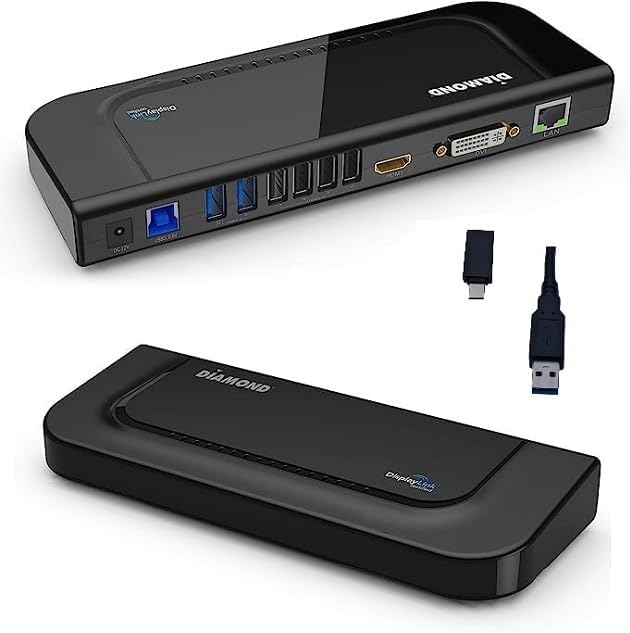


Diamond Multimedia Dual Video Output, USB/USB-C/TB3 Universal Docking Station with Gigabit Ethernet, HDMI, DVI, Audio for Windows 11, MacOS, Android 5.0+. DisplayLink Certified DL-3900 Chip (DS3900V3)
Product ID: 216243299
Buy anything from 5,000+ international stores. One checkout price. No surprise fees. Join 2M+ shoppers on Desertcart.
Desertcart purchases this item on your behalf and handles shipping, customs, and support to Greece.
Diamond Multimedia DS3900V3 Dual Display Docking Station for Mac and Windows Equipped USB 3.0 Laptops/Desktops. Front loading USB 3.0/USB-C Ports with vertical built in stand Review: Works perfectly - I work from home and have three screens. This allows me to switch from home laptop to work laptop. Review: Budget Friendly - Diamond Multimedia Dual Video Output Docking Station is a versatile and convenient solution for users looking to expand the connectivity options of their laptop or desktop computer. This docking station features two video outputs, allowing users to connect two additional monitors for increased productivity and a more immersive viewing experience. One of the standout features of this docking station is its sleek and compact design. It has a small footprint and can easily fit on a desk or workspace without taking up too much room. The docking station is also lightweight, making it easy to transport if needed. In terms of connectivity, the Diamond Multimedia Docking Station offers a variety of options. It has two video outputs, one HDMI and one VGA, allowing users to connect to a wide range of monitors and displays. Additionally, it has four USB 3.0 ports, providing fast data transfer speeds and the ability to connect various peripherals such as keyboard, mouse, and external hard drives. The docking station also has an Ethernet port for a wired internet connection and an audio jack for headphones or speakers. The setup process for the Diamond Multimedia Docking Station is straightforward and easy. You simply need to connect the docking station to your computer using the provided USB cable and then connect your desired peripherals and monitors. The docking station is also compatible with both Windows and Mac operating systems. In terms of performance, the Diamond Multimedia Docking Station delivers. The video outputs provide clear and sharp images, and the USB 3.0 ports offer fast data transfer speeds. The Ethernet port also provides a stable and reliable internet connection. One thing to note is that the docking station does require an external power supply, which is included in the package. This is not unusual for docking stations, but it is something to keep in mind when setting it up. Overall, the Diamond Multimedia Dual Video Output Docking Station is a great option for users looking to expand the connectivity options of their laptop or desktop computer. Its sleek and compact design, variety of connectivity options, and easy setup make it a convenient and versatile solution. The performance is also solid, with clear video outputs and fast data transfer speeds. The only downside is the requirement of an external power supply, but it is a small price to pay for the convenience and functionality that this docking station provides.
| ASIN | B089NBVFBB |
| Best Sellers Rank | #121,908 in Computers & Accessories ( See Top 100 in Computers & Accessories ) #3,066 in Laptop Docking Stations |
| Brand | Diamond Multimedia |
| Built-In Media | DS3900V3 Docking Station, Manual, Power Adapter |
| Color | Black |
| Compatible Devices | All laptops and PCs with USB |
| Customer Reviews | 4.2 out of 5 stars 18 Reviews |
| Global Trade Identification Number | 00757448025866 |
| Hardware Interface | DVI, HDMI , USB 1.0, USB 2.0, USB 3.0, USB Type C |
| Item Type Name | Docking Station |
| Item Weight | 0.75 Pounds |
| Manufacturer | Diamond Multimedia |
| Mfr Part Number | DS3900V3 |
| Model Number | DS3900V3 |
| Number of Ports | 6 |
| Total Number of HDMI Ports | 1 |
| Total USB Ports | 6 |
| Total Usb Ports | 6 |
| UPC | 757448025866 |
| Warranty Description | 2 year manufacturer |
D**E
Works perfectly
I work from home and have three screens. This allows me to switch from home laptop to work laptop.
J**N
Budget Friendly
Diamond Multimedia Dual Video Output Docking Station is a versatile and convenient solution for users looking to expand the connectivity options of their laptop or desktop computer. This docking station features two video outputs, allowing users to connect two additional monitors for increased productivity and a more immersive viewing experience. One of the standout features of this docking station is its sleek and compact design. It has a small footprint and can easily fit on a desk or workspace without taking up too much room. The docking station is also lightweight, making it easy to transport if needed. In terms of connectivity, the Diamond Multimedia Docking Station offers a variety of options. It has two video outputs, one HDMI and one VGA, allowing users to connect to a wide range of monitors and displays. Additionally, it has four USB 3.0 ports, providing fast data transfer speeds and the ability to connect various peripherals such as keyboard, mouse, and external hard drives. The docking station also has an Ethernet port for a wired internet connection and an audio jack for headphones or speakers. The setup process for the Diamond Multimedia Docking Station is straightforward and easy. You simply need to connect the docking station to your computer using the provided USB cable and then connect your desired peripherals and monitors. The docking station is also compatible with both Windows and Mac operating systems. In terms of performance, the Diamond Multimedia Docking Station delivers. The video outputs provide clear and sharp images, and the USB 3.0 ports offer fast data transfer speeds. The Ethernet port also provides a stable and reliable internet connection. One thing to note is that the docking station does require an external power supply, which is included in the package. This is not unusual for docking stations, but it is something to keep in mind when setting it up. Overall, the Diamond Multimedia Dual Video Output Docking Station is a great option for users looking to expand the connectivity options of their laptop or desktop computer. Its sleek and compact design, variety of connectivity options, and easy setup make it a convenient and versatile solution. The performance is also solid, with clear video outputs and fast data transfer speeds. The only downside is the requirement of an external power supply, but it is a small price to pay for the convenience and functionality that this docking station provides.
T**Y
Great Docking Station
Works as it should. No issues. Good value.
E**G
Works great on mac running catalina (OS X 10.15)
PRO: The electronics and software of this device has been working splendidly on an intel-based Apple Mac running OS X 10.15.# since I added it to the system. The price is competitive. CON: Four stars instead of five stars, because the mechanical design and manufacturing of the base+fascia is lacking, and broke in the first couple hours of use. The device was not returned for exchange because the original packaging was gone at that point. So, I had to glue it back together. OVERALL: If the mechanical weakness of the base is not an issue for you, this is a stellar piece for the price. Same holds true if you are willing to reinforce the base to device interface. I may buy another one for another computer, as in addition to the extra (HDMI, DVI) display ports, it is a very nice powered USB 3 hub (4 x usb3 A, 2 x usb 3 C), plus GbE/1000BaseT and audio in/out .
T**S
Multiple ports needed
Compact to fit on desk with all the ports needed
R**.
Util y el mas accesible
Buen producto, varios tipos de entradas y al mejor precio respecto a productos similares
Trustpilot
3 days ago
1 month ago