⚡ Stay Powered, Stay Connected — The Ultimate USB-C Ethernet Adapter for the Modern Pro
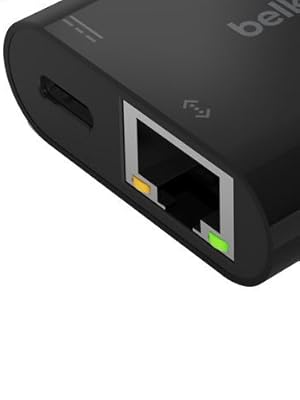
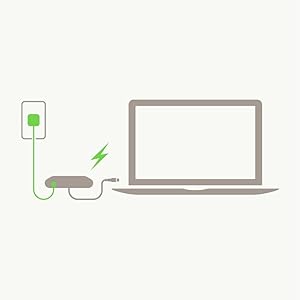
The Belkin 60W USB-C to Ethernet + Charge Adapter delivers reliable gigabit Ethernet speeds up to 1000 Mbps while simultaneously charging your device with up to 60W power delivery. Compatible with a wide range of USB-C devices including MacBook Air, MacBook Pro, and Windows laptops, this compact adapter ensures stable wired internet access in environments where Wi-Fi falls short. Its plug-and-play design, durable build, and 2-year warranty make it an essential accessory for professionals demanding seamless connectivity and power on the go.


| ASIN | B086SV2FK4 |
| Best Sellers Rank | #43 in USB Computer Network Adapters |
| Brand | Belkin |
| Built-In Media | USB-C to Ethernet Adapter + Charge |
| Color | Black |
| Compatible Devices | iPad mini 6th Gen MacBook Pro 13" M1 (2020) MacBook Air 13" M1 (2020) Mac mini M1 (2020) |
| Connector Type | Ethernet |
| Customer Reviews | 4.4 out of 5 stars 3,774 Reviews |
| External Testing Certification | Não aplicável |
| Finish | Matte |
| Finish Type | Matte |
| Global Trade Identification Number | 00745883799145 |
| Item Dimensions | 5.2 x 1.61 x 0.57 inches |
| Item Type Name | USB-C to Ethernet Adapter + Charge |
| Item Weight | 0.03 Kilograms |
| Item dimensions L x W x H | 5.2 x 1.61 x 0.57 inches |
| Manufacturer | Belkin |
| Model Number | INC001btBK |
| Nominal Power | 60 Watts |
| Number of Items | 1 |
| Number of Ports | 2 |
| Package Quantity | 1 |
| Power Plug Type | No Plug |
| UPC | 745883799145 |
| Unit Count | 1.0 Count |
| Warranty Description | 2 year manufacturer |
| Warranty Type | Limited |
D**R
►PROVEN FAST SPEED TEST! BELKIN USB-C Ethernet+Power Adapter 3Xs FASTER than Cable Matters pretender
►►PROVEN FAST SPEED TEST! 948 Mbps Down / 944 Mbps Up—94% of 1Gbps—proven— on my BELKIN USB-C Ethernet and Power adapter MODEL INC019btBK I bought on 10/8/2025 for $34.99 (my own money). ►►RELIABLE. My Belkin adapters LAST FOR YEARS. 2-Year Warranty. ►►DEPENDABLE. Plug fit SNUG and TIGHT and especially for the RJ45 Ethernet plug. ►►TRUSTED QUALITY. Made in USA (California) and Vietnam. ►►BETTER BUY is BELKIN. **DARE TO COMPARE. BELKIN BEAT and CRUSHED Cable Matters adapter model 201363-BLK that –pretended-- speeds of 2.5 Gbps. BELKIN Ethernet speeds were 3 TIMES HIGHER than the junk PRETENDER Cable Matters model that I bought at the same time. Tests were done on an ASUS VivoBook running RYZEN AI 9 HX 370.
C**1
Excellent for VR Streaming - if you do it right
I use my Quest3 VR headset in a different room from my gaming PC & read a lot of articles about people buying dedicated routers to do AirLink streaming but I thought something like this would be better & I was (mostly) right!. If you have ethernet in different rooms, this adapter makes it very easy to hook up your headset & stream in super high quality for hours. Depending on your home layout, you can even run your own ethernet cable from room to room (ethernet has a limit of approx. 300ft!). The biggest catch I found was the USBC from the adapter to the headset. Long story short, the shorter the cable the better. I wasted a lot of time trying to figure out what was wrong with the software or PC when it was the USBC cable the whole time. I decided to velcro this adapter to the side of my headset & run 20ft USBC power & ethernet cables right up my back to the headset. Works like a charm with the highest resolution settings! I plan to use a cable sleeve to bundle the 2 cables together. Using Virtual Desktop & my 3080TI, I am able to run 200 bitrate, godlike, & 120fps. If you are doing this, you should set up a OpenSpeedTest server on your gaming PC to ensure you're getting solid speeds. There can be a lot of unique variables in each person's environment, but if you're set up well, you should get over 900mbps speeds from the headset to your computer. IMHO, this is the best option when it comes to VR streaming. It is certainly the most bang for your buck!
S**E
Perfect fit for my android phone and I pad.
I absolutely love this adapter and was worth the price I paid for it. It worked beautifully and attached snuggly with my android phone unlike another adapter i bought that kept getting disconnected frequently.
M**N
Works with Chromecast with Google TV
This works perfectly with the Chromecast with Google TV provided you use the right power supply. You must use a quality 15W 5V/3A USB C charger or you will get the "not enough power" message on boot. The charger MUST have a USB C port on it, it will not work with any charger with a USB A port or with a USB A to C cable, no matter what amps the charger claims to put out. You do NOT need a higher wattage USB C PD charger as the CCwGTV only takes 5V. I used a spare Pixel phone USB C charger. One note, there is currently a bug with CCwGTV and USB C ethernet adapters, where upon a warm reboot it will not detect the adapter. You need to pull the power and do a cold boot to detect it. This is not limited to this Belkin adapter, it happens with all the USB C ethernet adapters that I've tried. Hopefully an update to the CCwGTV firmware will fix this in the future. Also note that the CCwGTV USB port seems to be USB 2.0, so the max you will get from this adapter is around 300mbps.
D**X
Almost perfect, does get hot
Works fine but it does get hot 🔥
A**B
Can't recommend--too many design and function flaws
**********************UPDATED REVIEW*********************** This adapter was barely OK due to some design problems--short cord pulling down hard on USB-C port, significant heat build-up threatening electronics, and the RJ45 port not grabbing/locking protected ethernet cable tips which then fall out of the port and cut devices' internet connection. For these reasons alone, we planned to return the adapter. But we wanted to check to see if, like other adapters, either basic function--internet pass-through or power pass-through--changed in the week since we bought the adapter. We're disappointed that we can no longer get online with the adapter despite using the same phone settings as before and the same RJ45 cable directly from the same modem. Who manufactures these adapters? We've bought over a dozen for our machines and to date only ONE works. Save yourself the frustration. But from our experience, we don't know what adapter/hub is reliable. **********************ORIGINAL REVIEW*********************** This allows us to hard-connect our USB-C Macbook to the internet while simultaneously charging. Most other docks we've tried ONLY do one or the other. So we're glad we can download updates or other large files without worrying we'll burn through our battery before the software transfer is complete. The big problem we've discovered with this hub is that it doesn't accommodate protected RJ45 ethernet cables. These are the ones with the little rubber hood over the tab you depress to insert/take out the cable from its port. These protective tabs are there to prevent the tabs from snagging on anything and then breaking off. That happened to us often before we invested in the protected cables. But this hub's port is designed to require a free tab to CLICK and lock securely into place. Otherwise, your internet connection is disrupted with the slightest motion as the end of the cable slips OUT of the port. We can't figure out why the design team made this port this way. Seems you have to accept the risk of ripping off the connection tab to keep it securely in place. Or use a protected tab and risk the cable easily slipping out of the port and cutting the internet connection. Why exchange reliability risks of wireless networks for unnecessary stability risks of wired networks? Another issue you should know--the short connection cable (you see this in the ad, granted) causes the bulky port to place dangerous strain on the USB-C port. Either the port or the hub's male USB-C insert over time is likely to fail. This could easily be solved by using a long cable (1m?) between the hub and the USB-C insert so the mass of the hub could rest stably on a desk. Many of us no longer leave our laptops on the table. Instead, we raise them up to eye level for more comfortable working, meaning anything attached to a port hangs down. Again, why would a design team not foresee this obvious structural flaw? A problem we guess is inevitable with a lot of these plastic hubs is that they get remarkably hot. And this small hub is no exception. It gets so hot it's uncomfortable to hold. If you were going to use this for hours on end, you might want to invest in a fan JUST for the hub. We don't know how all this extra heat affects the longevity of the hub, but when we spoke to Apple Support about the heat another hub was putting out, they told us that heat is the enemy of compact laptops (that don't have big fans and lots of space to move air around). So we don't feel comfortable using this hub for more than a few minutes... Given the three problems above, we're not sure we'll keep this hub. There are just too many major future failure points to justify investing in such a critical component (if you need a hard-connection instead of wifi to do serious work for many hours at a time). We're still on the hunt for a solid USB-C hub that allows, minimally, power and hard-internet pass-through without getting very hot. To end on a positive note about this port, though, it does allow at least 100 Mbps internet pass-through and standard 29W (Macbook) power pass-through, and it connects to the laptop without any fuss (plug-N-play). But minus 3-stars for the product's design flaws.
J**N
Zero drama, all works great!
🔌 Review: Reliable PC Adapter for All My Devices This adapter has earned its place as a permanent part of my tech setup. Works flawlessly across every platform I use—Windows computers, Apple iPad, and Android phones. 🌐 Universal Compatibility: No hiccups or limitations—smooth performance across all systems. ✅ As Advertised: Everything matches the description, and no unpleasant surprises. 🛠️ Durable & Consistent: Feels built to last, and I never have to second-guess its reliability. Once installed, it's just... part of the ecosystem now. Zero drama, all function.
J**N
Great product, but something you should know.
So I bought this for my Galaxy Tab A tablet, the WiFi seems really slow and I wanted faster net. When I first bought this I was using the Power Adapter that my Tablet came with. But I was only getting about .13 amps which was not enough to keep my tablet charged. After a bit I thought it's the charger. I thought the charger was not putting out enough amps, so I had a 3 amp charger and replaced the 1.55 amp charger that my tablet came with. This still did not increase the amps, the so again I looked at it and it hit me like a ton of bricks I had been using QC (Quick Charge) and I need PD (Power Delivery). PD allows the adapter to pull more power then quick charge does. I needed a PD charger and a Type C to Type C cable that supports PD. Once I got this now I get .5 amps which is enough to keep the tablet charged. This is maximum amount of amperage that this device allows (60w = .5 amps or 500 mA) If you need more Cable Matters make an Ethernet + Power Adapter that give 100 watts of power. You will need a PD adapter that puts out at least 60w for the Belkin and 100 watts for the Cable Matters. You will need a cable that supports PD 100 watts or better. Hope this help anyone that has this adapter.
Trustpilot
3 days ago
2 months ago