📸 Capture Moments, Share Memories!
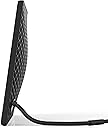
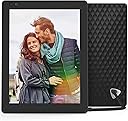
Product Description Nixplay Seed is a connected, Wi-Fi enabled digital picture frame that allows you to share and display your memories from your phone and social media with your loved ones. The Nixplay photo frame can be controlled through the Nixplay iOS/Android mobile app as well as through the Nixplay web app and desertcart Alexa. From the Manufacturer Review: Bought as a gift, got jealous, now buying my own! - We gave this to my father today for his birthday and the whole family already loves it. We all share photos via iCloud photo stream, but my father doesn’t own a smartphone and can barely operate a microwave, so he either has to rely on my mother, or miss out completely. This frame is literally the perfect gift, not only for him, but for anyone looking for a digital frame. I see some negative reviews claiming that it’s too difficult to use, but I’m guessing those people are like my father. The best part about this frame is that you can let everyone else do the uploading, and you just sit back and enjoy the show. Within minutes I had his frame set up, and my sisters and I downloaded the app and started sending photos to the frame. As an added bonus, you can add captions and even send videos. What’s great is that whenever someone sends a new photo, the frame notifies you in real time. On the opposite end, uploading and sending photos is lightning fast. When you set the frame up, you can invite friends to share their photos. You can even assign each person a default album, which is what we did. Photos of my son go directly to an album named after him, while each of my sisters uploads go to albums named after their kids. No filltering through the photos, or wasting time having to select an album. No lie, within 10 minutes of setting it up, my sister and I had each uploaded about 100 photos. The app works like any other sharing platform. You can either open the camera, or go right to you iPhone’s album and select 100 pictures. Long story short, it’s quite literally the perfect gift gift for non-computer saavy parents. For those who have iPhones and use the iCloud shared albums with family and friends, it’s the same concept in a frame. Plus you get motion sensors, transitions, a sleek design and landscape/portrait settings. I was so impressed by it (and jealous) that I just added the same frame to my cart. Just debating right now whether or not to get the 10.1 Widescreen version, which is $30 cheaper for some reason that I need to do some research on. And once I get mine, I’ll be able to use some of the advance features, like syncing my google photos albums directly to the frame and using Alexa. All in all, the quality is great, videos look awesome, the frame is modern looking, and I had zero issues with the app after playing around with it for a good 3 hours. Do not be swayed by the people saying it’s difficult. The interface is just like any other photo sharing service like Flickr, Instagram, google or desertcart photos. Honestly, Facebook is more confusing than this. And even if you get jammed up, the website is great and there are a ton of YouTube walkthroughs. So stop reading reviews and go buy it because that’s exactly what I’m about to do! Hey, maybe someone from Nix will see this and send me a free one lol. I wouldn’t mind having a few of those all around the house. Review: Product was great for the first month or so - Initial review: Product was great for the first month or so. Then it developed a dead line across the bottom part of the frame where a row of pixels went out. Contacted Nixplay support and was issued a warranty replacement within 2 hours (they had it shipped, even with tracking). Had the replacement frame for....3-4 weeks? The power supply went out. I am waiting on Nixplay to get back to me yet again. I will update my review at a later point with how this all turns out and/or how many replacement frames I end up going through. Very surprised. I have an older iteration of this frame and it's lasted 4 years now with zero issues. This updated one is sorely disappointing. Very well could be horrendous luck but it makes me extremely leery and I am a very disappointed customer. UPDATE: Received my new frame and it lasted approximately 6 weeks. So I am now contacting Nixplay for yet another warranty replacement. If you've lost count (I have a few times), this will be my 3rd replacement from Nixplay. Including my original purchase, that means I'm at 4 frames in 6 months.
| ASIN | B012FRC3PA |
| Aspect Ratio | 4:3 |
| Best Sellers Rank | #1,675 in Digital Picture Frames |
| Brand | Nixplay |
| Built-In Media | AC Power Plug, Digital Photo Frame, Remote Control |
| Color | Black |
| Compatible Devices | Smartphone, Tablet |
| Connectivity Technology | Wi-Fi |
| Control Method | Voice |
| Customer Reviews | 3.7 out of 5 stars 961 Reviews |
| Display Size | 9.7 inches |
| Frame Material | Plastic |
| Global Trade Identification Number | 05060156640883 |
| Item Type Name | Nixplay seed 10 inch wifi cloud digital photo frame with ips display, iphone & android app, free 10gb online storage and motion sensor (black) - w10a. |
| Item Weight | 1.1 pounds |
| Manufacturer | Feeke |
| Manufacturer Part Number | W10A - Black |
| Memory Storage Capacity | 8 GB |
| Model Number | W10PM |
| Power Source | Corded Electric |
| Resolution | XGA |
| Screen Size | 9.7 inches |
| Software Update Supported to Date | unknown |
| Touchscreen | Buttons |
| Unit Count | 1 Count |
| Warranty Description | 1 Year Labor and Parts |
M**S
Bought as a gift, got jealous, now buying my own!
We gave this to my father today for his birthday and the whole family already loves it. We all share photos via iCloud photo stream, but my father doesn’t own a smartphone and can barely operate a microwave, so he either has to rely on my mother, or miss out completely. This frame is literally the perfect gift, not only for him, but for anyone looking for a digital frame. I see some negative reviews claiming that it’s too difficult to use, but I’m guessing those people are like my father. The best part about this frame is that you can let everyone else do the uploading, and you just sit back and enjoy the show. Within minutes I had his frame set up, and my sisters and I downloaded the app and started sending photos to the frame. As an added bonus, you can add captions and even send videos. What’s great is that whenever someone sends a new photo, the frame notifies you in real time. On the opposite end, uploading and sending photos is lightning fast. When you set the frame up, you can invite friends to share their photos. You can even assign each person a default album, which is what we did. Photos of my son go directly to an album named after him, while each of my sisters uploads go to albums named after their kids. No filltering through the photos, or wasting time having to select an album. No lie, within 10 minutes of setting it up, my sister and I had each uploaded about 100 photos. The app works like any other sharing platform. You can either open the camera, or go right to you iPhone’s album and select 100 pictures. Long story short, it’s quite literally the perfect gift gift for non-computer saavy parents. For those who have iPhones and use the iCloud shared albums with family and friends, it’s the same concept in a frame. Plus you get motion sensors, transitions, a sleek design and landscape/portrait settings. I was so impressed by it (and jealous) that I just added the same frame to my cart. Just debating right now whether or not to get the 10.1 Widescreen version, which is $30 cheaper for some reason that I need to do some research on. And once I get mine, I’ll be able to use some of the advance features, like syncing my google photos albums directly to the frame and using Alexa. All in all, the quality is great, videos look awesome, the frame is modern looking, and I had zero issues with the app after playing around with it for a good 3 hours. Do not be swayed by the people saying it’s difficult. The interface is just like any other photo sharing service like Flickr, Instagram, google or amazon photos. Honestly, Facebook is more confusing than this. And even if you get jammed up, the website is great and there are a ton of YouTube walkthroughs. So stop reading reviews and go buy it because that’s exactly what I’m about to do! Hey, maybe someone from Nix will see this and send me a free one lol. I wouldn’t mind having a few of those all around the house.
L**C
Product was great for the first month or so
Initial review: Product was great for the first month or so. Then it developed a dead line across the bottom part of the frame where a row of pixels went out. Contacted Nixplay support and was issued a warranty replacement within 2 hours (they had it shipped, even with tracking). Had the replacement frame for....3-4 weeks? The power supply went out. I am waiting on Nixplay to get back to me yet again. I will update my review at a later point with how this all turns out and/or how many replacement frames I end up going through. Very surprised. I have an older iteration of this frame and it's lasted 4 years now with zero issues. This updated one is sorely disappointing. Very well could be horrendous luck but it makes me extremely leery and I am a very disappointed customer. UPDATE: Received my new frame and it lasted approximately 6 weeks. So I am now contacting Nixplay for yet another warranty replacement. If you've lost count (I have a few times), this will be my 3rd replacement from Nixplay. Including my original purchase, that means I'm at 4 frames in 6 months.
D**.
The NixPlay seed was the perfect solution. Photos can be uploaded to the frame ...
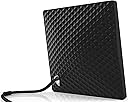
My wife and I wanted to get picture frames for both sets of parents that we could upload photos to while out and about. Other digital photo frames in the past essentially became static devices that required you to remove the SD card and upload photos manually. Unfortunately, we don't live in a world anymore where we are storing our snapshots on PCs and transferring them to SD cards. The NixPlay seed was the perfect solution. Photos can be uploaded to the frame by the owner or invited "friends" of the owner. Frame setup is easy - upon initial power-up it displays discovered WiFi networks and you can input the PSK using the included remote - the frame then displays it's activation code. You then go to the NixPlay website and create an account, and then add the frame to the account. Once the frame is activated, you can start adding pictures to it either using photos from a local library on your PC, linking from popular social media platforms, or by getting the NixPlay app from the Android or Apple App Store and uploading photos that way. One important detail that I was not able to find until I went through setup the first time is that you can completely set up the frame by creating a free Nixplay account using your own email, get some photos on it, and then after the frame has been gifted and set up for your recipient - the account can then be transferred to the frame's new owner. This is handy as you don't want to create an account for someone who you may be gifting the frame to using their email - they'll get a Nixplay welcome message, and you won't be able to confirm the account. (I could not find this information anywhere - so I wanted to make sure that it was out there somewhere.) On the Nixplay 10, the picture quality is maybe a 6 out of 10. If I understand correctly, the native resolution is 1024x768, so if you can - resize your photos to the native resolution for best results. Larger photos will not be scaled by Nixplay, but the frame will move the photo around so most / all of the photo is displayed during it's on screen duration. It does detect orientation automatically, and I thought we'd end up using the frame in landscape mode most of the time, but portrait actually seems to work better with most photos. Others have mentioned that the power cord/connector being part of the stand for the frame is troublesome - with both frames we purchased and gifted we did not find this to be the case. If I could make one change to the frame - it would be to use a better display. Display technology has gotten so much better in the past few years - a nice high-res OLED display would be outstanding and worth a few bucks more to me. Overall - if you want to have that gift that you know someone will use all the time and get the big reaction at your birthday/holiday - this is it. Fill it full of sentimental photos and you're well on the way to getting the waterworks going for the recipient!
J**N
I think my elderly parents will love this!
I have had the frame for a few days now. The set up was easy. The tutorial video on the Nixplay web site was excellent. I am setting this up for my parents, who are not technically savvy. It seems to work great! I think they will be able to enjoy it without any actions. I am setting that up from phone and pc. I like that I can change the set up for them. The remote for the frame is pretty easy to use, but my goal was to not have them need to do anything. I think it works! I am setting up family members as friends to contribute. Again the tutorial video was a great help. I learned the friends MUST install the nixplay app before they can do anything, they can't just email pics. I also learned that the web site doesn't display correctly on a tablet if held vertically - the login tab doesn't show. I was a bit frustrated until I happened to change the orientation of the tablet. Along the way I have asked questions of the support group. They have all been a great help. There are still a couple questions/issues being worked on, but I am extremely pleased and very impressed with the customer service. I even got a phone call to help resolve a question.
T**D
Excellent but 3 features short of a home run.
I bought this frame so my 86-year old non-Facebooking parents could be more in the loop on far-flung family doings. Success. I made myself the "administrator", setting up the frame. It was not hard. Most of our family has jumped in and emails in photos. Sending a photo is easy, in fact I shot a selfie of me and my dog in my car at a red light, sending it off to the frame before the light turned green. There are 3 things I would change about this frame, Nixplay please listen up: 1) First, the remote is too small and minimalist. My parents were put off by it and misplaced it. Bigger and labeled please. And maybe with a pocket in the back to hold the remote. 2) Second, why not bake in the ability to easily label photos? I know my parents would love to know wheres and whys on some of the photos we are sending. I have figured out ways to label the photos I send on my PC (Windows Ink or Paint) and Android phone (within Gallery or using Phonto app), but a lot of senders will not go to the trouble of figuring out labeling. A loss. 3) A few key control buttons on the frame (instead of complete dependence on the tiny remote) would be helpful, especially a button to reorder photos so the most recent are shown first. As it is, my parents often do a lot of looking before they see the new ones that their family has sent.
L**S
Great photo frame, best picture quality I’ve ever seen
I have owned many photo frames over the years and this is the best yet. The picture quality is incredible. The colors are vibrant and extremely accurate with no banding. I shoot with a SLR and love how accurately the photos are displayed. It does have a glossy screen with a little bit of glare. This is a cloud managed frame. You access the Nixplay website to add and remove photos and change frame settings. (You can also change the settings with the remote.) It an easy site to use, updated and has a lot of power/options. You can add photos to an album, put it in a play list and assign the play list to a frame. You can add friends to your account and they can use the Nixplay app or your Nixplay email address to send photos to a given play list->frame. The Nixplay account has a safety feature that will allow only friends you specify the ability to send photos to the frame. I really like the motion detection on/off – When I approach the frame it turns on and will remain on for x minutes. (A time you set.) When it turns back on it can continue the current playlist. You can have it shuffle a playlist with a transition time up to 1 hour. The most important feature is the “Photo fit”. You can select “fit to screen” or “fill screen”. In the “fill screen” it will pan left, right, up or down to display the photo in its original size. (This will depend on the resolution and size.) I much prefer the “fit to screen. It does a great job to make sure the entire photo is displayed in the best resolution possible. I have not had to edit or resize any of my photos. The frame takes care of that for me. Of course, if the photo is portrait and you have the frame in landscape mode it will display black bars on the left and right sides of the photo and vice-versa. (The frame works in both landscape and portrait modes with auto-rotation.) Very cool. Note to Nixplay: When I rotate the frame it advances to the next photo. I would like to keep it on the same photo. A few minor issues: The USB cord is also its stand. I tried to get the stand to stay upright but it kept wanting to lean back too far for viewing. You may have to prop it up or keep it more upright so it balances. Being forceful and shaping the cord helps. Not a good design. Corporate firewalls may have issues. When you first use the frame and connector your Wi-Fi it will want to do a firmware update. Our firewall at the office seemed to have issues with this. I took the frame home, did the setup there. When I brought it back to the office the next day it worked without issue. From what I can tell the frame uses ports 80, 443 and 125. The 10” size works well on my desk at the office and I’m glad I did not order a smaller one. Now I want a 15” for home.
L**N
It Quit after a few months. Use an old tablet or phone instead.
I absolutely loved this product for the first 7 months. Then it just stopped working. I can hear a slight hum when it's plugged in but that's all. I had been contemplating purchasing another nixplay but thankfully this one broke before I invested in another. I spent way too much money for this item that failed so easily. It was difficult to stand correctly, I needed to support it. I found the remote confusing and ineffectual. I did love how it would come on when I came into the room and showed me wonderful memories. Now I use an old tablet with an app. Set the timer for when to come on and have found that to be better. My tablet doesn't have quite as good image display or the motion detection but it does have the one thing I really need. It works. I'm disgusted that I spent so much money. This thing has been sitting around for a long time. I think it's time to toss it and let other people know to be wary of it.
C**O
Awesome, Awesome, Awesome, Digital Frame
I bought this for my wife for Christmas because she is always looking at her cell phone pictures of our grandchildren. I was not even sure that she would appreciate it because we do not normally buy each other gifts for Christmas but are just content with being with each other. I ordered the frame and was both surprised and blessed that Amazon had it up for a Christmas special which saved me quite a bit of money. Immediately after I ordered it the price went back up to normal. When I first loaded the pictures onto the frame they did not appear; however, the Nixplay app displayed a message that their servers were temporarily overwhelmed with Christmas installations. About thirty minutes later all of the pictures came up. On landscape pictures the unit pans the picture across the screen because we use ours in portrait mode. It never gets boring to see the constantly changing pictures. Some have complained about the stiff power cable being used to support the frame to which at first I was not happy. However, it supports the frame without any issues and if we decide to do something different to support the frame we will use a plate holder. Great unit, awesome resolution, great Android app to control the frame with and I would gladly purchase Nixplay again.
C**L
Super !
Je disposais auparavant d'un cadre Kodak pulse qui lui aussi était connecté mais qui a rendu l'âme. Celui-ci est de bien meilleure qualité. L'écran, dalle IPS de 10 pouces, est d'excellente qualité, visible aussi de côté sans perdre en couleur ni luminosité et à une bonne résolution (supérieure aux 800x600 de la plupart des autres cadres). On configure ensuite les photos via le site internet de Nixplay, simple rapide et fonctionnel. On peut régler : - l'allumage et l'extinction de l'écran a des heures prédéfinies. - la durée d'affichage des images - la luminosité On peut le régler pour qu'il aille chercher les photos sur Facebook, Flickr, Instagram ... Mais surtout on peut créer une adresse mail @mynixplay.com associée au cadre : du coup quand je suis en vacances je peux envoyer en "direct" des photos sur le cadre de mamie qui s'afficheront presque instantanément. EDIT : Le cadre s'est mis à jour et on peut maintenant y envoyer des petites vidéos (même avec le son) directement à partir de nos téléphones ! C'est juste fabuleux pour les grands-parents !
N**R
Nachträglich wird ein teures Abo Pflicht.
Finger weg! Aboabzocke auf perfide Art! Die eigentlichen Rahmen sind sehr teuer, was wir als gerechtfertigt angesehen hatten da es keine zwingenden weitere Kosten gab. Jetzt wird nachträglich das Geschäftsmodell geändert und die kostenfreie Nutzung so limitiert (max 500mb was für Bilder auf einem digitalen Bilderrahmen witzlos ist), so dass (ohne ein teures zusätzliches Abo) die Rahmen mehr oder weniger sinnlos sind. Fühlt sich für die Kunden wie Betrug an.
K**H
AWESOME!!
Simply one word. AWESOME!!!!! Must buy for everyone.
N**9
... given this frame out as presents twice and they love it. I have one myself
Have given this frame out as presents twice and they love it. I have one myself. It’s so easy to send pics to your frame and the set up is quite easy as well. Turns on when you walk into a room, optional but a great feature. The best digital picture frame I have ever had.
A**Z
Espectacular marco digital
Este marco digital es una barbaridad, no se puede definir de otra manera, gracias al WIFI se puede hacer toda la gestión del marco desde una plataforma web del propio fabricante. El marco está muy bien construido y con unos materiales muy buenos, de hecho no tiene pata de soporte, es el propio cable el que hace de soporte gracias a que es semirrigido en la parte pegada al marco, además el cable se conecta a un cargador USB como los de los teléfonos móviles (incluido pero se puede usar otro). El control del marco se realiza mediante un mando pequeño con un acabado igual que el del marco, con el podemos apagar el marco, pasar fotos o movernos por los menús. Una de las características más chulas es que es posible configurar el marco para que se apague y cuando detecta una persona (mediante un sensor de movimiento) se enciende durante un tiempo establecido. Una caracteristica impresionante de la plataforma, es que asigna al marco una cuenta de correo electrónico y que si das de alta otra direccion de correo, si mandas un correo con fotos desde esa cuenta a la del marco, la foto se almacenará y se reproducirá en el marco directamente. En resumen: -Pros ---Construcción de calidad ---Gran cantidad de funcionalidades y opciones ---Wifi ---La plataforma (es la mejor parte) ---La gestión remota del dispositivo -Contras --- No le encuentro ninguna en concreto Es una compra muy recomendada pues aunque pueda parecer caro, ofrece más funcionalidades de las habituales.
Trustpilot
3 weeks ago
1 month ago