Desertcart purchases this item on your behalf and handles shipping, customs, and support to Greece.
๐ Unlock convenience and security with every press!
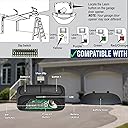
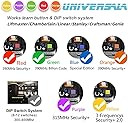
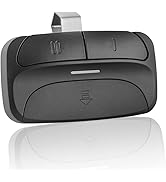
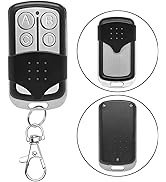
This Universal Garage Remote is engineered for professionals who demand reliability and style. Compatible with major brands like Chamberlain, LiftMaster, and Craftsman, it operates on multiple frequencies (310/315/390MHz) with secure rolling code encryption. Its compact, durable design features a slide-lock cover and metal-reinforced keychain hole, making it the perfect blend of portability and protection. Ready to use out of the box with included battery and keychain, itโs the smart upgrade your garage deserves.


| ASIN | B08741G88F |
| Additional Features | Universal |
| Battery Type | CR2032 |
| Best Sellers Rank | #81,620 in Tools & Home Improvement ( See Top 100 in Tools & Home Improvement ) #328 in Garage Door Keypads & Remotes |
| Brand | X X-HOUSE |
| Button Quantity | 2 |
| Compatible Devices | Garage Doors from LiftMaster, Chamberlain, Craftsman, Genie, Overhead Door, Stanley, and Linear |
| Connectivity Technology | Radio Frequency |
| Controller Type | Button Control |
| Customer Reviews | 4.1 out of 5 stars 4,001 Reviews |
| Item Dimensions L x W x H | 3.31"L x 0.98"H |
| Item Weight | 0.04 kg |
| Manufacturer | GIANT |
| Max Number of Supported Devices | 1 |
| Maximum Number of Supported Devices | 1 |
| Maximum Range | 100 meters |
| Model Name | JJ-RC-SM24-LT |
| Model Number | JJ-RC-SM24-LT |
| Number of Buttons | 2 |
| Special Feature | Universal |
| UPC | 795890034388 |
L**A
Good value ! Works good on Linear LCD 850
This universal remote works perfect for the Linear opener LCD 850. Just follow the instruction on the chart, very simple, keep the garage door close, press the learn program button on the remote till blue light comes on, the Linear opener is press โ1โ time on the remote control button. Then press the remote control learn program button again. Next press the learn button on the linear garage opener then press the selected remote control button and the garage door will open.
T**Y
Works Great
I have two separate garage doors. One with dip switches and one is rolling code. This can handle one of each or two rolling codes. Seems to be able to be programmed to just about every type of opener. The instructions are a little quirky. After pressing the program button inside the battery compartment, you need to press either number one or button number two (which ever you are trying to program) the same number of times as listed next to your garage door opener in the instructions. Then press the program button and you are done. For rolling code openers, you will also need to press the learn button on the opener itself to learn the signal from the remote control. The instructions imply that you need to press either button number one or button number two once and then press it again for the number of times listed in the instructions. You only press number one or number two buttons for the total number of listed in the instructions. I had a hard time with this, maybe I just didnโt read it clearly. All in all works very well. I have three!
J**.
Drains batteries
I have purchased 2 of these and they both drain the batteries quick. Purchased the most recent one at the end of April and itโs now a month and week later and Iโve had to change the battery THREE times. Now, Iโm outside the return window and canโt return it.
G**M
Works with very old Stanley Garage Door Opener with a bit of effort
My mother's home has a very old garage door opener from early 1990's. She lost her garage door opener many years ago, probably left in the car she traded in when she was still able to drive. Stanley support had no idea where to get replacement opener so I thought I'd give a hail-mary try and order the universally configurable opener. I followed the instructions for the only Stanley model they had listed. It required 15(!) pushes of the opener button and it still didn't work. So I did the opposite of what the instruction said about Stanley needing to be opposite and just matched up the DIP switches. And then I repeated the configuration process. On the 8th push of the button, the garage door started opening! Moral of the story with this opener: Don't follow instructions to the letter. Try different configurations. When configuring, ensure that you wait a second or two until the blue light stops flashing between button pushes. I'm just glad it worked. Had the instructions been more accurate for my garage door opener, I would have given it 5 stars.
R**Z
Vendedor and product
Excellent
I**9
Easy to program
Amazing, programmed my Chamberlain Garage Door with rolling codes to one button and my older door opener with micro switches to the other button. Easy to do. I am over 70 and not a techy, but was done in less than 10 minutes for each door. I don't have to carry two remotes any more. This is the only remote I could find that could do both, and by the way, considerably lower cost than just replacing my Chamberlain remote.
S**Y
Universal Garage Door Remote
Make sure you check to see if your opener brand is supported. My opener is an old stanley and uses the dip switches. I could not get it to work and then I read the instructions. After reading the instructions I realized that the dips on the remote and the opener had to be opposite and it worked. It works well but I have to be with in 10 feet of the door for it to work because my antenna is week on the opener.
M**.
Works!
My community has a gate that opens with this ancient 1950s looking remote that makes my sun visor fall down all the time. This remote programmed in seconds for my garage door. Programming the remote for the gate was a little confusing when it came to the instructions. I stopped trying to follow the chart on the instructions and instead did the following. (This only works if you have your dip switch settings correct) To program button 2 to be the gate, keep watching the gate to see if it opens. put into program mode, press button 2, wait a send, press button 2 again, wait a second. At some point while you keep doing this the gate may open. If it does, hit the program button to save it.
A**R
Didn't work on LiftMaster with Green Learn button
As per caption. Followed instructions, several times, then resorted to YouTube videos. Clearly not compatible. Return process a real pain too. These have to be mailed back to US.
A**N
No me sirvo para lo que ocupaba
No funciono en mi motor. mejor cambie el sensor directamente en el motor y ya venia con un remoto.
Trustpilot
3 weeks ago
2 weeks ago