Desertcart purchases this item on your behalf and handles shipping, customs, and support to Greece.
🚀 Elevate your Wi-Fi game — never miss a beat or a binge!
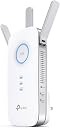
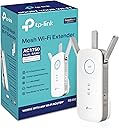
The TP-Link AC1750 RE450 WiFi Extender is a PCMag Editor's Choice device that dramatically expands your home Wi-Fi coverage up to 2000 square feet with dual-band speeds up to 1750Mbps. Featuring 3 adjustable antennas, a smart signal indicator for optimal placement, and a Gigabit Ethernet port for wired devices, it supports up to 32 devices simultaneously. Designed for easy setup and reliable performance, it eliminates dead zones and stabilizes connections for streaming, gaming, and smart home devices.


| ASIN | B010S6SG3S |
| Best Sellers Rank | #100 in Repeaters |
| Brand | TP-Link |
| Built-In Media | AC1750 Wi-Fi Range Extender RE450, Quick Installation Guide |
| Color | White |
| Compatible Devices | Router |
| Connector Type | RJ45 |
| Customer Reviews | 4.1 out of 5 stars 31,398 Reviews |
| Data Transfer Rate | 1750 megabits_per_second |
| Frequency Band Class | Dual-Band |
| Frequency Bands Supported | 2.4 GHz, 5 GHz |
| Global Trade Identification Number | 00845973092405 |
| Item Dimensions D x W x H | 2.6"D x 3"W x 6.4"H |
| Item Weight | 12 ounces |
| Manufacturer | TP-Link |
| Mfr Part Number | RE450 |
| Model Number | RE450 |
| Number of Items | 1 |
| Range | 2000 square_feet |
| Special Feature | Adjustable |
| Special Features | Adjustable |
| UPC | 840102182484 840460605885 845973092405 |
| Unit Count | 1 Count |
| Warranty Description | 2 year manufaturer warranty |
| Wireless Communication Standard | 802.11ac |
| Wireless Compability | 802.11ac |
P**L
Works fine for me, beware of the bad reviews
This is for the AC1750 WIFI Extender RE450: I feel like the way some of these reviews are being written it is making it appear that this extender is actually a router which is a giant no. I did see some reviews where they discuss this product isn't working properly which leads me to think it's a firmware issue or user error. Other reviews seemed to think that this would increase their internet speed over wireless, which is not necessarily true. Weak wifi signals will cause drops in connection which may make it seem like your internet is going slow, but it's really packet loss. So by boosting the signal strength you obtain a stable connection that doesn't lose as many packets which makes it seem like the internet is going faster when in reality you just aren't losing as much data in transmission and you're not waiting for your device to receive all the packets it expects. THAT SAID: I just received this product today and out of the box had it up and running in less than 5 minutes (I did not use the WPS method) and immediately noticed a stronger signal to all of my devices. THIS DOES NOT BOOST YOUR INTERNET CONNECTION SPEED. It merely ensures that your wireless connections are stronger to your router, thus giving you as much internet connection benefit as possible from your modem over a wireless connection. I cringe when I read reviews where people do speed tests and claim they see no benefit from this device. If this is you, you're doing it wrong. I went from a weak 5ghz signal (1-2 bar) transmitting at around 120 Mbps, to a solid 4 bar transmitting at 866.5 Mbps and have not noticed any hiccups in stability at that speed over the last few hours. This is on the farthest device from the extender through walls that have plumbing in them. I'm running 11 devices on my wifi network including phones/pc/laptop/security cameras and when it comes to the security cameras when I used to load them up over wireless there was usually a delay (device offline) before the images would come up. This extender has solved that and the images now pop up immediately. This alone makes me happy. While I'd prefer the device to not be such an outlet hog (You're going to sacrifice an outlet for this) I appreciate that I can turn the LED's off as well as use the ethernet port for a non-wifi device. For the price I can't really complain that there's only 1 ethernet port, but I wasn't buying this for that need. Overall so far I'm super happy with the extender. If it can hold up for at least 2 years I'd consider it a fair price, great product, and would buy it again.
H**K
Increased wifi speed 20x. I'm blown away.
i am blown away by how well this worked. We have an almost dead zone in my parents' family room, where we like to sit and watch tv at night. The connection is weak and flits in and out. I first tried an Airport Express, but that only works well with an Apple router, and even when I found my old Apple router, maybe that extender doubled the speed of my connection. It wasn't great. Worse yet, the Apple extender kept losing the signal, and I'd have to unplug and replug it every day. So I returned it, and based on reviews on a few tech sites, claiming this had great range and fast speeds, I bought the AC1750 extender. I am blown away. 1. Set up. Easy as can be. We have an xfinity router from Arris, password protected. All I had to do was plug the extender in, let it boot up, press the WPS buttton on the router, then press the "lock" button on the extender, and half a minute later it was done. (In fact, I had to press the wps button a second time on the router, as the first time nothing happened.) That was all I had to do, and it worked! 2. Function. We tried a few different electrical outlets in the family room. The first "only" increased the internet speed by a factor of ten. Just on a lark I plugged it in in a different outlet in the same room. Now our connection in that room is faster by a factor of 20. It's insane. I've attached a Speedtest image. The 4-5 mbps download speeds in that image are before I installed the extender. The 37-58 Mbps speeds are from the first location of the extender. And the 88-89 Mbps speeds are from the final location. That's the same speed I get when standing next to our actual Arris router in the kitchen. I simply cannot believe this thing works as well as it does. It's been a day and so far it hasn't lost the connection at the final location. It did not however like the previous location, and was blinking its disatisfaction, so you just move it. The only real negative I found is what someone else reported: you can log into the extender via a URL once. The second time you try, you get an error, and then it's far more complicated to log in without resetting the entire thing. Also, I tried to update the firmware and kept getting error messages when unzipping the firmware download. Still have solved either of those problems. But that aside, this is an amazing device. I've tried three other extenders in this house, and this is the only one that has consistently worked, not dropped the signal, and has boosted the signal to speeds equal to standing right next to the main router. It's only been 24 hours that I've had this extender, and I'll update this review if things change, but this thing is simply amazing. UPDATE: It's been a few weeks and this thing hasn't lost the signal once. Can't praise this enough. It's exactly what I've been looking for, for several years now.
K**R
Installation problems ... Updated
I tried installing the AC1750 yesterday, and had multiple problems during set-up. Most due to the final "reboot" that supposedly sets the configuration ... twice this final step didn't complete and returned an error. Once it "almost" worked, but only the 2.4 GHz setting seemed to be OK. Finally tried by connecting an ethernet cable directly to the pc (versus the wireless method), and had same problems. I was forced to do a hard reset each time and start over. Finally spoke to support, who walked me through the setup: (1) I was instructed to pick a different SSID for both 2.4 and 5GHz settings (I left the SSIDs the same as the router settings--which is what I wanted) (2) I was told to ignore the final reboot that just hangs (the screen shows 100%, but the "please wait" message never goes away) (3) after ignoring the "hanging reboot", I verified that the device was regenerating the wireless signals and was able to connect via my phone (4) the 5 GHz LED on the device did not light up even though the 5GHz signal was being generated. Because of the LED problem, I requested a return via Amazon (very quick and easy), and will exchange my unit when the new device arrives). NOTE that after several hours, the 5GHz LED suddenly came to life ... so the device "might" be working OK.... I have no clue why the LED suddenly started to work. I noticed one other odd thing. I use a "white list" for MAC addresses on my Verizon router. [Only those MAC addresses I specify can use my network--a security measure]. The AC1750 box lists a single MAC address (also on the device's label). I entered this address for both 2.4 and 5 GHz client devices. When I scanned the signals (using WiFi Analyzer on my Android phone), the MAC address for the 5 GHz SSID was different. The 2.4 GHz addresses ended in "1c" but the 5GHz address ended in "1e". I did enter the different 5GHz in my Router. I don't know if this is a problem or not: at least the documentation is inconsistent with actual device. My replacement extender arrived within 2 days of notifying Amazon...couldn't be easier. The replacement extender works great. Literally 5 minutes to set-up, both LEDs are on, and it actually seems that the coverage is even better. Signal is strong ... Note that my router is in a closet (by my office) and the signal needs to penetrate 3 plaster walls, plus a kitchen full of appliances. No problems at all. Giving another star since I'm happy with the device.
M**S
It works great with Ring Doorbell!! It shows live footage with no issues.
I'm so happy with this purchase!!! I am in the middle of a huge Wifi crisis right now- debating if I should ditch my Netgear nighthawk and get a Mesh wifi system (no Netgear for sure). This extender has 3 antennas and it broadcasts consistent strong signal both 5G and 2Ghz. I was not able to connect it to my router on the first attempt and I had to reset it and try again. I tried several times connecting to IP address of the extender, and nothing happened. I was successful using the app instead of my browser. ------Since I connected this extender to my router I don't think I had any drop outs, at least while trying to access my doorbell. ----- I truly recommend this device if you have Ring products - and I do hope it works well for you as it is working for me. And that is the main reason I'm happy with this extender: I was having lots of problems connecting my Ring doorbells to my Netgear router (although one of the doorbells is right beside the router). Even though I have very fast RCN service, every time I used to answer the door bell or sometimes when I was trying to see live images - it took long times to connect. - And if you have Ring you must be familiar with the frustrating message "Activating Device". The Ring Doorbell at my gate is far from the router and it needs an extender in order to connect itself to the internet. When I tried the Negtear extender I had the same problem. Not enough range. So I installed this TP-Link extender and the doorbell is working really well - no problems at all. In fact the two ring devices that are connected to this extender don't show any delays, whereas the devices onto the Nighthawk take sometime to connect and sometimes don't connect unless I shut the app down. I believe, based on my years of experience using Ring with Netgear, that Netgear must have some incompatibility with the Ring, or it could just be some kind of "funny" coincidence. I called Ring customer service (which is always great) and they told me that they are not aware of any incompatibility with Netgear). I am seriously considering buying a TP- Link mesh system soon. I am just waiting for their new release, which I saw an announcement for on their website. On a side note -As I mentioned before, I recently bought a Netgear wifi extender and it was below average. Unfortunately I did not act on time and missed the return window, so I decided to finally move on and try a different brand. (And after buying this (last) Netgear product, I promised myself to NEVER, EVER again buy another Netgear product. They work for a while and then something happens and you are on your own. Their customer service is terrible- the worse.
L**N
Fixed stuttering issue with my streaming.
Update 4/1/23 Downgrading a star. I should have paid more attention to the reviews. One month in and this thing has become a reboot nightmare. It keeps dropping connection and I am having to reset and reboot pretty much every day - sometimes multiple times! Was fine up until about a week ago and has not returned to its former glory since. If you looking for consistent connection this is not the one. Look elsewhere. I had noticed stuttering issues occasionally with my firestick but they were brief so I just let it go. Recently I signed up for Apple TV and it was a stuttering disaster. So bad I could barely watch it and became very frustrated. It led me to investigate and I discovered my firestick was barely utilizing 10 Mbps although my computer was running at around 250 Mbps (varies somewhat dependent on time of day. I researched and ended up deciding to go with this wifi extender. So far it is really doing what I wanted. As you can see from my pictures it took my utilized speed from about 10 to 35 Mbps. Moving the extender around I was able to increase it to about 78 but will need to rearrange upstairs office to get router closer to extender to take advantage of more speed. For now it is more than double and has fixed my stuttering issue with Apple TV so I am satisfied. It was fairly simple to setup. Only issue I had was a bit of confusion over which account to use for what because my router is a TP-Link as well so I thought it was wanting that password. It took me only 5 minutes or so to figure it out so not a bad install experience at all. I just wish I had figured this out sooner as I noticed it also seems to have helped my audio. Many times before the audio was a bit out of synch with the video but that no longer seems to be happening. I am happy with this purchase and I do recommend. If that changes I shall update!
F**R
I give it a fair shot, but it has completely failed
UPDATED REVIEW : In my original review below I gave this extender 4 stars. With it installed close to the router it seemed to be performing well in both the 2.4 and 5.0. The signal strength was good and the speed tests, as you can see below, were very acceptable. All was well, for a couple of days, and then the 5.0 began to fail. After five or six resets I gave up trying to use the 5.0 and started using the 2.4. Although not as fast it was still fast enough to keep up with anything I do. Because it's 2.4 is faster then my other extender I was considering just keeping this one in spite of its 5.0 failure. Well, it only took a day and a half before the 2.4 followed in the footsteps of the 5.0. I didn't buy this extender to power it on and off 5 or 6 times a day, so back it goes. My other extender, an MSRM, my not be as fast but it's much more reliable. To the seller: If you don't want peoples experience with this extender to turn them against trying your other products, as you state in every negative review response I've read, then here's my advice to you...GET IT RIGHT OR DONT SELL THEM!! As you can see below, I tried to be fair and did everything necessary to allow this extender to perform at its best, but it's just a bad product, or at the very least many of them are. Do you really expect people to believe that your other products are going to be any better? Come on, get real....Time to go shopping for a 5.0 MSRM. ORIGINAL REVIEW : You have to be fair to the extender. It is MUCH more important that the extender be close to the router than be close to you, especially when we're talking about the 5.0 signal. Placing the extender 20 or 30 feet from the router, especially if there is a wall or two between them, is not going to cut it when we're talking about using a 5.0 signal. Remember, the signal strength you see on your device reflect your connection to the extender, NOT the signal strength between the router and the extender. If that signal is weak your full signal bars shown on your device is meaningless. Now, that being said, of course you want to place the extender as close as possible to the area you want to extend to, but not at the expense of signal strength between the extender and the router. To find the best location to place the extender, stand next to your router and connect your device to your 5.0 router signal. You device should now show full bars signal strength. Now, start walking in the direction of the area you want to extend to while keeping an eye on your signal strength. At the first sign of a weakening signal that's your distance limit. You must place the extender within that distance. Anywhere outside of that and you're going to have 5.0 connection issues between your device and the extender regardless of the signal strength between your device and the extender. In reading many of the negative reviews I believe this is the cause of many of them because I had most of these issues myself until I placed the extender within the full strength 5.0 signal range of the router. The first picture below show the speed test of my 5.0 signal between my iPad and my router at the location I placed my extender. In the second picture I connected to the extender and ran the speed test while being right next to the extender. The 4 star rating is because I was disappointed with the amount of speed loss, but it's still quite fast. I then went into the bedroom, the area I wanted to extend to, closed the door and ran the test. Although there was quite a bit more speed loss, my connection is stable and still fast enough for video streaming despite having two instead of three bars of signal strength. (After submitting this review I realized I didn't show this speed test results. Picture 5 is the results) I will add that without the extender I can't get any 5.0 signal in the bedroom and my 2.4 is only one bar and unusable. However my extender 2.4 signal is three bars and quite fast. Picture 3 reflects that test. Picture 4 shows the test of the 2.4 one bar router signal I mentioned. So far, over all I would recommend this extender, and as long as it keeps working the way it is now I will be pleased. I will update this review if anything changes.
E**C
There is absolutely nothing more I could ask for in this unit or a range extender. Period.
I own a TP-Link Archer C5400 router that is several hundred feet away and behind several very sturdy walls. On a good day, I would barely get 200 kilobytes a second. This is actually pretty good considering every other brand I had tried (and there were a LOT I had tried), would not even connect let alone give me any sort of data. Once I installed this product into my room, it was as if I was hard-wired directly into the router. I may not have the fastest internet service available but being able to go from 200 KBps to over 5 MEGABYTES a second, wirelessly at that, is far beyond any expectation I had held. When it is hardwired via the ethernet port into my TV, I get full 4K video streaming without any stutter or delay. When I use the wireless function for gaming, my ping is extremely low and I can game online for the first time in years. I had mediocre hopes for this device to be honest. I was just hoping I could get a stable connection and maybe, just MAYBE 1 megabyte per second. This unit has beyond far exceeded my expectations. Not only does it play well with the android tethering app and enables me to control this unit and the router separately, it is nearly almost exactly plug and play. Almost anyone can install this with basic computer skills even without reading the instruction manual or having even mediocre networking knowledge. I would say I would purchase this again but this single one unit covers every single inch of my house that I do not even need to order another unit. Kudos to TP-Link again for providing me with quite possibly the best router and wireless range extender experience possible. Please do note that when I reference the router that I am speaking of the previous router from TP-Link that I had purchased as this unit IS NOT a router. And on a bonus side note, the customer service provided by TP-Link has far exceeded the customer service I have received from any product I have ever purchased, whether it was another form of electronics or otherwise. I cannot say for sure how well this product would work if not paired with a TP-Link router but based on how this unit is functioning, I can almost guarantee that it would work with any wireless router setup. This is a product that not only do I highly recommend with full confidence but would swear by it on my word. If you are experiencing poor reception or speeds that are far below what your service provider advertises (and I would test it hardwired on a speedtest site first to make sure your provider is not just feeding you fake rates), then this is exactly the product you are looking for and beyond.
M**E
Simple & Straightforward
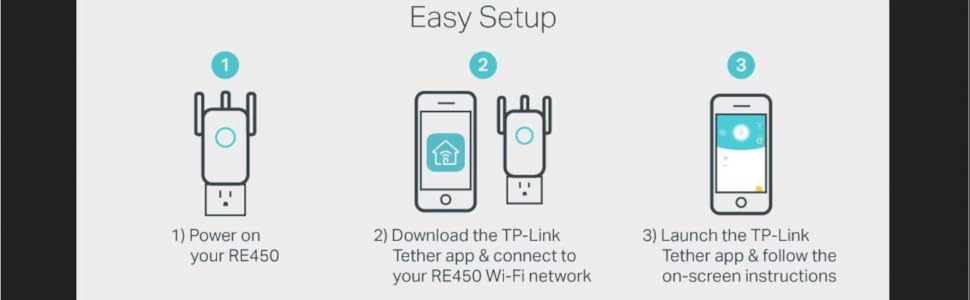
I don’t normally review items I purchase unless there is something negative to report so other consumers can be aware. This review is the opposite. First, it shipped earlier than expected. It came from Arizona and I’m in PA. It shipped and was delivered 5 days earlier than anticipated which was great. Received it today and was excited to try it. Secondly, the set up couldn’t be much easier. It didn’t come with some complicated manual. It came with a quick start guide for the manual. Was it quick. If I didn’t have to do anything on the laptop, this thing would literally be plug and play. Plugged it in, searched for the SSID on the laptop and followed the instructions. With basic knowledge of your home’s network and how it works, it will be a breeze. Lastly, it looks good in the outlet and though I haven’t viewed it in the dark, I can’t imagine the light for the signal indicator and the indicator lights for the frequency bands are going to be bright at all to even really notice. It gave us our strong internet in the attic like it was intended to do. Our gateway is located in the kitchen of our home and I plugged it in the second floor bedroom above where the gateway is to act as a halfway point like they suggest. I haven’t experienced any connection drop like some people have stated but it’s only the first night using it. The main reason I purchased it was for streaming TV and gaming. To test it I ran a connection speed test for my PS4 without any streaming going on on the laptop and connected to the gateway itself and not the extender. I received ~26mbps download and ~5mbps upload. Next, the laptop connected to the gateway and the PS4 connected to the extender while the laptop was streaming from the gateway, I received ~20mbps download and ~4mbps upload. Not much of a drop off at all and that’s what we needed. Overall, as of right now, I am pleased with the simplicity and ease of use of this extender. It will serve it’s purpose as long as it holds that connection all the time. I may update this review at a later date after some heavier use and some time has passed. Great product and well worth the money for those on a budget and that don’t have a huge home to try and extend coverage through.
R**K
CONSIGLIATO
FACILE INSTALLAZIONE , EFFICACE
K**L
Really quite impressed with this device.
You will NOT require a degree in computer science or relevant networking certification in order to set this up, the app for your phone/tablet will do all the hard work for you, and the instructions are very clear as long as you follow each step and do not try to skip the first one (place it within 10ft of the router first time when setting up) As the room I was trying to cover is a bit of a dead zone I was unable to put it where I wanted in the house, as I also wanted to use the Powerline Lan feature for my system whilst extending the wifi for other devices. BUT as it says in the instructions the idea is to place it in a place that extends the wifi between the router and the target area, which using the socket outside the room it has done very well, only had a couple of drop outs but not sure that wasn't the site I was streaming from. The powerline lan works incredibly well, I have several others and have only ever managed to achieve half 5-6Mb/sec this one caps out my top internet speed of 14Mb/sec from a virgin 100mbit line. So VERY impressed with that, I have also had zero network drops since I switched to this powerline lan. Tested on a default virgin media hub v3 and an AC1750 router connected to the hub in modem mode, it had no issues finding and setting up the extender.
A**T
Awesome product, don't buy from "Online IT World"
Product is awesome, its signal strength is too good. The problem is with the packaging, seller sent ONLY the device in the brown cardbox. I mean no manual, no TP-Link packaging. It felt like I bought a product worth less than 100 rupees. And the product was used, I had to reset the device to use it.
K**D
Besserer Werkstattempfang.
Schnelle Lieferung. Das Teil ist zwar gebraucht funktioniert aber tadellos. Jetzt kann ich auch in meiner Werkstatt Internetradio hören. Bin sehr zufrieden.
A**A
Worked as expected
Quality of internet connection across my house has improved quite a lot. Was easy to setup too
Trustpilot
3 weeks ago
2 days ago