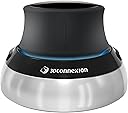
🚀 Elevate your 3D workflow—because your designs deserve precision and speed.
The 3Dconnexion SpaceMouse Compact is a professional-grade 3D navigation device featuring a patented 6 Degrees of Freedom sensor, two programmable buttons with customizable radial menus, and a compact, stable brushed steel base. Designed for engineers, architects, and designers, it enables intuitive manipulation of 3D models in CAD applications, enhancing productivity through a seamless two-handed workflow when paired with a CadMouse. Compatible with Windows and macOS, it offers a durable, ergonomic, and portable solution backed by a 3-year warranty.
| ASIN | B07B64T9J1 |
| Additional Features | Ergonomic Design, Portable, Programmable Buttons |
| Antenna Location | Office |
| Battery Average Life | 2 months |
| Best Sellers Rank | #2,055 in Computer Mice |
| Brand | 3Dconnexion |
| Button Quantity | 2 |
| Color | black |
| Compatible Devices | Personal Computer, Mac |
| Connectivity Technology | USB |
| Customer Reviews | 4.6 out of 5 stars 108 Reviews |
| EU Spare Part Availability Duration | 3 years |
| Embellishment Feature | No Embellishment Feature |
| Enclosure Material | Metal, Plastic |
| Hand Orientation | Ambidextrous |
| Hardware Platform | x86 |
| Included Components | 3Dconnexion SpaceMouse Compact |
| Item Dimensions L x W | 3.03"L x 3.03"W |
| Item Weight | 480 g |
| Manufacturer | 3Dconnexion |
| Mfr Part Number | 3DX-700066 |
| Model Name | SpaceMouse Compact |
| Model Number | SMC |
| Movement Detection | 6DoF Sensor |
| Movement Detection Technology | 6DoF Sensor |
| Number of Buttons | 2 |
| Operating System | Windows, macOS |
| Power Source | Battery Powered |
| Range | 5.0 meters |
| Special Feature | Ergonomic Design, Portable, Programmable Buttons |
| Style Name | Modern |
| Theme | 3D Navigation |
| Unit Count | 1 Count |
G**O
Excelente!!!
Es apenas lo que necesitaba. Es necesario practicar. Pero es excelente. 10 estrellas le daría.
K**R
Very nice to have.
Works just as well or better than the larger space mouse.
M**A
HERRAMIENTA MUY PRODUCTIVA!! RECOMENDADO!!1
MUY BUEN PRODUCTO! LO BUENO; MUY DINAMICO Y PRODUCTIVO... EXCELENTE HERRAMIENTA DE TRABAJO. LO MALO: QUE ME QUEDO GUSTO A POCO ....Y ME COMPRE EL SPACEMOUSE ENTERPRISE..
G**L
Cumple con las expectativas
Al principio cuesta un poco agarrarle la mano. La aplicación del driver deja que desear, algunas cosas quedan para ser editadas a través de archivo de configuración. Llegó a la Argentina sin problemas, el courier hizo los trámites en la aduana y lo que sobró lo reembolsaron luego.
Z**D
Good item
Good item
J**.
Streamline your modeling experience
I've used an older model forever and it finally gave out on me. This was a simple install, almost plug and play. It has great sensitivity and although smaller than my previous model has a solid feel. Definitely would make CAD work slower if I did not have this tool at my disposal.
M**L
Doesn't work with Mac OSX
Ads should be clear that there are no usable drivers for Mac OSX. Device works great with existing drivers for about 3-5 minutes. Then it just stops working. Restarting gets it back ... for another 3-5 minutes.
J**A
Everything I expected
Solidly made, movement smooth, software training easy to follow and do.
N**C
Love this
Enjoying every moment
シ**ウ
使いやすいものです。
fusion360で買いました。 すごく使いやすいです。 仕事効率に立ち上がります。
吉**生
本体はズッシリ、けど必要な重さは足りて無い。
主にblender、fusionで使うために購入。 開封1時間時点でのレビューですが、設定さえ何とかなれば視点操作は自由自在。 しかし、残念な点が1つ。 1.重さが足りない(机面との摩擦が足りない) 割と重量があって重いのですが、3Dマウスを操作する力に負けて本体が動いてしまう。力加減が割とシビアで、弱い力で操作すると入力を読み込まず、強い力で操作すると本体ごと動いてしまうので、そのまま使うには多分慣れが必要。 この問題さえ克服できればめちゃくちゃ使いやすいと思う。 3Dプリンターとかで手首を置く場所を作ったり、滑らないように細工をしながら使っていくつもりです。 追記2023.02.10 主にblenderで活躍しています。無意識のうちに手が伸びて、気が付いたらこの3Dマウスで操作します。 最初は違和感ゴリゴリだったのですが、マウスでの視点操作では手が届かないような操作をできるのがよかったです。 尚、blenderは視点移動系のバグが多いので、左右にあるボタンには そのバグをキャンセルできるテンキーのピリオド(画面内に収めるショートカットキー)を割り当てています。 一方で、fusion360は元からマウス操作だけで視点移動が完結しているのであまり相性はよくなかったです。
株**ト
Bluetoothより
有線とBluetoothと2台使っていますが、やはり有線の方が確実で正確に動作するので、コードは少々邪魔ですが有線がいいです。
A**ー
ビューワツールとしてはともかく
実作業で斜め視点&ローテションって作業ポイントへの移動以外ではそんなに使わないかも 要素選択でたまに便利な程度? 水平、垂直移動はあると確かに便利 慣れるまで触ってみるけど、今の所ローテ機能切って水平垂直移動だけ残したほうが便利な気がしてる
Trustpilot
2 weeks ago
5 days ago