
DOWNLOAD THE APP


Customer Services
Copyright © 2025 Desertcart Holdings Limited
DOWNLOAD THE APP

🚀 Cut the cords, not the speed — WiFi freedom for your wired devices!
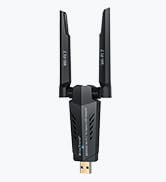
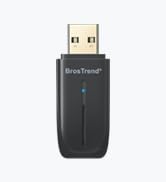
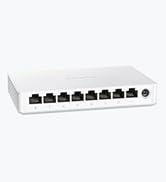
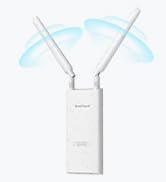
The BrosTrend AC1200 WiFi to Ethernet Adapter delivers up to 1200Mbps dual-band wireless speeds, enabling any Ethernet-enabled device—from smart TVs to gaming consoles—to connect wirelessly with plug-and-play ease. Featuring 2X adjustable external antennas and universal compatibility with all WiFi routers, it ensures a strong, reliable connection without driver installation. Perfect for professionals seeking a sleek, hassle-free way to modernize legacy devices and optimize home or office networks.






| ASIN | B0118SPFCK |
| Best Sellers Rank | #30 in USB Computer Network Adapters |
| Brand | BrosTrend |
| Color | white |
| Customer Reviews | 4.2 4.2 out of 5 stars (5,837) |
| Date First Available | September 8, 2015 |
| Is Discontinued By Manufacturer | No |
| Item Dimensions LxWxH | 0.7 x 1.21 x 0.88 inches |
| Item Weight | 0.32 ounces |
| Item model number | AC7 WiFi to Ethernet Adapter |
| Manufacturer | BrosTrend |
| Operating System | Driver free for Windows 11/10/8.1/8/7/Vista/XP, macOS, Linux, Unix, Android, Chrome OS, RTOS for Printers, etc. |
| Product Dimensions | 0.7 x 1.21 x 0.88 inches |
| Series | WiFi to Ethernet Adapter |
| Voltage | 230 Volts |
| Wireless Type | 2.4 GHz Radio Frequency, 5.8 GHz Radio Frequency, 802.11a/b/g/n |
C**S
Easy set up, works great!
Works great for what we needed. I needed to hook up a computer to ethernet and didn't want to run a cable throughout the house. This was perfect. It connects to the houses WiFi and sends out its own, separate WiFi signal and you can hook up an ethernet cable to it and receive internet. The signal it sends out is separate from the signal it receives (has a different name and such). The speed seems to be just as fast as our fiber modem in the living room. No issues with this at all. Super easy to set up and been using it for over a year now.
M**.
Does what it claims, solved a problem.
I gave it five stars because it does exactly what it claims and what I needed it to do—it allowed me to hook up an older printer that only had insecure WPS for WiFi to a modern WiFi 6 network without WPS. I do wish there was a way to turn off the range extender feature completely, but for those complaining about this device being a range extender, let me explain why it kind of has to be. If they removed the range extender function from it, there would be no way for you to configure the device from a phone unless they also added Bluetooth. It has to transmit either over WiFi or Bluetooth, or you would not be able to log in to the device from a phone. A few of us still have Ethernet capable laptops, but most people do not, so they need a wireless connectivity option. Bluetooth would solve it but would add cost. I did hide the networks and after hiding them, technically it is still broadcasting but any interference seems to be minimal because none of my nearby WiFi devices saw any loss in connectivity. I suppose your mileage may very. Now, what I used it for. We have an old Canon Pro-100 series printer. Old but still functions well, so we did not want to replace it. It's in a room with a brand new WiFi access point in the ceiling, but no Ethernet jacks. With our old Netgear WiFi equipment, this printer was available as a network printer on the 2.4 GHz band configured via WPS. When that netgear equipment started to fail, I switched to a TP-Link Omada system. TP-Link Omada does not offer WPS WiFi configuration because quite frankly, it's insecure and should never have been part of WiFi in the first place. The printer does have a 10/100 Ethernet jack. With this device, I was able to configure it to connect to the new 5GHz WiFi access point and run a Cat6 patch cable from this device to the printer. Everything on our home network that needs to use it was able to discover it via Bonjour protocol and can print using it. Thus, this device saved us from needing to buy a new color printer just because we updated our WiFi network. And the setup was extremely easy. The only possibly confusing part was hiding the range extender SSIDs which we do not need. So for that, I give it 5 stars.
A**R
Awesome WiFi extender
This little guy came on time, was super easy to set up (less than 5 min) and works just as expected. No issues.
J**N
Works well, but management interface could use help for the experience user.
The WIFI to Ethernet adapter worked just as it should but after some trial and loss of hair. I was trying to plug it into a DSL router after the DSL lines were down and use a cell phone data for home Internet. Once I installed a regular router (non-DLS), I was able to get it fully working. I thought the management of the adapter was simplistic and confusing. I wanted to change the IP address feeding the router, but could not. Once again, after replacing the DSL modem with a non-DSL modem, it all worked.
D**N
DO NOT buy this--riddled with bugs that the manufacturer doesn't seem interested in addressing
Do NOT buy this. They ultimately end up stealing IP addresses from your local network's DHCP pool that are assigned to other devices (even reservations) causing that device to become non-responsive. Sometimes, that's fine because' it's a Roku or something like that, but when it's a printer or a router or NAS storage or something you need to be able to initiate a connection with, now it's a real problem. In my case, it's taken the router's address (that was a day of I'll never get back trying to find the culprit) and now the office printer. The firmware's riddled with bugs that it seems they're more than aware of but no fix. Worked fine for a bit... now it's a paperweight inside my trash can. ABSOLUTE GARBAGE!
L**.
good product. Does as it describes.
I have a device that doesn't have wifi. This wifi to ethernet solution works very well. Speed is good too.
C**S
Comore el brosTrend ac1200 pde momento funciona bien aunque parece que tambien funciona como repetidor wifi , a mi no interesa y vere como se puede desactivar pero repite en 2.4 y 5 ghz por si a alguien le interesa
E**I
It didn’t work as I expected could not connect the printer and their technical support wasn’t much help
M**K
Works perfect, and easy to set up
N**.
This BrosTrend wifi adapter worked like a charm ! I got this wifi adapter for two purposes. The first is to use it with my old MacBook Air from 2010 when I need a faster connection (large backups or file transfers). The second was because I wanted to rearrange my home office and my PC doesn't have built-in wifi. The PC is currently connected using an Ethernet cable but where I would be placing the PC would make it difficult to connect by Ethernet. I didn't want to get a long cable and have to run it along several walls. By connecting this simple and affordable wifi adapter, my problem is solved. I want to note that I read the instructions and was careful to load the correct (and up to date) drivers before inserting the USB wifi adapter. This processed worked very well both on my PC (running Windows) and my MacBook Air (running MacOS/OSX). I also made sure to disable the built-in wifi on my MacBook Air so that there wouldn't be any conflicts and issues. I did a quick internet speed test on the laptop with the built-in wifi and then again with the BrosTrend USB 802.11ac Wifi adapter. I was happy to see that using the BrosTrend doubled the speed that I got. Given the price, performance (doubling my internet connection speed) and ease of use, I am very happy with this adapter and feel that warrants a 5 star rating. Kudos to BrosTrend ! ---------------------------------- Note: I received this product for free or at a discounted rate in exchange for an unbiased, honest review as provided here. As a consumer advocate, I believe in providing quality and honest feedback and receiving a product at a discounted rate will never affect my opinions. Please feel free to ask me any questions; I will do my best to help.
M**S
Good quality. Easy to setup. Provides effective solution for a wired ethernet connection to a non-WiFi enabled device.
Trustpilot
2 weeks ago
3 weeks ago