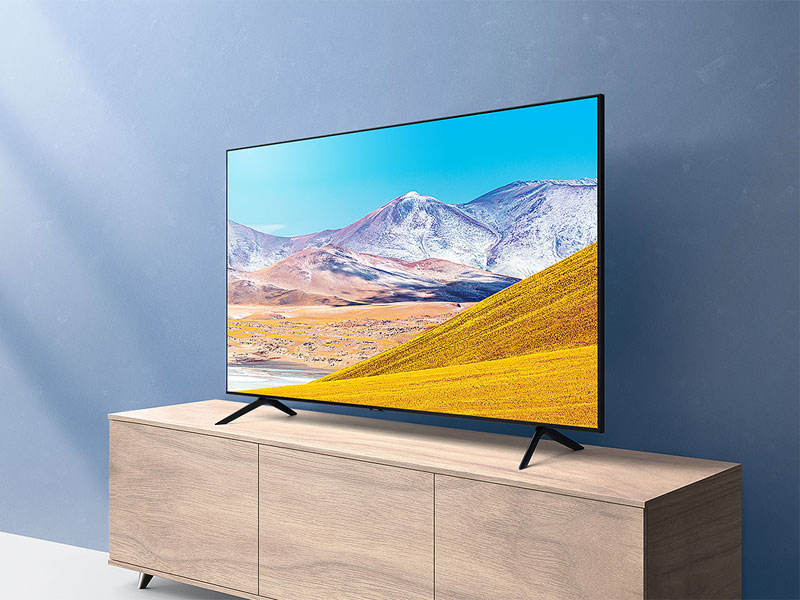
📺 Elevate your binge-watching game with crystal-clear 4K and hands-free control!
The Samsung 65-inch TU-8000 Series Crystal UHD Smart TV delivers vibrant 4K UHD resolution enhanced by a powerful Crystal Processor 4K for ultra-smooth upscaling. Featuring built-in Alexa and Bixby voice assistants, it offers intuitive hands-free control and seamless smart home integration. HDR technology reveals stunning color depth, while the Tizen OS provides easy access to popular streaming apps. With a sleek design and multiple connectivity options, this 2020 model is perfect for professionals seeking a premium, effortless entertainment upgrade.


| ASIN | B084JBTYHJ |
| Additional Features | UHD, Smart TV, HDR, Built-in Alexa, Crystal Display, Ultra Fast Processor |
| Analog Audio Output Count | 1 |
| Antenna Location | Home Viewing |
| Aspect Ratio | 16:9 |
| Audio Input | HDMI, USB, Optical, RCA, or Coaxial |
| Audio Output Mode | Digital |
| Base Depth | 11.1 inches |
| Battery Type | AAA |
| Best Sellers Rank | #178,592 in Electronics ( See Top 100 in Electronics ) #538 in LED & LCD TVs |
| Brand | Samsung |
| Built-In Media | Power Cable, Remote Control, User Manual, Wall Bracket |
| Color | Black |
| Compatible Devices | Smart Home Device |
| Connectivity Technology | Bluetooth, Ethernet, HDMI, USB, Wireless |
| Connector Type | HDMI |
| Content Sharing Direction | Mobile to TV |
| Contrast Ratio | 16:9 |
| Control Method | Voice |
| Controller Type | amazon_alexa, vera |
| Customer Reviews | 4.4 out of 5 stars 24,373 Reviews |
| Display Backlight Configuration | Direct LED |
| Display Backlight Technology | LED |
| Display Language Options | English |
| Display Refresh Rate in Hertz | 60 |
| Display Size Class | 65 inches |
| Display Technology | LCD |
| HDR Format Supported | HDR10 |
| Hardware Interface | USB |
| Integrated Surround Sound Format | Object Tracking Sound Lite (OTS Lite) |
| Internet Applications | Amazon Instant Video, Browser, Hulu, Netflix, YouTube, Apple TV |
| Item Dimensions D x W x H | 11.1"D x 57.1"W x 35.7"H |
| Item Type Name | Smart TV |
| Item Weight | 45.4 pounds |
| Line Voltage | 110 VAC 60 Hz |
| Manufacturer | Samsung |
| Mfr Part Number | UN65TU8000FXZA |
| Model Name | TU8000 UHD 8 Series |
| Model Number | SAMUN65TU8000 |
| Model Series | 8 |
| Model Year | 2020 |
| Mounting Type | Can be wall mounted |
| Number of Audio Channels | 2 |
| Number of Batteries | 2 AAA batteries required. |
| Number of Items | 1 |
| Operating System | Tizen |
| Picture Quality Enhancement Technology | Crystal processor 4K, Crystal display |
| Power Consumption | 0.5 watts |
| Refresh Rate | 60 hertz |
| Remote Control Technology | Bluetooth |
| Remote Required Battery Quantity | 2 |
| Remote Required Battery Size | AAA |
| Resolution | 4K |
| Screen Finish | Flat |
| Screen Mirroring Technology | Miracast |
| Screen Size | 65 inches |
| Signal Format | digital |
| Size | 65-Inch |
| Speaker Description | Built-in speakers |
| Special Feature | UHD, Smart TV, HDR, Built-in Alexa, Crystal Display, Ultra Fast Processor |
| Total Audio Out Ports | 1 |
| Total Number of HDMI Ports | 2 |
| Total USB 2.0 Ports | 2 |
| Total Usb Ports | 2 |
| Tuner Type | ATSC |
| UPC | 887276397726 |
| VESA Mount Standard | 800 x 400 mm |
| Video Encoding | HDR10 |
| Warranty Description | 1 year manufacturer |
| Warranty Type | Limited |
| Water Resistance Level | Not Water Resistant |
| Wireless Technology | Bluetooth, Wi-Fi |
C**O
Samsung TVs Are Tricky to Connect to Sonos Beam Soundbar BUT They Can :-)
The TV is great but I had a heck of a time getting it to work my with Sonos Beam soundbar. After many hours of tech support, I want to share the solution below so others don't have to have a headache with it. Very pleased now. I am glad to report that it is working now. After various online website and app chat diagnostics reports, I was impatient and called the Sonos 800 number and I believe the tech support person's name was Lara. We spent almost 40 minutes on the call and she carefully had me isolate each separate HDMI device. From my end, I had the Sonos Beam SOLELY connected to the Samsung HDMI e-ARC input and it worked fine. In this instance, when one lowered the TV volume, instead of "TV Speakers" being the icon displayed with the volume changing displayed on the TV screen, the HDMI (Receiver) was the icon displayed. And since the only physical device connected at all (via HDMI) then it was the Sonos Beam, I could clearly and only hear sound from the Sonos Beam, could change the volume also using the Sonos S2 App and the TV remote, and no sound was ever dropped in and out. Then we connected the Google Chromecast via another HDMI, and the Sonos Beam still worked. Lastly, we connected the Comcast Xfinity cable box via another HDMI, and it still worked. Mind you: unplugging and replugging the power cords and HDMIs for all of these devices had not worked for me before. Only when I solely had the Samsung TV play video and audio through a native SmartTV app. For whatever reason, the order of connecting these devices seemed to have made a difference for me. I wanted to share this with others since this has been a huge pain in the butt, I was about to return one or both products, and none of the other community tech support postings seemed to have a solution posted for the last several months. Lastly, before this was resolved, and the Beam was only successfully playing music with other synced wifi Sonos speakers via Spotify, the S2 App would not allow me to finish the "TV Setup" connection either via HDMI ARC nor the Optical-HDMI adapter. After this was resolved, that S2 App "TV Setup" option went through automatically. I'm a happy camper now. Took awhile but wanted to share this possible solution with others.
J**F
Fantastic TV for the money, but make sure to disable soap opera effect!
I have had this TV for 10 days now and I wanted to share my feelings on the positives, negatives, and overall traits. I did extensive research on Youtube and Amazon before landing on this one. I was moving up from a 60" plasma Samsung which I was moving into my living room, to replace a 42" Panasonic plasma which I am moving outdoors to my patio. I've owned several Samsung TVs. Here are my thoughts: Positives: - Great packaging. The box has a "pull off top" that allows you to expose the TV while it is standing upright and easily get your hands under it to lift if straight out. There was plenty of styrofoam and the screen and TV overall were clean and devoid of scratches or cracks. - Delivery. I paid the extra few dollars for "delivery to any room" and the delivery team took it straight to my home theatre in the basement. Both were very nice and wearing masks and arrived on time. - 4K picture. I have watched hours of 4K content on Youtube to test the color, dynamic range, etc. It's brilliant! Really blew me away. I would recommend (after making this mistake myself) to not get too wrapped up in all the comparisons and little distractions brought up in various Youtube videos. The reality is a 2020 Samsung 4K TV is going to look pretty amazing. The reviewers get down into crazy details that the average person just won't notice. - Setup. The setup for the remote, Smart TV options, etc, was SUPER easy. It automatically paired to the Samsung sound bar I also bought, and also automatically connected to my cable TV box (Spectrum) and the setup of Netflix, Hulu, and Amazon Prime Video was done in minutes. Negatives and Annoyances: - The remote kinda sucks. It is very small (same size as an Amazon Fire TV remote) and has minimal buttons. I've learned to use it just fine, but I really don't understand this dumb concept of "minimalist" TV remotes. If you are using the remote in a dark media room, it's basically impossible to see the buttons. And the remote has no backlite or glow-in-the-dark features. Also, the volume and channel buttons are narrow little toggles that you click literally forward/backward instead of just pressing up or down. Really, just stupid design. Not a dealbreaker, but terrible nonetheless. ALSO, the soundbar remote is basically IDENTICAL, but without channel or Home options. I can't tell you how many times I grab the wrong remote in the dark. Overall, the remote sucks. - SOAP OPERA EFFECT ENABLED OUT OF THE BOX - Disable this! It ruins 4K movies! You can do your own research on this topic, but bottom line, this TV (like many competitors) automatically enables "motion smoothing technology" which might be OK for sports, but RUINS real 4K movies. But don't despair! Just disable LED Clear Motion in the Expert Settings, and the problem is solved. - Sound. The soundbar also, for whatever dumb reason, comes set up with "sound delay" which means moving mouths do not match the sound. This is also an option you can fix easily in Expert Settings, but again, so stupid for it to be enabled. It should not even be an option in my opinion. Overall: Really love it and would recommend. Note, I am not using it for gaming, just streaming movies and regular TV. Beautiful picture, easy setup, good packaging and delivery, and very easy-to-use smart TV options. I would definitely buy it again!
D**.
Great TV at a great price
I really like this TV overall and am happy with my purchase. I ran some 4K demo videos through the built-in YouTube app and the 4K picture is absolutely beautiful. The one minor gripe is that the blacks aren't truly black, as is the case with all LCD screens, but unless you're going to pony up the money for an OLED, that's just the way it's going to be. The sound quality is also quite good from the TV's built in speakers. I only have a couple of minor complaints overall about the TV. The first is that I'm not really a fan of the modern style "minimalist" remote. Call me old fashioned, but I would prefer to have a number pad, especially when using the built-in Spectrum TV app to watch my cable TV channels. But if it really bothers me that much I assume I could probably buy a universal remote to use with the TV My other minor complaint is that I don't really like the "stand" that came with the TV. My old Samsung TV had a really nice swivel stand that allowed me to turn the TV from side to side, depending on where in the room I was sitting. This TV only has 2 "feet" for a stand, so no swiveling of the TV is really possible. Here again, I can probably remedy this by buying an after-market universal TV stand that will swivel if I want to. Overall I am very satisfied with this TV and would definitely recommend it. At under $400 it's a very good value.
B**N
Love this TV
Granted, this is a significant upgrade from what I had, but this is a great TV. I bought it with the Samsung sound bar to replace the main TV in the living room. Great quality UHD picture and great sound as well. Setup was easy, it has all the apps I want, it's very light, and it has plenty of inputs. Just a few caveats though. I have an older Panasonic VCR/DVD recorder combo. It has HDMI out, but when trying to connect this there were connection problems. Perhaps all that is needed is a newer HDMI cable, but I haven't bothered. I just hooked it up composite. Another thing is I thought the Samsung sound bar would be more easily controlled with the same remote as for the TV. Once connected it does simply take over as the TV sound, with +, -, and mute controlled by the TV remote with no problem. The trouble is the sound bar power stays on when you turn off the TV. In other words, I thought you'd be able to turn everything on and off at once. Not the case, or at least I haven't figured it out. I just leave the sound bar on all the time. When you turn on the TV you first hear sound from the TV speakers for about 15 seconds while everything boots up, and then the sound bar takes over. Another thing is there are some OEM apps you can't delete. This is a bummer, because it clutters up the home screen with things I won't ever use.
A**W
Great TV with some caveats
As many reviewers have pointed out. Theres a remote control latency. Luckily I primarily won't be using the remote. Got my Google tv remote to control it. Second, yes if you are mounting the 50", please make sure you got Two M8 22m and Two M8 25mm bolts for the brackets. So if you are using your old one, make sure you for spares lying around. So far no damage, white screen, red dots that some have experienced. I'll give it a week or two and see what happens. The UI is okay I guess. Not planning to use any of the assistant features. You pay for what you get and at $399 it's a great value. Update 3/6/2025 Screen went blank and keeps trying to boot. The bottom status red light keeps blinking. Shelf life. About four years. Sad. Do NOT Buy!
E**R
Every day I like it more!
I haven’t bought a “good” TV in about 20 years. My last two were inexpensive Insignia Roku TVs under 32”. And when I bought my first one, my Mom and I spent a few weeks marveling at the picture quality (a measly 720 dpi!). I’ve been experiencing some deja vu the last week or so every time I watch something that is UHD. On the whole I think the TV is great! Larger than I expected, but that’s largely because I didn’t go out TV shopping at stores in person beforehand—I relied on Amazon’s recommendations and research. I really like the Tizen Smart TV interface and am looking forward to not having to deal with delays in new streaming apps because of Roku’s business dealings. It was pretty easy to set things up as I like and their store had all of the apps that I use regularly. The remote has actually been a delight to me. I would not have expected something so small and … condensed (as in it has so few buttons in comparison to my other remotes) to be so useful. I only use the bulky universal remote that I got from Spectrum when I need to use the cable box. Switching over to the Spectrum app removes that need entirely—which I love. The only thing that I haven’t really tried is the voice control feature. I’m really pleased with this purchase. The TV is great. The picture quality is amazing. The sound quality is better than I expected. The interface is nice. I’m super pleased!
R**D
Do not purchase!!!
After a year and a half, the tv had horizontal lines going through it and then the picture went out completely and would not turn on , only a blue screen would flicker on and off . I called Samsung and after hours with customer support they finally convinced me to have a repair man come , which I had to pay for and they sent me the part under warranty, which they told me there is only a one year warranty on the tv but they would take care of it . Ok it’s fixed , cost me $100 which I wasn’t thrilled with but fine . Fast forward to April 2026 and the exact same thing happened. After hours on support chat , they finally tell me to get a tv repair man over which I have to pay for again and once he diagnosed it they would let me know if they will do anything for me , which is crazy to me that it will cost me at least $100. So then I would be into it for half the cost o originally paid for it . So the $400 tv is now $600 and will probably break again. It’s not about the money , it’s the fact that they do not stand behind there products. I will never purchase anything from Samsung again because they do not stand behind it. Very disappointing . I will not be having this repaired, I will just purchase a different brand . This is also a known issue with this tv and they still will not do anything about it. I know tvs are more inexpensive these days and don’t last as long as they used to but to break twice in less than six years is crazy.
B**A
Beware of specs on this page.
The specs on this are confusing because this Amazon page does not correspond to the specs on other websites. For instance it says 60 fps here but 120 fps elsewhere. After research the 55" and larger are 120 fps, the smaller are 60 fps. Also it notes 2 HDMI here and 3 elsewhere. I believe this is also to do with the size of the television you bought but not sure. Even when viewing a 55" or larger tv the compare feature here is still showing for their smaller versions. This has lead to a lot of "I didn't know this was 60 fps when I bought it but I can't tell" because it is actually 120 if 55" or larger. Hope this helps, look up the stats elsewhere. Besides this the tv is great, the colors are amazing compared to a normal tv but the RU8000 has a deeper color palette. Basically this is the economy version of the RU8000 but performs very well. It does very well, maybe even the best in it's class for 4k. The input lag is very low so this could be used for gaming very easily. The gaming mode actually scores better than the movie picture mode in most reviews. The initial settings will need to be tweaked to run this at it's full potential. Just look up online the best setting than your good to go. After being optimized this tv scored a 9.0 for 4k TV's, pre-optimized settings it scored a 7.9
Trustpilot
3 weeks ago
4 days ago