We remain fully operational. Our teams are working around the clock to ensure your deliveries continue safely.

DOWNLOAD THE APP


Customer Services
Copyright © 2025 Desertcart Holdings Limited
DOWNLOAD THE APP
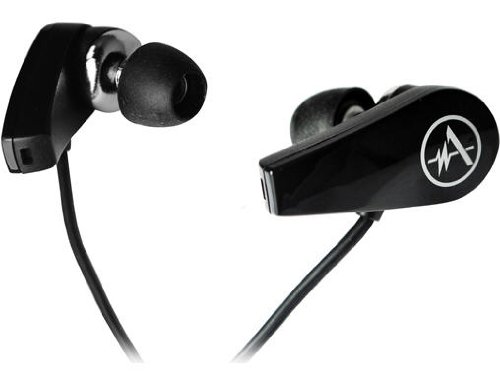
🎶 Elevate Your Listening Game with Andrea's 3D Sound Experience!
The Andrea Communications 3D Surround Sound Recording Ear Buds SB-205B deliver an exceptional audio experience with a frequency response of 20Hz-20KHz, advanced noise cancellation technology, and binaural recording capabilities, making them perfect for music lovers and professionals alike. The USB digital audio adapter ensures compatibility with both Mac and PC, providing a high-fidelity sound experience.
D**P
Binaural Recording On A Budget
Was considering the Roland CS 10EM recording earphones & saw these on Amazon @ a fraction of the price and thought "Give 'em a try!!". Received them quickly, plugged them into my Editrol R-09HR & they powered up beautifully. Sound was crisp & defined and what really helped was the FREE software from Andrea Electronics which gave a whole new edge in recording, even over my Cakewalk program I will be chomping at the bit, waiting for a opportunity with a good quality live recording to give them a proper testing. Usually I use a Sony M-S stereo mic w/ the Sony 7506 headphones on monitor & make excellent recordings @ 96 kHz on a SDHC card. The binaural sound field of the Andrea's earpieces impart an openness to the recording that's hard to describe-warm, tight, very listenable. As always, be sure to ask permission before recording an artist's work or you may be in trouble.
O**Z
Buy it if you need a good quality binaural microphone, don't buy if you need earbuds
I first thought to purchase a Roland binaural microphone set. But price was a concern. Then I found that stereo microphone set. I tested that with my old Olympus WS-331M sound recorder and worked very well. Also I connected it to a GoPro Hero 4 BE with a cheap audio adapter. It worked very well again. I paid 11USD for these. It has a very high quality carrying case, a USB adapter (for computer) and an extension cable. Only concern is it is not good as earbuds. I couldn't hear my record when I tried to listen with them. Sound level was very low. But then I changed the earbuds and the sound level was very good. The problem is Andrea microphone quality is very good but earbud quality is bad.
E**E
Perfect Fit with Dragon Naturally Speaking
This microphone was purchased specifically to work with Dragon Naturally Speaking. Previously I used Andrea NC-181VM USB, which did a good job. What I didn't like about the 181's is the boom mic. Ideally the microphone should be in the same position every time you dictate and that had been a problem. The biggest problem was that when dictating for long stretches I like to sip warm tea and the boom has to be rotated out of the way every time, then swung down and hopefully in the same position as before. The Andrea SB205 solved both issues that I had with the boom mic. They are always in the same position and taking a sip of tea is no longer an inconvenience. The voice to text recognition is excellent.Configuring the software to use with Dragon took a couple of emails to Andrea support, which were answered in a reasonable time. First, don't install Andrea's Audio Commander if all you plan to use the microphones for is dictating. To save you time here's what Andrea support advised for PC users:1) Right click on the speaker icon in the lower right of the window and select 'Recording devices'.2) With the sound settings open confirm that 'Andrea SuperBeam USB Headset' has a green check mark. If not click on it once to select, then 'Set to default'.3) Make sure that when you speak you see green bars on the sound indicator. If you see green bars on any other device right click and disable it.4) Double click the 'Andrea SuperBeam USB Headset' to open the properties window for this device.5) Select the 'Listen' tab and make certain that check box next to "Listen to this device' is NOT ticked.6) Select the 'Levels' tab and make sure the microphone level is set to a minimum of 80. (Dragon later readjusted this to 49.)7) If the 'Enhancement' tab is present click it and make certain that NONE of the enhancements are ticked--this interfers with Dragons ability to properly set the recording levels.8) Select the 'Exclusive Mode' tab and make certain that both choices ARE ticked.If you are using the 205's with a VoIP application (Skype) you can enable the noise cancellation. Not advisable with Dragon because it interferes with Dragon's ability to set the microphone level.[UPDATE]Several of the negative reviews complain of noise. It's true. Andrea has included a USB audio adapter that is noisy. Found the Sabrent Aluminum USB External Stereo Sound Adapter (works with Mac or PC) far superior. Just about any USB audio adapter is going to be better than the one included.http://www.amazon.com/gp/product/B00OJ5AV8I?psc=1&redirect=true&ref_=oh_aui_detailpage_o08_s00
P**O
Well worth the price if you need a mic in your ear-buds
This puppy works and feels great. I was hesitant to buy at first because I wasn't sure the tips would fit my ears as large ones just will not stay in, but this actually came with three different sizes of tips that you can change so I didn't need to worry. Great sound if you just want to use them for regular era buds (just listen to music or audio books). And while I can't speak on the technical side of things, like how much the speakers can handle and all that, I will say the music sounds good to me, but I primarily bought these to use with my Rosetta Stone and they work fantastic for that. I can hear clearly and the program responds well to me. I can only assume they would be great to use with that Dragon software as well.As for some features ... There is both a mute and adjustable volume controls for the mic set close to the V-split, so you can use them easily enough.Plus they have all the connections you would usually need. You can connect to your computer via USB or the dual, separated headphone/mic jacks (One jack for the mic and one for the headphones ... I think it sounds better than the USB, on ANY device I have tried, not just these, but it's possible I am just hearing things. Ha, get it? Yeah ... pretty bad joke. Sorry). However, they also come with a twin jack to single adapter, so you can plug into anything that only uses the one jack for both headphones and mic, like a laptop or a cell phone.Once again, I am not using these things for anything technical or important, and I am certainly not out recording nature, but for average, everyday use and use on speech recognition programs like Rosetta Stone, they work great.
J**G
Three Stars
Great
N**S
Bonne paire de micro binaural pour le prix
Voici un couple de micro et oreillettes binaural, compatible avec tous les enregistreurs portable, la connectique est en Jack. On peut également les brancher sur un ordi une tablette ou un Smartphone si on a l'adaptateur adéquat puisqu'un petit préamplis est fourni Très bon rapport qualité prix pour ceux qui veulent s'équiper de micros binauraux
A**N
Five Stars
Brilliant idea of making actual recording as the ears hear it.
Trustpilot
3 weeks ago
1 week ago