Buy anything from 5,000+ international stores. One checkout price. No surprise fees. Join 2M+ shoppers on Desertcart.
Desertcart purchases this item on your behalf and handles shipping, customs, and support to Greece.
🖐️ Elevate your workflow with the original vertical mouse—comfort meets precision!
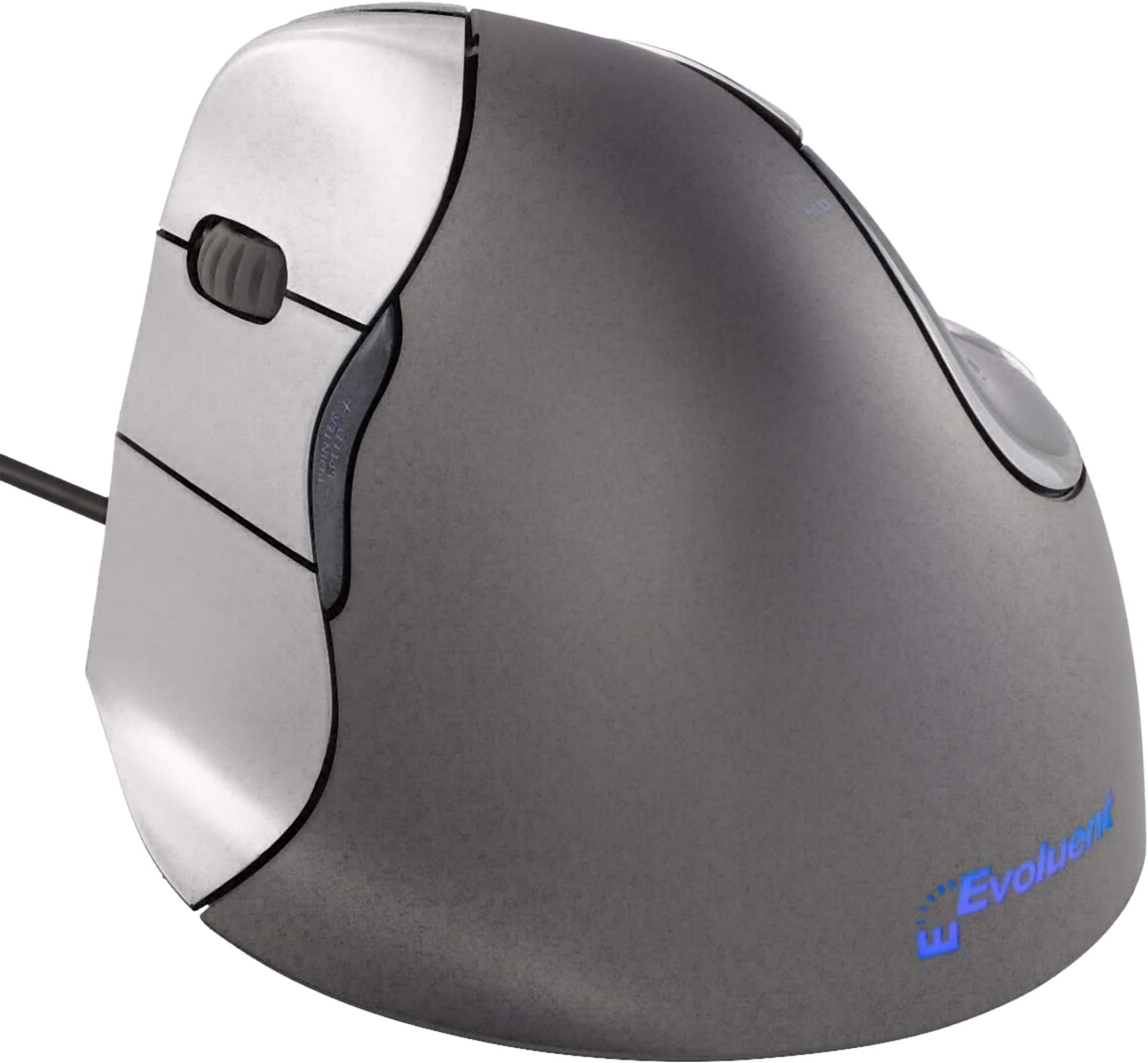
The Evoluent VM4L is the pioneering left-handed ergonomic vertical mouse, designed to support a neutral handshake grip that significantly reduces wrist and forearm strain. Featuring 6 customizable buttons, 4 adjustable pointer speeds with LED indicators, and plug-and-play USB connectivity, it offers professional-grade precision and comfort backed by over 30 years of ergonomic innovation. Ideal for managers and professionals seeking to prevent repetitive strain injuries while enhancing productivity.


| ASIN | B00427OTEU |
| Additional Features | Ergonomic Design |
| Antenna Location | Indoor |
| Are Batteries Included | No |
| Are Batteries Required | No |
| Best Sellers Rank | #653 in Computer Mice |
| Brand | Evoluent |
| Built-In Media | 1 package |
| Button Quantity | 6 |
| Color | Grey, silver |
| Compatible Devices | Personal Computer |
| Connectivity Technology | USB |
| Customer Reviews | 4.2 4.2 out of 5 stars (606) |
| Enclosure Material | pointer speed |
| Global Trade Identification Number | 00852153014218 |
| Hand Orientation | Left |
| Hardware Platform | PC, Mac, Linux |
| Item Type Name | Evoluent vertical mouse 4 Left-handed VM 4L |
| Item Weight | 1 Grams |
| Manufacturer | Evoluent |
| Model Name | Evoluent Vertical Mouse 4 Left Hand Ergonomic Mouse |
| Model Number | VM4L |
| Movement Detection | Optical |
| Number of Batteries | 1 AAA batteries required. |
| Operating System | Linux, Windows 7, Windows XP |
| Power Source | Wired USB |
| Range | feet |
| Style Name | Wired |
| UPC | 852153014218 |
| Unit Count | 1.00 Count |
| Warranty Description | manufacture warranty |
E**N
A no-compromise left-handed ergonomic mouse
I like this mouse better than the Logitech MX 610 Left-Hand Laser Cordless Mouse , which it replaced. The unusual sideways orientation of the Evoluent looks strange, but it took no time getting used to. It promotes a very relaxed and natural hand and wrist posture. It looks like your fingers are lined up vertically, but in reality, your fingers are positioned in a gentle arc and your hand is turned inwards by a few degrees. Your thumb rests in a chrome-looking divot. The Evoluent 4 design has a bottom "lip" that prevents your pinky finger from rubbing against the desk. I can confirm that it works beautifully and adds to the overall comfort. It helps you to position your hand correctly. I also find that proper chair height (in relation to your desk) and wrist support is essential to keeping the arm and wrist straight. It also has a very long cord, approximately 6 ft. Your index, middle, and ring fingers align with buttons 1, 2 and 3. Between buttons 1 and 2 are a scroll wheel (with notched movement). The scroll wheel can be clicked as another button. Above and below the thumb are two additional buttons that could be used for back/forward functions in your favorite browser, bringing the total button count to 6, and they are all programmable under Windows (a non-WQHL-certified 32-bit and 64-bit Windows driver are included in the box on a small (mini) CD. The purpose of the drivers is to assign custom actions for the buttons. You can even assign actions to a combination of the thumb and finger buttons when pressed simultaneously. Mouse sensitivity is controlled by its own dedicated rocker buttons located where it cannot be accidentally pressed. Note: Even though the Evoluent Windows drivers warns you to uninstall any previous mouse drivers to "prevent conflicts," I ignored that and kept my Logitech drivers (SetPoint). Both mice work fine. I can actually still access the SetPoint drivers through a tab in the Evoluent drivers setting page. Nice. The Evoluent's sensitivity is indicated by 4 LEDs located at the top of the thumb divot and correspond to four hard-wired sensitivity settings. The lowest sensitivity is around 400cpi, while the highest feels like around 2000cpi (these are my estimates obtained by comparing it with other mice; it is not specified by Evoluent). I operate it on the 2nd-lowest setting, which is about 800cpi. The nice thing is that the sensitivity function does not require special OS drivers, so it works right out of the box on any computer and any OS. The mouse even remembers the last sensitivity setting used when you unplug it. The sensor is an eye-safe infrared laser. Even though it is not sold as a "gaming mouse", the Evoluent 4's sensor performs as well as gaming mice in both speed and tracking under high-acceleration. That is more than I can say for the MX 610. There are no Mac OS drivers supplied by the company, although third-party drivers exist for reprogramming the buttons (links are provided on the Evoluent product page). On Mac OS X, I did not install the third-party drivers, so I could not assign any special functions for the buttons. Out of the box, the button under your index finger is mapped to the "left button" (primary on a right-handed mouse). Button 3 under your ring finger is mapped to the "right button" (secondary). Button 2 (middle finger) brings up the Mac OS X dashboard, and the top thumb button triggers Exposé. The bottom thumb button and the mouse wheel button do nothing. The mouse is light enough and sensitive enough to push around with just your wrist; you don't have to move your whole arm. You can even steer it with just your thumb and finger tips. This is the secret to its comfort. It encourages you not to grip the mouse with any tension. You don't need to. With conventional mice, even ergonomic ones like the Logitech, I eventually find myself gripping the mouse with just the ring finger and thumb, and that creates tension and fatigue within an hour of use. The downsides are minor. The buttons don't require much force to click. While I like the light touch, it's sensitive enough that just reaching out and wrapping my hand around the mouse will sometimes result in unwanted button clicks. This is not a big problem, but I have noticed a minor increase in accidental clicking since I began using the Evoluent. Maybe I am still getting used to it. I can pick up and reposition the mouse while resting my fingers on the buttons without clicking those buttons, so it is not hair-trigger sensitive. Also, the dark gray part of the mouse where your palm touches is covered in a "soft touch" coating. While it feels nice, this type of coating is not very durable in the long run and will start to breakdown after several years, becoming tacky to the touch, or it can rub off at the points of frequent contact. This is probably why the pamphlet in the box warns not to use solvents or cleaners on the mouse, only a damp cloth. I wish companies would stop using this coating. Its unusual appearance also makes it a great conversation piece. Bottom line: if you're thinking about buying this mouse, buy it!
L**X
Reduced pain and numbness in just days. Best mouse ever!!!
Well worth every penny! I work from home and have rheumatoid arthritis. I also mouse with my left hand. Ongoing wrist pain and repetitive ganglion cysts had me looking for solutions other than a regular mouse. I looked for weeks, read reviews and thought I could get by with a cheaper version. Big mistake. This mouse is worth it, don't waste time on cheeper versions. There is zero drag, movement is very, very smooth. It is very sensitive, you don't have to move it around very much. Once I got the driver installed, all the features really popped out, in a good way. I love that the middle button for the fingers can be the "double click." And the thumb isn't just sitting there, either. The grip angle is perfect for comfort and stabilization. Using multiple fingers significantly reduced strain on my joints, reducing my pain. Adding a padded wrist rest has increased the benefits. Two weeks of use and my pain is better, my cysts are going down and my hand fatigue at the end of the day is almost mik. I'm getting another one for my home computer, and getting one for my son as well. Please don't change the design too much in the future, it's pretty perfect right now!
P**.
Good ergo mouse for large hands
Was looking for a vertical, left handed ergo mouse and read good things about these. I have been buying cheap wireless ones and they work great, until they don't. First on this mouse: it's big, but since I have the hands of Andre the Giant, that's great for me. It's corded which is also good since I don't have to charge it. The negatives: the gripping surfaces are very slippery so it feels like it's going to squirt out of my hand. I probably just need to get used to it but it feels weird. Also, the effort to click the buttons, as in main left and right, is way too easy. That in combination with the slipperiness and the fact it has some weight to it makes me accidentally click the left and right mouse buttons all the time. In terms of overall feel, it's a quality device and the hand position is good. I am mostly happy with it and will see how it goes in terms of me getting used to it, and relearning the muscle memory I had for my old mouse.
姚**祥
Prod is good but the driver's Certificate expired and Official downlaod is dead
G**E
Die vertikale Maus für links habe ich mir nach langjährigen, immer mal wieder aufflackernden Problemen mit der rechten Hand (+ Arm) als Ergänzung zu meiner ergonomischen Tastatur und als Abwechslung zur Maus auf der rechten Seite (im Büro) für zuhause gekauft. Ich nutze sie jetzt seit wenigen Tagen und ich finde sie einfach super! Bislang nutze ich nur die rechte/linke Taste und das Rad zum Scrollen, und das funktioniert bereits sehr gut. Es ist am Anfang sicher eine Umgewöhnung, aber das ist es auf jeden Fall wert, gerade wenn man sonst Probleme hat. Ich möchte diese Maus schon jetzt nicht mehr missen und kann sie auf jeden Fall empfehlen. Sollte ich dann irgendwann noch die weiteren Funktionen nutzen, wäre das noch das Sahnehäubchen. Es ist aber so schon eine große Erleichterung. Eine Maus auf der linken Seite ist i.ü. auch ganz gut, wenn man mit der Maus am Computer viel macht und gleichzeitig rechts mit der Hand handschriftlich etwas notieren will, ohne dauernd die "Geräte" wechseln zu wollen. --- Und am Rande noch ein Tip an alle Interessierten, die ihre Handgelenke schnell und einfach entlasten wollen oder sich fragen, ob noch eine Handballenauflage sinnvoll sein könnte (wie ich): Ich habe versuchsweise mal ein Pack Taschentücher (10 Stück) parallel zur Schreibtischkante zwischen mich und die vertikale Maus gelegt, mit einem Abstand zur Maus von etwa 7 cm. So ruht mein Handgelenk/Unterarm (leicht weich gebettet) auf der Seite, und es fällt mir leichter, die vertikale Maus entspannt zu bewegen (besonders gut in Kombination mit einem eher klein eingestellten Radius der Maus). Mit so einem einfachen Taschentuchpack kann man auf gleiche Weise auch im Büro oder unterwegs, wenn man mit einer normalen Maus oder einem Touchpad arbeitet, u.U. seinem Handgelenk/Arm kurzzeitig mal Entlastung verschaffen, weil man so den Knick im Handgelenk beim Bewegen der Maus deutlich verkleinern kann. Und ein Pack Taschentücher ist überall zu bekommen, leicht und verursacht keine Zusatzkosten. Auf diese Art kann man auch mal ausprobieren, ob eine Handballenauflage zur Maus etwas wäre (das Prinzip ist ja ähnlich, auch wenn es professioneller aussieht ;-) ). - Ist der Taschentuchpack zu hoch, kann man die Tücher rausnehmen, bis es paßt. - Ist der Taschentuchpack im Sommer zu schwitzig, kann man ihn in einem Taschentuch wie ein Geschenk einpacken und es auf der Unterseite mit Tesa fixieren. Mir hat das sehr geholfen. Wenn es auch anderen hilft, umso besser. :-)
N**B
Wunderbar. Expensive but very nice for my hand
A**B
Helps reduce my RSI - but the only thing I don't like is the 3 buttons. Wish they had just stuck with 2.
G**O
Bello e comodo, pieno di tasti programmabili, ottimo per l'utilizzo di programmi di grafica e progettazione, lo consiglio!
Trustpilot
2 weeks ago
2 months ago