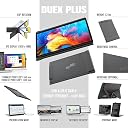
🚀 Double your screen, double your impact — productivity that travels with you!
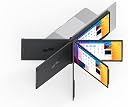
The Mobile Pixels Duex Plus is a 12.5-inch portable Full HD (1920x1080) IPS monitor designed to extend your laptop screen effortlessly. Featuring 270° rotation, plug-and-play USB-C/USB-A compatibility, and eye-care technologies, it offers versatile viewing modes and universal OS support. Its magnetic mount and lightweight design make it the perfect dual-monitor solution for professionals seeking enhanced productivity anywhere.


| ASIN | B07V465K93 |
| Aspect Ratio | 16:9 |
| Best Sellers Rank | #96,275 in Electronics ( See Top 100 in Electronics ) #2,042 in Computer Monitors |
| Customer Reviews | 4.0 4.0 out of 5 stars (1,526) |
| Date First Available | July 15, 2019 |
| Image brightness | 300 cd/m² |
| Item Weight | 1.6 pounds |
| Item model number | DUEX Pro |
| Manufacturer | Mobile Pixels |
| Product Dimensions | 0.48 x 12.8 x 8.6 inches |
| Resolution | FHD 1080p |
| Standing screen display size | 12.5 Inches |
| Total Usb Ports | 1 |
S**E
A dual monitor setup for everywhere and an eye-catching conversation starter
I'm a writer and a student and I use my laptop in various locations such as coffee shops, restaurants, and the couch in friends' homes. Sometimes I need to do research or reference notes, and having a second monitor makes it much easier to do than switching windows on one screen. The Duex Pro Portable Monitor first caught my attention because in most places I work away from home I barely have room for my laptop, let alone a second monitor, and this attached monitor makes that a moot point. At first I was hesitant because of the price, but since I've had it (over 3 months now), it's been worth the money. Mounting and preparation for use are very easy. It came with the cable and magnets for mounting to three laptops. Yes, there were glitches with the video in the beginning, but I was provided a quick and easy fix and it has worked fine since. The picture quality is great. It mounts to the back the laptop monitor via magnets. I have a 15" laptop and mounted my Duex Pro monitor centered top to bottom. According to the product description (Tips), "Duex pro must be seated against the table top. The magnets are only meant to hold Duex pro upright, they cannot hold Duex pro on by themselves. This was the design intention." The magnets do hold the monitor onto the back of my laptop just fine while extended without resting on anything, but after a while it may slide a little bit. I've used it for hours at a time extended and not resting on anything and I have no complaints. The magnets make it easy to remove for transport (if it won't fit in your laptop sleeve, for example) or if you want to use it in portrait mode (self-supporting) or with the kickstand (landscape). Everywhere I use it people ask me about it, and they're impressed with how nice it looks and works. I'm very happy with my purchase and recommend it to everyone.
N**I
double your productivity
allright, so i don't review stuff much, but anyone who has doubt should read this review. i initially got this monitor because i needed two screen for notes. the thing with power point is that it is reallly a good dictation software. however, when the professor is dictating, i give him the mic and powerpoint does a good job in transcribing. near perfect. however while it's dictating, i don't have the function to write on the slides because dictation will stop. i was looking for a solution, and I emailed the customer service person, and he got back to me real fast. so what i did was extend the screen (you could also mirror the screen). i extended the screen, and then i had two inputs for pointers(one a tablet-xp tablet) and one the mouse. Hence i didn't think this would solve my problem. However i had downloaded the program plural input or something let's me have two mouse. weird, right? That's what i thought. so i extended the screen and somehow windows is smart enough to let me duplicate the environment in the extended screen aka the duex pro. Really smart for windows. so i extend my powerpoint on that screen, and on my original screen, i have the pdf file, and i am writing on. This took a complex scenario to solve, but the solution came not intuitively but with just dumb luck. However let me review the monitor. It is bright, good quality, and the resolution is much better than my dell xps 13 montior which shocked me. the screen also folds nicely inside thus when i am not using it, i can fold it up. I have used the mirror mode, but i like the extend mode a lot better. Realistically i am not lying, it's lying having two computers in one, if you extend the screen, and get the software plural input (free by the way). I must say, this thing i was surprised. It exceeded my expectations. the price---ok...well a little high, but i guess what beats anything is the convenience that comes with this. One of the best things ever made, really. I felt like this thing needed a long review so other customers may benefit from an honest reviewer. I get nothing from this review, but just knowing that somehow i solved my problem which saved me hundreds of hours over the semester.
A**N
works great
what do i do if I need a spare set of magnets? -I love the unit and worth the purchase--sticks well to the back of your PC with magnets.
A**A
Excelente pantalla !!! de fácil conexión e instalación, eso sí, es un poco pesada y se cae un poco, pero con unos alambritos queda bien! :D
B**T
Works perfectly!!!!!!
C**É
Je ne m’attendais pas à une si belle image! Sa ne prend pas de place car peu rester sur l’ordinateur sans nécessairement être utilisé! On peut étendre l’image ou la dupliquer. Ce qui fait bien lorsqu’on présente a quelqu’un
Trustpilot
2 days ago
1 day ago