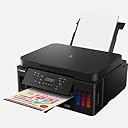
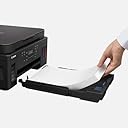
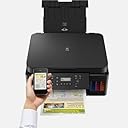
🖨️ Elevate your workspace with Canon PIXMA G6050 — where precision meets productivity!
The Canon PIXMA G6050 is a compact A4 multifunction printer delivering ultra-high 4800x1200 dpi print resolution. Featuring wireless connectivity via Wi-Fi, USB, and Cloud Link, it supports seamless printing from multiple devices including smartphones and tablets. With a generous 350-sheet input capacity and automatic duplex printing, it’s designed for busy professionals seeking efficiency and quality in one sleek package.
| Additional Printer Functions | All In One |
| Asin | B07QCQKLSZ |
| B W Pages Per Minute | 13 ppm |
| Brand Name | Canon |
| Color Pages Per Minute | 6.8 ppm |
| Colour | Black |
| Compatible Cartridge | PG-245, CL-246 |
| Compatible Devices | Laptops, PC, Smartphones, Tablets |
| Control Method | App |
| Controller Type | Android, iOS |
| Customer Reviews | 4.2 4.2 out of 5 stars (944) 4.2 out of 5 stars |
| Dual Sided Printing | Yes |
| Duplex | Automatic |
| Global Trade Identification Number | 04549292141085 |
| Hardware Interface | USB |
| Initial Page Print Time | 5 Sekunden |
| Ink Colour | Black |
| Item Dimensions D X W X H | 14.5D x 15.9W x 7.7H centimetres |
| Item Weight | 8.1 Kilograms |
| Manufacturer | Canon |
| Maximum Copy Resolution Black And White | 4800x1200 dpi |
| Maximum Copy Resolution Color | 4800x1200 dpi |
| Maximum Copy Speed Black And White | 13 ppm |
| Maximum Print Resolution Black And White | 4800 dots_per_inch |
| Maximum Print Resolution Color | 4800x1200 dpi |
| Maximum Sheet Capacity | 350 |
| Maximum Supported Paper Size | A4 |
| Model Name | G6050 |
| Model Number | 3113C006 |
| Model Series | PIXMA |
| Network Connectivity Technology | USB |
| Number Of Trays | 1 |
| Other Special Features Of The Product | Auto-Duplex, Network-Ready |
| Output Sheet Capacity | 250 |
| Paper Size | A4 |
| Print Media | Glossy photo paper, High-resolution paper |
| Printer Output Type | Colour |
| Printer Resolution Vertical Max In Color | 1200 Centimeters |
| Printer Type | Inkjet |
| Processor Count | 1 |
| Resolution | 4800 x 1200 |
| Scanner Type | Photo |
| Specific Uses For Product | Home Office |
| Total Usb 2 0 Ports | 1 |
| Total Usb Ports | 1 |
| Unit Count | 1.0 count |
| Wattage | 15 watts |
User
Maybe in short supply
I've had this printer for a few months now and have grown to love it. It does everything I need a uses very little ink - the problem if you don't buy genuine Canon is the special top need on the bottle - but there is a way around it. Even the Canon inks are cheap compared to Canon cartridges though.
User
Best printer yet
I have tried all sorts of printers that don't last long. This picks up labels better than others and is very economical on ink so don't let the purchase price put you off. You will more than save this in ink.
User
Fiddly to set up but works great once setup is complete
I chose to set this printer up manually on the grounds that I didn't want to install a load of third party software aside from the driver. I probably made the setup more complex than necessary as a result so that's partially my fault, but manually entering the router name and password was a chore with the printer's control panel.Once it was installed both printing and scanning worked great over AirPrint (the reason I wanted this printer was because it supported AirPrint and wouldn't require additional software). The colours seem a little muted but there's probably some tweaks I can make regarding that. (UPDATE: You get far more vibrant colours when printing onto photo paper instead of regular A4)The amount of black ink you get with this printer is insane! 3 bottles totalling about half a litre of ink is probably enough ink to last for the lifetime of the printer. The colour ink supply isn't so generous but at least replacement bottles will be cheaper.
User
Excellent printer - far better than previous Canon
I've been using this for 12 months for domestic printing - bought because old Canon that I'd had for 8 years finally gave up. Was concerned about ink tanks but really no need - it comes with 3 blacks and one of each colour bottles, filled with no mess and after a year the black tank is still 1/4 full and colour tanks over half full. I guess in that time I've printed at least 3000 sheets. The only thing I don't like is the cheap black lcd display which is unreadable without shining a light on it and really unacceptable in a printer of this quality. Having said that its only used infrequently. Overall an excellent product and much cheaper / convenient to run than the cartridge ink model.
User
Great printer but installation is horrendous
I managed to get the app installed but I am still struggling with installing on both of my 2 laptops.Cannon could not help and our IT is also struggling. Do for now would not recommend for anyone who is not a specialist.Print quality is ace though
User
Avoid
Product failed before the completion of set-up and had to be returned for refund. No Canon helpline available to troubleshoot the problem. The display is so small as to be practically unreadable - poor for a printer at this price point.
User
Printer with ink tanks
This printer has tanks for the ink which even after a few months of use show little sign of being depleted. That was the primary reason I went for that type of printer after spending fortunes over the years for HP cartridges.It works well with Windows, iphone and (latest) Linux.The printer is quite deep. When printing photos you need a good 2ft of space.I am concerned that the flimsy plastic on the photo paper feeder and the output tray may not last as long as the ink does should they get any form of knock.
User
Good 👍
Good
User
Prima Drucker
Der Drucker kam schnell und gut verpackt. Die Einrichtung ging problemlos, er wurde vom Macbook erkannt und man konnte sofort drucken und scannen. Ein Wndowsrechner wurde auch bereits benutzt, Software CD liegt hierfür bei. 2- 3 Handys (iPhone und Android ) funktionierten ad hoc sobald man die Canon print App installiert hat. Man kann direkt aus Handy scannen , sehr praktisch und besser als nur abfotografieren. Insgesamt kann ich einige der Rezensionen nicht nachvollziehen. Die Einrichtung und Benutzung ging mit allen erdenklichen Geräten ohne Probleme: Macbook, Windows Rechner, iPhone und 2 Android Phones- und ich bin alles andere als ein Computer Geek.Die interne Kassette für Papier fasst 250 Blatt , man kann einstellen ,dass der Drucker nur diesen Einzug verwendet für Din a 4 und etwaige andere Formate (Briefumschläge) für den 2.Einzug oben/hinten nutzt. Tinte liegt reichlich bei: 2 gr Flaschen schwarz und je eine Farbfasche (soll für 17000-18000 Blatt reichen). Original Canon Nachschub ist überraschend günstig. Das war der Hauptgrund dafür den alten Drucker aufzugeben - teure Druckerpatronen.Der Drucker schaltet sich zunächst nach 60 min ab, man kann aber einen permanenten Standby Betrieb einstellen, er spült dann auch nicht dauernd die Düsen . Der Drucker braucht einige Sekunden bis Befehle umgesetzt werden . Wenn ich im Erdgeschoss beim Gerät ankomme arbeitet er meist noch die letzten Zeilen ab und das Ergebnis ist stets OK. Das Display ist klappbar, etwas klein vielleicht - aber ablesbar und auch zufriedenstellend. Der Preis für den Drucker ist sicher zunächst abschreckend , aber wenn er so sparsam ist wie versprochen dann ist er im Vergleich zu unserem alten Drucker immer noch ein Schnäppchen...abgerechnet wird halt am Ende.
User
Impresora multifunción muy versátil.
Decidí comprar la impresora multifunción Canon PIXMA G6050 por los siguientes motivos:Posibilidad de recargar los depósitos de tinta. Bandeja de papel delantera de gran capacidad. Impresión a doble cara automática. Anterior experiencia con una impresora Canon muy buena.Hasta la fecha muy satisfecho.El pedido llegó en la fecha indicada.
User
Reliable and Long-lasting Ink
Bought in September 2022 for my tech-phobic mother who's a teacher, after a succession of HP printers spawned by satan this machine has been a literal lifesaver. We went from hours each week of trauma with tech issues to nothing but peace and tranquility.This printer is reliable, does black and white printing and copies very well, colour is pretty okay (not super fancy, but we also only have normal paper). It also prints double sided and scanning is great. We've had it 1 year 6 months, it's used about 5 hours aweek (outside of school holidays) - and we've only had to refill the black ink once! Colour ink levels low now but still going. Set-up was relatively straightforward, quick and well-explained. You can connect to a laptop via cable or wifi.Only advice would be to be careful to not overload the printer queue, as sometimes machine can get a little confused if there's too many requests at once. Otherwise it runs smoothly - only ever had one issue since we had it, which I only knew about since my mother called me excitedly to say she fixed it all by herself by turning on and off again (extremely proud moment).Things this machine does NOT do:- refuse to print despite being connected via cable because it can't find the wifi- refuse to print because you are not logged into their app- refuse to print black and white, even if you have ink, because the colour cartridge is low (and vice versa)- make you buy a new printer ink cartridge every other week and make it super hard to find in normal supermarkets- print about 3 sheets of test paper every time you turn it on for no reason, wasting ink and moneyIn conclusion, highly recommend this very functional little printer for those with a lot of admin work who want something low hassle, that works, and doesn't spend a fortune on ink. In cartridges are also more eco-friendly (since you need so much less of them).
User
Great low-cost workhorse, but occasional color mixing
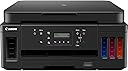
I’ve been using the Canon PIXMA MegaTank G6050 for over a year and overall I’m very satisfied. The MegaTank system keeps printing costs low, it handles high page volumes well, and the 350-sheet capacity with automatic duplex printing is very convenient for home or office use. Connectivity (Wi-Fi and Ethernet) is stable and daily printing is reliable.The only downside is that colors occasionally appear slightly mixed or inaccurate, which usually requires maintenance such as a nozzle check, print head cleaning, or alignment. It doesn’t happen often, but when it does, it can be a bit time-consuming.Overall, it’s a solid and efficient printer with excellent ink economy. I’m happy with it, but I’m giving 4 stars due to the occasional color issues.
User
Costoso da acquistare, economico da usare, qualità non così male
Scusate la qualità del mio italiano, sono un acquirente francese.Per quanto riguarda il venditore: consegna veloce, niente da dire.Per quanto riguarda la stampante: l'acquisto resta caro, ma si conferma che il prezzo per la stampa è super economico. Per le impostazioni Wi-Fi: ricordati di disattivare le tue VPN e gli anti-tracker sul tuo smartphone in modo che l'app possa rilevare correttamente la stampante. Allora è facile. Sul lato Windows (10 e 11) o Linux (Debian 11), la stampante viene rilevata automaticamente sulla rete locale e il driver viene installato automaticamente. Infine, piacevolmente sorpreso dalla qualità di stampa: nessuno spostamento delle testine (le linee sono dritte e allineate). Ho provato su carta fotografica: i colori non sono perfetti, ma il risultato non è disastroso (considerato il prezzo). In sintesi: molto soddisfatto del mio acquisto, che soddisfa pienamente le mie aspettative.
Trustpilot
3 days ago
2 months ago