๐ Upgrade your internet gameโfast, secure, and wallet-friendly!
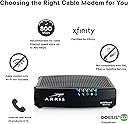
The ARRIS SURFboard SBV2402 is a DOCSIS 3.0 cable modem designed exclusively for Xfinity Internet & Voice services. It supports speeds up to 800 Mbps, helping you save up to $168 per year by eliminating rental fees. With a simple app-based setup and a compact design, itโs the smart choice for professionals seeking reliable, high-speed connectivity backed by ARRISโs 70-year legacy of innovation.


| ASIN | B07M9J3YZM |
| Best Sellers Rank | #4,979 in Computers & Accessories ( See Top 100 in Computers & Accessories ) #43 in Computer Networking Modems |
| Brand | ARRIS |
| Built-In Media | SURFboard SBV2402- DOCSIS 3.0 Voice Modem for Xfinity - AMZ |
| Color | Black |
| Compatible Devices | Personal Computer |
| Connectivity Technology | Ethernet |
| Customer Reviews | 4.1 out of 5 stars 420 Reviews |
| Data Transfer Rate | 800 Megabits Per Second |
| Global Trade Identification Number | 00612572216156 |
| Internet Service Provider | Xfinity ONLY |
| Internet service provider | Xfinity ONLY |
| Item Dimensions L x W x H | 2.4"L x 8.5"W x 10.25"H |
| Item Type Name | Xfinity Voice Cable Modem |
| Manufacturer | CommScope |
| Maximum Downstream Data Transfer Rate | 800 Megabits Per Second |
| Maximum Upstream Data Transfer Rate | 262 Megabits Per Second |
| Mfr Part Number | SBV2402 |
| Model Number | SBV2402 |
| Modem Type | Cable |
| Number of Ethernet Ports | 1 |
| Number of Ports | 3 |
| Product Dimensions | 2.4"L x 8.5"W x 10.25"H |
| UPC | 612572216156 |
| Unit Count | 1.0 Count |
| Warranty Description | 2 Year |
J**D
Internet product
Worked great, price was reasonable
Y**N
You WILL need to contact Comcast(for Comcast customers) but it will all work out, have patience.
Replaced an older Arris cable modem that was providing 140 MB speed. Upgraded to 250 MB speed so it was time to upgrade. As a Comcast customer, they will only update your modem to cable/WiFi modem. I have a WiFi mesh network so I purchased this modem. The instructions recommend to use the Comcast self service activation at xfinity/activate, which I tried, but eventually had to call Comcast. I spoke to Maria and she was pleasant. Initially the modem wouldnโt activate, after numerous attempts, but eventually Maria said the modem was downloading an update that will take about 30 minutes. I was told the modem should activate after update. After about 20 minutes, it activated and I was able to get Internet. Speeds are actually faster than 250 MB.
J**N
Be prepared for Xfinity issues
Hopes to self-install with Xfinity website, as I was able to do with previous Arris modem, were quickly dashed. After two phone calls on two separate days with lots of waiting time of course and two separate representatives I still had the old modem working and this one in the box. Technician visit was next and, voila, it took him less than 5 minutes - including 4 minutes of chatting with the representative on the phone. I was told that modem numbers (MAC address) was entered incorrectly and/or in incorrect location by representatives. Works fine now. Just be prepared. Comcast appears to be the weakest link.
S**3
Pays for itself. It's a no brainer!
Paying $14 per month for XFInity's modem/router was bugging me, especially since I use my own router for the "router" part of the network and only need the modem. $99 for this modem seemed like a no brainer! I also purchased three $30 Rokus since you can use them as Xfinity cable boxes by running the Xfinity app. So for about $200 with tax for the whole lot, I'll save $44 per month on my bill which is about a 5 month pay off. Bill went from $211 to $167. Some things to note before you purchase: 1. This is NOT a router. It is only a DOCSIS modem. It does NOT have WiFi. You are likely replacing Xfinity's gateway which is a combined Modem AND WiFi router. This is not the same thing. In addition to this you will need a router to run your network. Your router plugs into the back of this modem. 2. Make sure that this modem is on your list of approved devices for your account. You can find this in the Xfinity app or on the Xfinity website - log into your account. If you have voice (phone) even if you don't use it, you need a modem with data and voice. This one has that. If you buy a modem that is not on that list, Xfinity will not set it up. 3. It took me about 90 mins on the phone with Comcast. Reading other reviews, this seems to be the norm for adding your own modem. The MAC address for the modem was not being accepted by Comcast's system so I went through three support folks before I got to John who had the authority to add the MAC address into the system. After that it was plain sailing and he provisioned the modem and we were up and running. 4. This is NOT a router (I thought I'd mention that again). No WiFi. 5. Internet speed right after install is about 400MBps. I pay for 600 but it ranges from 350-550 depending on who is online in the house so nothing has changed there. All in all, I'm very happy with this modem. If anything changes, I will update. I just wanted to add that my 90 mins with Comcast was on a Sunday during the Coronavirus lockdown. All four of the folks I spoke to were helpful and friendly and AMAZING. This is not the same Comcast support from a few years ago. Kudos to them all.
C**E
Wasted two hours of my life on this
I tried to get this activated. After 30 minutes of dealing with xfinity, I got a human to activate it. But, wouldn't you know it, no internet. Called my buddy that works at Comcast and he stopped by. Dead ethernet port from the factory. My old Arris is 12 years old and still working, in fact we had them reinstate it while I return this defective unit. I bought a Netgear unit for my mom two years ago and that setup was a piece of cake.. So.. I bought a netgear unit and hopefully can try again a couple days. Have been paying 14.00/mth to rent my current modem from comcast. For 12 years... I upgraded my plan to 800 mbs but no one told me that the cable modem needed to be upgraded too. So, 10 years of paying 120/mth with slow speed... because Xfinity support never told me my modem couldn't do more than 200 mbs... If you have upgraded service and it still seems slow, it might be your modem.
G**N
Working modem, easy to install, however, NO TECH SUPPORT from the manufacturer.
You should know that if you purchase this modem this model DOES NOT come with any technical support from the manufacturer. You will need to contact Comcast.
A**R
Perfect
Be warned that you cannot activate this by yourself since Comcast needs the modem's MAC address found on the box and the bottom of the device, so you will have to call Comcast to activate it. I plugged it in where my old rental modem was and paired it with a TP-Link Archer A6 router. I then called customer service and was directed to an "activation agent". He asked for my modem's MAC address and model number. He registered the modem with my account, de-registered the old rental modem, and sent the restart signal. This got internet working, but then he had to repeat the process get the landline phone working. All this done in like 30 minutes. Is it just me or has Comcast's customer service gotten much, much better? They also put up no fight when I wanted to cut my TV cable and downgrade my internet speed earlier this year. Hard to believe this is the same company as it was 10 years ago. As for the modem itself, it's nice and small (I measured 7"x6.5"x1.5"), doesn't make any high pitched noises like I heard other Arris modems make. It reboots very, very quickly too, much more than my old rental modem. Can't comment on its fast speeds, I only get 75 Mbps, which I get just fine, but its advertised to do 400 Mbps. 5 stars for the modem, 5 stars for Comcast's customer service.
H**E
This is a fine TELEPHONE MODEM for use with VOIP...
(Revised to fix spelling errors) The main issue is to get the device provisioned with Xfinity. That is the problem! You will likely have to keep trying to get a technician who REALLY knows what they are doing. I spent over five hours on the cell phone until I finally was talking to a knowledgeable technician. THAT IS XFINITY 's problem, not this modem. My absolute intention is to simply use the modem ONLY for the telephone. I had a similar model that worked for years, but it got fried when a water pipe leaked on it. There was no reason for this modem not to be provisioned. I had to explain this many times to various technicians , but it isn't easy. Xfinity REALLY needs better education for its representatives. The modem is fine! If you don't have patience, don't consider Xfinity.
Trustpilot
1 month ago
2 weeks ago