Buy anything from 5,000+ international stores. One checkout price. No surprise fees. Join 2M+ shoppers on Desertcart.
Desertcart purchases this item on your behalf and handles shipping, customs, and support to Greece.
🚀 Elevate your location game with Geekstory G72 — precision meets plug & play power!
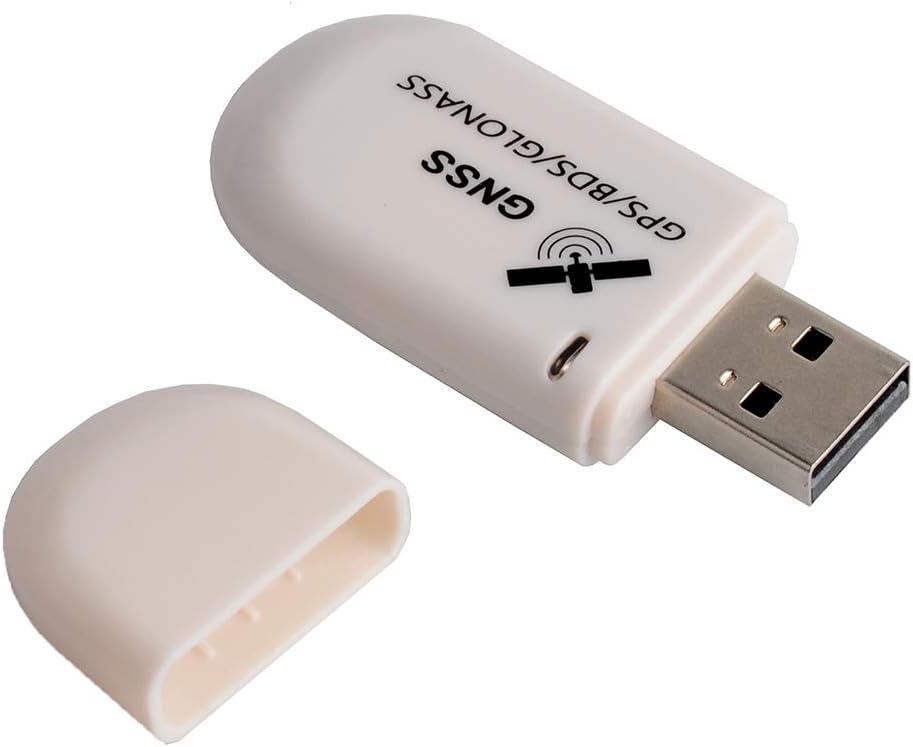
The Geekstory G72 G-Mouse USB GPS Dongle features the cutting-edge M8130-KT chip, offering superior accuracy and multi-constellation support (GPS, Beidou, Glonass). Compatible with Windows, Raspberry Pi, Linux, and Google Earth, it delivers real-time updates up to 10Hz. Its compact, lightweight design and plug-and-play functionality on Linux and Raspberry Pi make it an essential tool for professionals seeking reliable, high-performance GPS tracking.


| ASIN | B07SMRXSC8 |
| Additional Features | GPS |
| Are Batteries Included | No |
| Brand | Geekstory |
| Built-In Media | 1 X G72 USB GPS Receiver |
| Compatible Devices | Windows, Raspberry Pi, Linux, Google Earth |
| Compatible with Vehicle Type | Car, Truck, Motorcycle, SUV, RV, Boat |
| Connectivity Protocol | USB |
| Connectivity Technology | USB |
| Control Method | Touch |
| Customer Reviews | 3.8 3.8 out of 5 stars (157) |
| Display Type | LCD |
| Human-Interface Input | Mouse |
| Item Dimensions L x W x H | 0.94"W x 0.35"H |
| Item Weight | 0.39 Ounces |
| Manufacturer | Geekstory |
| Map Types | Satellite |
| Model Name | G72 |
| Mounting Type | Dashboard Mount, found in image |
| Operating System | Linux, Windows 10, Windows 7, Windows 8, Windows ME |
| Sport Type | Outdoor Lifestyle |
| Supported Satellite Navigation System | BeiDou |
| Touch Screen Type | Resistive |
| UPC | 747356634083 |
J**S
Plug and play with Win 11.
This GPS dongle works extremely well with Win 11. When you plug it in it must load a driver automatically. You should then try your app to see if it is working. If not, you may have a conflict with the serial port it is using. Go into your Control Panel/Device Manager and select Ports. Open Ports and see which port is using USB Serial. Go back into your application program and set the communication port for the GPS to the same port you identified in the device manager. That should resolve the conflict. Your application should begin working properly now.
J**Z
G72 G-Mouse USB GPS Dongle Glonass Beidou GNSS Receiver
It works, you must have patience it can take 20 minutes to acquire satellites. Doesn't look like it's doing anything, but eventually the light will start blinking...
T**R
Simple and ubiquitous GPS receiver of decent sensitivity
I originally set this up on a raspberry pi, on a table at least 6' inside a room with windows, and it was able to pick up enough of a signal to get useful time information. Once moved to just inside the window, with a sky view, it worked great, and has been since then. I bought it for use with ham radio related software, and found it to be quite reliable. It has been in continuous operation for two weeks. I chose to connect it to the Pi via a 10' USB3 cable, though it was working fine plugged directly into the Pi. Even worked with a PiZeroW.
+**-
Does work
Better than most cheap junk. It does work vs most cheap gps receivers from China which seem to be DOA and/or counterfeit u-blox (not quite) clones.
J**H
Raspberry Pi?! Nope
I left this in the pi for over an hour, near a window, no lock. I plugged it into a USB outlet and plugged it into the wall literally right next to the pi.....got a lock in 2 minutes. Also note, I have spend well over 8 hrs installing all sorts of different gps software, watches many videos that claimed to fix it....nothing worked. So either there is something different with the newest version of raspberry pi.....or the usbs are just not giving it enough power. Either way, it didn't work for the pi.
B**N
Budget friendly GPS
I bought this to aid in mapping our water and sewer for our town. I’m the water and sewer operator and we had a bunch of old maps but it’s just a shot in the dark tying to find anything. So I’ve been using this to help mark our assets more accurately. This will get it closer for the next person to locate. I don’t really have a Trimble unit to compare it too but it’s close in Google which is what our mapping software is based off of. I use an iPad Pro 12 with this and a cellular data plan and it works great for us.
B**S
Final on FALSE CLAIMS! OLD Device & FW. Can't receive GALILEO. Can't upgrade to current FW.
TECHNICAL & OPERATIONAL NOTES to ALL: These issues are likely the same with almost any u-blox chips, such as M8/8, 7 or 6, and from any/all Amazon or other vendors. IF you really need GALILEO or FW upgrades, read carefully, and Buyer Beware! That said, for _most_ Users, the combination of GPS and GLONASS may offer the best available joint geolocation solution. Updated 12 June: >> Newest - GeekStory finally admitted that the device FW cannot be updated at all, so only v2.01. - Also claimed to clarify ad and eliminate inaccurate mentions of GALILEO. - (Still two mentions remain today.) - Upped to two Stars for their apparent trying to correct the situation, and refunding. Update 10 June: >> GeekStory finally admitted that the device cannot do GALILEO. - I had already verified this with u-blox factory & user groups. - Evidently a too small antenna for those frequencies, even if chip worked. - I urged GeekStory to remove all references to GALILEO to be honest with clients. >> As of today, GeekStory still has not explained how or why the device firmware cannot be upgraded. - We need update from old v2.01 to current v3.01, which has additional fixes and improvements. - This process is already included in the referenced SW below, but still fails... Almost every URL link & reference received ended in Dead webpages! After extensive web search, acquired and used latest recommended software: v22.05 & 22.03 & 8.26. Claimed to receive GALILEO. FALSE! Unit has old 2.01 FW. Factory notice was End Of Life in 2017! "New" device?? Yet FW & internal battery likely over five years old already! Current 3.01 FW required for GALILEO. FAILS upgrade FW via any SW & multiple PCs. Claimed to have FLASH for updates. FAILED updates indicate incompatible or no FLASH. Also much less sensitive reception when side-by-side with another vendors same M8 chip. (Which also had old FW, no GALILEO and Failed FW updates, too!) FALSE CLAIMS, FAILED performance, BAD FW!! Returning for refund. Would greatly prefer New Device, Current 3.01 FW, with FLASH, and Receive GALILEO! Still searching..... :-(
D**S
BETTER THAN VK172, FASTER LOCK, WORTH THE EXTRA $$
solid GPS dongle. Significantly better than the cheaper version (VK172). Can get a gps lock and can hold it much better/faster than the other.
R**E
Sensibile alla ricezione
J**F
Funciona muy bien pero debemos estar cerca de una ventana para que capte bien la señal. Si estamos algo lejos se puede emplear un cable alargador USB.
Z**S
I like the cheerful green LED on this dongle. It is configured for American GPS and Chinese BeiDou satellites It may be possible to re-configure in Windows using the Ublox U-center program but I don't know how. As another reviewer stated, you must use a USB 2 socket, not USB 3. I am using this on a Linux computer for Network Time Protocol. The jitter of the NMEA sentences is amazingly low at a millisecond or less. Not something the average user would care about except as an indication of excellent hardware and software. Linux detects the pulse per second output from this dongle but I have not found a way for NTP to use it. Again, not a thing most users would care about at all. I have this on a 2 metre Amazon USB extension cable in an attic window. On a Raspberry Pi or Linux computer you can install gpsd and gpsd-clients and then use xgps to watch a diagram of the American and Chinese satellites in the sky. I intend to get another one of these.
M**.
Top!
A**S
Device worked as advertised after figuring out the right drivers to use. Windows driver selection by default instantiates the device as a "Sensor" instead of a virtual com port. In theory this should work using windows Sensor API but for most users, they just want the classic NMEA feed on a com port. Following steps had me up and running as expected: follow the below steps to set it: - open Device Manager - find the GNSS locations sensor - right click and select "update Driver Software" - Browse my computer for driver software - Let me pick from a list of device drivers on my computer - select "u-blox GNSS receiver" in the list I'll buy some more of these.
Trustpilot
1 month ago
2 weeks ago