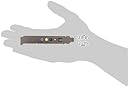
🎮 Level up your sound game with ASUS XONAR SE — hear what others miss!
The ASUS XONAR SE is a PCIe sound card delivering 5.1 channel surround sound with 192kHz/24-bit Hi-Res audio and a 116dB signal-to-noise ratio. Featuring a 300Ω headphone amplifier and ASUS Hyper Grounding Technology, it ensures crystal-clear, immersive audio with minimal distortion. Compatible with Windows 10, it includes an intuitive audio control center and a low-profile bracket for versatile installation.


| ASIN | B003ZXDOL6 |
| Audio Output Mode | Surround |
| Audio output mode | Surround |
| Best Sellers Rank | 128,245 in Computers & Accessories ( See Top 100 in Computers & Accessories ) 28 in Internal Sound Cards |
| Box Contents | Asus Xonar Dg Headphone Amp, Asus Xonar Dg Headphone Amp & Pci 5.1 Audio Card, Pci 5.1 Audio Card |
| Brand | ASUS |
| Brand Name | ASUS |
| Compatible Devices | Headphone |
| Compatible devices | Headphone |
| Customer Reviews | 4.1 out of 5 stars 980 Reviews |
| Global Trade Identification Number | 00610839339976, 04719543339978 |
| Hardware Connectivity | PCI Express x4 |
| Hardware Platform | Headphone |
| Hardware interface | PCI Express x4 |
| Hardware platform | Headphone |
| Item Part Number | 90-YAA0K0-0UAN0BZ, 90YAA0K00UAN0BZ, XONAR DG |
| Manufacturer | ASUS |
| Manufacturer Part Number | XONAR_DG |
| Model Name | XONAR DG |
| Model Number | XONAR_DG |
| Platform | Windows 7, Windows 8, Windows XP Home Edition, Windows XP Professional |
| Signal-to-Noise Ratio | 105 dB |
| Surround Sound Channel Configuration | 5.1 |
| UPC | 012305075317 803982784568 016839339976 763616035025 132017945682 088020585745 115970737334 610839339976 012300364508 |
S**B
Pleasantly surprised
I initiated purchase of a PCI sound card for one reason only: Like most onboard sound cards, the one on my ASUS P8Z77V-LX motherboard generates an annoying "POP" on PC boot that is completely out of character with an otherwise very refined system. The ASUS DG card is inexpensive and supports a front panel connection, so I ordered one. The first one was faulty (not detected in any PCI slot despite care taken to observe anti-static precautions) and replaced without quibble by Amazon. The second one installed flawlessly, first time, having of course first disabled the onboard soundcard via the BIOS utility. My pleasant surprise has been the staggering difference in sound quality both compared to the onboard sound card ("wooden") and also a Creative Soundblaster Audigy card (nothing special) that I used until recently in another PC, in the same location, with the same Creative 5.1 amplifier and speakers. Sure, it is not a patch on high end HiFI kit, but music is surprisingly, well, musical - and enjoyable for it. 5.1 imaging from true surround sound source is also more precise than with the other cards. Very happy.
J**T
Sounds like a boss
I was skeptical to say the least, I'm quite the audio-enthusiast and was looking for a card that wouldn't break the banks after recently building a new home media/gaming computer. I was shocked frankly. Granted I do have a nice healthy set of headphones and speakers to go with it, and am unsure on the effects of lower-priced alternatives. But, with on-board sound, high volumes had terrible hissing, the bass was flat, the sound became distorted at certain volumes. >Plug in card >Boot up >install drivers. Turn speakers on at the old sound level, BLEW MY MIND. It was extremely loud, I now have my speaker notch so incredibly low it's insane :|. The bass actually packs a punch, it's not some pathetic fizzly thud, it has oomph. My movies are more enjoyable, my gaming is that bit more enjoyable also. Headphones, you can certainly notice a difference. Again, silence, no electric hissing or anything. The 3 settings provided, e.g. VoIP, enthusiast, are really great in my opinion. I can turn my bass up without distortion or destroying the rest of my songs detail. The sound is much clearer, and crisper, and the highs are much better than my on-board realtek. So, in short. This was a great buy for me and I have no regrets, for the price, it does pack a punch and certainly offers benefits over your typical on-board solutions.
L**S
No- I'm not giving it 5 stars
I bought this - being in need of a sound card and this has some ecxellent reviews - all five stars as I can see. But it does have a small problem, now I would expect, old fool that I am, that the default output from a sound card would be switched, depending upon the connected outputs, but no, its not. Now when you read all these 5 star reviews please note they are invariably from those who listen via headphones, and that dear readers is the default setting. If you want your speakers to give you the benefit of your new toy you are going to manually switch from headphone to speaker system every time you switch on or even wake up. Its not the greatest chore in the world you merely merely end up with the Xonar short cut pinned. I did contact Asus and had a bit of a gripe, and was told to get used to it cos thats the way it worked. Now then having got that off my chest let me say that this is a lovely piece of kit the sound is gorgeous both with speakers and headphones, I found it easy to load and set up, apart of course, from its default setting. The job it does is worthy of the 5 stars thrown at it willy nilly, but I don't like the way it does it; so no -I'm not giving it 5 stars Many months have past and at last I've discovered the secret. Took it off the computer; removed the software; refitted but ignored the instructions and used no internal connections -so no front panel and merely reloaded the driver, voila a miracle the sound card now will only operate on the speakers leaving the phones to use the motherboard via the front panel, and it still mutes the card.
G**G
Great sound quality
I bought this card because the sound on my motherboard packed up. I picked this one as all my other gear is Asus. It was easy to install on a spare pci slot and I connected the front panel HD audio panel. The drivers were easy to install on my dual booted XP and Windows 7 64. Just install the card and boot up. Just make sure you disable the on board sound in bios and uninstall all the sound drivers before installation. I was amazed at the power of output and the quality. Through headphones you can simulate 7.1 surround sound and Dolby surround. There are many adjustments you can make in the console. The sound quality is far superior to any on board sound. I can now confirm that this card works fine with Windows 10.
D**C
Not fully supported on Linux
Considering the price this card is great value and it works well under Windows 7, although I'm not a fan of the naff Winamp style user interface (it pretends it's a stereo, which was an exciting UI concept in 1997). It could also do with support for hotkeys, so you could switch the output from front panel to rear outputs (headphone to speaker) without opening the UI. The headphone amp works well in Windows and I use it to drive some 80 ohm headphones and they sound great. The main issue I have with it is the lack of driver support for Linux, something which is not going to get addressed according to what I've read in the Pulseaudio formums and elsewhere. The rear connector works (I'm listening to it now) but the front panel output and the headphone amp do not. So if you're planning on using Linux then go for something else.
L**E
Excellent, but tricky!
I'm currently only using this soundcard to play the audio through the optical output to my home theatre system when watching movies, and so far its proved 100% perfect, not had sound drop-outs/distortion or anything so rating this 5* as cannot find any floors. HOWEVER, did have a bit of a nightmare getting this to install correctly in Windows 7 Pro 32-bit, once I installed the card and booted up the PC, Windows updates auto-downloaded the driver (great) but didnt instal the Xonar audio software (not so great!) so the card wouldnt work at all. So inserted the CD that comes wth the card and tried to install the software from there and received error "please insert sound card" (?? - it is!). I read a few forums on www with other people with this same issue - however i found in the end all i needed to do was manually download the latest drivers from the Asus Xonar website and manually install them, once this was done it was all fine - just a heads up in case you find this same issue!
C**S
Good souncard
I bought this mainly because i wanted to use stereo mix for recording audio from the pc. I did have on-board sound but that got damaged by static when i plugged in my amplifier. Amplifier is now bonded to the pc. I had other cards but had problems wih them. An old creative audigy ls that didnt have stereo mix on win 7 64 bit & an Aureon Terratec 7.1 space. The latter card is a a great card but the stereo mix level on mine was almost non existent.. I was pleasantly surprised by the audio quality & signal to noise ratio. Glad i bought this.
A**N
Cheap price but quality product
The card is a half-height and it comes with a half-height adapter. Installation is straight forward. The Xonar software has good configuration function for adjusting the sound quality and effect; there are a lot of well configured presets ready to use. Just two observations; 1) if you select surround sound for you headphones, you may want to adjust the “distance” of the surround sound effect otherwise it can sound like you are sitting in a tin bath. 2) If you are going to use the Analogue Mic function onboard, it is not powered, keep the mic cable short otherwise it can be too quiet. I have a more expensive (older) Auzeneech X-Fi Prelude, apart from missing some customisation function, the Xonar card is almost as good at a budget price.
S**D
Perfect sound!
I was looking of a sound card that fits a low profile case and has Optical output and works with Ubuntu 18. This card has it all and it sounds great! I do not use it for gaming.. just music and videos. Also is a really good value for the money.
H**N
Mas que suficiente para disfrutar de tus reproducciones de sonido como para juegos.
Hola hace poco me compre esta estupenda tarjeta de sonido, la complemento con unos Beyerdinamic DT 770 Pro 80 Ohm, funcionan estupendamente con esta tarjeta de sonido, es mas que suficiente para sacarles partido, gracias a la amplificacion de auriculares que entrega 150 Ohm. Especificaciones del producto: Rendimiento de audio Relación Señal Ruido- Output (A-Weighted): 105 dB Relación Señal Ruido - Input (A-Weighted): 103 dB Output THD+N para 1kHz: 0.0025% (-92dB) Input THD+N para 1kHz: 0.0022% (-93dB) Respuesta en frecuencia (-3dB, 24-bit/96kHz input): <10Hz to 48kHz Output/Input Full-Scale Voltage 1Vrms (3Vp-p) Bus Compatibility: PCI - PCI v2.2 o superior Chipset principal: C-Media CMI8786 High-Definition Procesador de Audio: Sound Processor (Max. 96KHz/24bit) High Fidelity Headphone Amplifier: Optimized for 32~150' 24-bit D-A conversión de fuentes digitales: Cirrus Logic CS4245*1 (104dB DNR, Max. 192KHz/24bit) / Cirrus Logic CS4361*1 (103dB DNR, Max. 192KHz/24bit) 24-bit A-D conversión de fuentes analógicas: Cirrus Logic CS4245*1 (104dB DNR, Max. 192KHz/24bit) Frecuéncia de muestreo y resolución: 44.1K/48K/96KHz @ 16/24bit for all channels Frecuencia de muestreo y resolución para reproducción analógica: 44.1K/48K/96KHz @ 16/24bit for all channels Frecuencia de muestreo y resolución para grabación analógica: 44.1K/48K/96KHz @ 16/24bit Salida S/PDIF digital: 44.1K/48K/96KHz @ 16/24bit, Dolby Digital, DTS, WMA-Pro Soporte driver ASIO 2.0: 44.1K/48K/96KHz @ 16/24bit Puertos entrada/salida Jack salida analógico: 3.50mm mini jack *3 (Frontal/Lateral/Centro-Subwoofer) Jack entrada analógico: 3.50mm mini jack *1 (Entrada de línea/Entrada de micrófono) Otras entradas analógicas de línea (para CD-IN/TV Tuner): Entrada auxiliar (4-pin header on the card) Salida Digital S/PDIF: Conector óptico 96KHz/24bits -Cabezal SPDIF-out adicional para conectar gráficas con salida de audio HDMI Cabezal panel frontal Soporta detección de conexión y reasignación automática de la salida audio del panel posterior al frontal Características de los drivers DS3D GX2.0: DS3D GX 2.5 soporta los efectos EAX para gaming y las funciones mejoradas de DirectSound 3D para Windows 7/Vista. (compatible con DirectX/DirectSound 3D) VocalFX': Lo útlimo en tecnología para voz para gaming y VoIP, incluyendo: - VoiceEX: reververación natural para tu voz para juegos EAX - ChatEX: emulación de efectos de sala para chat online - Magic Voice: modifica tu voz (Monstruo/Dibujos animados') para ocultar tu voz o pasártelo bien mientras chateas. Sistema Operativo: Windows Vista/XP(32/64bit)/MCE2005 Tecnologías Dolby®: Dolby Headphone: technology allows users to listen to music, watch movies, or play games with the dramatic 5.1-channel surround or realistic 3D spacious effects through any set of stereo headphones. Smart Volume Normalizer': Normalizes the volume of all audio sources into a constant level and also enhances your 3D sound listening range and advantages in gaming Alternador de altavoz virtual Xear 3D': Adjustable virtual 7.1-speaker positioning Magic Voice': Changes your voice pitch to different types (Monster/Cartoon') for disguising your real voice or just for fun in online chatting Funciones Karaoke: Music Pitch-Shifting, Vocal Cancellation, and Microphone Echo effects with Stereo Mix recording (Wave and Mic-in) for online Karaoke or online DJ applications FlexBass': Professional Bass Management/Enhancement system Otros efectos: 10-band Equalier/27 Environment Effects Motores de sonido 3D/APIs: 7: DirectSound3D® GX 2.5, EAX®2.0&1.0, DirectSound® HW, DirectSound SW, A3D®1.0, OpenAL generic modes, 128 3D sounds processing capability Vista: DirectSound3D® GX 2.5, EAX®2.0&1.0, DirectSound® HW, DirectSound SW, A3D®1.0, OpenAL generic modes, 128 3D sounds processing capability XP: DirectSound3D® GX 2.5, EAX®2.0&1.0, DirectSound® HW, DirectSound SW, A3D®1.0, OpenAL generic modes, 128 3D sounds processing capability Accesorios 1 x Driver CD 1 x Quick Start Guide 1 x Bracket de perfil bajo
J**G
Solved my Windows 10 sound problems dirt cheap!
I have an Asus motherboard with an AMD Phenom quad core processor that ran Windows 7 Home. The on board Via sound chip was good enough I ran the line out to the Aux in on an old Yamaha FX-495 Receiver that was gathering dust in a closet. I connected some early Bose satellite speakers and subwoofer to the receiver and got decent sound. I used the software equalizer and bass boost to improve the output, but it was still a computer output. When I upgraded to Windows 10 the sound enhancements for the chip were not compatible with Windows 10 and the sound quality went south. Via's newer drivers did not solve the problem. I studied the idea of disabling the on board sound and adding a PCI sound card to an expansion slot. I was going to buy a $35 ASUS Xonar PGI PCIe card until several contributors to ASUS forums mentioned the ASUS Xonar DG card would give comparable sound quality, use a PCI slot, and cost less. I noticed I could get the Xonar DG card on an open box special for $15 with free shipping and ordered it from Amazon. I disabled the on board sound chip in Bios and deleted the Via drivers and software completely. I downloaded the latest driver for the card from the ASUS support site. I installed the card and booted up. When windows recognized new hardware I clicked that I had the drivers I wanted rather than let Windows 10 load whatever it might load. I browsed to my download folder and clicked on the Asus driver and let their setup program install the drivers and software. The installation went without a hitch and as soon as I configured my speakers as the default sound output I had sound with no problems at all. I clicked on a YouTube video and found myself cranking up the volume and enjoying much better sound quality and much better bass than I ever had with the on board sound. I opened the Xonar DG Audio Center and customized the settings, selected for two speakers/large, matched the bass crossover frequency to match the Bose crossover and set the speakers as "large" even though they are satellite speakers. I played some Springsteen and then some Metallica and can say without hesitation that this card gives me bass again and the Bose speakers sound nearly as good hooked up to this computer as they did years ago hooked up to a CD player. This was the sound I had wanted out of the computer from the start...and I finally got what I wanted for fifteen dollars. That is a bargain that cannot be denied. The sound quality is excellent I have everything from deep bass to the tweeters, the THD is minimal and I can crank up the volume and listen to the music without grumbling over fidelity. Hey. This is an under-thirty-dollar sound card and it plugged right in, worked with Windows 10, and gave me full sound and great fidelity. I give it five stars for the quality at the price point. The front headphone jack is the card's default output. The headphone jack has its own on-card amplifier. The sound in an old pair of KOSS headphones was great. The card is supposed to switch automatically to line out when you have an empty headphone jack; it does not. The software has a two click setting that resets the output to line out with no problem. This problem is so minor to me compared to the enhanced quality of the sound and the improved bass I'd live with it anyway. I had to tinker with the sound chip all the time in Windows 10 anyway so this new card is probably less of a hassle to use than the on board chip was. I might buy an even better sound card if I was going to plug the line out from this computer to my primary home sound system, but I might not need a better sound card than this one if I did. The price is right (and buying the open box option even better) and I am finally happy with the fidelity and quality of the sound from my computer. If you are needing better sound than your on board sound chip provides and have a PCI slot open this might be your best bang for the buck. I could not be more pleased.
S**I
Excelente tarjeta de sonido
La recomiendo si quieres mejorar el volumen en tus juegos ya que tiene amplificador para audifonos. La he usado sin problemas en Windows 7 y 10. Recomiendo verificar que tengas un puerto PCI Libre, ya que no todas las tarjetas madres ya los traen, algunas ya solo traen PCI EXpress.
B**N
Scheda Audio PCI Asus Xonar Dg
In caso di salto generazionale di vecchi pc assemblati e/o preconfigurati può capitare di avere problemi con i driver di alcune periferiche, per le quali è stato abbandonato il supporto da parte del proprietario costruttore. Spesso sono le schede video e le schede audio a non poter essere utilizzate in ambienti a 64 bit, quindi, per riavere la piena efficienza del vecchio, caro, sistema, si può scendere a compromessi con periferiche come questa, che non solo completano la totale funzionalità hardware/software, ma lo fanno anche bene. Nella fattispecie una scheda audio senza pretese ma con parametri di lavoro pari alle professionali: Analog Playback Sample Rate and Resolution: 44.1K/48K/96KHz @ 16/24bit for all channels Analog Recording Sample Rate and Resolution: 44.1K/48K/96KHz @ 16/24bit S/PDIF Digital Output: 44.1K/48K/96KHz @ 16/24bit, Dolby Digital, DTS, WMA-Pro ASIO 2.0 Driver Support: 44.1K/48K/96KHz @ 16/24bit ... componentistica e livelli operativi di fascia medio/alta: Audio Processor: 24-bit A-D Converter for Analog Inputs: Cirrus Logic CS4245*1 (104dB DNR, Max. 192KHz/24bit) Cirrus Logic CS4361*1 (103dB DNR, Max. 192KHz/24bit) High Fidelity Headphone Amplifier: C-Media CMI8786 High-Definition Sound Processor (Max. 96KHz/24bit) Optimized for 32~150Ω 24-bit D-A Converter of Digital Sources: Output Signal-to-Noise Ratio (A-Weighted): 105 dB Input Signal-to-Noise Ratio (A-Weighted): 103 dB Output THD+N at 1kHz: 0.0025% (-92dB) Input THD+N at 1kHz: 0.0022% (-93dB) Frequency Response (-3dB, 24-bit/96kHz input): <10Hz to 48kHz Output/Input Full-Scale Voltage 1Vrms (3Vp-p) Per gli esperti capire che si tratta di un ottimo investimento non è difficile, ergo, per chiunque altro: approfittatene!!
Trustpilot
3 weeks ago
2 weeks ago