

🔢 Elevate your number crunching—wireless, sleek, and always ready to power your productivity!
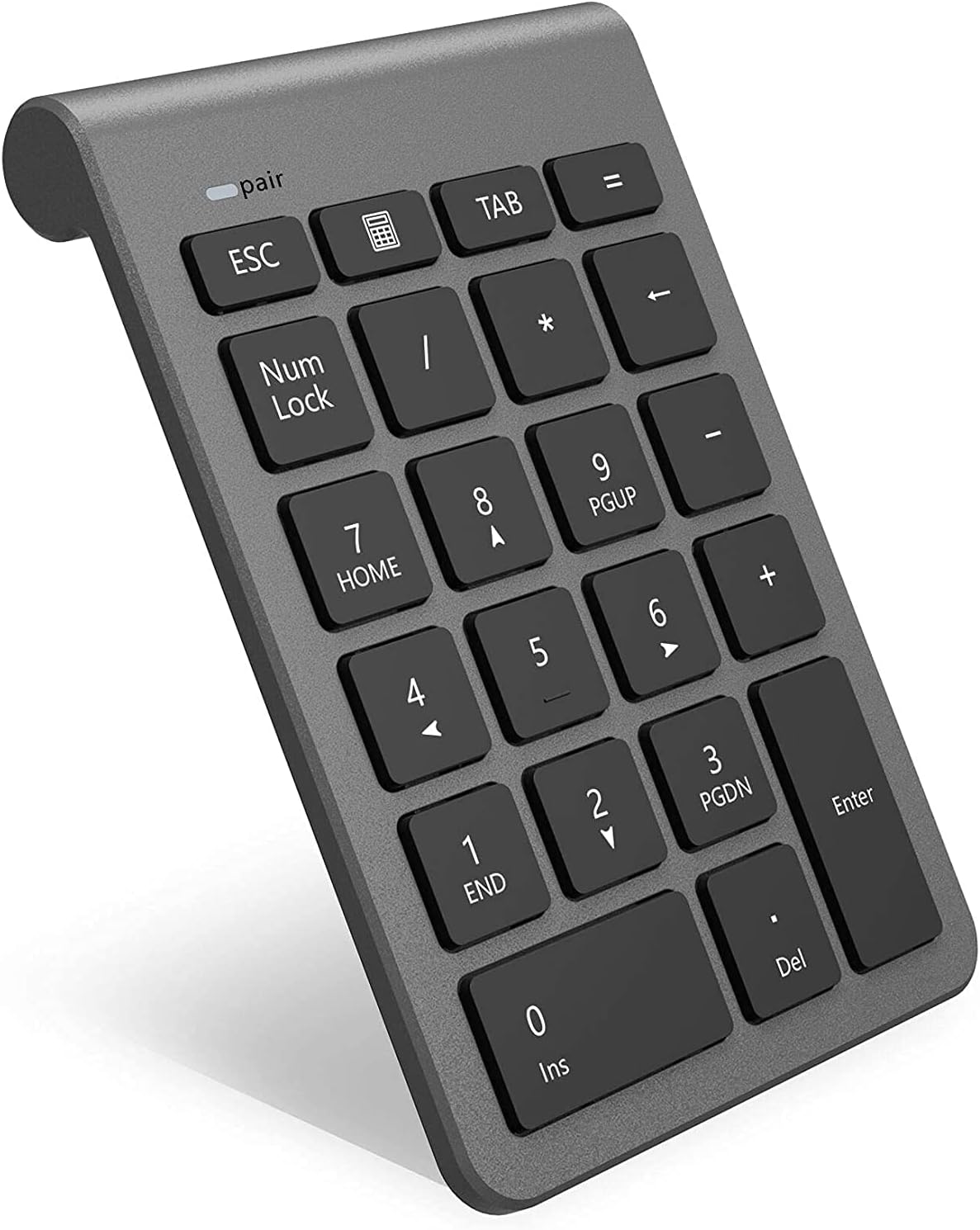
The Rytaki Bluetooth Numeric Keypad is a portable, wireless 22-key external number pad designed for professionals who demand efficient numeric input on laptops, tablets, and desktops. Featuring Bluetooth 3.0 for stable, driver-free connectivity up to 10 meters, it supports essential keys like NumLock, ESC, and Delete, plus a shortcut to open the calculator. Its energy-saving auto-standby mode extends battery life, while broad compatibility covers Windows and Linux systems, with partial Mac functionality. Lightweight and compact, it’s the perfect productivity booster for on-the-go managers and data pros.


| ASIN | B07H5K5KW3 |
| Are Batteries Included | No |
| Best Sellers Rank | 15,807 in Computers & Accessories ( See Top 100 in Computers & Accessories ) 15 in Numeric Keypads |
| Brand | Rytaki |
| Colour | Bluetooth Number Pad |
| Customer Reviews | 4.3 4.3 out of 5 stars (704) |
| Date First Available | 19 July 2018 |
| Guaranteed software updates until | unknown |
| Hardware Platform | Laptop, PC, Tablet |
| Item Weight | 120 g |
| Item model number | BKB-22K-RY |
| Manufacturer | Rytaki |
| Number of Batteries | 1 |
| Operating System | Linux, Windows Vista, Windows XP |
| Power Source | Battery Powered |
| Product Dimensions | 12.7 x 8.64 x 2.03 cm; 120 g |
| Series | Rytaki Bluetooth Numeric Keypad |
M**D
Works with MacBook Pro - No Dongle required.
Pleased with this so far. Powers down automatically to conserve battery. When you want to use it, tap a key and it powers up - press the required key again and it will action the command. Happy enough with that method rather than plowing through batteries. No wired option, but happy with that too. Build quality seems pretty good and has a fairly sleek design that sits well with the Mac. Should be good with a Windows machine, but not tested.
L**A
Works great. Easy to pair
Works great. Good price
S**S
Good enough
Light, well designed. Nice stand by mode. You won't lose key strokes while it is coming out of it. I just wish the numbers lock indicating light was not so intense.
F**Y
Great!
Very happy with quality and value of this item.
M**S
Connects easily, works well, big improvement over previous unit
The Bluetooth connection was seamless, and was working in minutes. Had this for weeks now with no issues. The feel of the keys is good. Note that the battery saving scheme puts the keypad in standby mode after some minutes of inactivity, but the keys pressed are buffered and not lost when it wakes up. Highly recommended. Connected to MS Surfacebook3, windows 11.
D**S
Rytaki Portable Wireless Bluetooth 22-Key Numeric Keypad Keyboard
Great for use when your "go to" Qwerty keypad has no number pad. Bluetooth connectivity took a bit of setting up but once set up means you don't need a separate dongle. Now connects when I turn the keypad on. I have a small desk so small keyboard and no keypad. I found I need a keypad occasionally and this so far has been ideal. You can move it around the desk separately from the Qwerty keypad so is possibly great for lefties.
A**3
Infuriating to use
Ordered this as my previous one broke and thought I’d try Bluetooth to free up a USB port. It goes to sleep when not used for few mins, which is fine, but to reactivate you not only have to press a button but you then have to use your mouse to click back where you want it to write your number. You can’t simply press the button to wake it up and then press the number. It’s infuriating to work with. If it wasn’t for the fact I don’t want to leave the house to post back during covid19 outbreak or incur someone to have to deliver another one I would have sent back. Having to make do.
C**Y
Works perfectly with my Dell Laptop
Connects immediately from sleep mode. Calculator button brings up a calculator on the screen...which is a plus I wasn't aware of. Otherwise it works exactly like a numeric keypad you find on a normal keyboard. Recommended.
P**I
Leggero, pratico, ben fatto e funzionale. Semplice da collegare e bello esteticamente messo al fianco del Mac.
P**Y
Está muy bien y fácil usar. Y que el Bluetooth integrado, no ocupas una puerta de USB de tu ordenador.
K**K
super
C**E
Disclaimer: give this thing a few days of decent use before you rate it. I’m a teacher and in order to move my desk to the best spot in the room for me and for students to have the maximum ability to see, I needed to use my school-provided laptop which of course has only two USB ports and no number pad (you know, because we teachers don’t enter a ton of numbers at one time that might require a 10 key...like grades...). This was my cheap little prayer. I was hesitant at first because I had attempted a USB version years ago but it wasn’t compatible with our gradebook software or most applications. This one, however, worked beautifully and paired easily. My dumb issue is that when I turned it on, if the pairing had somehow disconnected I’d see that a device was connected under the Bluetooth settings on Windows 10 and get frustrated that it wasn’t working. This was total user error as for some reason, usb connections to my mouse (and not any other usb connections) were appearing under Bluetooth, making me think that they were already paired. Once I figured that out, it’s been a dream since. You may have to press a key twice each time you start as the first keystroke wakes it up, but since I’m usually entering hundreds of grade columns or tons of data into spreadsheets at once, this is nothing more than wiggling a mouse to wake it up. So glad I took the leap for faith for this one!
D**S
Super complément pour ordi sans clavier numérique Fonctionne parfaitement bien en Bluetooth
Trustpilot
4 days ago
1 month ago