Desertcart purchases this item on your behalf and handles shipping, customs, and support to Greece.
❄️ Keep your SSD cool, your workflow hotter!
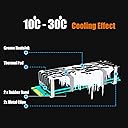
The GLOTRENDS M.2 Heatsink Kit is a sleek, aluminum cooling solution designed specifically for 2280 M.2 SSDs in desktop PCs. With a compact 22x70x10mm profile, it reduces SSD temperatures by up to 30°C using a high-performance thermal pad and flexible mounting options, ensuring enhanced drive longevity and sustained peak performance without noise or power consumption.


| ASIN | B07LCQLC8Y |
| Best Sellers Rank | #8 in Heatsinks |
| Brand | GLOTRENDS |
| Brand Name | GLOTRENDS |
| Compatible Devices | Office |
| Cooling Method | Air |
| Customer Reviews | 4.4 out of 5 stars 1,668 Reviews |
| Included Components | Thermal cushion |
| Item Dimensions L x W x H | 2.76"L x 0.87"W x 0.4"H |
| Item Highlight | Fits Desktop PC (Not for Laptop) and NAS & WORKSTATION, 5-30°C Cooling, Tool-Free Clasps & Rubber Bands, Thermal Pad Included |
| Item Weight | 0.02 kg |
| Manufacturer | glotrends |
| Material | Aluminum |
| Material Type | Aluminum |
| Model | 22x70x10mm |
| Number of Items | 1 |
| Number of Packs | 1 |
| Part Number | Heatsink(22x70x10) |
| Power Connector Type | 6-Pin |
| Product Dimensions | 2.76"L x 0.87"W x 0.4"H |
E**O
Works well on my NVME drive, with a 20C reduction, during Samsungs performance benchmark
I bought this for my Samsung NVME 970 Evo Plus, after it hit 85C, during the performance benchmark. Slapped this on, at slightly higher ambient temps, and this heatsink brought that value down to 64C. In the image, the after is the top values. I used the metal clips, which went on fine. The way I secured them was to spread them outside the sides of the hs, positioned it where i wanted it, then pushed the clips in, and over the outside fins. They clip right in. Sliding them on didn't seem like a good idea, as it could scratch the bottom of the drive. I also stuck this on a WD Black SN750, but it wasn't in, before the hs came in. It's running at the same temps as the Samsung, but it only has one temp sensor, which seems to be the same type as Samsung's first value. I would definitely recommend these, as an easy way to bring down those crazy NVME temps, and maybe extend the life of the drive.
M**G
10mm Heatsink Solved Roku Stick Overheating Issue
Attached the heatsink to my Roku Stick after it started overheating with out new Samsung TV. It never overheated with our other TV, but the new Samsung OLED seems to drive the Roku hotter. Since updating the TVs software and the Roku's software didn't fix the issue; I had to resort to plan-B. Adding this heatsink was relatively easy, even though the Roku is not flat. Enough of the heatsink made contact to bring temps down from 116C to 101C. Not as low as I'd hoped for, but the annoying message about my Roku overheating is gone. I'll probably buy another one to attach to the other side of the Roku to see if it can bring it down further.
J**.
Works for single sided m.2 SSDs!
Works as intended for single sided m.2 ssds. Lowered the temp by 12C and prevented throttling of my single sided Samsung 970 EVO Plus SSD. Only issue is don't use the rubber bands for permanent installation, only for temporary testing. The metal clips are what you use in real installations. Space out the metal clips to distribute pressure evenly not on the ends as depicted by pictures. They are metal clips so be careful with scratching the PCB of the ssd and make sure you don't short out anything of some cheaper drives. Insert from bottom don't slide it along the ssd. If SSD is double sided look for something else, not this.
A**C
Immediately Decreased my SSD Temps by 20 Degree C
I have a Samsung 970 Evo Plus as my primary drive inside a mini ITX case. The case itself is cramped and the SSD sits near the CPU. At idle my SSD reads about 65 degree Celsius. After installing this heatsink the temperature dropped to 45 degree C. I installed the thermal pad on TOP of the tamper-evident sticker on SSD as I didn't want to void my SSD warranty, so if you're willing to remove the sticker you'd likely get even more effective cooling. I highly recommend this to anyone who is worried about SSD temperatures.
S**9
The rubber bands DO NOT LAST
I have two of these heatsinks and have been happy with them. However, today I opened my system only discover the rubber bands holding the heatsink to the M2 chip had cracked and failed leaving my heatsink on the floor of the computer. Lucky for me I have an extra fan blowing directly on the M.2s in my PCIe card and that probably saved my my expensive M.2. I would highly recommend that one used the metal clips supplied with the sink and do not rely on the bands supplied. The bands supplied with a different heatsink I have installed have not failed and are still in new condition after a longer period than the Glotrends bands.
R**E
Great little product for the money
I don't have a lot to compare this product to, but it was an easy install and seems to be working. This went into my Qnap TVS-882 NAS under the CPU cooler shroud, so the fins are getting direct blower cooling, which is a bonus.
T**N
Impressive cooling performance on my Samsung 970 Evo+
I purchased the 22x70x10mm size heatsink. This heatsink keeps my 970 evo+ within 42 degrees C. Before it would run 57+ degrees. Samsung's software was always warning me the drive was running hot when I ran their benchmarking program. This is no longer the situation. This is even more amazing when you factor in that my drive is in an airflow restricted Asrock x300m mini PC system. I would recommend this cooler to anyone that has an NVME drive that is running hot and/or poor airflow systems.
S**N
A little too big for PS5
I like the simplicity and was in the market to add a heat sink to my Samsung 980 M.2 SSD. Unfortunately the heat sink is a little too tall for the PS5 chamber plate.
J**N
super
parfait
E**R
Muito bom
Qualidade excelente e de fácil instalação e o mais importante: muito eficiente. Atendeu perfeitamente minhas expectativas
E**E
Recomendable!! -20º en mi Samsung 970 EVO Plus
Lo primero que comentaré, será que cumple su función sobradamente y a continuación detallo algo más el producto. En mi caso, no pretendía "enfriar", sino "disipar" el calor que se producía en el interior de un MiniPC chino. El tema es que el disco, un Samsung 970 EVO Plus 500GB, me queda demasiado cerca del procesador y el calor generado irradia hacia el disco. El paquete que envían contiene (admás del disipador): - Dos toallitas (una húmeda y otra seca). - Dos gomillas negras para fijar el disipador al disco. - Dos anclajes de metal para fijar el disipador al disco. - Cinta térmica para colocar entre el disco y el disipador. El montaje me llevó unos 5 minutos, contando que parte del tiempo lo empleé en quitar la pegatina de los chips superiores del disco y en limpiarlos con ambas toallitas. Para la sujeción empleé los anclajes de metal, teniendo cuidado de no dañar la placa inferior de cobre que viene con este modelo de disco. El resultado es un bloque compacto bastante firme que atornillé finalmente al zócalo M.2. Antes de montarlo, las temperaturas del disco oscilaban entre 60º (iddle) y +85º(stress). Ahora mismo en reposo anda sobre los 40/42º dependiendo de la temperatura ambiente y no consigo que supere los 60º tras someterlo a múltiples pruebas de rendimiento. Adjunto 2 capturas durante una prueba de rendimiento realizada con CrystalDiskMark 7 (9 pasadas de 1 GiB) y otra tras 5 minutos de reposo. Comentar también que, ya que disponía de espacio, preferí comprar el disipador de 10mm de alto (22x70x10mm) para asegurar bien la disipación.
T**N
ürün güzel
soğutma konusunda iyi beklentiniz fazla olmasın 10derece aşağısı olması yeter zaten
A**T
dropped temps and added reliability to OLD SSD
I've an ancient Toshiba THNSNJ25 that fits the NVMe sockets (its a B-key drive). It is not fancy, but its been with me a long time. SMART claims it is still good.... but for big writes it was throwing errors. LOTS of errors. I was going to chuck it, which made me sad, so thought to buy and test a cooler on it first. Glad I did! Using Linux (Mint 21.2) and f3write to fill the drive with 1GB files, it hit a max of 43 degrees, which was a drop from ~60 to ~65. The speed to write was constant at ~100MB/sec. But READ speeds, tested with f3read, shot up to 400 MB/sec... which was rather astounding! Previously there were corruptions everywhere. It was a mess. Now, with the cooler, zero corruptions. To say I'm chuffed would be a vast understatement. FIVE THUMBS UP - HIGHLY RECOMMENDED As an added thing - I agree with others on the metal bands. These seem to be a bad idea. My kit came with 3 neoprene-like bands - which hold the radiator very firmly to the drive. I would not use the metal bands, for the underside of these drives are encrusted with contact points...... bad!
Trustpilot
1 week ago
1 month ago