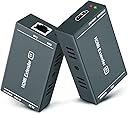
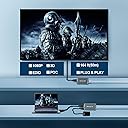



HDMI Extender, Up to 164 ft/50m, Over Cat5e/Cat6/Cat7 Ethernet Cables, 1080P@60Hz Ultra HD Uncompressed Transmit
Product ID: 135664067
🎥1080P@60Hz Ultra HD
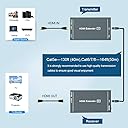
📏164 ft max range
🔌Power over Cable (PoC)
🚀 Elevate your AV game—long-distance HDMI without compromise!
This HDMI extender transmits uncompressed 1080P@60Hz video and audio signals up to 164 feet over a single Cat5e/6/7 Ethernet cable. Featuring EDID copy for seamless display compatibility and Power over Cable (PoC) to simplify power needs, it ensures stable, distortion-free transmission with built-in ESD protection and automatic signal adjustment. Ideal for professional AV setups, home theaters, and large-scale displays, it combines expert engineering with easy plug-and-play installation.


| Best Sellers Rank | #6,529 in Audio & Video Connectors & Adapters |
| Customer Reviews | 4.3 out of 5 stars 738 Reviews |
L**.
Works great!
Easy to set up and works great! Just remember, long runs need CAT 6, not just CAT 5. Also, use the heavier gauge cable and not that super-thin 34 gauge stuff or your power might fall off over a long distance. Coming from a camcorder, picture quality was great and stable over 150 feet of CAT 6. You'll have more trouble with the HDMI path getting to the sender than anything else. It would be nice if this also had a splitter on the sender so the signal at the source could be monitored (to isolate connection problems going in to the sender). A competitor does this but gets poor marks for its actual performance, so I went with this unit. From the receiver I have fed both 1x2 and 1x4 HDMI splitters without any trouble. Some people ask about that. This unit can only be powered at the sender and not the receiver. It would be nice to have options on both ends but this is only a minor complaint. HDMI is a royal pain! It's unreliable, subject to lots of connection issues, poor with long lengths, and sensitive to signal strength. This unit is inexpensive and solves some of those problems. I have a 100 foot amplified HDMI cable and this beats it hands down! If you already have some CAT 6, this is cheaper too. While it is easier to set up that 100 foot HDMI cable, you'll be sorry in the end.
R**K
Replacement worked perfectly
I bought the HDMI extender for my motorhome to replace one that fails intermittently. When I received the unit I tried replacing the transmitter because that was accessible but it didn't work at all. I assumed the designs are different (although they look exactly the same as in my motorhome) and I would have to wait until I could access the receiver which was inaccessible in storage. Prior to installing it in my motorhome I thought I should test it at home on one of my TVs. Unfortunately it did not work and now it's apparently too late to return to the vendor. {UPDATE] I wrote to the dealer and received an immediate response that they would replace the faulty unit. I received the replacement quickly and it works flawlessly! Great-HT is a great company to deal with!
S**N
Works well (some setups will need this trick)
I got this for a work configuration so we could use a large LG TV as a monitor to display a web application in a manager's office. My test system worked flawlessly, but when doing the final install, the manager's laptop detected the TV but showed no picture. I was able to run the Intel Display Control Panel and switch the video refresh mode from 60p to 60i, and the screen started to display properly. I saved the setting in the Intel control panel as the default. The exact setting you need may depend on the TV or the modes supported by your computer HDMI controller. Installation: Extremely easy. Just a Cat5 or better Ethernet cable, and two HDMI cables - one at the computer, the other at the TV. Power is only needed at the computer end, and connecting the CAT5/6 cable transfers video, audio and power to the receiver at the TV end. I ran my network cable inside the wall, but used RJ45 connectors instead of terminating it into faceplate jacks. I figure the fewer connecting points, the less likely we are to have noise or signal loss issues. Setup: For most cases, it should be super simple. My case required a tweak due to the TV needing Interlace refresh. See my note at the top for the steps I took. Your specific steps may vary based on the video card and driver in your computer. Image Quality: Excellent. Sharp images and text were 100% usable even with the TV 15 ft (4.6 m) across the office. Summary: I am very pleased with this HDMI extender. I will purchase this exact unit again if the need should arise. I can see cases where there may not be a way to tweak settings like I did, and that could cause some situations to result in no picture being displayed. I see that as a limitation of the source or the TV, and not of this device.
T**A
Great for what they are
Pretty great for the price. There is a bit of a reduction in color data and they don't really like some cameras but for multi-cam 1080p internet broadcasts these get the job done connecting low-grade support cameras like GoPros and PTZ systems to a main switcher. My FAVORITE thing about these is how STUPID they are... and I mean that as a compliment. Other similar (and more expensive) units have features and/or DIP switches that get in the way of use during an event. I have had been on-site where someone is trying to get a computer to interface with a projector or a TV using an advanced unit that simply won't pass the signal or get the job done. So far, every time I've just bypassed whatever system they were trying to use and instead used a pair of these it has just worked. It's plug and play. The device has no idea what it is doing and is therefore flexible. I've even used these to set up a "video village" in a few instances where too many walls make the Teradek useless and there either aren't enough long SDI cables on site or there is already point-to-point Ethernet infrastructure already installed making this a simpler solution than snaking cable. Yes the quality isn't high but in many cases "good enough and works" is good enough. These don't really have a "professional" application but for small jobs/odd jobs it's pretty good to have a few in the toolbox.
J**5
You get what you pay for, TEST RESULTS BELOW
Okay so let me be clear: I am a nerd and have been all my life. I have test equipment that most people do not, some that even other nerds such as myself have not even heard of. HDMI is a digital signal and is sort of an "all or nothing" beast. The rule of thumb for a cheap run of the mill "box store" HDMI cable is 16 feet maximum transmission distance to "get the goods." A better quality cable nets better results, WITHOUT a built in booster a QUALITY cable can efficiently transmit full signal to about 50 feet without issue. Cables with built in "boosters" can go further, for sure. In some applications I have used quality boosted cables at lengths of 100+ with solid results. Now we get into longer lengths and "hard to get to" locations. For my application, it was a monitor (Brand new, TKL 55 inch LCD) for a CCTV system, remotely installed in a lobby where incoming customers could see the views, as well as the security personnel on site to monitor the other parts of the building. Total distance from the source is 112 feet. However there is a 36 inch firewall, a second 18 inch firewall and a whole lot of interference in between from other equipment and devices. Using shielded CAT6E, the cable was ran. Mind you it was not suitable to drill another 1+ inch hole in both fire walls to fit the large HDMI male through, plus the distance issue. This was the logical choice. This device, the "HDMI extender" states that it can extend to 164 feet a full 1080P signal. (It has a dip switch that changes the distance or "gain" from 30M to 60M on the receiver. Which in theory should "boost" the signal even more at the higher number.) It does not. Using a test console designed to measure signals of all types (Fluke 725,) I connected to the dongle I made specifically for testing HDMI cables. This simply allows the signal to be measured accurately with the tool. At the TX end, prior to the transmitter we have nearly a full 5 volt output with 890mA current. As expected video shows perfectly on my Ideal R171000. (A device used to test IP/digital/analong/HD Coax CCTV items.) Insert the transmitter, with a 3 foot piece of CAT6E, signal drastically drops. Sadly. 4.2 volts and 575mA current. Bad sign already. Going to the end of my 112 foot run of already installed CAT6E, signal drops even more. This prior to inserting receiver and is relatively to be expected but not with these numbers. 3.4 volts and right at 400mA current. Insert the receiver, test dongle and check signal: Even though 30 meters is only around 96 feet, just for the purposes of being thorough I tested it: 4.1 volts 410mA current. Not even enough for a TV or monitor to detect a signal. With the setting on 60M which in theory should be around 196 feet, it shows on the meter 4.8 volts and 462mA current. Still not enough to let the TV/monitor know it has a signal. With my Ideal R171000 and adjusting parameters it was able to pick up the signal and show a very poor picture, clearly under powered. Okay, after all of that techy nerdy mumbo jumbo here is the final thought: This simply did not work. Does that mean that there has not been some that did? Absolutely not. It is possible that I received a bad unit. This happens, A LOT, with electronics when you go cheap. Just remember that going cheap is not always the best route. Hope this helps.
A**R
Works perfect and easy installation
Before ordering this item, I read thru previous reviews and they were mixed. I was delighted with the quality of this product once I received and installed it. I am getting excellent quality using what I think is Cat5e cable (labeling not clear) and about a 40-50 foot cable run. My TV is a 65" Samsung QLED. The older extender I was using (2010 technology) required two Cat 5 wires and I would get adequate quality but not always stable. This product has at least the ability to handle 1080P with a very sharp picture and true colors. This was an excellent bargain.
G**5
Rugged Extender, plug and play.
This product works perfectly. I used it to transmit a 1080 signal from an HDMI splitter connected to an NVR's HDMI output over a Cat5e cable, up to the receiver and TV on another floor. On the way upstairs to do the install, I dropped the receiver on the floor, but its sturdy metal case protected the device - no issues whatsoever. Just make SURE with this type of HDMI gear that your monitor/TV, the cables you use, and the video source, all match the proper resolution. I bought another of these for another CCTV installation where the client wants the monitor located far from the NVR location.
P**L
It works great as it should
I used it for a 60ft run to a Samsung 65inch tv and it solved my problem. Before that, I was getting no signal using an hdmi cable.
E**D
Works. Just plug and play
It works. Audio and visual.
B**O
Solved my problem
Sitting in a lawn chair with the campfire between me and the stage where I have some speakers and a TV, I had many issues with the long HDMI cable I used. A friend suggested to use Apple TV and use AirPlay. That only worked for about three minutes. Maybe my older version of the Apple product wasn't fully compatible, or the reach was too short for the distance to my chair. Enter the HDMI Extender product described here and with 75 feet of Ethernet cable, my signal got to the TV flawlessly, no fuss, no tweaking, no nothing... it just worked! That's what I like. Plug it in and watch it work. Thank you for this wonderful pair of devices. Be careful to check other options, some need two power supplies; this one needs only one power supply at the TX unit. I would have preferred the power supply to be at the RX unit, but one more extension cord was not a fuss.
J**Y
Poor Quality product
Worked for 2 weeks reterned for a refund stay away from POE extenders theybdont last
R**K
produziert Bildfehler
In Verbindung mit einem 50m Cat 7 Kabel besserer Mittelklasse indoor verursacht es weisse Pünktchen im Bild. HF Einstreuung ??? für professionellen Einsatz ungeeignet.
J**F
Recommend
Working and easy to install
Trustpilot
2 weeks ago
2 months ago