


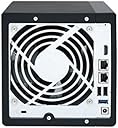
QNAP 4 Bay NAS with 12TB Storage Capacity, Preconfigured RAID 5 Seagate IronWolf Drives Bundle (TS-451+-2G-44R-US)
Product ID: 135027027
⚡2.0GHz Quad-Core
💾12TB Storage
🔒RAID 5 Protection
🚀 Elevate Your Digital Experience!
The QNAP 4 Bay NAS with 12TB Storage Capacity is a robust and efficient network-attached storage solution, featuring preconfigured RAID 5 with Seagate IronWolf drives, a powerful Intel Celeron Quad-Core processor, and versatile multimedia streaming capabilities. Perfect for professionals seeking centralized file storage and seamless access to their digital content.


| Customer Reviews | 4.2 out of 5 stars 28 Reviews |
B**D
Works great, until following their instructions corrupts all of your data
I bought the version with 4TB drives and wanted to upgrade to 8TB drives, so I looks up supported drives by model and firmware, and purchased 5 drives, so I would have a cold spare ready to go if anything went wrong. I followed the process listed here: https://www.qnap.com/en/how-to/tutorial/article/online-raid-capacity-upgrade/ It took about 8 hours to rebuild the array each time, so I just inserted a new drive in the morning before I started work so I could monitor the progress as I worked. After 3 days, I had gotten 3 drives replaced. I confirmed after each one that my RAID 5 set was intact and completed an integrity check of the Storage Pool and each partition. Then, on Wednesday morning, I clicked "Replace Disks One by One" as I had with the previous drives, selected the single remaining 4 TB drive, HDD4, which said "You can replace this disk", and clicked "Change". The Description updated to "Please remove this drive", and I pulled the drive. Naturally, the LED on HDD4 went out as expected, and I inserted the new drive. Then the LEDs on HDD2 and HDD1 BOTH went dark, HDD4 wouldn't light up, only HDD3 was still connected according to the GUI, the status on the RAID 5 set updated to "Failed", the storage pool disappeared entirely, along with all of my partitions, and my externally attached drive disappeared from the list of connected devices. Complete and total failure of the entire NAS on every level. After spending 4 hours trying to contact customer support and being hung up on by the automated system every 30 minutes, I made the decision to reboot my NAS to get it to recognize the drives again. After reboot, I was informed that the RAID 5 set now only contained HDD1 and HDD2, while HDD3 and HDD4 were not recognized as part of the RAID set. I again tried calling tech support, and while waiting on them, I removed HDD4 entirely and tried getting it to recognize HDD3. After another reboot, the system once again recognized HDD3 as part of the RAID 5 set, and after an integrity check, stated that the RAID 5 was intact but degraded, so I connected HDD4, and it rebuild the array. Success, or so I thought. Once the RAID set was rebuilt, it turned out that QNAP recklessly uses a proprietary LVM thin pool variant for their volume management, making it impossible to repair problems with their thin pool using standard LVM tools. While this is a horrifying decision for any company to make, on top of that, they use a thin pool to provision non-thin volumes as well. This manages to combine the metadata corruption vulnerability of thin provisioning with the inability to dynamically provision your space to your volumes. In short, they spent time and effort to invent completely proprietary drive provisioning that actively puts all of their customer's data significantly greater risk JUST so they can make a new method of volume management that's even worse than anything anyone else has ever created. This is the consequence of a shockingly incompetent manager making decisions they refuse to understand, and ignoring the advice of their engineers to not create an amateurish drive management system. Or it's a concerted effort to create a system that will prevent any customer from ever migrating their storage to another platform, knowing that the consequences will be that some of their customer's data will be completely destroyed because they have chosen to use derived but proprietary volume management that hasn't been tested by RedHat, Ubuntu, Microsoft, Amazon, and every other cloud provider. This hubris of "Let's reinvent the wheel, but make it worse" has led to this colossal failure. While their system MIGHT work for you, the fact of the matter is that if something goes wrong, their custom volume management prevents you from using standard LVM2 tools to repair or retrieve your data, their tiered thin pools utilize non-standard metadata volumes, and they do not provide equivalent tools. Up until following their instructions TO THE LETTER corrupted all 7 TB of my data, it was a fantastic NAS that I would have recommended to anyone. But the decision to create proprietary volume management only they can fix, that's less stable? That's enough for me to tell everyone I know this: Never buy a QNAP. They are designed to stop you from ever retrieving your data if anything goes wrong.
D**N
Can’t get Plex to Work
Hardware seems okay but wanted to use Plex for media files and the web site and product information make his out to be workable. Plex app doesn’t recognize any media files so far. Support is polite and responsive but just explain it isn’t directly supported and point me to web pages that don’t work either. The HD Station app this supported works but has a very slow interface. My issues may be with apples but if you’re going to play up the app since it is so popular, it needs to work apor at least have support to bt it sorted.
E**C
There is nothing to be said...
This thing just works and is great!
P**T
Configure Failure
First, let me say that upon working with the QNAP product I can say the QNAP has done a lot of great work in product development. The hardware is very good and software suite clearly has had good development and support. But there is a crack in armor. As as an IT professional I recognize the good effort QNAP has put in, but they had 3 strikers with me and I sent this QNAP NAS back, here's why: #1 - Documentation is dated. Firmware has been updated but documentation has not followed. My read between the lines highlight possible resource restraints in QNAP. I could let it go though; it's not hard to adapt what you read to what you see and of course there is lot's in general internet forms and YouTube. #2 - My study prior to purchase told me QNAP was fairly techy and this manifests as numerous options to satisfy any backup / sync / NAS goal. It's actually becomes difficult to know what to choose and where to start. You may end up, almost must, do some testing driving of the different programs. This was not unexpected but for sure you will have notable study and playing around to do. Still though, there's a lot on on line help but sharp focus from QNAP to get you going, is not great, it's 'OK', but you've got work to do. #3 I settled on QSync as main focus #1. Buying the TS-451 'bundle meant drives were included and set up. Some documentation on what this meant would have been a fantastic idea, but you have to figure that out yourself. I deduce the 'Homes" and 'Home' folders I see in the File Manager were set up as part of the factory package config. The folders i.e. 'Public' all need permission attention, that you have to figure out. Still I'm ok with this. However, when trying to establish and extend my personal folders, things got ugly. Basically I'm trying to replicate the folders I want to Sync but the hierarchy is not playing nice and data replication is occurring in the wrong tier. Let's say that's my fault, (Not sure it is), but I decide that rather than clean up I would just delete the and re-create the related volume. In itself this is easy but in the re-create the 'Homes' and 'Home' folders do not not appear: - QSync complains that it cannot find 'Home' - I say it's poor programming to build in this soft dependency in QSync. - Deduce that 'Home' and 'Homes' where part of custom factory config to pre-load the drives. - Deduce/Suspect 'Homes' (Plural) was an error, and they did not clean it up Conclusion: All three items added up too much for me and I decided to return the unit. I've read that QNAP support is very good and if all I had was #3, I would have tried them out, but gambled that QNAP would force too much of my not-anticipated time, so I'll look to a different brand.
Trustpilot
1 week ago
2 days ago