Buy anything from 5,000+ international stores. One checkout price. No surprise fees. Join 2M+ shoppers on Desertcart.
Desertcart purchases this item on your behalf and handles shipping, customs, and support to Greece.
🎮 Elevate your game with precision, speed, and style — the G303 Daedalus Apex is your secret weapon.
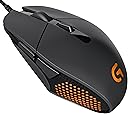
The Logitech G303 Daedalus Apex Performance Edition is a high-precision, lightweight gaming mouse featuring an exclusive Delta Zero optical sensor with up to 12,000 DPI sensitivity. Designed with pro gamers in mind, it offers ultra-responsive buttons rated for 20 million clicks, customizable RGB lighting, and on-the-fly DPI switching across five settings. Its durable yet ergonomic design ensures comfort during extended sessions, making it a top choice for FPS enthusiasts seeking accuracy and speed.
| ASIN | B00TKFD51M |
| Additional Features | Lightweight |
| Antenna Location | Gaming |
| Are Batteries Included | No |
| Are Batteries Required | No |
| Best Sellers Rank | #49,109 in Video Games ( See Top 100 in Video Games ) #1,505 in PC Gaming Mice |
| Brand | Logitech |
| Button Quantity | 6 |
| Color | Black |
| Compatible Devices | Mac |
| Connectivity Technology | USB |
| Customer Reviews | 4.4 out of 5 stars 1,083 Reviews |
| Embellishment Feature | LED |
| Enclosure Material | Plastic |
| Global Trade Identification Number | 00097855112620 |
| Hand Orientation | Ambidextrous |
| Hardware Platform | PC |
| Item Weight | 7.2 ounces |
| Manufacturer | Logitech |
| Mfr Part Number | 910-004380 |
| Model Number | 910-004380 |
| Mouse Maximum Sensitivity | 12000 Dots per Inch |
| Movement Detection | Optical |
| Movement Detection Technology | Optical |
| Number of Buttons | 6 |
| Operating System | Windows 11 |
| Power Source | Corded Electric |
| Range | feet |
| Special Feature | Lightweight |
| Style Name | Modern |
| UPC | 796327872962 097855112620 734911501669 |
| Unit Count | 1.0 Count |
D**H
Perfect gaming mouse for guy with larger hands who uses a pure fingertip-style mouse grip and high sensitivity
TL;DR: I love this mouse because I have large hands and use a fingertips-only style grip. If you use a palm or claw grip there's a good chance this mouse won't work for you unless you have smaller hands. --------------------------------------------------------------------------------------------------------------------------------------------------------------------------------------------------- After using this mouse for about a year, I think I've finally ended my search for the right mouse for my hand size and grip style. I have large palms (4.5" from wrist to bottom of middle finger) compared to my fingers (3.5" from bottom to top of middle finger). In total my hands are a little larger than average for my height (6' 1"). I hold the mouse with a fingertip-style grip - base of palm resting on mousepad, only touching the mouse with the tips of my fingers, and moving it with a combination of finger contraction and wrist pivoting along with frequently lifting the mouse completely off the pad to place it in a better position for continued movement. I've tried forcing myself to use a palm grip on a mouse intended for it and I just can't get used to having to move my entire arm to control the mouse. Definitely not the most common style, but it's just what naturally has always felt and worked best for me while playing games. I tend to use DPI of about 1200-1600, as that's the level I like for everyday productivity usage, and then set sensitivity in games to whatever feels right. Generally, in any genre of game, I use a fairly high sensitivity to the point that it allows me to do a complete 180 turn in an FPS by just moving the mouse an inch to the right or left. After buying at least 10 mice in the last 10 years trying to find one that feels "right", this is finally the one that does it for me. It's smaller and lighter than the bulky, heavy mice intended for use with a palm grip and has a base that's just enough smaller than the top to make it super easy to lift and reposition the mouse while holding with just my fingertips. That same inward/downward vertical slant of the sides also makes it super easy to maintain my grip on the mouse without having to press super tightly like I have in the past with other mice whose bases are wider than their tops. Much less hand/finger fatigue while using this mouse for prolonged periods of high activity. As I've come to expect from Logitech mice, the sensor/buttons/wheel are all very high quality and feel solid and well-made. It tracks really well and the software you can install on your computer to tweak the mouse settings and set up profiles gives you lots of nice customization options. At the price I paid for this mouse (in the low 40 dollar range) it's a tremendous value and I would happily buy it again at double the cost if this one died. All that being said, if you do use a palm grip this mouse may not be the one for you, unless you have smaller hands. The smaller your hands the easier it will be to use this mouse with a palm or claw grip style, as it's not a large mouse. If you have hands around my size, using this mouse with a palm grip would be almost impossible - when I hold it in that way the end of the mouse barely reaches the top of my palm, so there's no more mouse left on which to actually rest my palm. Pros (specifically for me, based on hand size/grip style): - Small and light - Base smaller than top, making edges very grippable - Just enough buttons to do everything I need without a bunch of superfluous ones getting in the way - High quality sensor and mechanical parts - Logitech mouse software is generally easy to use and has nice features - High quality, braided cord that doesn't get tangled or feel too stiff - Great price for what you get Cons: - Honestly, I have to try pretty hard to come up with any cons for myself. I guess one would be that the scroll wheel isn't as high quality as some of the much more expensive Logitech mice, and doesn't have left-to-right scrolling by tilting the wheel to either side. - If you use a palm or claw grip and don't have pretty small hands, I would say this mouse probably won't work for you.
G**Y
Solid FPS mouse for Claw/Fingertip/Hybrid Grips
I've been using the G303 for about a full day of gaming now and here are my impressions. Sensor: Feels fine, appropriately snappy and responsive, doesn't malfunction at any speed I can reach, etc. I don't have superhuman perceptions but I thought the DA 2013 (with Synapse) was a bit laggy and I don't think this is laggy. I'm sure there is a whole range of responsiveness between DA 2013 w/ Synapse and 'fine' but take what you will from my assessment. Shape: Surprisingly comfortable. The way my thumb and pinky pinch slightly inwards when I grip the mouse curls the base of my palm inwards, making a natural 'pocket' where the thin rear of the G303 fits really nicely. I hate to disappoint the naysayers but there may have been an actual ergonomist involved in the mouse shell. The inward sloping front lets the thumb grip it while in a very natural, relaxed posture. The pinky similarly is able to sit along the right side very naturally but the front becomes so thin that the longer ring finger doesn't really have a natural place to sit. I find myself most comfortable with 3 fingers on top of the mouse, where normally I have 2, ring and pinky both gripping the right side. Vertically the area of the mouse you would grip is \_/ shaped (like the Zowie FK etc.) so it's very easy to lift with minimal pressure. It could stand to be a bit lighter, but the Ninox Aurora spoiled me that way. Buttons: M1 and M2 are probably the best buttons on any mouse I've ever used. They click as easily and lightly as any 20M Omrons but they have that crisp, resilient feel of Huanos. They make the G502 buttons feel mushy by comparison! If you hunt for pre-travel you can find some (less than 1mm) by pressing the very front edge of the switch, but at least where my fingers naturally sit there is none. M3, M4, M5 are nothing special, and in my opinion M4 and M5 should be wider or located further down, as I need to move my thumb slightly to activate them. Wheel: The scroll wheel has a nice notched feeling similar to the newer Zowie mice but with more defined stops, and a pleasant, rubbery texture. If you have 3 fingers atop the mouse you will find it in a good position, but if you only have 2 fingers atop the mouse I think you will find it's located slightly too far back. Cable: The cable is thick and braided but flexible, and Logitech wisely chose to ship it loosely wrapped instead of bundled so it doesn't arrive already kinked and tangled to **** . The only issue I have is it sometimes gets caught on the rough edges of my Hayate, which I solved by pushing my monitors together and just throwing the cable over top of them so it naturally curves upward. Despite its thickness it's not too heavy, and besides the Artisan pad issue I haven't noticed any resistance. Overall Impressions: While I still feel there is room for improvement in the ergonomics, specifically in the right side (which would make it 'almost-ambidextrous' but why worry about that when there are already only side buttons for righties) and in the placements of M4, M5 and the wheel, the G303 is still the most comfortable functional mouse of the 15+ I've used to date and has earned its place as my new daily driver.
G**E
Incredible Performance and Design
I cannot describe in words how good this mouse is, but I will try. I don't know how Logitech did it, but they managed to make one of the best fitting and comfortable mice that I have ever used. I don't know about others but when I grip this mouse, it just feels like a glove for my hand and I have medium sized hands. When you grip this mouse, it kind of leaves your hand in 1 position, which is good because it improves accuracy and doesn't make your fingers or your hand slip off of the mouse. The keys on this mouse are soo good as they are very easily clickable, but not too sensitive either. I love the RGB honeycomb pattern on the sides, which I have set to slow cycling effect. I love it's simplistic design as I do not like too many unnecessary buttons and even left handed people love this mouse as well as it is almost ambidextrous. I love how light the mouse is and the fact that it is not too tall so my hand always feels comfortable and doesn't get tired from long hours of usage. The sensor on this mouse is so responsive and accurate that it literally feels like I have an extra hand. Also, the software that Logitech provides for free with this mouse allows you to auto-tune your surface to the mouse, whether it be a hard or soft surface, which makes your mouse even slightly more accurate. Lastly, the 6 pads on the bottom of the mouse bottom surface are very nice as well since they provide good balance and it feels like butter when you slide this mouse across your mouse pad. Literally, the only thing I can even think of that is bad with this mouse is the reported rattle issues on it, which was actually fixed by Logitech a year after it's release. It really is a shame that it was discontinued because I can honestly say that this mouse is one of the best products that Logitech has ever put out and I really hope to see it's return one day.
D**H
great mouse but with one major flaw
Ok so i like this mouse and would give it 4 or 5 stars because the fit is great in my hand, its simple, its small, its uniform in shape, the led is amazing on the plus side, the dpi switch is perfect and is all u need, same with the side buttons, the clicks on all buttons feels great, the sensor -- i jumped into a match of csgo last night and i felt a little better without even getting used to the mouse, the braided cable is nice but it tends to snag on the corner my desk so i have it pinned with an ancient blank cd thing, theirs only 2 negative aspects to this mouse one is the wheel, sometimes it just "mystery moves" it will basically over scroll sometimes making it inaccurate to use and for this i would give the mouse a 4 stars if everything else worked as it should, the biggest problem is the housing for the mouse sensor (go figure the most important part of the mouse) within 2-3 minutes of use i could tell their was some sort of vibration or noise coming from where the sensor is, especially if i picked up the mouse and moved it (i claw and finger, hybrid), i figured hey maybe thats just how its built i played csgo for about 2 hours then this morning i decide to test the mouse and shake it next to my ear now i can already hear a slight rattle (this wasnt there last night before i played csgo but it was only 2 hours) -- logitech i have seen this before in reviews but i was willing to take a shot to try and see if i could get a lucky mouse - it might be that they are just constructed that way, but logi really needs to address this, if my sensor and sensor housing was built with durability in mind this would be an amazing mouse, my g400 is like 4-6 years old by now and is still rock solid (mouse is just old and worn, the logi symbol is gone just from use haha so it was time for an upgrade) -- to people who give this a shot i hope u get one without weird sensor vibration because it will eventually become a rattle, either way do some extensive testing the first night, on a side note i dont even flick the mouse like most do i have 600dpi, windows mouse setting 6, 1000hz polling, in csgo i use like 2.5 sensitivity and mouse accel 1.05 so my mouse movments arent hard or taxing on the mouse, just another thing to keep in mind when purchasing i guess, and my last smallest gripe would be theirs a tiny scratch on the bottom, im thinking this is from manufacturer though because the rest of the mouse looks pristine new
G**G
This should not work for me
I've lusted after this mouse after first learning about it, but it's usual/MSRP price was too much for me considering it didn't like a good fit for me. It's marketed towards MOBAs (I never play MOBAs) and has a smallness to it (though my fingers are kind of long), with love-it-or-hate-it shape (I'm not one to take those kind of risks). However, the fact that it's brought up frequently for fingertip grips and has amazing technology and it was on sale at the time, I just had to go for it. My first impression this mouse is still the same way I feel towards it. This mouse was so worth it, even if I end up not using it often. I put it in my hand and was immediately like "I like this, though I'm not sure how it will work for gaming". Rocket Jump Ninja is a YouTube channel which reviews tons of mice, and he recommended this for small hands with claw grips and I completely agree. This is a shorter/smaller mouse, but it has a definite hump. The hump makes contact with my index finger bone and middle finger bone, rather than actually resting on my palm. The Logitech G502 did this same at times too, however that mouse hurt my hand and made it fatigued. I don't have that problem with this mouse. I feel like I can use this mouse, even though it should not work for me. Whether it's optimal or not is another story, but even if I move onto other things, I'm glad I have this available. It's a great mouse to even just browse the web with. I have a Zowie FK2 as well, but that mouse is very "meh" or unexciting. The G303 is different. It's the mouse I want to use. I also like that it does a lot more than the FK2 - it has software, it has an extra button, it can be calibrated to different surfaces, and it has LED lighting. I particularly like the surface calibration - I don't think it makes a difference that translates into being noticeable, it's a feature at the sensor level that changes lift of distance and adapts the sensor's dynamic range to the surface (I did some research, but not many are familiar with it technically). It's a feature of the sensor itself, not a proprietary Logitech thing, and I feel like I've entered placebo territory with it. Might as well calibrate my mouse pads, what's the worse that can happen, if I feel I'm better because of it? This mouse is a gamble though. If you check around, there are a ton of loose sensor/sensor shake problems. If the sensor isn't staying still either, how well can it track? I've gotten lucky, mine has absolutely ZERO, ZERO shake. I bought mine in November 2016 from Amazon directly. Also, I believe that Logitech isn't the best with support for discontinued products, so if they ever stop supporting it, I may be out of luck. I'm having an issue where the LED lights in my mouse randomly turn off and won't start until I plug it in again. I may try another USB port (though I really don't want to) or reflashing the latest firmware to my mouse (though it did ship with that that to start). Overall, I'm glad I got this mouse.
D**G
Ideal FPS mouse
This is a solid FPS mouse and performs perfectly in that function. I transitioned from a Razer Deathradder 2013 and I play mainly CS:GO, and to a lesser extent Dota 2. The Deathadder is more naturally suited for a hybrid grip where part of your palm is touching the mouse but your fingers are also slightly lifted off. Didn't have a problem with that grip until I tried out the G303. It's definitely more aggressively claw oriented with a flatter and less form fitting design, but in my opinion this is perfect for a twitch shooter like counter strike since it give you more finger control (better and more precise than moving almost your whole hand). Compared to the g502, I liked the 303's more streamlined design and smoother buttons. With the g502, I felt like my thumb was always placed against a jagged edge / almost pressing down a side button. Not ideal for FPS where excess buttons are unnecessary and tracking/ergonomics is of utmost importance. This mouse is still great for genres outside FPS, but note that minimalist feature set/button count is definitely geared toward non-macro/hotkey intensive games like shooters. It would not be my first choice if Dota 2 were the main game I played, although it would work just fine. The sensor is flawless, I don't have anything to say about it because it just works perfectly as I expect it. Beware the surface tuning option: I found it to sometimes cause my mouse cursor to "jump" around (terrible mid fire fight in cs), and I have a glorious PC mousepad XL. The default setting works just as well (honestly can't notice a difference pre/post surface tuning) and I haven't encounter jumping issues since. The scroll wheel feels more solid with tighter, smaller "notches" than the deathadder, and clicking it is easy and responsive. The actual mouse buttons click as responsively as any of the top gaming mouses I've tried, including my deathadder (although I suspect the buttons on the DA have worn down a decent bit over time, so not a fair comparison) The LED design is pretty cool looking too.
A**R
BEST MOUSE EVER!
This mouse is one of the best mouse I've ever own! I was hesitating at first whether to buy this mouse or not for I thought all mice are the same... Then Black Friday came and this mouse was on sale for $25 and I decided to pick it up. This came within 2 days without the Amazon Prime, and I have to say this is the BEST STEAL OF BLACK FRIDAY! The click is super satisfying, yet very light, so that you can click the mouse super fast. For the gamers, this mouse is super responsive, where every click register. You can switch the DPI setting to match certain situations, whether it's for the slow and pin-point accuracy sniping in CS:GO, or the rapid mouse movement in MOBAs, and you can do that in game all in one button. I can say now that the reviews saying that this mouse hurts their hands are not true. I game frequently and this has never hurt my hand once and I have very big hands (9.5 inches from tip of thumb to tip of pinky). To top it all off, LIGHTS. I know we all want some lights in our gaming gears, and this product came with 3 settings, the breathing effect, the color cycle, or just one solid color. The only con that this great mouse seem to have is that the cord that comes with it is a bit too long for laptops, so you have to plug the cord in from the opposite side of the hand you're using the mouse on. This was on sale for only 5 hours at that price so if you did picked one up during the sale, you're the lucky ones! If you decided to pick one up, you won't be disappointed and will ended up like me, a happy customer writing a 5-star review on this product! If you didn't have time to read the whole review... Pros: Cons - Light, satisfying clicking - Cord is a bit long for laptops - Responsive - People might try to steal this from you out of jealousy - DPI switch for different games/preference - LIGHTS - Solid construction - Fast shipping - Comfortable
C**N
All of the buttons on this mouse feel nice but I ran into issues with the left and ...
Decided to purchase this mouse after the scroll wheel on my prior mouse died (Mionix Naos 7200). I use a hybrid palm/claw grip and my hand measures 18cm from tip of middle finger to base of palm and 9cm from thumb to side of little finger. I bought this mouse with FPS games in mind as that's what I'm currently playing the most of. All of the buttons on this mouse feel nice but I ran into issues with the left and right mouse buttons having accidental clicks just from picking the mouse up and setting it down (granted, this happened during situations where I would put the mouse down with a small amount of force, usually from having to turn quickly in an FPS game). For me, this is a pretty big downside, the buttons feel great for normal browsing but having accidental clicks of any kind while in tense situations is just something I can't ignore. I also had some issues with the cable, there was a crimp in the cable where the cable was wrapped with a twist tie and after a good amount of massaging I was never able to get this crimp out. The crimp would get caught on the edge of my mouse pad or other things on my desk and ultimately ended up being a general nuisance. In regards to the shape of the mouse as I know it's one of the biggest things people have trouble getting used to or getting over, even with a hybrid palm/claw grip this mouse was not for me. Personally, I would say this mouse is best used by people who use a dedicated claw grip as no matter how I shifted around my hand I could never really get comfortable holding this mouse. On the bright side, the software Logitech has for their mice is easy to use and allows for a lot of customization, can't say enough good things about their software and its ease of use. All in all, the mouse felt like it was a quality mouse, but there were small things (and I can't help like I might have gotten a bad apple) that were enough to push me towards purchasing a mouse other than this one. As an additional note: I have not experienced any issues with sensor rattle that this model was known for having previously even after using the mouse as my main mouse for close to a month. If you love this mouse and were only putt off by the sensor rattle, this might be worth looking into, the mouse just wasn't for me personally.
A**R
Amazing sensor, excellent feel. Been using this mouse for a high level shooter.
I've been using a Logitech G303 for about a year and a half. I bought this as a second mouse to replace my original g303 as the scroll wheel had become worn out (this only happened because I put more pressure on the scroll wheel than normal, for an extended period of time, the mouse still works fine and I actually still use my other mouse for my laptop... even the scroll wheel works fine, I just don't like the feel of it). Some more information about my use of the mouse. I play CS:GO at a high level to the point where I fairly frequently play with professional players. As CS:GO is a "twitch shooter" (requires quick, accurate crosshair movement and response time), I need a mouse that I can control with a lot of precision and with a good sensor, which doesn't jitter when the sensor gets a piece of hair or something in it. I came upon the G303 after replacing my Razer Death Adder a couple years back. I couldn't be happier. The sensor is probably the best sensor I've ever seen on a mouse (and I work with computers for a living). It was immediately noticeable how smooth the movement of the cursor was. While I mentioned the scroll wheel breaking on my old one, the scroll wheel itself is not too cheaply made (in fact, it's way sturdier than the death adder I had). Again, it only wore out because of how I was using it (not normal use). For anybody looking for information on how the mouse feels: It's a small mouse, especially when compared to the death adder, zowie fk2, g402 or similar mice. If you like using a full palm grip this isn't the mouse for you (if you have a bit of an "in-between" grip like myself it's really good, though). I find the most comfortable way for me to use the mouse is to have the upper 1/4 - 1/2 of my palm resting on the mouse while using my thumb and 4th/5th finger to maneuver the mouse. If this is your natural grip this mouse is a great buy for you. Once you get used to the different shape of the sides (they're a bit sharper than normal mice), it feels amazing. I believe it would also be good for people with "claw" grips. Finally, some pros and cons. Pros: -Amazing sensor. I can't say enough how good this thing tracks, and I've never had an issue with it jittering due to hair, dust, etc. on my mousepad, ever. I use my other one on flat tables at the college and it still tracks perfectly. -Feels great with a palm grip so long as you don't rest your entire hand on the mouse. I don't have a claw grip so I can't say for sure... if you have a claw grip I suggest you try one of these out in stores, or read a review from somebody with a claw grip. -Would probably feel good for a full palm grip if you have small hands (I would check one out in store before purchasing, though) -Feels well made. As long as you don't throw it at the wall or drop it every day it shouldn't break on you -Customizable RGB? (If this matters to you, personally idc if my mouse looks like an office mouse if it preforms well) -2 programmable buttons (I use them mostly for back/forward in web browsing, pulling out grenades in CS, and binding abilities in other games). Not ideal if you're looking for a mouse for an MMO with lots of extra buttons. -Braided cord (less likely to randomly break than traditional plastic wrapped cables) -Can be programmed with multiple DPI settings (anywhere from 0-10000 iirc) and switched using the button below the scroll wheel seen in the picture. I don't use this but it's handy for somebody who wants a different sensitivity in a program when the program doesn't allow fine control of sensitivity settings (note: These dpi settings are actually saved on the mouse itself so if you bring your mouse to another computer it'll have the same DPI options saved - and assuming the sensitivity levels are the same on that machine it'll feel just like your "normal" computer). Cons: -Not built for people with large hands. If you have larger hands you might like a Logitech G402 or Zowie FK2 more - just some suggestions, everybody's tastes are different. -Not a lot of extra programmable buttons (I included this in both con and pro since this largely depends on your needs - but then, why are you looking at a G303 if you need a mouse with 15 extra buttons? I couldn't live without at least 2 extra, but any more is unnecessary to me) -Honestly that's about it. Overall: 5/5, for somebody who plays a game that absolutely requires a precise mouse with a natural grip (thing feels like an extension of my hand now) and reliable sensor, this mouse exceeded my expectations. I'll be using this mouse for years until I'm forced to switch. I even bring my second to work to use instead of the office mice. One final thing, the mouse is shaped a bit differently so you might be initially turned off but I highly recommend you try it out for a couple hours if you feel this way. It really does start to feel like its design should be a standard among mice after a while.
N**Y
Perfecto para MOBAs
Me encanta el mouse por la facilidad de configuración que tiene ya que el software de Logitech es muy sencillo de usar. Antes usaba un G400s y el cambio si es algo notable, este mouse es más ligero y un poco más pequeño pero su forma me es más práctica que la del G400s. No recomendaría este mouse para personas de manos muy grandes o acostumbradas a un agarre diferente de claw grip. Para juegos como Dota 2 o LoL este mouse es más que adecuado. Aun no lo he probado con FPS pero con 12000 DPI como máximo no creo que tenga problema alguno para jugarlos tranquilamente.
S**R
One of the best mice ever.
Pros - Great shape(personal opinion), best mouse sensor ever, perfectly balanced weight distribution, the button clicks feel so damn good, RGB, inuilt memory, glides like butter on hot paratha One of the best mouse for FPS gamers who cant spend more than 5k on a mouse. Cons - Not officially available in India, Software keeps resetting RGB setting sometimes, braided cable Really great mouse and it was a huge upgrade over my Logitech G90, would definitely recommend this mouse to everyone looking to play FPS games.
C**R
Superb mouse!
I'll keep this short. - Excellent mouse. Superb sensor. At first I thought it wasn't comfortable but turns out it is. You naturally grab those edges that protrude with the middle of your thumb and pinky and you control it like that, which is awesome. - The LED colors are really nice, the nicest I've seen. - Excellent buttons and scroll wheel (really nice feeling for scrolling and clicking). The spring in the button reminds me of old mice, which is great as those were quality mice! - It has the best braided cable I've ever tried. It is VERY soft like high quality fabric and bends extremely well. Not stiff! - I love that it's light. - The side buttons aren't the easiest to press, especially the top one (the one that is below the left mouse button) but it's ok, not a big deal. - I just wish it had one more button! So, what I had to do is make the DPI button into a profile switch button and put other commands (once I switch to another profile).
J**O
Precio - calidad
Un diseño muy ergonómico, cómodo de usar, buen tamaño y lo más importante, tiene leds RGB, y te regalan FPS :v
Trustpilot
1 month ago
1 day ago