

Desertcart purchases this item on your behalf and handles shipping, customs, and support to Greece.
โจ๏ธ Unlock your productivity and game like a pro with every keystroke!
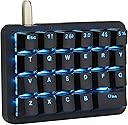
The Koolertron One-Handed Macro Keyboard is a compact, 23-key mechanical keypad featuring fully programmable keys with 4 customizable layers stored onboard. Equipped with Outemu Red switches for smooth, quiet typing and adjustable blue LED backlighting, it supports complex macros up to 349 key commands. Its portable design and detachable USB-C cable make it ideal for professionals and gamers seeking a powerful, space-saving input device compatible with PC and Mac.


| ASIN | B07RM3BS44 |
| Additional Features | Programmable Keys |
| Antenna Location | Gaming |
| Best Sellers Rank | #2,638 in Computer Keyboards |
| Brand | Koolertron |
| Built-In Media | USB Cable |
| Button Quantity | 23 |
| Color | Black/Blue backlit/Red switches |
| Compatible Devices | PC |
| Compatible Operating System Family | MacOS, Windows |
| Connectivity Technology | USB-C |
| Customer Reviews | 4.0 out of 5 stars 84 Reviews |
| Enclosure Material | Plastic |
| Hand Orientation | Ambidextrous |
| Item Dimensions L x W x H | 5"L x 3.5"W x 1.2"H |
| Item Highlight | Blue LED backlit, compact portable design, fully programmable keys, compatible with PC/Mac, ideal for gaming and productivity |
| Item Weight | 2.24 ounces |
| Keyboard Backlighting Color Support | Single Color |
| Keyboard Description | Gaming |
| Keyboard Layout | QWERTY |
| Manufacturer | Koolertron |
| Mfr Part Number | 23-BKB |
| Model Name | MG3AE-GAMAG23G-BKA |
| Model Number | MG3AE-GAMAG23G-BKA |
| Number of Items | 1 |
| Number of Keys | 9 |
| Number of Packs | 1 |
| Number of Sections | 23 |
| Recommended Uses For Product | Gaming |
| Special Feature | Programmable Keys |
| Style Name | 23 Keys/Blue Backlit/Red switches |
| Switch Type | Outemu red/blue switches |
| Theme | gaming |
| UPC | 886085662049 |
| Unit Count | 1 Count |
| Warranty Description | NO |
| Water Resistance Level | Not Water Resistant |
J**S
Not a stream deck, but still very cool and useful.
Took a little time to figure out the software. Lots of online tutorials to help you understand it. Plenty of keys, with a fn key and 2 fn toggle modes means you could map a ton of keys and macros to this thing. For example, I mapped a bunch of the shortcuts I used to the normal mode, my Zoom shortcuts to the f2 layer, and my Teams shortcuts to f3. The same keys start and stop audio and video, share screen, and swap cameras and displays. I also have persistent keys set on all layers for screen clipping and cut/copy/paste. Pretty convenient. I also love the macro feature. While you can't record macros on the fly, the software (amag) allows you to define some pretty substantial macros with key sequences, time delays, etc. And assign them to keys. It also completely stores the profile and macros in onboard memory, so I can program it on my personal PC, and use it on all my work PCs. No driver issues, it just shows up as a keyboard. (Note: I can't program with one of my work PCs while it is plugged into a thunderbolt dock. The scant documentation kinda hints at it, but it explains why I have trouble programming it sometimes) (Note: software is standalone and portable and does not require installation or elevated permission to run) It comes with an almost complete set of keycaps of the different profiles, which is annoying, cuz they have regular symbols on them, double shot so the LEDs can bleed they, but you'll probably want a consistent flow of keycap angles, which limits certain keys to certain rows. It also comes with a bag of flimsy all white keycaps, all the same profile, that look good, but don't feel as nice as the mx caps. There are 2 status LEDs under the top row center keys (1C and 1D) that by default are num and caps lock, but they can be repurposed as f2/f3 status indicators too using the software. They are close to the same brightness as the backlight at max, so it's hard to see at full bright, but visible at lower bright levels.
F**I
Great build quality but disappointing implementation.
Refers to Koolerton 23 Key keyboard (Blue Backlight / Red Switchs) this is really a mixed review. There's a lot to like here and this might be perfect for some applications. But in my case, there are a lot of down sides too. Lets start with the things I like 1) Excellent build quality. Feels solid. Worked perfectly out of the box. A+ here. 2) Very high quality USB cable came with it. Another A+ 3) There are 4 layers, so in reality you can map up to 96 different keys (23 x 4). 4) Full set of Black keyboard keys with transparent letters, perfect for the backlit keys 5) 23 extra blank white keys. 6) Included keycap puller 7) Actual usable instruction pamphlet included with it. Who does that these days! Very nice touch. Like it. 8) Software worked well (on an up-to-date Win 10), no problems running it and connecting to the Keypad. 9) Running the software on 2 PC is possible. When moving the keypad to the other PC, just connecting to the keypad will download the config from the keypad into the software for changes. No need to transfer config files from one PC to another. Now for the list of things I didn't like (or could use improvement): 1) The software for programming the keyboard is a little quirky but nothing too difficult to figure out with just a little trial and error. 2) Clicking the "Upload" to keypad button only uploads the section you're working on. ie. changing the keymapping upload will not upload the macros. You need to upload those separately. Just a quirk to learn 3) Each key can be programmed with either a single keystroke or a macro. By single keystroke, I mean one key-press. If you want to do a combination keystroke, like Win+L, that's 2 keystrokes. Tp do that you need to use macros. 4) You can assign a "Macro" to a key press. But you're limited to only 24 macros. For your macros, 12 of them are "Quick Macros" limited to 24 chars max. And 12 are "Custom Macros" which are limited to 42 chars. Remember, pressing Shift, Ctrl, Alt, or Win key modifiers consume one of your precious few characters. 5) Remember, with the 4 layers, you really have 92 programmable keys but only 24 macros. That limits the usefulness of the keyboard as the remaining 69 keys will need to be single keys, same as on your normal keyboard. 6) Given the limited size of each macro (24 or 42 chars) and only having 24 macros available, the usefulness is limited. 7) Macros can contain other imbedded macros, so you could work-around the 24 or 42 char limit, but you'd be using more of your precious few macros. My intent was to store fairly long strings of frequently repeated keystrokes. This is just to limiting for that. Things for improvement: 1) Increase the size limit on the macros to at least 100 chars. 2) Increase the number of macros available. 92 sounds like a good number :) 3) One missing feature that would be nice to have in the software is a Macro recorder. Would be nice to have it record my keystrokes as I work instead of making me enter a series of keystrokes manually. So there you have it. Its a well built solid product. But has a lot of drawbacks when it comes to taking full advantage of an otherwise excellent product. ** Update 1 ** I noticed a weird quirk. If Caps Lock is set ON on your main keyboard, the Caps Lock will also apply to any key or macro on this keypad as well. Kind of defeats the purpose, especially if you have passwords stored on this keypad.
J**A
Works With Windows Media Center and does a lot more
Believe it or not but I still have a machine that runs Windows 7 because I love to use Windows Media Center as my DVR for cable TV. The one downside to WMC is that it has inconvenient keyboard shortcuts so you can't go zipping around the interface very easily when watching videos. However, with the Koolertron keypad, you can program those awkward shortcuts so they can be executed with a single keystroke. Note that I programmed the keypad using a Windows 10 machine but the keypad still works on a Windows 7 machine, so it is truly portable. I also use this for PowerDVD when watching Blu-Rays because it too requires multi-key shortcuts to do navigation. I also use alternate character sets when typing documents. Nothing slows my typing down more than having to hold the Alt key down followed by typing 4 digits on the keyboard numpad to get an "a" with particular accent marker, or an "n" with a tilda. Now that I have the Koolertron, I can program these characters so they can be executed with a single keystroke. What a timesaver! Just to clear up some confusion about the use of Layers on this keypad: this keypad does have 4 layers, meaning you can technically program 4 x 23 = 92 keys. However, since you need some keys to navigate between layers, you really only have 20 keys per layer. And lastly, one of the layers requires you to press an "FN" key along with another key to execute a command. So I never use that layer because my whole reason for buying this keypad was to avoid multi-key typing. So for me, I have 3 x 20 = 60 keys available for programming which is plenty considering you can only program 24 macros total. I do wish Koolertron would produce a new version that had more than 24 total macros. I would be willing to pay double for a keypad that had 48 total macros. I get around this current limitation by saving different configurations to .hex files (this is a great feature of this keypad) and loading the one with the macros I need for the task at hand. But it would be nicer not having to keep track of what macro was on what configuration file.
A**R
Research the software link for your self before you buy (see review)
This product simply doesn't work. The software needed to run the device is unreliable. AI says it can be finicky at best. Had to find the software through Reddit. The link that's provided offers the latest version but when down loaded, it can't connect. So then go the "older version" but that is nothing but a loop. Caveat emptor.
C**Y
Not bad
Extremely bright. If you plan on using this in a dark room, be prepared to wear some blue light glasses or sunshades.
E**S
Nice Little Tool For Digital Artists
There's not a whole lot to say here. It does exactly what it says, feels good to press, and holds up well. Programming the keys isn't too difficult once you learn the Amag software, and having plenty of spare key caps to choose from is nice. Although, i really wish there was a Space, Ctrl, and Shift key cap. Even if they were a single key cap instead of a double. Other than that, no complaints.
A**R
Great keypad
Can't say enough good about this keypad. It does exactly what it's advertised to do. Buyer beware though, the description DOES say "Blue LED Backlit" and it is exactly that. This model does NOT have options to change the colors of the LEDs, even though the software for it gives you those options. You will get an error when trying to load in some of the RGB settings. But the blue is nice, and you can still adjust the intensity and other items for it.
W**O
Keys don't have the same height. Otherwise good product
Good programmable keyboard that can use some improvements. Pros: All 23 keys are programmable. Can map simultaneous key presses i.e. (Lshift-Ralt-a) to a single key Really good USB cable - feels solid and nice to the touch. Comes with a complete set of extra key caps and key remover Reasonably decent programming instructions though there is some experimentation needed to figure out the quirks. LED glow on the black keys looks fantastic. You can map up to 4 sets of key mapping and toggle between them if you reserve a least 1 key to do the toggling. Two of the key LEDs can be programmed to act like a status indicator to indicate which key map mode you are in (i.e. white instead of blue) Cons: All the black key caps are tapered by different amounts. If you arrange the different letters to be on the same row of a standard keyboard you are ok. But if you put say the F4 key cap on the same row as the X key cap you'll find that they are not of even height which is annoying. It would have been better if all the keys had the same profile so you can truly mix and match. The white key caps look ugly with the LED on. The illumination through the white plastic does not look even. Though one can program up to 4 different key mappings, it is hard to fully take advantage of it since there is only 24 macros that you can define. You can map lower case keys directly without using up a macro. But if you want to map simultaneous key presses such as Ctrll-c, $ (Shift-4), A (Shift-a) you need to use a macro. So you quickly run out of macros. I think a product improvement would be to either allow simultaneous key presses to be mapped without a macro, or increase the number of macros supported. Overall it is a good product despite some shortcomings.
Trustpilot
1 month ago
1 week ago