


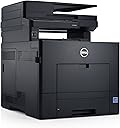
Dell Color Laser Printer C2665dnf, with AirPrint, 1-year Limited Hardware Warranty and 1-year Next Business Day Onsite Service after Remote Diagnosis
Product ID: 1270967
Dell Computer C2665dnf Color Printer with Scanner, Copier and Fax
R**A
Most troublesome printer I have ever had.
This printer stinks. I've never had a printer that had so many problems and I'm only in month 2. Today, an envelope got stuck, or actually lost. It wasn't until I pulled out the manual feed tray that I found it. Too bad that wasn't one of the things the instructions told you to do. And then let's talk about customer service. It appears that it may be offshore. That's fine by me but it took me 15 minutes to get past one guy who was possibly half asleep to get to a person who could help with printers. Then, that person didn't even know how to remove the manual feed tray. He had to research it. In the meantime, I figured it out and solved the problem. So.....printer has problems, service is terrible. Bottom line....don't buy this printer.
E**H
A BEAST (but a sexy beast)
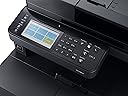
Please Note: This printer is very large and very heavy. It requires about 24" of depth because the scanner door needs room to swing. It is also 22" high and 17" wide...and at 75lbs, it is enormous for a home printer. That said, this is one very excellent color laser printer/scanner. (I cannot comment on the fax features, as we do not use them)Important features for me were primarily how this printer would work with i-devices (iPhones/iPads), Linux support and ability to scan to a central server quickly and efficiently. All of these it does flawlessly, and a million times better than the HP LaserJet Pro 400 M425dn we upgraded from. (Find my review on that here: https://www.amazon.com/review/R1MDITRWEXCVHO/ref=cm_cr_rdp_perm)One feature we really love is the ability to have many preset scan modes that we can turn into dedicated soft-buttons on the home screen. Each of us has our own set of folders on the server and we have others for dedicated functions. This machine can scan directly to them according to the configuration we set when programming the buttons. For example, I can now press "Receipts" which then will scan in a 300dpi Color PDF and put it into the "Receipts" directory on our central server (using CIFS or FTP). We also have settings for Photos, Bills, and Legal Documents. Each user also has their own subset of buttons as well and custom settings are easy to do on the fly.Making copies is the same as using any copier you've used before: Put stuff in, hit "Copy"...or adjust default settings, which are also configurable.Color printing on this thing is astounding. We haven't tried it yet but I imagine with photo paper one could very happily print proper photos. I do know that we have printed a few holiday photos on regular paper and framed them for the season...they looked great and plan on switching them up every now and again.Linux: It just works. Our server and several workstations are running various versions of Mint or Ubuntu and got this thing setup in seconds. Need I say more?OSX & iDevices: Same. Click, click, done.There are a couple small downsides, but not enough to keep me from giving five stars or not recommending this to friends:1) When in "super-power-saving-mega-sleep-mode", if you send a print job from an iDevice, it takes about 30 seconds to a minute for the printer to wake up on its own and process the job. This usually doesn't bother me because if I'm printing from my phone or iPad then I am probably in a different room and have to walk over anyhow...by which time it is done. However, when I was doing initial testing with the device I found this annoying. Also, you CANNOT disable this feature. Even if you want to keep it permanently in "semi-sleep" and burn electricity, you can only do so for a maximum of about an hour.2) I am disappointed that the scanner is not two sided. It has to flip pages to scan the second side, which makes that process a bit slower than I'd like...but since it does seem to scan through reams and reams of paper without issue, I feel pretty comfortable stacking up 20 pages and just walking away.3) Doing the user button configurations isn't possible from the web interface. This isn't the end of the world, but having to use the screen on the printer for configuration is sub-optimal. Once they are done they are done...but I'd rather have been able to move and tweak and set and change every-little-thing from the comfort of my desk. Alas.All in all, I still give it 5 stars. It is by far the best MFP I've seen, as well as the best color laserjet I've used. I'm hoping it serves us well for many years and I will report back occasionally.
E**K
The print quality is amazing and the toner refill cost is very reasonable
The print quality is amazing and the toner refill cost is very reasonable. (I researched toner refill cost before purchasing. And I use re-manufactured/generic toner.) Installed relatively easily. It also prints very fast for my small office. However the reason for three stars instead of five is the envelope printing is absolutely unusable for an office environment. (As was mentioned in another review). It wrinkles the envelopes horribly. I have never seen a laser printer handle envelopes so poorly. If you don't need to print envelopes, I highly recommend this printer, if you do need it to print envelopes, AVOID this printer.Another annoying issue is this printer beeps A LOT and at just about everything. It is always beeping about something. At first I thought it was jamming, but it was telling me it started printing, then it was telling me it finished printing. It beeps several times with each warning. It is very annoying if you have this printer near customers or clients. You will want to turn the sounds off.The scan feature is so-so. It seems to jam quite a bit for me. I do not use it primarily for scanning, so not a big issue for me. But if you need scanning, you may not be happy with this one.Overall, for just regular printing, I am happy with this printer, except for the envelopes. It is not a good all around printer because of its limitation, but if you want a quality color laser at a reasonable price, this printer works for that.
Trustpilot
2 weeks ago
1 week ago