🎮 Dominate your game with lightning-fast precision and endless power!
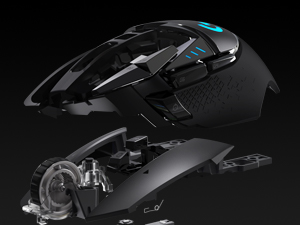
The Logitech G502 Lightspeed Wireless Gaming Mouse combines pro-grade Hero 25K optical sensor technology with ultra-fast 1ms wireless connectivity, offering up to 60 hours of battery life and compatibility with PowerPlay wireless charging. Featuring 11 customizable buttons, adjustable weights, and vibrant LightSync RGB lighting, it delivers a tailored, high-performance experience for serious gamers and professionals alike.


| ASIN | B07L4BM851 |
| Additional Features | Wireless |
| Antenna Location | Gaming |
| Are Batteries Included | Yes |
| Are Batteries Required | Yes |
| Battery Average Life | 60 Hours |
| Best Sellers Rank | #16 in Video Games ( See Top 100 in Video Games ) #2 in PC Gaming Mice #7 in Mac Accessories |
| Brand | Logitech G |
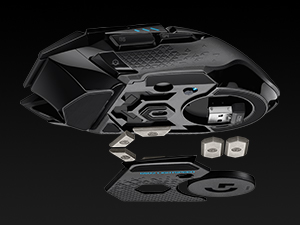
| Built-In Media | 2 x 4g Weights, 4 x 2g Weights, Accessory Box, Charging/Data Cable, G502 LIGHTSPEED Wireless Gaming Mouse, LIGHTSPEED™ Wireless Receiver, Receiver Extension Adapter, User Documentation |
| Button Quantity | 11 |
| Color | Black |
| Compatible Devices | Personal Computer |
| Connectivity Technology | LIGHTSPEED Wireless |
| Customer Reviews | 4.6 out of 5 stars 70,547 Reviews |
| Enclosure Material | Plastic |
| Global Trade Identification Number | 00097855145246 |
| Hand Orientation | Right |
| Hardware Platform | Mac, PC |
| Item Dimensions L x W | 1.6"L x 3"W |
| Item Type Name | Gaming Mouse |
| Item Weight | 12.96 ounces |
| Manufacturer | Logitech |
| Model Name | G502 Lightspeed Wireless Gaming Mouse |
| Model Number | 910-005565 |
| Mouse Maximum Sensitivity | 16000 Dots per Inch |
| Movement Detection | Optical |
| Movement Detection Technology | Optical |
| Number of Batteries | 1 Lithium Polymer batteries required. (included) |
| Number of Buttons | 11 |
| Operating System | Chrome OS, Mac OS X 10.7 Lion, Windows 7 |
| Power Source | Battery Powered |
| Range | 5.0 meters |
| Special Feature | Wireless |
| Style Name | Wireless |
| Theme | Gaming |
| UPC | 097855145246 |
| Unit Count | 1.0 Count |
| Warranty Description | Manufacturer’s warranty can be requested from customer service. |
S**M
Great Mouse! Lasted me 5+ years, and still works perfectly fine
I have had this mouse for over 5+ years, along with my Logitech G213 Prodigy keyboard. This was a great mouse that lasted me forever. It is a wired mouse that you can change the RGB like most, and it is a great mouse that allows you to have any DPI that you could want. The look is nice with the mouse, and it has a nice feel in the hand, especially if you have larger hands, like I do, especially. I rest my thumb on the bottom left lip of the mouse, and it works terrific for that, and has great reach to the Mouse's 5 and 6 buttons. It does have an infinite scrolling button if you want to as well, like most Logitech mice do now, and it works well! I did end up replacing this mouse, but not because it broke! I just switched up the look of my setup and wanted something new. This thing lasted me 5+ years, and I felt like I would put it to rest for a bit. It still worked great, and I still have it, in case anything happens. Great value for the money! Especially if you want to pair it up with the Logitech G213 Prodigy. These are old, I know! But these are great for anyone who is just getting into gaming, or wanna give Logitech a shot, as you might be a fan of a different brand, but you don't wish to spend over $100+ with each purchase, just to try the brand out.
N**W
Perfect Gaming Mouse for Every Setup
The Logitech G502 Hero is fantastic. It feels solid and comfortable, with precise tracking that makes gaming a breeze. The customizable buttons and adjustable weight system let me tailor it perfectly to my setup. Build quality is top-notch, and the software, once you get used to it, is very powerful. Definitely one of the best mice I’ve ever used—worth every penny.
C**.
Great product!
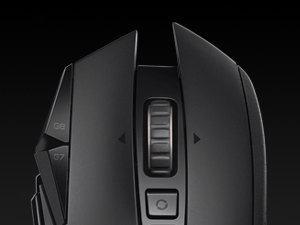
I LOVE Logitech products because they last a VERY long time. I love how this mouse feels in my hand and it's just so comfortable. It's not to big or to small and it fits perfectly. It has lots of buttons for you to accidentally push, especially if you are gaming lol. I love the fact that on the bottom, you can open it up and put in as many magnetic weights inside to hardly any to none. It just depends on how much weight you want your mouse to have. I Love a good weighty mouse, so this mouse is perfect. You can also make the colours change consistently, or have it one solid colour. The scroll button in the middle is amazing! You can lock it so that it doesn't scroll very fast, and unlock it to ZOOOOM pretty quickly to the bottom of the page and I LOVE that feature. Logitech is the best when it comes to electronics. I had speakers from them that I had bought a good 15 to 20 years ago and they just NOW went out on me. So I suspect this mouse is going to last me a very, VERY long time. :)
G**.
Outstanding mouse once you get past the software
If you talk about this mouse, you really need to talk about the Logitech software, There are 3 different downloads at the Logitech website to change your 5 profile settings if you don't like the default settings on the G502. The one they will suggest first is G HUB and it is by far the worst and most convoluted to learn to setup and use. The second which they are phasing out is Logitech Gaming Software. (If you install both G HUB and Logitech Gaming Software, and you try to use Logitech Gaming Software, it will not allow you to use it, and it will tell you to use G HUB instead even though many FAQ's at the Logitech website still refer to Logitech Gaming Software.) However, the third, and the one you should download and use, is called Onboard Memory Manager. It is very simple and easy to figure out, does almost everything you want it to, and it doesn't also install a lot of other crap on your system. NOTE: If you do wind up installing G HUB or Logitech Gaming Software, the setting DPI LIGHTING for "ALWAYS ON" is unchecked by default and is not in Onboard Memory Manager. (By default, when you change profiles, the side DPI lights on the G502 briefly go on and then go off to indicate what profile you are on.) I suspect this setting is unchecked by default for a reason, because I could not get it to work properly when set to "ALWAYS ON". When this option is checked the side DPI lights would not stay on the proper profile indicator to indicate the current profile setting, and they would randomly change (such as when I used the scroll wheel.) What I did was to keep this setting in G HUB or Logitech Gaming Software unchecked. Then in Onboard Memory Manager I would select a fixed color for each profile so I would always know what profile I was currently on. (BTW, this is similar to what is on the wireless G305 mouse but they are only small dots of color, you can't change the default colors, and they only select up to 5 different DPI settings on only one available onboard profile as opposed to the 5 profiles each with 5 DPI settings on the G502.) Unless you have a desire to be frustrated, do yourself a favor and just download Onboard Memory Manager. On the G502, the only reason I can see for using G HUB or Logitech Gaming Software is if you want to change settings for mouse click one or two, which Onboard Memory Manager won't allow, or if you want to setup profiles for individual games and software on your computer, in which case I would lean in favor of Logitech Gaming Software which is much more intuitive and easy to use. All that being said, once you get past setting the G502 up, the mouse performance is outstanding. I didn't add the weights since the mouse felt fine to me. And even though the highest default DPI setting is at 6400, you can set it all the way up to 25,600 if you wish. Also, I have small hands, and even though some of the buttons I will never be able to push without really reaching, it's very comfortable using for long periods of time, and for the current price you can't beat it.
I**T
Good mouse with some things of note.
This is an old design, from before the age up ultra-lights with honeycomb shells. It's heavy, and has the now absurd design feature of being able add little weights to make it heavier. But it has a few things that ultralights lack (about 20g more baseline mass). The killer feature for me is the scroll wheel. It's also massy. It's the same kind of infinite scroll wheel found on the Master series--or at least the one I tried. It's not quite as heavy as the Master series, but when you release it to spin freely, it's still a long spinning flywheel. Scrolling isn't quite "infinitely smooth" in reality though, because that's a software issue. There's still an internally quantum of scrolling for every so many radians of rotation of the wheel, but it doesn't click or stop, and that makes scrolling feel smoother, both in terms of tactility and what you see on screen. You can still scroll a single click's worth at a time, but that's not what this is for. This is for blasting your way through long documents with flick of your fingertip, and it does that very well and quietly. I found myself missing that feature daily when I retired my last G502 years ago for the lighter models. Another thing this brings to the table is more rigidity to the shell. Ultralights make tradeoffs to be that light. There's not creakiness here, no accidental clicks from gripping the side. The "sniper mode" thumb button is reasonably well placed for the average thumb. Mine is a little short but it's still within reach when I need it, I just have to be more deliberate about it. The back and forward buttons are pretty much perfect. The Dpi switch button being on top, right behind the scroll wheel click/infinite lock is another feature I found myself missing from other mice--especially ones made by Razer. All these years and Razer is still putting the button to cycle DPI in the second worst possible place: on the bottom next to the sensor. The only thing worse would be inside the shell and requiring a screwdriver to get access to it. It would be nice to have this mouse with less mass. I also wish it weren't Logitech because I have never liked their configuration software. For some reason, this one almost immediately discolored on contact with my skin, taking on a dark green hue where my hand rested on it. That didn't happen with the G502 I had years ago, nor has it happened in any other mouse or plastic HID I've ever used.
W**R
Impressive and Comfortable
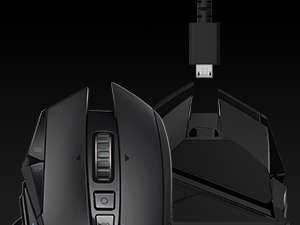
Only after a couple play sessions in BF6 with this mouse, I can already feel how much more precise I can be with it. My first play session was a bit rough getting used to the feel of it. It’s quickly getting more natural. I switched from a ghost keyboards m1 mouse to this. The left and right mouse clicks feel a bit more stiff than my m1 mouse which I like. Easier to avoid accidental inputs. All the other buttons feel solid with clean clicks. The mouse wheel is a very different feel with more significant bumps while scrolling, but it adds a more tactile feel being easier to control. It also has a release that lets it just spin for probably more work type use rather than gaming. It’s easy to setup, basically plug and play but a bit confusing. It comes with of course, a charging cable but the Bluetooth usb comes in some sort of housing that plugs in by the charging cable. Not sure if that is better or worse than how I have it now which is the usb receiver plugged into the back of my pc. Works fine. Looking at the Logitech website shows up to 48 hours of battery life with default lighting, or up to 60 hours with no lighting. Fully charged it showed 26 hours (25 hours now at 96%). And turning off the lighting at 96% only goes up to 28 hours. Which is plenty as I usually plug my wireless device in to charge after use. My favorite part of this mouse is how comfortable it is. It’s a bit thicker filling in my smaller hands more compared to my m1 mouse. Another nice added comfort feature is the thumb ledge. It keeps my thumb off my mouse pad, and helps with control of the mouse in high stress fps situations. The weight also help in precise aiming. My m1 mouse was 65g , the g502 is 111g plus the 1 big weight and 2 smaller weights I added making it go up to maybe 119g. Highly recommend this mouse, and will try to update if it fails prematurely.
M**Z
Very Good mouse. Scroll wheel could use a better feel.
I bought this 4 years ago. And its very comfortable. Its fast and the buttons are alright. Clicks are good. My only gripe is the mouse wheel. It feels terrible. Not the scroll itself but the ridges on the wheel itself that you touch. It doesnt feel good. Scrolling needed an adjustment in settings but overall its good. If you plan on changing settings or remapping the buttons you'll need to download G-Hub which is their app.
S**E
One of the Best Around Tried and True
One of the best peripherals we've ever used. Company wide we use this and will recommend and will buy again...in bulk hehe. Feels great and the adjustable weights make it tailored for each person. USB connect so there's no recharge to worry about, but it can get in the way. The scrolling of this thing is awesome, I find myself playing with it too. The gaming performance is spot on with adjustable DPI and settings for each game. It is a bit louder when clicked then some other gaming mice. Great gaming mouse or just a great mouse all around.
Trustpilot
3 weeks ago
3 days ago