
DOWNLOAD THE APP


Customer Services
Copyright © 2025 Desertcart Holdings Limited
DOWNLOAD THE APP

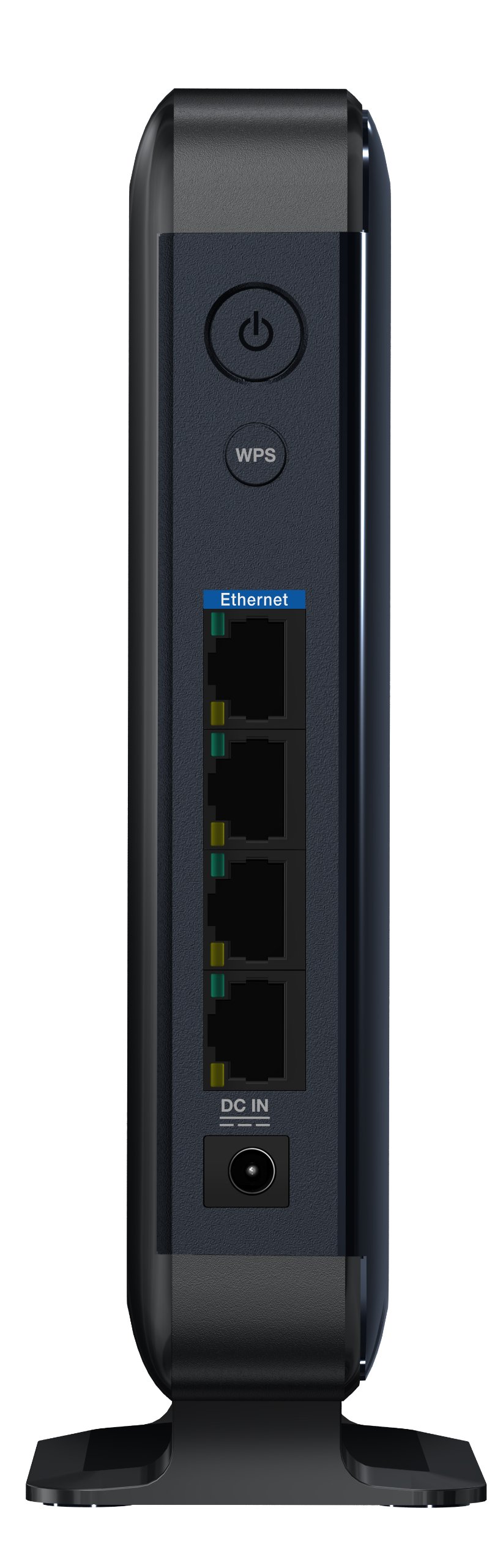

🚀 Elevate your network game—fast, flawless, and fuss-free!
The WD My Net AC Bridge delivers high-speed 802.11ac wireless connectivity combined with four Gigabit Ethernet ports, enabling seamless streaming and gaming without the clutter of cables. Its simple push-button setup makes installation effortless, while Western Digital’s trusted engineering ensures reliable performance for your home or office network.
| Wireless Type | 802.11a/b/g/n |
| Brand | Western Digital |
| Item model number | WDBMRD0000NBL-HESN |
| Operating System | RouterOS |
| Item Weight | 2.02 pounds |
| Product Dimensions | 3 x 12.52 x 9.9 inches |
| Item Dimensions LxWxH | 3 x 12.52 x 9.9 inches |
| Manufacturer | Western Digital |
| Language | English |
| ASIN | B00A66WJWK |
| Is Discontinued By Manufacturer | No |
| Date First Available | November 14, 2012 |
P**O
WATCH OUT FOR SELLER "TRINITY ADVANTAGE LLC"
I purchased two of these devices from this seller at the same time. Both items were listed as "new" and being sold at full retail price. Upon arrival I quickly found that they were both faulty and unable to locate wireless networks. (This is part of the setup process and is uber important) I contacted WD support and they asked for the serial numbers of the items. WD reported that both units are refurbished, without question. WD evidently tracks the serial numbers for all refurbed items.I am obviously returning both of these junk units since they dont work, but this company will likely resell them to the next unaware buyer. (No doubt listing the items as "new") The next customer will waste hours trying to figure out why the device isnt working, just like I did. It is a shame that sellers can push used items into the Amazon market place and claim that they are free. Please save yourself from this and purchase from a different seller.I should note that a 1-star review for this item is not fair, but I dont know how else to warn people about this seller. People read product reviews, but rarely read the seller reviews when buying new items that are fulfilled by Amazon. These bridges are excellent. We have 4 of them supporting various areas of our office (with 2 additional units soon to be added) and they are rock solid. Over the past year I have never had to reboot or reset a unit due to a loss of wireless signal. They hold their connection with the main wireless router and provide great throughput.We have these units picking up the wireless signal from our ASUS RT-AC87U router and they work together wonderfully. I suspect that if folks are having issues with their unit holding a connection, it probably has more to do with their wireless router than anything else. I also have one of these units at home, connected to a ASUS RT-AC66U wireless router and things have been just as solid.As you may have guessed, you can definitely have more than 1 of these units connected to your wireless router at the same time. I have 4 connected to the same router, same 5GHZ band, with no issues. I did learn that you cannot run a switch off of one of these units to share the connection with more end points. Each unit has 4 ports. You can connect up to 4 devices, that's it. If you need more than 4 connections from a location, you'll need to purchase another unit. You'll just have 2 of these sitting right next to each other, but they'll work great.
P**S
A fast, wireless bridge to connect your computer or game console on the other side of the house to the internet, without cables.
After discovering that my phone line was damaged in part of my house, I was looking into possibly having to rewire part of my house with new phone lines. I then realized that the part of the house effected only had a phone line to feed my DSL modem that was next to my computer. There had to be another way to get internet to that computer, at least I hoped so.Then I saw this Wireless AC Bridge on Amazon and I thought, I should be able to go wireless, especially with the new AC speeds this bridge provides. So I decided to give it a try. I put my DSL modem close to where the phone line is coming into the house and hooked an AC router (that I already had) up next to it. After installing this AC bridge next to my computer and hooking the computer up to it, I have a high speed internet connection without the wires and it's fast on top of it. In my case it's fast enough not to slow the feed the modem provides to me (40 MB/s) and I haven't have to restart the bridge yet either to speed it up. This installation was a breeze and well over a year ago, with so far NO problems at all.After I had this one installed, I bought another one to connect my Xbox One and Playstation 4 to the internet too. Much faster than the modems that come in these devices.
L**D
It just works!
Update: For some reason, this bridge does not work well with some flavors of Linux (CentOS, Zorin I know for sure), even when using the identical hardware that used to host my Windows 7 & 8.1 installations. Flawless with Windows 7, 8.1 or 10, though.Original review:Very happy, recommended!Absolutely no problems hooking this up, I was online in literally seconds. If the router has DHCP enabled, nothing is needed except power and pressing the WPS button on the router* and the bridge. Antenna strength is far stronger (three bars to one) than the 802.11ac NIC on my new ASUS Maximus VI Formula motherboard (which has never made a stable connection) from the same location. Download speed is right at the maximum my contract offers, identical to when I directly wire the computer to the router.*Note: Router is an ASUS RT-AC68U with no subscribers on the 2.4GHz net and only this bridge on the 5GHz side. Signal is passing diagonally through two masonry & metal reinforced walls to a room where for the past two years I have never gotten a stable signal (802.11g, n - in either band - nor ac ) on laptops, smart phones, or USB dongles.There are two other 5GHz AC nets in range according to the bridge's "networks found" tool, but I streamed two HD videos over the bridge to two different computers on ports 3 and 4, while both computers were simultantaneously logged on to an MMO game (from Germany to California, by the way) and my wife and I fought through two different five-man skirmishes for 15 minutes with the game in one window and the video in another on each system. No framerate issues, skips, buffer exhaustion, disconnects, or problems of any type.By the way: The firmware updater told me that it already had the latest version. Not a major thing, but nice.I took one star off the rating for the following cumulative reasons:1) There was no documentation, and no instructions on where to find it online. Thank you, Google!2) Access to the bridge is password protected, and without the documentation (see previous sentence), you can't find out what the defaults are to get in.3) Once in, there is no easy way to determine signal strength. You have to start the WiFi connection wizard (even though already connected), read the signal strength off the "found networks" screen, then abort the connection wizard by clicking on the "Back" button.4) Finally, my biggest gripe is that there seems to be no way to determine the wireless connection speed between bridge and router at all. Windows of course only indicates the gigabit "wired" connection between the computer's NIC and the bridge.To sum up: Works fine right out of the box, especially if you are not technically inclined, don't want to change the default security settings, and just want to stop running wires down the hall. :) Strong signal (for the first time ever) into our computer room. Not designed for a technophile. Really, how hard would it have been to add indicators for signal strength and connection speed to the overview screen?
Trustpilot
1 month ago
4 days ago