Desertcart purchases this item on your behalf and handles shipping, customs, and support to Greece.
🖨️ Elevate your office game with pro-quality prints that get noticed!
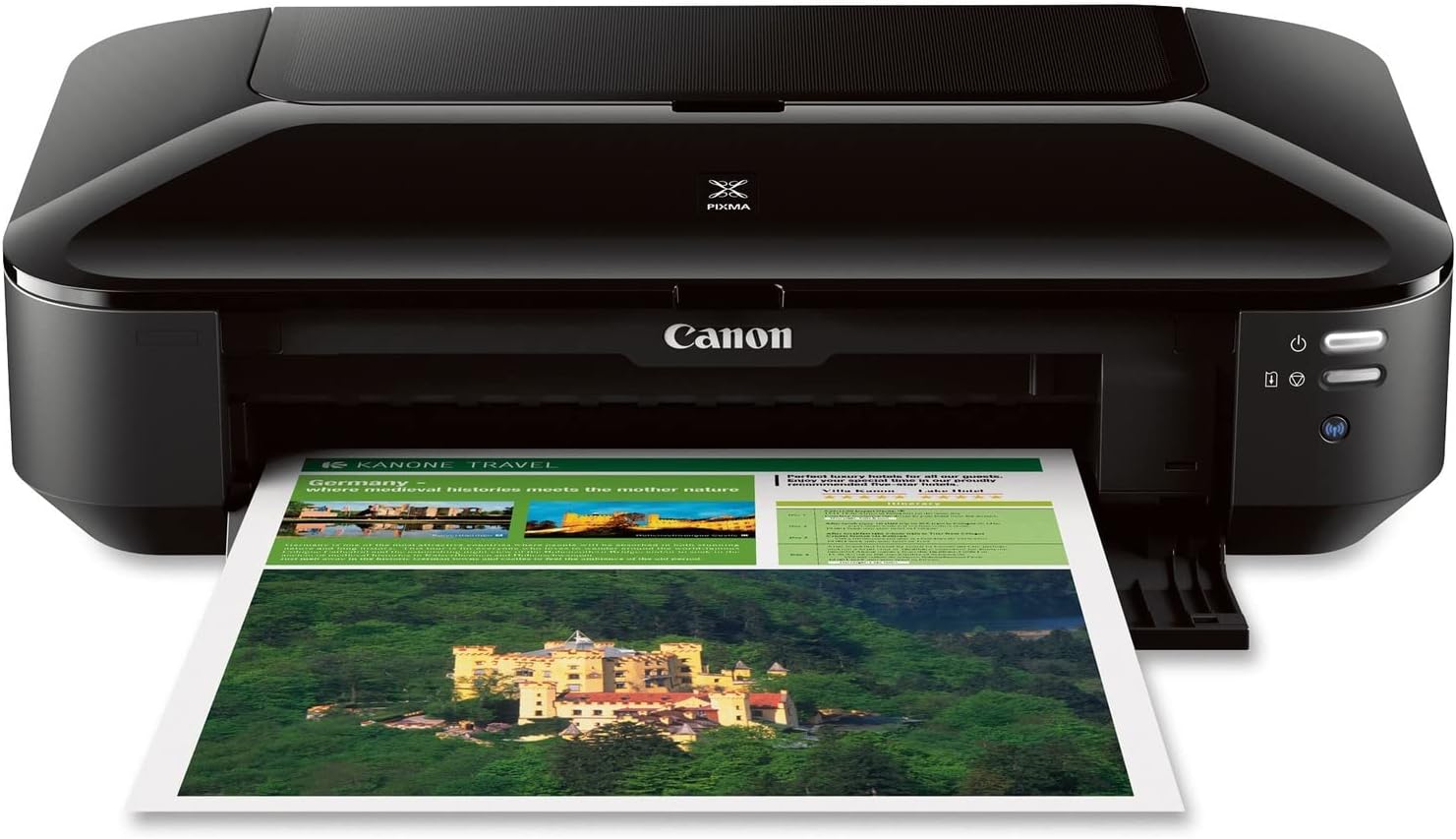
The Canon Pixma iX6820 is a wireless business inkjet printer designed for professionals who demand high-resolution, large-format prints up to 13” x 19”. Featuring a 5-color individual ink tank system, it delivers vibrant, precise color with economical ink replacement. Compatible with Windows and Mac, it supports AirPrint, Google Cloud Print, and Pixma Printing Solutions for seamless mobile and cloud printing. Fast print speeds, borderless photo capability, and smart software tools like My Image Garden make it a productivity powerhouse for modern offices.


| ASIN | B00HM0IVDY |
| Additional Printer Functions | Print Only, Scan |
| B&W Pages per Minute | 14.5 pages_per_minute |
| Best Sellers Rank | #12,657 in Office Products ( See Top 100 in Office Products ) #28 in Ink Tank Printers |
| Brand | Canon |
| Built-In Media | Printer |
| Color | Black |
| Color Depth | 24 bpp |
| Color Pages per Minute | 15 pages_per_minute |
| Compatible Cartridge | compatible Canon ink cartridges |
| Compatible Devices | Windows 8, Windows 8.1, Windows 7,13 Windows 7 SP1, Windows Vista SP1, Vista SP2, Windows XP SP3 32-bit13 Mac OS X v10.6.8 - v10.913 / PGI-250 Pigment Black XL CLI-251 Cyan XL CLI-251 Magenta XL CLI-251 Yellow XL CLI-251 Black XL PGI-250 Pigment Black CLI-251 Cyan CLI-251 Magenta CLI-251 Yellow CLI-251 Black / Plain: Plain Paper, High Resolution Paper; Super High Gloss: Photo Paper Pro Platinum; G… |
| Connectivity Technology | Wireless;Ethernet; USB |
| Control Method | App |
| Controller Type | Android |
| Customer Reviews | 4.1 out of 5 stars 4,279 Reviews |
| Duplex | No |
| Global Trade Identification Number | 00013803230260 |
| Hardware Interface | Ethernet |
| Ink Color | Cyan, Magenta, Yellow, Black |
| Item Dimensions D x W x H | 12.3"D x 23"W x 6.3"H |
| Item Type Name | Inkjet Printer |
| Item Weight | 17.9 pounds |
| Manufacturer | Canon USA Inc. |
| Maximum Copy Resolution Black and White | 9600 x 2400 dpi |
| Maximum Copy Resolution Color | 9600 x 2400 dpi |
| Maximum Copy Speed Black and White | 14.5 pages_per_minute |
| Maximum Media Size | 13 x 19 inch |
| Maximum Print Resolution Black and White | 9600 x 2400 |
| Maximum Sheet Capacity | 1 |
| Maximum print Resolution Color | 9600 x 2400 dpi |
| Model Name | PIXMA iX6820 |
| Model Number | 8747B002 |
| Model Series | PIXMA |
| Number of Trays | 1 |
| Other Special Features of the Product | Auto Power Off, Auto Power On, Borderless Printing |
| Output sheet capacity | 140 |
| Paper Size | 4 inch x 6 |
| Print media | Glossy photo paper |
| Printer Connectivity Type | Wireless;Ethernet; USB |
| Printer Output Type | Color |
| Printer Type | Inkjet |
| Printing Technology | Inkjet |
| Processor Count | 1 |
| Resolution | 9600 x 2400 |
| Scanner Type | document |
| Series Number | 8747 |
| Special Feature | Auto Power Off, Auto Power On, Borderless Printing |
| Specific Uses For Product | Multi-Purpose |
| Total USB 2.0 Ports | 1 |
| Total Usb Ports | 1 |
| UPC | 013803230260 |
| Unit Count | 1 Count |
| Warranty Description | 1 year limited |
| Warranty Type | limited warranty |
P**N
Excellent Machine, Comparison with Pro9000 II
I am very impressed by this machine and believe that Canon made a marketing error calling it a "business printer". I am an artist who uses photo reference, so I need a lot of good, detailed prints for my work. Previously, I was using the Pro9000 II. It made very nice photos, but I could not support its unquenchable thirst for ink. With 8 small cartridges, I was constantly ordering refills. The cost was terrible, but it was also extremely inconvenient--I never knew when I was going to be stuck in the middle of a project with no ink. I tried an off-brand refill system but it leaked all over the place. So, apprehensively, I decided to try one of the printers with fewer cartridges--at least with only 4 inks (I believe the pigment black is only for text) I could cut the problem in half. I decided that I could live with diminished print quality in exchange for the cost and convenience. Well, so far I am delighted with the prints from this model. With a little tweaking, I was able to get a near-perfect match to my monitor (I reset the printer with a bit less magenta and a tad brighter). I was never able to do this with the Pro9000 II, which was inconsistent from print to print. There is no visible deficit from having half the number of inks--transitions are just as smooth or better, colors are vivid, contrast is excellent. It's difficult to be certain, but details and textures might be ever-so-slightly sharper with the Pro9000 II, and the ink dots might be a tad more visible with the iX6820, but that's under very close scrutiny. So far I've printed about 12 8 1/2 X 11 prints and the ink levels are all above half--and that is using the smaller cartridges that came with the machine. That's already better than the Pro9000 II, which would have been demanding a fix by now. I have only been using it for about a week, so I can't attest to its durability--I hope it will continue to work this well. I also can't comment on the wireless capability. I just connected it to the USB cable I had from my last machine. It works fine with a cable but quite a few people have complained about wireless problems. UPDATE: Many months later, this printer continues to make excellent prints. I notice that when I don't make a print for a long time--maybe a few weeks--there will be a slight bit of banding in the first print that comes out, but that seems to work itself out quickly by the next print. This is excellent performance compared to the Pro9000, which had a lot of banding issues and needed to be cleaned and fussed with regularly. I have had 2 small problems that should be noted. The paper feed is somewhat unreliable--there have been a few times when I had to fiddle with the paper for 5 minutes or so to get the machine to grab onto it. Also, the ink sensor function is extremely premature, to the point of being useless. I was able to continue to make excellent prints for a very long time after the notification that inks needed to be replaced. Interestingly, when the ink finally does run out, the difference in prints is abrupt...you know right away. These are annoying defects, but the quality of the prints is still such an astonishing bargain that I am keeping the 5 star rating.
F**K
Great so far
I had to write a review of this printer even though I've only had it a week, because I am so impressed by the print quality. I am branching out into selling my artwork as greeting cards and needed something to replace my diabolical Epson WF-3640 printer/scanner combo. To be clear, I was only looking to purchase a printer, as the scanner on my Epson is ok. I wasted hundreds of dollars in time and on ink cartridges trying to work with the printer on it over the past 18 months, and finally gave in. It is AWFUL and I will never buy another Epson printer. I took the plunge on this Canon Pixma iX6820 because it received decent reviews in the art world, and on Amazon. I had my eye on other Canon printers, but couldn't spend more than $150 so this fit the budget. INSTALLATION: Relatively easy. I had to download the setup files twice before I was able to run the programs, but once installed, it was an hour tops. WIFI CONNECTIVITY: Not so easy. Still haven't gotten that sorted out. It would be nice if I had wifi connectivity, but as my printer is located right next to my computer, it's not a dealbreaker to me if I don't have this feature. I've never had luck with any printer and wifi connectivity, to be fair. PRINT QUALITY: Surprisingly good. I am still fine tuning the ideal print settings, as I work mainly in watercolor, pen & ink. Watercolor is challenging to reproduce accurately. That said, I've already printed higher quality, more color-accurate prints on PLAIN COPY PAPER using this printer, than I ever did using very expensive photo paper in the Epson. EASE OF USE: I have not used the My Photo Garden or whatever it's called yet, and you are not required to use it when printing. It's just an additional print formatting option. I have had no trouble printing from Photoshop directly, from PDF, or from my default Windows Photo Viewer. INK USAGE: Can't really tell yet, as it's only been a week, but the cartridges that came in the box were easy to install (not messy or difficult like I read in some reviews) and still show full levels after about 15 high quality full-page prints have been made, plus various smaller proofs. I will update this review if anything changes. UPDATE 1 MONTH LATER: I am still impressed. Ink cartridge life is great compared to my old Epson. The only 2 issues I have are: it is a pretty slow printer. Takes about 15 minutes to print 25 full color "photo setting" 8.5x11 documents. However, it is quiet, and the quality is gorgeous. The other issue is that it still doesn't work to connect wirelessly. Since my computer is always next to the printer, it's not a big issue for me, but for those who must have wireless print capability, plan to spend some time with tech support if installation doesn't go smoothly on our own. I haven't gotten around to it yet.
H**.
Great Printer But Open Box Was DOA.
I bought this printer as an open box item through the Amazon Warehouse Deals. Sadly, the printer was pretty much DOA. The print head carriage wouldn't budge from its home dock and it made some strange noises along with every light flashing. I was going to return it to Amazon, but I decided to contact Canon instead because it would be a crap shoot if I would ever get a working open box printer from the Amazon warehouse. Canon's customer service is excellent. I emailed them about the problem and because I had bought the printer within the last 12 months (I only had it 1 day before contacting Canon), they replaced it (along with the printhead and ink) with a refurb that arrived within a couple of days via UPS. The printer prints beautifully. Although, I didn't get it for photo or color printing. I'm using it to print negative stencils on transparency film and I needed something that would print larger than the standard 8 1/2 x 11". This for the bill for $100. The instructions for the initial wifi setup could be a little better. I had a little problem with getting the printer connected via wifi because I am on a secured network and I was trying to connect as if I weren't. But once I noticed the WPS setup with PIN (in the right sidebar of the setup screen where it asks if you want to connect wireless or usb), everything was done within a couple of minutes. Make sure you are connected to your router through your computer and on your router's setup page. If you don't know how to do that, Google is your friend. Search for your router make and model number and configuration. You'll find how to get in there in no time. Follow the Canon setup instructions to print out the PIN. Input the PIN on your router configuration page (should be under Wireless and WPS). It should immediately find your printer. Go back to the Canon setup and follow through the rest and you're done. So for about $100, I basically got a priinter in mint condition. Refurbs are great ways to get your electronics cheaply. They are rebuilt with all of the bugs fixed and tested before they are sent out. They are better than new and still carry a manufacturer's warranty. All you need to do is get one of the open box deals, if it has a problem, contact Canon and tell them you got it from Amazon (I didn't say it was an open box). You'll get a working unit. This is the second Canon I own. My other Canon has been with me for over 6 years and I bought it on clearance from Best Buy for $30 (even now, it still retails for over $200). Usually, I end up having to buy a new printer every 2-3 years and that's pushing it on their lifespan. Also, Canons (along with Epsons) are easy to get generic ink cartridges with refillable tanks for and are the easiest to refill. So, I'll be sticking with Canon.
A**F
I am really disappointed with this printer
In fact I love the printer itself. The way it prints easily on card stock and the colors are pretty accurate, for the most part. However, In the space of two years, I had to buy TWO of these printers. The reason is simply because it starts acting up, as far as the software. It starts giving me an error that says "Printer xxxx could not print document xxx". No further explanations. There are no yellow lights on the printer, that I could push to clear the error, nothing! I have no clue WHY the printer could not print this document. And then I cancel the document, to try again, and I get the message :Printer is in error status"! This is extremely frustrating, and help is IMPOSSIBLE to get from CANON. They send you online. Then you spend HOURS online, from screen to screen, to try to find out how to fix this error, and to no avail. Such a waste of my precious time, and so much frustration! This printer is literally the only thing that completely ruins my days, because I feel helpless. When this happened with the first printer, I just didnt want to deal with it again, and bought another one. I have had this one for only a very few months, maybe 3 months, and its already doing this. I was able to "fix" it, or at least reset everything, after hours of reading forums from other users having the same issue. But I cant remember the steps I took - it was complicated, clicking many screens in advanced settings. That actually worked. But I have no clue what I did anymore. I was trying to find that forum again, but to no avail. I just dont think that it is fair that you pay so much for this printer and have to buy two in the space of two years, and this one after 3 months is already creating these mysterious software issues, and I am the one who has to spend hours and hours trying to figure this out on my own. I am not a printer technician. I am about to give up for today, and I will have to drive to town to Kinko-s to get my document printed today. Unbelievable. So my recommendation is DO NOT BUY CANON products. They dont invest any money in technical support and their customer service is nonexistent. You're on your own reading their online manuals. I am now going to shop for an Epson, and hope that I have better luck.
W**Y
Excellent Printer with some things to know beforehand...
5/18/24 Update: So I still love this printer many years later and wanted to add an easier way to connect this printer to the internet wirelessly! Firstly make sure you have the driver for this printer, then you hold the wifi button down until the power button flashes once, then release the wifi button and it should be blinking. Within 2 minutes, go to your router and press the WPS button and that's it! I've had this printer for a day so I might come back and edit this, but as of now I am very satisfied with the results so far! I've printed on normal paper and adhesive vinyl/sticker paper and both are very high quality! I have some gripes that made the setup annoying but here are some tips that can hopefully make it easier for you because this is an amazing printer! The initial setup with the machine itself was very simple, but I ran into issues when connecting it to the internet. 1) This does NOT come with a USB cable or ethernet, which could've made connecting to wifi a lot easier; without a touch screen and cables, connecting to wifi appeared impossible for me. Luckily I had an ethernet cable handy which worked right away; this allows for wireless printing which is part of what makes this printer very good in my opinion. You also have the option for wired printing which requires a USB 2.0 Printer Cable - A-Male to B-Male Cord (I got one on Amazon as a backup in case I run into wireless issues). Both cable connections are located on the back-right of the machine with the ethernet port covered with a gray plastic piece. 2) **For Mac, but might be the case for other machines as well** Make sure when you connect your computer to your printer that you don't download it as Airprint because that is a setting for your phone, which has limited capabilities. This is important because it didn't allow me to print on my sticker paper/adhesive vinyl and made me think it wasn't capable of doing so despite other reviews claiming to be able to do so. You know this is an issue when you go to print and the paper takes the paper, scans it, and then spits it out blank and shows up as an error. Make sure your paper is good for inkjet printers and NOT laser!! 3) Ink is expensive for this, BUT I got ink from Arthur Imaging which has a set of 4 for about $20 which is an amazing deal! I have yet to comment on the ink consumption but I'm sure other reviews can tell you about that. Overall the printer allows for a variety of print sizes and paper types, and I'm excited to see how this works! Great for both documents and art pieces, and I could not recommend it enough! A lot of the 1 star reviews talk about how hard it is to set up which I agree with, and is the reason I cannot give this 5 stars, plus the fact that it boasts having USB connectivity despite not having one... could've at least made that very apparent Canon... But otherwise great! Also it is pretty big so make some space for it.
O**N
Great!
So far, so good. Had one of these for 8 years when the printhead went bad. The wireless printing had never worked on the older one. I had also ended up using a previous USB cord from forever ago from an old Epson 1280. However, the wireless connection on this new one I bought about a week ago works perfectly so far. Can print from laptops, phones, iPads etc. This is my second Pixma iX6820 and glad to see they are still being made and sold as it’s very reliable and produces high quality fantastic looking graphics and photos. Also prints quickly for everyday documents. It’s lightweight and very easy to use. Downloaded the driver from Canon to set up the wireless connection Let’s hope this one lasts another 8 years. I use it mostly for graphics and photography prints.
M**4
A MUST have for ANY GRAPHIC DESIGNER OR PHOTOGRAPHER
Keep in mind this is a speciality printer for wide prints and not an office printer or mass production printer. It's Great for CAD prints, Graphic Designers and photographers to print wide and long at a reasonable price. I have price all the wide 13” printer brands and looked at all the reviews. There are not many out there to print up to 13” and print custom length size like from a roll of paper for banners. The ones that are out there are ridiculously priced so much so they are a rip-off and on top of that everybody has problems with ink jets getting clogged eventually. So no way did I want to spend 8hundred to 1k for a wide 13” ink jet that may not work later because of clogged problems and just in general unreliable prints at some point. This Wide Canon printer has worked out very well for me and I am very happy with its prints, ink lasting and function. Especially for this remarkable price, even if it only last a few years the price is reasonable as a disposable printer and buy another after a few years, we hope not but have no problem comprehending it since the price is reasonable to see how it goes. I really needed the custom length size with wide format 13”... I can print as long of paper as I want. The only one other company that offers custom length size for a 13 wide printer wants 1k for their version. I was worried about ink lasting so I wanted this printer to have the ink tanks instead of cartridges, then I figured the price was so reasonable that I gave it a try anyways. I haven’t had a problem with wasted ink or cleaning heads a million times to get good prints like you know who...Eps0n. This is my 1st Canon ink jet and I can say they have it better engineered then eps0n does so ink does not get wasted. I saw that right away just looking at the cartridges and seeing how they have accomplished their engineering of inkjet cartridges. Not knowing what to expect I did purchase the 3rd party reusable fill cartridges to fill the ink myself but I haven’t had to use them yet so that’s good. Keep in mind I only use this printer to print large line art banners and not large photos. My old Eps0n wide printer that I paid over 5hundred for many years ago is going in the garbage now which I had nothing but problems with the print heads and ink wasting. I LOVE this Cannon printer and I will no longer use Eps0n wide printers. UPDATE: Printing wide and long paper for custom size must be inputted to 12.95” wide to any length for 13” wide paper or it won’t work right. Also if you find the larger paper jumps too much when the printer grabs it and makes it jam... the fix is to put a stack of paper behind it to bring it closer to the front so it doesn't jump. Another words keep it full for large paper feeds. Over all still happy with it for the price.
W**R
They work well and have nice print quality.
We have used these printers since they first came out on the market. We use these until we wear them out, and then purchase another. They work fantastic right out of the box, are easy to set up, and print quality is outstanding. The easiest way to set them up is to use the USB connection. A USB cable is not included however. We have previously set them up to use TCP/IP using an assigned IP address, however my assistant claims to have issues with it. When something happens and she cannot connect to it, she is not computer techie enough to figure it out. If you do this type of setup, you can enter the IP address in a browser such as "Internet Explorer" or "Firefox" and see status screens, and set configuration changes right from your computer, which I find convenient and a nice feature. We have had difficulty at times using wireless with loosing connectivity, but I'm not sure that is not a wireless router issue or the printer. This only happens when we go for several days or weeks without using the printer. All wireless devices seem to go 'stale' when sitting for days/weeks without using them. This printer is no exception. A power off / power on (reset) seems to fix it, but you still have to do it. One feature rarely mentioned in the reviews, this printer is considered a 'wide format' printer. It will print 11 x 17" pages and larger, up to 13” x 19" for charts, etc. If you don't print with it frequently, once you start printing, it will click and bump, and rumble for a minute or two, I think it is purging the print head and pumping ink to get everything ready to print. It's annoying to print something and have to wait for it to finish whatever it is doing, however when it finally prints, it prints well so whatever it's doing, it's doing something that helps. Overall, we like these printers, they work well and have very nice print quality.
E**S
muy buena compra
muy buena impresora, la uso para positivos de serigrafía y tiene una muy buena calidad y hasta el día de hoy no me ha fallado
M**A
For my work it excellent
I use it everyday!
G**V
ink cartridges costly
quality wise very good .. but ink cartridges are very costly
Y**.
Excelente para imprimir tabloides
La calidad es excelente, el papel fotográfico deja un precioso acabado. La impresora no trae cables para conectar a la compu, así que lo vinculé con mi cel. Enciendan su wps del módem para que se conecte fácilmente a la red.
S**N
do not buy this product...
First one, rollers broke, they replaced it, newer model. Had the new one two weeks rollers stopped feeding, they tell me to shake the printer.... Now they can only offer me 25% off another product... Not a happy camper at all
Trustpilot
1 month ago
3 weeks ago