Buy anything from 5,000+ international stores. One checkout price. No surprise fees. Join 2M+ shoppers on Desertcart.
Desertcart purchases this item on your behalf and handles shipping, customs, and support to Greece.
🔒 Elevate your security game with AI-powered clarity and endless peace of mind!
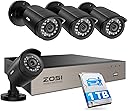
The ZOSI 3K Lite Security Camera System combines 4 high-definition 1080P weatherproof cameras with an 8-channel H.265+ DVR featuring AI human and vehicle detection. Equipped with a 1TB hard drive, it offers ultra-long recording and remote access through the ZOSI Smart app, making it a robust, cost-effective solution for professional-grade home or business surveillance.


| ASIN | B00MP57IOY |
| Antenna Location | Business, Home, Indoor/Outdoor |
| Best Sellers Rank | #15 in Surveillance DVR Kits |
| Brand | ZOSI |
| Built-In Media | 1 x H.265+ 8CH 3K lite DVR with 1TB Security Grade Hard Drive, 2 x power supply and 1 x USB mouse, 4 x BNC Cables and 1 x Ethernet Cable, 4 x Security Cameras and 1 x 1 To 4 Power Splitter, 4 x mounting screw bags and 1 x quick start guide |
| Camera Description | Front, Rear |
| Color | Wired-4Cam |
| Compatible Devices | Laptops, Smartphones, TV, Tablets |
| Connectivity Technology | Wired |
| Customer Reviews | 4.2 out of 5 stars 9,015 Reviews |
| Frame Rate | 30 FPS |
| Global Trade Identification Number | 00698545075425 |
| Hardware Interface | HDMI, VGA |
| Item Dimensions | 15 x 11 x 7 inches |
| Item Type Name | Security Camera System |
| Lens Type | Fixed |
| Manufacturer | ZOSI |
| Manufacturer Warranty Description | One Years quality warranty |
| Memory Storage Capacity | 1 TB |
| Mfr Part Number | LYSB00MP57IOY-ELECTRNCS |
| Model Number | 8WN-211B4S-10-US |
| Night Vision | Night Color |
| Night Vision Range | 80 Feet |
| Number of Channels | 8 |
| Operating System | Linux-Based Or Proprietary |
| Optical Sensor Technology | CCD |
| Other Special Features of the Product | App Control, Automatic Overwrite, Human Detection, Image Sensor, Motion Sensor |
| Power Source | Corded Electric |
| Recording Mode | Event, Schedule |
| Signal Format | Analog |
| Total Usb Ports | 2 |
| UPC | 698545075425 |
| Unit Count | 1.0 Count |
| Video Capture Resolution | 1080p |
| Video Input | BNC |
| Viewing Angle | 90 Degrees |
W**R
Read this review before you purchase, install, or return this system. .. Seriously, this will help.
So, this is one of many systems I have bought and installed in my many years . What you will receive is a high quality DVR, with four very good cameras and the hardware to get it all connected. The DVR performs excellently. My old ZModo system looked great on the camera, but playback was one third the resolution, this one looks live during playback. This all sounds great, but there is always a downside, the downside in this case is the total lack of instructions. there are steps that are totally left out of the leaflet of instructions, and intuitive this is NOT. You will NEED and Android/Apple phone to install it. Set up the cameras, connect, and power up the DVR. Before you can do ANYTHING, you need the username and password. Again, no instructions on this step. Download an app called SPD to your Android/Apple phone. Open the app, scan the the qr code on the DVR, or the QR code that appears on the monitors screen when you try to access the DVR Menu. This will give you the "Super Password" for the DVR. Leave the username as "admin" and the password is LONG and case sensitive. You can now set the DVR up... Again, nowhere is this evident. (You may think ... ahah!, go to the website!... Well, it does explain the steps, but the "translation" is not at all clear. (It also has apps that are outdated that will confuse the situation, "Zosi view" for example, is obsolete, but still posted). Now, you should have access to the DVR menu, so you can connect it to your router. There will be a screen on the website to set the online viewer up. there will be an area that shows you to activate the "cloud viewer" ... my software didn't even have this, but when I checked my internet connection, it came back as ok, and it was good. Do NOT install the "Zosi View" app as previously mentioned, install "Zosi Smart" app and check the website to figure out how to get the QR code displayed on your monitor from your DVR to again use the SPD app to scan the info for another super password. log in and you should be good to export the DVR info to the phone app. To view the DVR on a Windows PC was tricky, (The software had to be downloaded in three parts, so you know you have downloaded the correct "Active" link) ... but the good part is the IT support staff @ Zosi is dedicated, professional, and willing to help. There is NO phone support, use Facebook messenger. This worked out great for me, but be aware, in the US, in the Northeast, their hours of operation translates to 9:00PM to 5:00AM. If you download the "Teamviewer" program, (It's got a free version) The good old team @ Zosi can remotely operate your PC and set it up for you. These instructions will make your installation MUCH easier and less frustrating, enabling you to purchase this system, install most of it, and enjoy the fact that it operates very nicely, especially for the price. Again, Kudos to the support team @ Zosi, they save the the day! :D This system is very nice, I DO recommend it, use Facebook messenger for help, be patient, and you will end up with a very nice system, at a great price point.
S**S
Great system and great value. Easy to install
I love this new system! I was on the hunt for a security camera system. After doing some research I decided I didn’t want to use a cloud based service that would cost me a monthly operating fee. I then looked at the big box stores, but I elected to try the ZOSI DVR wired camera system. Best value and cost by far. I installed the system without any problems. One could just hook it up and it automatically starts recording, or you can use many other useful features. My mom probably could have just plugged it in to record without any reading... if you want other features, some degree of technical abilities is needed. Points to know: 1. I created a gmail account just for this and set security on my gmail to low so that the ZOSI dvr was able to use the outgoing mail server without any issues. I could then make settings on the DVR to email me alerts when motion is detected. 2. I didn’t use a PC to program, but rather the included mouse. It’s easy. One can then look at a frame and select where in the frame to look for motion and set the sensitivity. This is useful if a frame has trees blowing and cars going by, but you only want an alert if a gate opens. 3. I downloaded the ZOSI app for my iPhone and I initially couldn’t get it to work. I emailed their tech support and they were fast and helpful. The manual is not well written and the tech support by email required me to think a bit differently. I sent screen shots and they texted back, “Please use zosi smart app on your phone, your DVR's network is okay, And the e-mail issue, the smtp server is smtp.gmail.com please refer to the below link” I was initially thinking... “don’t they see I did use the ZOSI app? But then I thought to look and there is more than one app... and there is one called, “ZOSI smart” I had ZOSI view. So get the right one! And I quickly said to myself... that’s how I set up the email... but I wrote “google” and not “gmail”. It was easy once I corrected my mistakes. Thank you ZOSI support. 4. Lots of options for cameras and DVRs. I have a guest house and a front house. Small city lot, but still further than the 65’ of run for the camera cable. I ended up buying 2 different ZOSI systems. Both are great. The cost is great. The app registers the devices and I can monitor from my iPhone. 5. In trying to solve some email issues before contacting their support, I read some posts on setting up port forwarding on your router. Don’t worry... it wasn’t needed. This isn’t as complicated as I was thinking! So in the end, I was able to install 2 systems with 6 cameras and my property is covered! All for much cheaper than a monthly fee based service.
K**.
Easy to setup, great quality for this price, good app and software.
I've found this system to be of great usefulness thus far. The extension cables that come with the 4 camera system + 1TB DVR are about 70 feet long, with a 2 foot pigtail on each camera. I've installed tons of systems for clients in the past, from low to high end. These fall snugly right in the upper middle, and their software is actually quite decent, better than some at a much higher price. For those wanting to use the system remotely from your router, I personally used the tp-link wireless extenders. These are super handy, they connect to and extend your wifi (as you'd expect), but even better is that they have an ethernet port built in. I have one running in my lab, and I simply plugged the DVR into the extender with the included ethernet cable. Voila, a wired and wireless system for under $35. I can stream live to my PC as well as my phone simultaneously AND have it connected to a spare TV via the HDMI port on the DVR, at the HD setting, with zero data loss. When installing the cameras outside, I'd recommend a simple solution to prolong the connections lifespan - use something like vinyl flashing tape. Just snip off a piece long enough to wrap around the connections twice and wrap each one. Add electrical tape to that for an even more robust setup. The flashing tape is made from an extremely durable and sticky butyl rubber that permanently fuses to itself, it's stretchy, and will provide a nice watertight seal. This is what we used when performing communications tower work on all the connections on the tower, and it's really handy stuff. Liquid tape also works great, it's made for exterior electrical connections. I'm not sure why others have stated the lack of a 4-camera option on the app, as it allows this as well as many other features you'd expect. The software setup is pretty straightforward, but here are a couple of tips to streamline the process a bit more for unexperienced users: Setup the DVR first, connect a tv or monitor with the HDMI (or VGA if that's all you have), plug the included mouse into the front USB port, and configure as desired. Once that is done, reboot the DVR and then setup the app on your mobile device. A handy on-screen QR code is created to expedite this process, all you need to do is setup an account, sign in, add device and scan the code. After the app is running you can download the PC app and if you login with the same account it will be auto-populated with the system already from setting it up previously on your phone or mobile device. The software quickly finds and populates devices on your network with the scan feature and makes setup a snap. After you have everything running, THEN make sure you change the login password - user name is admin and password is blank at startup. You can select what type of objects trigger the motion - people, vehicles, animals, etc. which is rad as this is often a paid upgrade feature on many other systems. The software allows for adding multiple other cameras and devices quickly and easily; if you want to add wireless cameras to the hardlined DVR/camera system, it's super quick and easy to do so. The thoughtful staff included sticker templates for mounting, decent screws for each camera, 4 x 70ft extension cables, and a 4-way power splitter for the cameras. Be aware you'll need 2 AC outlets to run the setup, one for the DVR's power transformer, one for the cameras transformer - they are identical, incidentally, at a 12v 2a output for each. The cameras and DVR are well packaged and protected for shipping as well. I hope this helps someone, and don't forget to wrap those connections! You'll get a long lifespan out of the system if you do. Had all the features I'd expect, the ones I was hoping for, and a few bonus ones on top. Great system, can definitely recommend the buy.
C**M
Super low cost super system, Superior Support
I can’t believe that for around 150 dollars I have this four camera (expandable to eight!!!) system that produces great visibility day and night!!! I have used several very expensive (don’t know how many thousands of dollars they cost) for work around rockets (that’s another story!) and I get just as good quality of pictures! I must first tell that upon receiving the system I was impressed with the packaging; very nicely stored equipment well packaged in sturdy cardboard boxes. Everything thing easily inventoried then setup! At this time I have three of these well built cameras mounted, after bench testing the system. My son, as I type, is drilling through our stucco wall to mount a wooden base for the fourth camera. With the ZOSI Smart app you can look at your pictures (the live video feed) from anywhere in the world where there is internet access. As I am new to this I haven’t had a chance to explore all the capabilities of the software which brings me to the cake and eating it too!!! ZOSI SUPPOTT IS AMAZING!!! Not only will they take care of the hardware with a great warranty the support is like that of a “mom and pop” shop!!! They CARE about helping the customer! When originally setting up my software (I know just enough to get into trouble!) I was “fat fingering” characters (adding extra keystrokes) getting the wrong apps (I loaded everything that said ZOSI on it) and got lost! CUSTOMER SERVICE TO THE RESCUE!!! I was helped tremendously by “Helly” in the service department. As they are halfway around the world we started chatting through email that in many cases laid out a step by step list of instructions getting me out of the deep hole I dug! (Remember, I know just enough to get into trouble!!! I have to say THANK YOU HELLY!!!. You did a great job rescuing me! The Superior personal service allowing me to get going is that icing on my second cake!!! When money allows me (I’m retired and on a tight budget) I will get the ZOSI pack that will give me four more clear pictured cameras Just don’t know where I’ll put them yet! Thanks again Helly and thanks ZOSI a great company offering super systems and superior Support
N**E
Great system for the price (Read Review for detailed information)
I was skeptical about the price of this whole entire set but don't I am glad I did! These cameras were very easy to setup and the quality is very good but there are some things you need to know before purchasing them. 1. Web Interface The Web Interface ONLY works with IE. In order for this to work you need to go into IE's settings for your zone and change ActiveX to Prompt for unsigned active X controls. I have had some crashing of the web interface but nothing unbearable. I do like the program that comes with the kit but just like anything else, it has a learning curve. 2. Wires These are terminated wires. The size is very large so in order to run them to your DVR you will have to drill at least a 5/8" hole to run these cables unless you can terminate yourself then that would make that part of the project easier. 3. Motion Sensitivity It took me about a week to figure out the sensitivity of the motion detection. 1 is actually the highest sensitivity and 10 is the least. If I didn't see that important fact on other review on amazon I would have still been fighting that part of the configuration. 4. Mobile App I use the mobile app (secu365) and it is pretty straight forward to use. I do not have my cameras out on the internet. I set them up on a segregated VLAN that has no traffic out to the internet. I use VPN to access my system when necessary for security purposes. Overall, I am using these for home surveillance. They are great for that purpose. For the price you really can't go wrong. The things mentioned above were just small obstacles I came across when working with this system so hopefully if you are reading this review you will benefit from the information I specified above. Feel free to ask questions if you have any about this system.
J**N
Decent hardware, garbage software. Not worth the hassle.
The cameras work, and it does record stuff, as far as I can tell so far. However, the apps for viewing stuff are worse than terrible. They barely work, and that's if you find the right app for your system; apparently there are different apps depending on the specific model from Zosi. If you can finally get and app to connect to your system, it will take forever to load the video. There are virtually no settings available within the app, and you can't set defaults. On my tablet that I was going to use to test the views during installation of the cameras, I couldn't even pull up a full screen view. It would cause the app to crash every time. So I ended up using my phone instead, where I could at least get a full screen view. I tried going through settings on the actual DVR unit to see if I could get it to always show high quality feeds on the remote viewing apps, but nope. And forget viewing on a PC - a) a total pain to set up and b) absolutely no option to view a high quality video feed. At. All. Oh, and the only application I could get to work on PC has a default login of admin/admin and you can't change the password or add other users for the app. Yes, you do have to add the user and password for the DVR within the app, but once it's there, it's always available. The app opens with the user and password admin/admin saved too, so you can't clear it out to fool another user that might happen to be on the same computer. So pretty much completely insecure for any kind of business use. I was having a heck of a time getting things set up for any kind of remote viewing, so I reached out to support. Regardless of language barrier issues, the support person basically just sent me the same guide that I was able to search for online, and gave a couple "tips" that were already spelled out in the setup guide that came with the system. At least they were responsive, even if there was a lack of real help. It seems like they built the system with pretty much no regard for remote viewing, which by today's standards seem like a HUGE oversight. Who wants a surveillance system that they have to go into a closet to view these days?
Y**Z
Excelent
Now if it gives a lot of security to my house I love this product I recommend it
D**E
Worked mostly well, until it didn't
It seemed to do an alright job. Good picture quality during the day. I had the cameras installed inside pointing through a window so the night time quality wasn't great but it wasn't bad (IR glare through the window, if you really want night vision don't install them inside). I could never get the remote access to work, never was able to get the DVR to connect to the internet. Tried to forward ports etc but I am not super savy with that. The instructions are not very clear but that was to be expected when being translated from another language. General installing is easy, just screw the cameras where you want them, run the cable, plug them into the DVR and you're good to go. They sell extra cables if you need to run longer distances, which you probably will need to. But again I could never get the remote access to work. I just had them recording 24/7 so I didn't use the motion sense at all. The user interface is a bit clunky running through the menu but it isn't the worst out there and you can go through it fairly easy once you get the hang of it. Going through the recordings is also a bit clunky but you get the hang of it after a bit. My only issues were with the remote access never working, other than that I didn't have any complaints until about a year and half in. I don't know if the motherboard failed or the HDD but it no longer functions. There is a very loud audible high pitched tone coming from he DVR. I opened it up and the sound is coming from a piece on the motherboard. Not sure what it is that is wrong but I assume that is a chime to let you know something failed. Hopefully I just got a bad DVR that can be replaced. The cameras seem to be good quality.
C**N
Excelentes camaras
Estas cámaras son difíciles de instalar, no por que su instalación resulte difícil, sino porque es difícil seleccionar dónde colocarlas. La imagen es excelente, se pueden cubrir áreas muy grandes, se pueden colocar en prácticamente cualquier angulo que uno desee (esta es la parte difícil) e incluso graban en la obscuridad. Son tan buenas cámaras que incluso compré dos juegos más para poder tener más seguridad en mi hogar. El DVR incluye un disco duro de 2TB, lo que es suficientemente grande para grabar por meses sin tener que borrarlo en su totalidad; además se puede conectar a tu internet por si tenemosque salir (aunque no creo que esto sea posible en estas condiciones). El DVR permite conectar otras 4 cámaras, tomar fotos, mandar archivos a una memoria USB y está en español, ideal por si tenemos dudas en su manejo.
K**K
Cheap security cameras
Cheap camera with cheap plastic and cheap screws and the cables are cheap 3 of them don't work hard to set up I would not buy again
C**O
Calidad al precio justo
Es de fácil instalación y material contenido es de buena calidad, hasta ahora no he tenido problema, leía que algunas personas tienen problema para visualizar su equipo en sus dispositivos móviles, solo como recomendación, una vez que haya creado la cuenta, solo es necesario que agreguen el dispositivo 1 vez nada más, la velocidad en la que puedan recibir señal de sus cámaras dependerá de la velocidad a internet que tengan en casa.
S**E
Pas de disque inclus
Faire attention, la photo indique un disque de 1To mais il nest pas inclus
A**O
Muy buenas pero faltan las contraseñas
No puedo ingresar me. Pide una contraseña y no entra ninguna de las que dice
Trustpilot
4 days ago
5 days ago