Desertcart purchases this item on your behalf and handles shipping, customs, and support to Greece.
💽 Elevate your storage game — speed, safety, and style in one sleek dock!
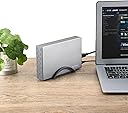
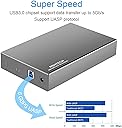
The RSHTECH 3.5 Hard Drive Enclosure RSH-339 is a premium aluminum USB 3.0 to SATA dock supporting up to 16TB 3.5" SATA I/II/III HDDs and SSDs. Featuring 6Gbps transfer speeds with UASP, multi-layer hardware protections, automatic sleep mode, and versatile vertical or flat positioning, it ensures stable, fast, and safe data access across Windows, Mac, Linux, and gaming consoles. Perfect for professionals demanding reliable, high-capacity external storage with plug-and-play convenience.
| Asin | B07LCFQ9C3 |
| Best Sellers Rank | #347 in Enclosures |
| Brand | RSHTECH |
| Color | Silver |
| Compatible Devices | Desktop, Gaming Console, Laptop, PC,, PS4 , PS4 Pro, PS5 |
| Connectivity Technology | USB |
| Customer Reviews | 4.5 4.5 out of 5 stars (1,634) 4.5 out of 5 stars |
| Data Transfer Rate | 6 gigabits_per_second |
| Enclosure Material | Acrylonitrile Butadiene Styrene (ABS), Aluminum |
| Hard Disk Form Factor | 3.5 inches |
| Hardware Interface | SATA 6.0 Gb/s, Solid State Drive |
| Hardware Platform | USB-A to SATA |
| Item Dimensions L X W X H | 7.1"L x 4.3"W x 1.3"H |
| Item Highlight | External Hard Disk Case for 3.5 inch SATA HDD SSD, Support UASP and Automatic Sleep Function |
| Item Weight | 0.58 kg |
| Manufacturer | RSHTECH |
| Memory Storage Capacity | 24 TB |
| Mfr Part Number | 8541664210 |
| Model Number | RSH-339 |
| Supported Devices Quantity | 1 |
| Warranty Description | 18 months warranty for non-human damage |
User
Works As Expected
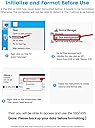
RSHTech USB 3.0 to SATA, RSH-339(C)We have purchased two of the Amazon Basics (AB) 3.5-inch drive enclosures and now one of these from RSHTech (RSH). The computer system is brand new, homebuilt, Windows 10, using an AMD Ryzen 3950X 16-core CPU and an ASUS ROG Crosshair VIII motherboard w PCIe 4.0. Here is what I like about the RSHTech box attached to that system:1. It is well built. The aluminum enclosure is not cheaply made, as some reviews have stated. It's plenty solid, far more so than the plastic AB box. I haven't done it, but I think I could stand on it.2. One of the AB boxes actually failed during continuous file transfer on two occasions. It happened during backup, at night, when no one was around. Happily, after being powered off in the morning, the box recovered each time. I believe that the box got too hot, even though it was resting flat on a copper plate intended to draw heat away. The AB box is rated for a 40 degree C (104 F) max ambient temp. The RSH box, by contrast, is rated for 55 degrees C (131 F).3. Further, the RSH box runs cooler, perhaps because of its heat-conducting aluminum case. Using the same drive, resting on the same copper plate, and being hammered continuously (read and write) by RoboCopy in the same script, the RSH box tops out at 48 degrees C (115 F), whereas the AB box reached 53 degrees C. Temps are reported by the drive, actually, courtesy of CrystalDiskInfo.exe.4. Note: The maximum allowable ambient temp for both boxes is meant to be the temperature OUTSIDE the box, not the temp of the drive inside the box. In our use, the temp outside the box is "room temp" at the top of a wooden desk, ranging up to maybe 25 C (77 F) on a warm day. The failures did occur on a warm day. The 4TB WD Gold drive is rated for a 60 degree C (140 F) max operating temperature, so it's unlikely that the failures were caused by the drive. They were caused by the enclosure or its power supply.5. There is no significant difference between the boxes in data-transfer speed when copying to and from another rotating disk, according to CrystalDiskMark.exe and according to my more extensive tests with large files. On my system the speed tends to be about 1.7Gb/s when transferring to other WD Gold drives in the computer case. CrystalDiskMark shows about 1.8Gb/s. Everything is USB 3.0 and SATA III, so maximum theoretical would be 6Gb/s.6. There is also no significant difference in data transfer speed when copying to and from an SSD drive. The speed is higher, of course, maybe 2.2Gb/s and it depends a little on the transfer direction. It varies - this is Windows 10 after all.7. Other features of the RSH enclosure: (A) A supplied bracket makes it easy to orient the drive vertically on an edge or down flat on a side; (B) Vents on the back allow for some air circulation, as a drive would get in a desktop PC; (C) The box uses four screws for mounting the drive into a tray and securing the tray in the enclosure. A screwdriver is provided. The result is a very solid device; (D) The manual states that the enclosure supports rotating drives and SSDs up to 16TB in capacity; (E) The manual includes a tutorial for connecting a brand new unformatted drive to a PC or a Mac; (F) It supports the UASP protocol, though I think the AB enclosure does too, because the transfer speeds seem the same.
User
Works with latest 16tb Seagate Exos drive
I found no vendors of this type of drive enclosure who state compatibility with recently-available 16TB hard drives. I queried a few vendors but only got a clear response on this product page, apparently from the manufacturer (or seller, or maybe that’s the same thing here). I was assured it would work with 16TB and it does. I received the enclosure today, and installed a new Seagate 16TB HDD Exos X16 7200 RPM 512e/4Kn SATA 6Gb/s 256MB Cache 3.5-Inch Enterprise Hard Drive (ST16000NM001G) purchased at the same time on Amazon.I use an iMac (27-inch late 2017), so I had to format (erase) the drive initially. I then partitioned it into 4 drives of various sizes to suit my needs. No problems so far. I’ll be duplicating several drives to this one drive’s partitions so I can carry a single drive with me for travel.There were a couple of minor functional issues installing the drive. Included in the enclosure’s package is a bag with 2 short screws and 2 long screws. The accompanying printed instruction sheet states (less clearly than this in broken but understandable English): You are supposed to insert the drive into the inner case or sled, then use the short screws to secure the sled to the drive. You then install the sled/drive into the case, and install the longer screws through the outer case, through the sled inside and into the hard drive’s other existing screw holes. I found with the 16tb Seagate mentioned above that the inner case/sled had only one set of holes matching up with the drive, but that these needed to be used to secure the outer case (and sled) to the drive. The other holes in the sled did not meet the other holes in the drive, they're "off" by about an inch from the other two drive holes. I may possibly drill my own (in the sled, not the drive!) I’ve noticed before that hard drives do not all have the same hole arrangement on the bottom or sides (let’s blame the manufacturers for not getting this organized). But if the sled had a couple additional holes molded into in it, it would fit more drives that it does now.Even with only one set of two screws, passing through the outer case, through the inner case/sled, and into the hard drive, everything seems quite secure. But I’ll probably do as mentioned and drill a couple holes in the sled to accommodate the other holes in my hard drive to really snug things up.I will report again here if I notice unusual heat or have other issues with this setup related to the enclosure. I like that the outer shell is aluminum and will dissipate heat, but I may drill a few vent holes in the top as I don’t plan to use the vertical “foot” that is included. So far I’m 100% happy to have all this data consolidated to one drive, and portable to boot.
User
Works perfect for DLNA Router (Roku TV streaming) use!
They include a link on support site to change the mode of the chipset. When you use these w/ NAS or DLNA low power mode plays hell on the setup. It flashed so fast I wondered if it were set prior to shipping. It's insane the number of drives that cannot have power down adjusted or disabled! I mean it's not like these things are hot water heaters... A HDD uses 12v & few amps. None of the other 4 drive cases I bought worked! Everything from 10$ to 60$. I think this was ~25$.It came w/ a good power supply and has held up since Christmas 2022. I believe it was double or triple the amps of my drive. IMO that's a must as components slowly age they become out of spec. I have had many "bricks" that cannot output same amount of power.I liked the metal case but felt mislead. I thought it said all metal construction or something. The whole inside is PLASTIC and the end caps are too! I dinged a star on that. Plastic is an Insulation material. So it's durable but not very breathable. I'm using a Toshiba NAS drive. They could've designed it all one or two metal pieces. That would've maximized heatsink but likely raised cost. The stand is plastic as well. That doesn't really matter. I do recommend using it. I feel using case gives it better breathing.I don't think it's case fault. I can only stream to one TV at a time. That's more likely Asus router fault. I can stream in bedroom as good as I do with a cable in living room!TLDR; Worth the money. Works w/ Router/TV/DLNA/ETC. Support site offers a tool, against JMS policy. (BEWARE NOOBs it's possible to brick case). That tool even allows cloning drive name to bridge. So basically it looks like there is no external case or chipset involved! I was fascinated by that!
User
Easy, Clean, Good-looking Piece of Equipment
I had an older WD 1 TB 3.5" drive that came out of an exploded pc. It had a LOT of data on it that was valuable. Not in the sense of needed it right away, urgently valuable. But older records, tax info, pics, files, etc that I needed for personal and business reasons. I'd been using a UGreen 3.0 to SATA adapter to access the drive whenever I need to get to some data, and that worked. However, I really needed to upgrade that temporary solution to be a little more efficient and permanent. This enclosure is just ideal! I ordered it for a great price, it was delivered in a day or so, it took me all of 3 minutes to install, and now it sits next to my pc, looks great and works perfectly. Nice job, RSHTech. I know it just a simple piece of equipment, but you did a great job all around, and I am very happy with it. I would certainly buy another one if I need it, and would certainly buy from this company again. Thanks.
User
BUY IT!
UPDATE: They charge $2 bucks more than others PAY IT! I have had 7 others fail in 31 days. Whats the warranty for most? 30. No fans, no failures, Crystal Disk says runs COOLER than bare naked out of a case. I would buy 50 of these if I could afford toI had a recovery / forensics to do on a system. A VERY old 160gb WD drive that was vital to save so a drive duplicator was not an option. It had to run through the recovery server byte for byte and boy did it get hot!I had one last shot at the attempt so I tried this case. VERY GLAD I DID!The metal enclosure stayed cool when my duplicator overheated and shut down several times in the process. There are times that going external is the way to go.I do recommend this product, highly! It saved the data and my reputation. It even saw the WinXP SP3 drive IMMEDIATELY.If anyone needs a 160GB Hard drive that doubles as a door stop now feel free to contact me
User
Did what I needed it to do, not more needed
I have been swapping out old drives in my NAS for newer larger capacity models. I wanted this so that I could use one of the new drives to backup the NAS data, then after I swapped out two of the drives, use those two drives to do another backup so I could complete the swap.Each backup took an excess of 24 hours, with the second backup iteration being about 16 hours for each of two drives which split the backup. So over one week this unit was online for probably 50 hours total at more than 24 hours a pop.The drive Bay worked flawlessly. Yes the drives got a little water than I'd like on their own, but I just had a simple desk fan blowing over the drive enclosure and it was adequete.Both backup operations functioned without issue, and I'm certain I could use it in the future to amend the backups or to doa restore if necessary and not have much of a worry.Note, for my purposes I did need to connect the NAS drives to my PC and format prior to the NAS recognizing them as backup storage, but this was easy as well. The bay itself displayed no issues with power or connection.
User
Solid case, smooth and quiet operation. May need reformating before running on Linux
My old external drive was getting to the point where it was not spinning up and heeding the Ubuntu software call to back up. It turns out that the PS2 style connector on the case had one broken pin not allowing enough power for the motor. Having owned at least three externals--all Seagate Barracudas--I knew the case often fails before the actual hard drive does so after looking at several choices including a cheaper one recommended by Amazon, I opted for this one. The reason; it has retention bolts in the drawer to hold the HD in place; something the cheaper options lacked. A bolted in hard drive does not vibrate when spinning. The case itself is designed to be mounted vertically. I am not a great fan of vertical drives; I think that format forces the drive to work harder. However the vertical format has better cooling so most externals are set up that way. It was very easy to me to slide in the heavy "Cuda", tighten the two main bolts and then tighten the small screws with the provided screwdriver. Everything fit well. Hooking up data and power was also a cinch. The included data cable fit snugly in its outlet and the power cable fit into its barrel connector without any of that annoying looseness of those finicky PS2 pins on my previous unit. I noticed the "brick" on the end of the cable is much smaller as well. The power-on is a soft one like on a tablet. However when it came to operating out of the box--well not quite. The unit readily spun up but did not mount. I went into "Disks" to find out why and saw a pre-failure message and realized I had to reformat. Fortunately I was able to move all my multimedia data to my laptop and reformat with Gparted. The drive has since backed up without any problems and Ubuntu recognizes it when I power it on. This box is definitely one to recommend if you have an old but working 3.5 inch drive.
User
excellent highly durable aluminum 3.5" SATA HDD for external uses
I still use several 7200rpm 1TB, 2TB, and 4TB HDD's for data storage and data backup. This is one of the best, IMHO, exceptional value for money, has a very high durability rating and uses high speed USB ports type A/B, for connecting to your computer. I love also love it includes its own power adapter. It's very easy to get into and install the HDD, then slide cover back on and secure with included screws. the Aluminum case helps the installed drive stay cool and the included rigid plastic stand gives optimum storage capacity on your desk. I have bought 3 of these over the years. using on a Mac mini, and a Windows laptop and desktop,
User
Buen producto
Hasta ahora bien, ha sido muy fácil instalar y respaldar imágenes, vídeos y archivos importantes pero de uso poco frecuente. No lo transporto fuera de casa por lo que no puedo emitir una opinión sobre si es unas buena opción de movilidad extrema.
User
Works great
A solid hard drive case. Easy to swap out drives (4 screws). Works great. No issues with connectivity.
User
Qualité de l’article
cet article est de très bonne qualité et facile à installer
User
Good enough
These enclosures do what they're supposed to do.They can get warm when used for a long time and when you put an HDD in them,the transfert speed is ok.Not too good with a 2.5" ssd,the transfer speed in that case are just so-so.The build quality is what you would expect for a product in this price range.It's ok.All in all,i am satisfied as i use them with hdd's and they work quite well.
User
Muy bueno
Excelente producto, fácil de instalar y de buena calidad
Trustpilot
2 months ago
5 days ago