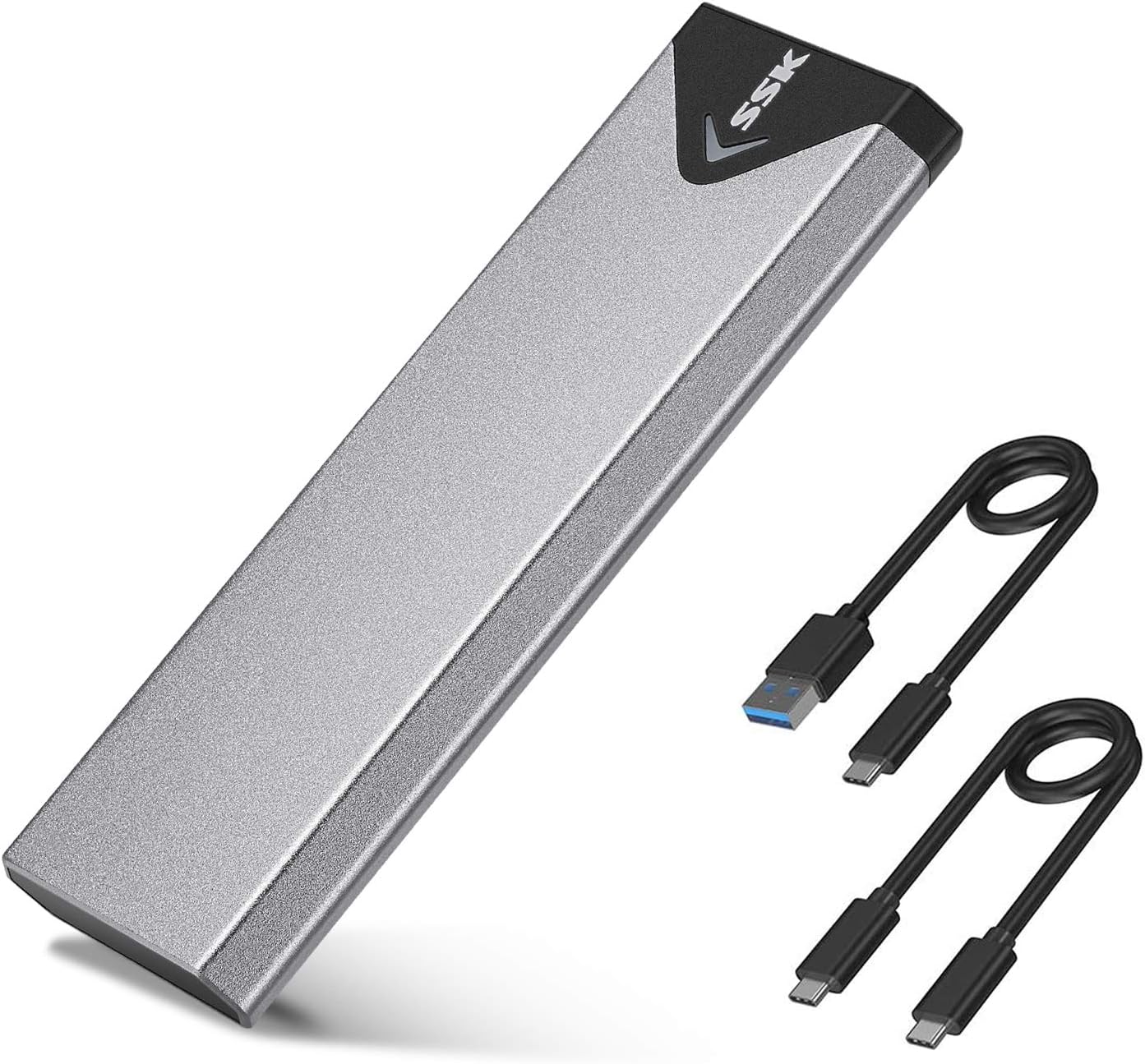
🚀 Unlock lightning-fast storage on the move — because speed waits for no one!
The SSK M.2 NVMe/SATA SSD Enclosure combines cutting-edge USB 3.2 Gen 2 (10Gbps) connectivity with a durable aluminum alloy shell for superior heat dissipation and portability. Compatible with M.2 NVMe and SATA SSDs in sizes 2242, 2260, and 2280, it supports plug-and-play across multiple operating systems without external power. Ideal for professionals seeking rapid, reliable external storage in a sleek, travel-friendly design.


| ASIN | B07MNFH1PX |
| Best Sellers Rank | #6 in Enclosures |
| Compatible Devices | Laptop |
| Connectivity Technology | USB |
| Customer Reviews | 4.4 4.4 out of 5 stars (21,275) |
| Data Transfer Rate | 10 Gigabytes Per Second |
| Date First Available | December 27, 2018 |
| Hard Disk Form Factor | 2280 Millimeters |
| Is Discontinued By Manufacturer | No |
| Item Weight | 3.52 ounces |
| Item model number | SHE-C325 PRO |
| Manufacturer | SSK Corporation |
| Material | Aluminum |
| Max Number of Supported Devices | 1 |
| Memory Storage Capacity | 4 TB |
| Product Dimensions | 4.53 x 1.54 x 0.43 inches |
J**N
High‑Speed Compact Enclosure – Excellent Build & Pocket‑Friendly
I recently picked up the SSK M.2 NVMe/SATA SSD Enclosure (model B07MNFH1PX) and I’m impressed. The build quality is superb—its slim aluminum alloy shell gives it a premium feel and excellent heat dissipation. The size (just about 11 mm thick) makes it ultra‑portable and easy to throw into a laptop bag, backpack, or even my gear rolling case. As for performance, it lives up to its promise: with the USB 3.2 Gen 2 (10 Gbps) interface it enables very fast transfer speeds (up to 1000 MB/s under ideal conditions). It handled my NVMe drive perfectly—and for a compact external enclosure I couldn’t ask for much more. Highly recommended if you want a durable, speedy, and pocket‑friendly enclosure.
J**O
Great item
I’ve been using this SSK M.2 NVMe/SATA enclosure for a while, and overall I’m really satisfied with it. The ease of use is great once you install the SSD, although the setup takes a few minutes. The plastic material feels solid enough and keeps the weight low, making it easy to carry around — great portableness for travel or daily use. The cable length is just right for connecting to my laptop without clutter, and the compatibility with both NVMe and SATA drives is a big plus. It performs fast and reliably, perfect for backups and quick file transfers.
B**R
Upgrade old Windows 10 PC with Crucial SSD and SSK USB M2 SSD adapter
I've been using a Windows 10 Dell desktop PC for more than nine years. Microsoft will not allow an update to Windows 11, but they did give me extended support for the next year at no cost. This system works great for me and I see no reason to junk it for a Windows 11 replacement system. I did notice recently that my 256gb SSD is nearly full, so I used Google search AI mode to review my options. I chose a Crucial P310 500GB SSD along with a USB SSK M.2 NVME SATA SSD Enclosure Adapter to allow cloning my C: drive. I highly recommend both. With Prime I had these items next morning after ordering. I immediately installed the SSD in the adapter and plugged it into a USB 3 port. I was concerned when a new drive did not appear in Windows Explorer, but after another Google AI mode search, I learned I needed to format the SSD drive using Windows Drive Manager. For the cloning software, I initially downloaded the Acronis True Image for Crucial program referenced on the Crucial site, but it would not work claiming not to have found a Crucial SSD. Acronis online support was useless. I searched for an alternative solution and happily discovered DiskGenius which offers a free version that worked very well and much quicker than I expected (about 20 minutes). Exchanging old with new SSD was easily done and rebooting found Windows and all of my apps working normally with plenty of room to spare on the C: drive. I saw on the motherboard two empty RAM slots and thought I would like having a memory upgrade as well. Back to Google AI mode, I got the exact information needed to go from 8 to 32GB. I found and ordered a kit for $57 which I will have in less than a week. So for $110 I have breathed new life into my old but perfectly good PC. I doubt that I will replace it even after MS extended support expires next year.
C**N
Nice enclosure
Installed easily and working well
F**K
Saved me and my data!
Saved all my data when my mother board died. It does get a bit warm, but It worked fine to get the job done. It saved me and my data! Once I got the drive mounted in the enclosure it hooked right in to another computer and I was able to recover my files!
A**H
Works really well, very affordable.
Wow, that really worked. Slapped an old Samsung 960 Pro in there and it was 100x faster than my USB flash drives I had laying around.
B**Z
Breathes new life into old NVME drives.
I replaced the NVME drive in my desktop with one of greater capacity but the motherboard had only one M.2 slot, so this unit became the home for the smaller drive. I bought the external drive unit because the motherboard is rather 'open-PCI-slot-deficient' due my extras, so there is insufficient room for a PCI board version (my preference) which would make the drive internal to the machine (again). It's relatively easy to put together, but getting the installed drive back into the case was a bit of a problem because you have to press down on a piece of the opposite side of the assembly to allow the assembly to slide completely inside the case. The screws are tiny, so if your vision is not sharp or you have big hands, getting the screws in will be another joy - luckily, the screwdriver they supply is magnetic, which helps a lot. Lastly, the cable is short - really short - so if you're buying for a desktop, make sure you.have a spare cable with some length. Everything isn't a laptop, as some of these manufacturers think. It's very sturdy, made of aluminum, so it won't break. A good buy.
D**N
I'd decided that I wanted to use M.2 SSD devices as part of my travelling toolkit for server builds/software installation, so was looking for a suitable caddy. I particularly wanted a solid case; on the basis of reviews I went for this one, and it doesn't disappoint on that score. In short, I'm very happy that I went down this route, especially after the surprise I got described further down in the review! I was quite impressed with first one, so I've now purchased two more of these enclosures over the last 6 months or so - another one for me and one for a family member who does a lot of video work. They're easy to put together, everything you need is in the package including a screwdriver, a thermal pad (important!) for your NVMe device and two short USB cables (USB-A to USB-C and USB-C to USB-C). The small screws (2 needed) are slightly fiddly to fit if you have chubby fingers like me, but nothing unusual there. It takes about 5 minutes including unpacking to get it ready to go. I use Samsung 970 EVO Plus (256G and 1TB) devices in the caddies. The performance I thought was pretty darn good compared with the USB3 flash drives I used before, worth the 'upgrade' to NVMe. For mid to large file transfers I see typically 300MB/s+ even using Windows copy - see the first pic. But then I upgraded my home desktop PC, fitting NVMe devices alongside a Crucial BX500 SSD. Hmm... The first file transfers were pretty much the same, around 300MB/s+ from the SSK to the Crucial SSD. But then I did a copy from the SSK caddy to one of the internal NMVe devices... oh, my...! In the second pic, you'll see the rate at 1.8GB/s (actually it was faster initially), which is probably close to the USB 3.2 max. I'd forgotten that the transfer rate for SATA SSDs was probably the limiter... What this tells you is that the controller in the caddy has properly implemented NVMe and USB 3.2 Gen 2. One thing you will want to watch for. The NVMe drives run pretty hot, more so than USB flash drives, so it's a good idea to make sure they're in free air when you use them. The thermal pad applied to the device and the aluminium body help to get the heat away, which will help the life of the device; just be aware that yes, it really does get that warm!
T**R
Easy to use. Excellent quality. Must have.
K**D
Works great, the addition of the two cables is nice, I use it to plug into my phone for longer trips to watch movies. M.2 having a low power draw is easy on my battery.
A**R
Très bon débit de l'interface, permet d'exploiter le débit du SSD qui y est connecté.
H**K
Goede behuizing, ideaal met de extra USB kabels.
Trustpilot
5 days ago
2 weeks ago