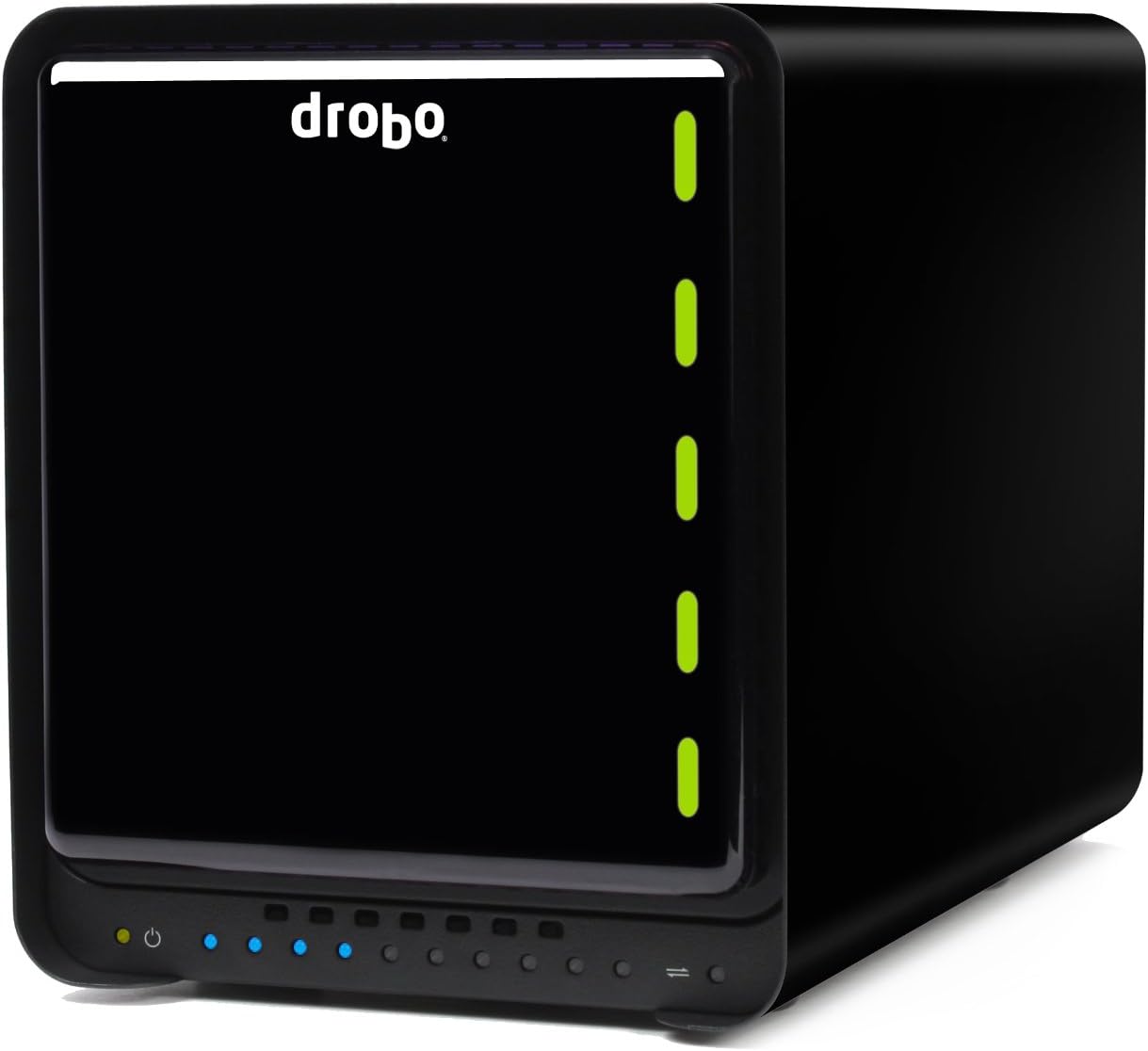

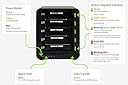
Drobo DDR4A31 5C 5 Bay USB 3.0 Type-C DAS Enclosure
Product ID: 48653005
Details
- Assembly requiredNo
- BrandDrobo
- Compatible devicesLaptop
- Item weight5 Kilograms
- SizeEnclosure
💾64TB Capacity
🔄Hot-Swap Drives
🔋Battery Backup
🚀 Elevate Your Data Game with Drobo!
The Drobo DDR4A31 5 Bay USB 3.0 Type-C DAS Enclosure is a robust storage solution designed to hold up to five 3.5-inch SATA HDDs, offering an impressive 64TB volume size. With features like hot-swappable drives and battery-backed memory, it ensures your data is safe and easily accessible across both Mac and Windows platforms.


| ASIN | B01LZPJHE2 |
| Assembly required | No |
| Brand | Drobo |
| Brand Name | Drobo |
| Compatible Devices | Laptop |
| Compatible devices | Laptop |
| Customer Reviews | 3.5 out of 5 stars 28 Reviews |
| Global Trade Identification Number | 00816604020012 |
| Is Assembly Required | No |
| Item Weight | 5 Kilograms |
| Item weight | 5 Kilograms |
| Manufacturer | Drobo |
| Manufacturer Part Number | 0B30122 |
| Model Number | 0B30122 |
| Product Warranty | 24 Months |
| Size | Enclosure |
| UPC | 816604020012 |
| Weight Capacity | Maximum weight: 5 kg |
| Weight capacity | Maximum weight: 5 kg |
P**N
Two years in - perfect.
This is a review, two years in to ownership. Flawless. Perfect, no issues. Does what it says on the tin. I've run it continuously powered on for the vast majority of the time I have owned it (I have two 5C's FWIW) and have done multiple disk upgrades and file movements. I will be buying another at some point. PS if you're planning on buying on of these, check who the actual seller is. If it's HDEW (or some variant thereof) check what the warranty / return / repair policy is. HDEW are based in Hong Kong and the UK Warranty is their's NOT Drobo's...
P**Y
Might be good as a basic store, but only time will tell.
Being cheaper than most alternatives and being relatively simple to set up is a big plus. Transfer rates are okay, through USB 3, but nothing special. It's quiet and inoffensive, so easy to live with. However, I've had a few issues of it not restarting after the computer comes out of sleep, so had to reboot (nothing else would work) and one occasion it reported a bad drive issue that necessitated a rebuild of the data (took 2 days), although I think it was caused by a poor connection of the drive (maybe because the unit was new). Removing and re-seating seems to have cured it. Long term, I've yet to find out because the reliability of the whole system depends upon the box and I've had those hiccups, so I still have niggling doubts. If I was to offer advice to other buyers it would be to seat/re-seat each drive several times initially before powering up, just to ensure a good connection.
S**S
Recommended, but if any issues experienced at all, replace it!
Early review - Only had it for a couple of days. Using as a large primary data store for photos and videos. Arrives in great packaging. Set up is so simple. I put 3 WD red 4tb's in and started moving my data across. Shut down PC and drobo sleeps. All looking good until starting last night when it failed to detect on my pc. After rebooting PC and the drobo couple of times it finally detected. Shut it all down again no issues, however this morning it will not mount after numerous attempts, and then one of the drive lights turned red for a moment before the machine then proceeded to start flashing amber and green. Still going. I've only had it a few days but I suspect this means one of the drives was faulty rather than the drobo causing a problem. Not sure whether this is why the drobo wont mount so waiting on their tech support to answer that. Otherwise, it would seem the drobo is doing what it's meant to and protecting my data for me. More drives on their way! Will update review once properly tested and these issues ironed out. UPDATE - No need for new drives but concerned about reliability....the amber green blinking stopped after a few hours and then it turned green. Then a reboot showed all drives as red. Still not detecting but when I shut down pc the drobo detected and fell asleep?! Started the next day, all drives green and healthy and it detected.....am continuing migrating data across but am currently nervous about the reliability of what it's telling me so dropping a star for now. Still need to figure out whether the issue with the drive not mounting continues or whether the result of the data protection step outlined above...still yet to really test speeds! UPDATE - Drobo support suggested I restore to factory settings which would mean formatting the new drives. This defeats the purpose of buying one of these so I wasn't prepared to do this given time spent migrating data. Instead I replaced given it seemed to be an issue with the Drobo and I'd lost confidence in it. Replacement arrived and I migrated the drives across in minutes. Drobo allows for this without the need to lose any data which is a massive plus! It was seamless. Further, the issue I was experiencing was a fault in the original Drobo. The replacement works perfectly. All bays showing green and mounting on the PC every time. I've tested it for speed and it's reasonable for photo retouching in lightroom and photoshop, but my existing setup wasn't the fastest anyway. Some will want faster am sure. Yet to try video editing, can't see it coping too well with 4K so I'll likely be purchasing an SSD to cover all live work going forward. I still only have 3 drives inserted and believe for best performance, you want to use all 5 bays. The simplicity of the Drobo is excellent I must say, and I'm now really pleased with it. I finally have the ability to grow my primary storage with ease and future proofing. Apologies for the long review but in the event this helps others I'll leave the entire story up. I'd been looking for a DAS for a long while and am not regretting this purchase now one bit despite some initial headaches. Would give 5 if quicker and had some usb ports on the back.
B**E
The Drobo 5C will stop working after a year or so.
I first wrote a review here in July 2017 which was very positive about the Drobo 5C. I gave it four stars. You will see the review below. I am now adding this important update because I think people should absolutely avoid the Drobo 5C. After I bought the first one I went on to buy four in total. After about a year to eighteen months three of these have needed to be returned to be replaced because they either became very difficult to start up requiring many attempts or they simply died completely. The one that hasn't failed was bought more recently so I am assuming it will fail. You will get one year or maybe two out of the Drobo 5C before it fails in my experience. The only good thing is that they do seem to fail within the warranty period but sending them back is a lot of hassle which you don't need. Before I was using the Drobo 5C I was using FireWire Drobos (2nd Gen), I had four of those and they were very reliable. That's why I made the mistake of committing so much to the awful Drobo 5C. I also have one Drobo 5D which is older than my four 5Cs but so far it has not failed. Avoid the Drobo 5C. Below is my original positive review soon after I bought my first 5C: ===================================================== I first started using Drobos in 2010 when I got my first 2nd Gen 4 bay Drobo. I actually kept getting more of those until I was up to four. I am a video editor (mostly) so that explains why I use up so much disc space. Those Drobos have been fine for years although they have always been rather slow. I used them with the FireWire connection which is pretty fast so it was really the Drobos themselves that were slow. A year ago I got the new Drobo 5D and it is really very much faster. Quite a change from the old 2nd Gen Drobos. I am using the 5D with USB 3.0 connection and that is faster than FireWire, but the real speed advantage is that the 5D is a much faster device than my old 2nd Gen Drobos. So just a week ago I purchased the Drobo 5C and this seems to be just as fast as the 5D although it doesn't have quite as many connection options as the 5D. On the other hand I think USB 3 will be fine now for most people, and the 5C is very much cheaper than my 5D was. In the past Drobos have been expensive but flexible, however this new 5C really is much more competitively priced. I can't comment on long term reliability for the 5C but I have had the 5D for a year and it has been flawless for the year, which is what you'd expect. The oldest of my four 2nd Gen Drobos is seven years and the youngest five years, those have been pretty good over that time however in the last months two of them may have misbehaved a bit, but I'm still not sure. I need to analyse the drives. One of them is telling me one of the drives has failed, however it takes forever to reallocate the data (yes they do take many hours to do this, but this one is taking even longer and seems to never want to finish). I need to take the disc pack out and really just check those drives and see what is going on. I have another of my old 2nd Gen drobos which was telling me a drive had gone bad and I had, what I now realise was a bad idea, which was to take the disc pack out and put them back in different slots, thinking maybe the "bad drive" was just a poor connection and this might correct it. Anyway that led Drobo Dashboard telling me the whole Drobo was out to lunch. Those issues were with old 2nd Gen Drobos with equally old and much used drives. However I would say that you absolutely should backup everything more than once. My Drobos are actually used to create two layers of backup so there are identical pairs of Drobos backing up data on my Mac Pro. My old 2nd Gen Drobos are going to be phased out now with my Drobo 5D and 5Cs. In my experience I would recommend that if the Drobo flags up a drive as having problems then do take that drive out and use a utility to check it. I use Prosoft Drive Genius. This will check over the drive very thoroughly. My old 2nd Gen drives have occasionally flagged up a drive as being faulty when in reality there was no fault. I think it is just a connection issue perhaps. You might find that after you have checked the flagged up drive thoroughly it is okay, and you can just put it back in and all will be okay. However always have everything backed up of course. I have given the Drobo 5C four stars. It loses one star primarily because the on/off switch is on the back. This is very annoying. I want the on/off switch on the front. Why put it on the back? I use these for backup and so I want to be able to just switch them on and off easily. It is an improvement on the old 2nd Gen Drobos which had no on/off switch however.
D**B
Reliability Issue?
Not really happy. Having be advised that Drobo had a reliability issue I was a bit dubious at first but after further research thought that those may be isolated cases. General reviews show the product as being reliable or very reliable. Purchased on amazon along with 3 x6b WD red drives. Prepared to start and transfer over my data as was time sensitive. After plugging in and following the start up procedure...drobo failed to mount . Went though the troubleshooting process to repair with disk utility which couldn't resolve the problem. Have returned and wont be reordering. Probably time too try lacie or pegasus even though the features I only want are provided by the Drobo. Everything about the Drobo 5c is what I want for a easy to use, mass storage with 1 or 2 drive redundancy. Annoyed it just didn't work.
J**K
Peace of Mind
Having suffered an external hard drive failure, fortunately I was backed up, but it still caused a lot of hassle. I decided to invest in a Drobo. It has performed perfectly and it is nice to know that if one of the drives in the Drobo fail, your work is still safe and you can carry on working and change the duff drive at leisure without any hassle!
P**S
Customer service were very good and efficiently replaced it
After one month the unit failed to start up. Customer service were very good and efficiently replaced it. The new unit has been OK so far but I'm weary of it so make backups elsewhere too.
L**J
Four Stars
Good and works!
E**R
5 Sterne beim Einsatz auf Mac bis OS 10.10 - seit Update gehts
Eigentlich ist die Drobo ein tolles System, solange man nicht auf Mac OS 10.11 wechselt, denn dann geht der USB 3-Anschluss nicht mehr, selbst Updates für die Drobo bringen nichts, wenn man die Drobo direkt via USB-C verbindet dann kommt man auf 30 Megabyte pro Sekunden, über USB-C zu USB-A geht gar nichts, da stürzt der Mac ab wenn man den Drobo an USB 3-Buchsen anschliesst, geht nur wenn man den Drobo an USB 2-Buchsen konnektiert. Das ist ein gewaltiges Manko und man kann bei schnellen iMacs den Drobo nicht mehr ausnutzen da der mit veralteter USB-C-Technik ausgestattet ist. Update 01.03.2018 - seit den letzten Updates stürzt die Drobo nicht mehr ab, aber leider ist die Drobo nicht mehr so schnell wie früher unter USB3.0, da ist die Drobo 5d3 dagegen mit 300 Mbyte pro Sekunde Lesen und Schreiben rasend schnell, wenn die 5C dagegen gerade mal 33/50 Lesen Schreiben schafft, wenn man Pech hat via USB 3 und längeren Kabel auch noch langsamer. Alles in allem aber gutes System für Backup, habe mehrere Drobos im Einsatz und hatte mit ein wenig Festplattenärger und abgerauchten Festplatten meine Probleme, das lag aber an WD oder Toshiba und nicht an Drobo.
A**E
Extrem langsam / Schlechte Performance
Extrem langsame Performance 15mb/s read/write. Keine Ahnung wer sowas benutzen will. 5 brandneue WD Reds 3tb Platten. Laut Forum bin ich nicht der Einzige. Edit: Für alle mit dem gleichen Problem: 1. Orientierung des USB3 Typ C Steckers ändern (umdrehen) 2. Alle anderen USB Geräte (Maus,Monitor,...) ausstecken ggfs einen Hub verwenden Läuft jetzt ok erstmal. Wer gibt mir meine 6 Stunden Lebenszeit zurück? .
P**T
Excellent idea and design, ease of use, but with some important caveats.
I bought this Drobo with the idea of: 1) replacing a single external USB attached HDD, used as an extension of the internal SSD drive on my Mac and as a general backup 2) stop buying ever bigger HDDs when the old ones were not big enough anymore 3) stop copying over TBs of data when 2) happened 4) expand storage capacity without the need to "buy now" the overall (estimated) capacity I would need in X years, at a higher price 5) put to good use older functioning HDD lying around unused and gathering dust when 2) happens. The good - which would have me give 5 stars wholeheartedly to this device: 1) impressive build of high quality and smart industrial design 2) quiet fan and overall operation 3) high transfers speeds of 100Mbps write/200Mbps read (I use 4xHDDs and 1xSSD in current configuration) 4) ease of use and operation 5) functional Dashboard software with clear information and functions 6) accepts combinations of whatever disks you have - SSDs with HDDs, in both 3.5" and 2.5" formats (I use 1x Samsung SSD, 2x WD NAS Red, 1x WD Green, 1x regular consumer WD laptop drive...!) The bad (hence 4 stars, if not even 3 if power management is important to you): 1) waking up the computer from sleep generates random "Disk not ejected properly" messages when the Drobo wakes up too, that give me the chills about data being lost 2) when the Drobo goes to sleep (and that happens only when the Mac goes to sleep), it sometimes wakes up randomly, especially within the first minute or so of sleep, for no apparent reason (NOTE: Power Nap is NOT enabled, as advised in the Drobo documentation) 3) even if 1) were not an issue, when the Drobo goes to "sleep", the fan at the back doesn't shut down - so it doesn't really sleep... 4) the only way to register on their support portal, is to register, then not wait for the confirmation email and instead login by clicking on the "forgot password" link - this will have the system send you a link to confirm your email and "new password" As of time of review (May 7th, 2019) I am running the latest 4.1.2 Drobo firmware and 3.4.2 Drobo Dashboard software. The Drobo is connected with the provided USB 3 cable (with USB C to USB A connectors) attached *directly* to a Mac mini 2018 running the latest 10.14.4 macOS. I contacted Drobo support (opened a ticket), which was prompt in reply and gave advice on what to do to avoid the issue: use the supplied cable with direct connection to the Mac, update software, disable Power Nap on the Mac. To this day there doesn't seem to be a really working solution other than to avoid the Mac going to sleep. The problem, after searching on the Internet, seems to be a nagging issue for Drobo since years, for several of their previous versions of the Direct Attached Storage products (like this 5C), on different interfaces (USB 2, USB 3, Firewire and even Thunderbolt on rare occasions). It seems to me it is a low level software issue due to both Drobo and Apple (I cannot test the Drobo on a Windows machine). Drobo in its firmware release notes in October 2018 writes explicitly to have fixed such "standby/sleep" issues, but it seems to me that each time Apple updates macOS the problem shows up again. So it is a sort of catch-up game between the 2 - one fixes it, the other breaks it (again). This all being said: 1) I will continue to use the Drobo as it serves really well its purposes 2) it is a RAID device in a USB enclosure: RAID systems are never really meant to sleep (as my 2 other NAS I have at home don't do) as they are meant to be 24/7 always-on systems; so I don't really care of any power management on the Drobo - also because when sleeping, the fan on the Drobo still runs...if I could actually disable any power saving features on the Drobo I would do it 4) if I should ever get a "Disk not ejected properly" message on regular, non sleep/stand-by use (no such cases so far), I have a full back up elsewhere for any data that goes on the Drobo, should data ever get corrupted A few pieces of advice about usage in general: 1) backup your data! not because the Drobo can loose it, but because all storage solutions can fail! 2) use NAS level drives: all RAID systems, like the Drobo uses (hidden under a simple user interface), can easily stress HDDs especially when one drive fails and resilvering takes place after replacing it; if you use consumer grade drives don't be surprised if they fail sooner than you might think 3) read speeds are limited somewhat by the fastest drive; using at least 1 SSD in your setup, seems to do wonders and Drobo can make good use of it; 4) write speeds are *average* numbers - Drobo writes data by striping it on any number of drives inside of it; if each drive's write speed is widely different, overall writing speeds will not be constant at all; write speeds don't seem to be limited by the slowest drive 5) try to use all 5 bays at once for best performance (especially in consideration of 3 and 4) 6) attach it *directly* to your Mac 7) Drobo doesn't use standard RAID setups; it uses a flexible combination of RAID levels even on 5 drive setups, depending on size and type of disks; hence, it might be verifying and moving data around also when not in use - leave it alone and don't tinker with it even if not actively reading/writing on it 8) don't use SSD drives with Sandforce controllers (they are not supported, as per Drobo documentation) 9) before turning it off, *eject* the drive (or unmount it) using either the Drobo Dashboard software or Finder, as with all USB attached devices and as advised by Drobo! Considering price, hardware build quality, ease of use and operation, transparent RAID redundant data security features *and* if you plan to leave it attached to an always-on system (or you don't mind turning it off at the end of each day), hands down a buy. If the sleep feature is instead of the utmost importance for you, look elsewhere and rely on traditional external drives/ enclosures that support reliably sleep functions: Drobo is clearly not there yet (and I would argue Apple too).
T**L
Elektroschrott
Unzuverlässig - gibt es etwas Schlimmeres, das man über ein Backup-System sagen kann? Funktionsfähige Festplatten werden vom System als defekt gemeldet, das wiederherstellen der Daten dauert dann ewig. Teilweise werden bei aktuellen, schnellen Festplatten nur noch 15 MB/sec. Schreibgeschwindigkeit erreicht, das ist absolut inakzeptabel. Im Lauf der letzten Monate wurde es immer schlimmer. Leider ein echter Fehlkauf. Aktualisierung nach einem weiteren Jahr: jetzt kommt das Ding endgültig zur Sammelstelle. Immer weitere Ausfälle und Speicherfehlschläge. Jetzt kommt eine Fantec 4-Bay her, die Dinger tun wenigstens, was sie sollen.
D**U
Die beste Wahl für Mac-Nutzer
Nachdem mir als Linux sowie macOS-Betreuer und Admin in Bewertungen immer wieder Informationen für Mac-User fehlten dachte ich mir, dass ich nun auch einmal eine Bewertung für etwas schreibe, dass ich mir gegönnt habe. Eines gleich vorweg: Der Drobo ist perfekt für alle, die einen absolut laientauglichen, sicheren Speicherplatz suchen, und er ist jeden Cent wert. Warum? =========== Ich wollte endlich einmal eine Speicherlösung, die auch für eine völlig unbedarfte Person eine praktisch absolute Datensicherheit garantiert, denn ich habe schon zu viel wertvolle Lebenszeit damit vergeudet, unter Linux und *BSD mdadm bzw. ZFS ordentlich und zuverlässig zum Laufen zu bekommen. Wen interessieren schon kryptische Fehlermeldungen des Kernels („Exception Emask SATA frozen blablabla“) an einem Samstagabend? Warum muss ich wichtige Informationen erst in seitentiefen Forenbeiträgen suchen und dann hoffen, dass mir irgendjemand mit meinem Problem hilft? Eben. Ich kenne und betreue genug Personen, denen es genauso geht: Der Computer soll für mich arbeiten und mir klipp und klar sagen, was ich tun soll, wenn wirklich einmal etwas sein sollte. Ich will einen Support, der diesen Namen auch verdient und der mich nicht um Regen stehen lässt, und schon gar nicht will ich ein halbes Informatikstudium lesen müssen und kryptische Kommandozeilenbefehle eingeben müssen, nur um meine wichtigen Arbeitsdateien (Fotoshootings, Schnittmaterial, aber auch persönliche Dateien) nicht zu verlieren. Ich habe es satt, mir in Kompatibilitätslisten an alter Hardware irgendwas zusammensuchen zu müssen, und als der normale Anwender soll ich nicht akademische Diskussionen über RAID-Levels und „die ideale Chunk-Size“ verstehen müssen, ganz zu schweigen von LVM oder gar „mdadm -EVVVV“. Zu oft habe ich erlebt, wie Daten verloren gingen oder der Aufwand für den laufenden Betrieb in keinem Verhältnis standen. Nachdem ich immer wieder auf den Drobo schielte dachte ich mir nach den guten Bewertungen dieser fünften Generation, dass es an der Zeit sei, endlich aus Nerdistan auszuziehen und nicht mehr für meine Geräte zu arbeiten. Inbetriebnahme =========== Die Inbetriebnahme des Drobo gestaltet sich sehr einfach - man stecke das Strom- sowie Datenkabel an und gehe auf [...]. Simple „Ja“ oder „Nein“ -Antworten reichen aus, und animierte Bilder sorgen dafür, dass wirklich jeder die simple Einrichtung erledigen kann. Die Einrichtung hat sogar den Muttertest bestanden. Während der Einrichtung lädt man das sogenannte „Drobo Dashboard“ herunter. Es benötigt lediglich 70MB - in Zeiten von SSDs eine sehr willkommene Verschlankung. Nach dem Neustart des Macs einfach das Drobo Dashboard starten, und der Drobo wird vor der ersten Einrichtung „automagisch“ mit der neuesten Software ausgestattet. Als letzter Schritt muss der Drobo nur noch für den Mac formatiert werden - dies ist mit drei Klicks auf „Weiter“ erledigt, und dann steht der Nutzung nichts mehr im Wege. Bei mir (bzw. meiner Mutter) hat die gesamte Inbetriebnahme gerade einmal 14 Minuten gedauert. Während dieser Zeit musste man nichts anderes tun als eine Software herunterladen und auf „Weiter“ klicken. Diese Einfachheit kombiniert mit diesem Funktionsumfang hatte ich bis jetzt bei keinem anderen System. Ich habe keinerlei Bedenken, den Drobo einer kleinen KMU oder einem eigenständigen Professionisten „anzuvertrauen“, der sich keine eigene IT-Abteilung oder professionellen Support leisten kann oder will (mich aber dennoch um vier Uhr früh anruft, wenn wieder mal ein billig-Gehäuse aus China den Geist ausgehaucht hat und mal wieder kein Backup gemacht wurde…). Eigene Tests: ========== Da ich hohe Ansprüche an Speicherlösungen, die ich selbst verwende, habe, musste der Drobo erst einmal in der Praxis beweisen, was von den tollen Technologien („BeyondRAID“, „Data Scrubbing“) übrig bleibt. Also haben ich und ein paar Freunde ihn im Zuge einer LAN-Party ausführlich gequält. Wir haben das Gerät an einem Mac Mini (Late 2012) als Server angeschlossen und im laufenden Betrieb(!) *) zwei Filme in FullHD via Plex am Mac Mini übers Netzwerk gestreamt *) Festplatten (<— Mehrzahl) aus dem Gehäuse entfernt *) Festplatten unterschiedlicher Größe und Geschwindigkeit wieder eingebaut *) Über das Netzwerk Daten vom Drobo kopiert. Noch immer am Lesen? Sehr gut - denn das alles haben wir GLEICHZEITIG gemacht, damit wir ihn auch wirklich an seine Grenzen bringen. Der Drobo meisterte all diese Gemeinheiten mit Bravour, und keine einzige Datei ging verloren (oder änderte ihre Prüfsumme). Sogar als wir Dinge taten, von denen das Dashboard abriet, waren die Daten nach dem Wiedereinführen der Platten und einer kurzen Denkpause des Drobos wieder da. Der Drobo liefert immer rund 210MB/s sowohl schreibend als auch lesend, und sowohl AJA als auch Black Magic bestätigen diese Werte. Das reicht völlig aus für alle gängigen Anwendungsfälle wie Lightroom, Fotos, Datenspeicher, Filmwiedergabe etc. Generelles: ========== *) Die Helligkeit der LEDs lässt sich regeln. Auch auf der niedrigsten Stufe sind sie zwar noch zu lesen, aber auch im Dunkeln alles andere als störend. Man kann daneben ohne Ablenkung arbeiten oder fernsehen, da sie im Normalfall auch nicht blinken. *) Die Lautstärke empfinde ich als absolut schreibtischtauglich. Ab einer Entfernung von rund einer Armlänge hört man nichts mehr vom Lüfter. Sie ist absolut vergleichbar mit der eines Mac Minis. *) *Kein* RAID ist ein Ersatz für ein Backup! So unwahrscheinlich ein Datenverlust mit einem Drobo auch ist, man sollte immer ein Backup seiner Daten haben. Besonderheiten am Mac =========== Am Mac gibt es die Möglichkeit, mittels einem Icon in der Menüleiste leicht das Drobo Dashboard zu erreichen. *) Die Verschlüsselung eines eigenen TimeMachine-Laufwerks ist binnen 2 Minuten (500GB Volume für mein Macbook Pro) erledigt und die Backups laufen wie gewohnt ab. *) Es ist KEIN Problem, das speziell dafür eingerichtete Laufwerk für TimeMachine zu verschlüsseln. Aber UNTER KEINEN UMSTÄNDEN sollte das andere,große „Haupt“-Laufwerk verschlüsselt werden. Das kann zum Glück nicht unabsichtlich passieren, und stellt für den normalen Anwender kein Problem dar. *) Der Drobo 5c ist dank eines USB-C Anschlusses absolut zukunftssicher und passt perfekt zum neuen Macbook Pro. Da anzunehmen ist, dass Apple alle zukünftigen Geräte nur noch mit USB-C Anschlüssen ausliefert habe ich mich für den 5c entschieden und rate jeden Mac-User dazu, dasselbe zu tun. *) Ein vorher erstelltes TimeMachine-Volume erscheint an anderen Macs ohne die Installation der Drobo-Software, für das „Haupt-Volume“ muss jedoch immer die Software installiert werden. *) Wer denkt, dass er als Mac-Nutzer die teurere Thunderbolt-Version benötigt, irrt gewaltig. Die USB-C Version steht der 5D mit Thunderbolt in Nichts nach, kostet aber bedeutend weniger. Für Profis und Administratoren: =========== *) APFS-Unterstützung (Stand macOS 10.12.2): Der Drobo lässt sich ohne Probleme via Kommandozeile auf APFS umformatieren. Da APFS auch in Zukunft keinerlei RAID-Funktionalität bekommen wird ist der Drobo der ideale Partner für APFS, da das automatische Scrubbing des Drobo perfekt mit der Selbstreparatur von APFS zusammenarbeitet und der Drobo für die dringend nötige Ausfallsicherheit des Laufwerks sorgt. Auch die fehlende Verschlüsselung des Drobos könnte mit APFS endlich der Vergangenheit angehören, denn APFS wird nicht wie FileVault 2 erst ein CoreStorage-Volume anlegen müssen, sondern die Verschlüsselung wird direkt Teil des Dateisystems werden. *) Ein Drobo 5c bietet an einem Mac Mini als Server genug Durchsatz für eine kleine Arbeitsgruppe von rund 5-8 Mitarbeitern und ist rund 3U hoch. Für Racks oder für größere Gruppen würde ich aber eher zum großen Bruder B810i oder B1200i in Verbindung mit einem Mac Mini mittels iSCSI raten. *) Der Drobo ist eine ideale Lösung für KMUs, die nicht dauernd am Rockzipfel ihres Systembetreuers kleben wollen und eine absolut einfach zu wartende Lösung für Ihren Speicherplatz suchen. *) Auch als On-Site Backup ist der Drobo absolut empfehlenswert, da er ein völlig anderes System als mdadm oder ZFS darstellt und somit eine perfekte Redundanz bietet. Thema Verschlüsselung: ================ Dieser Punkt verdient einen eigenen Absatz, denn es gibt hierzu sehr widersprüchliche Aussagen. Wer wirklich sein gesamtes Laufwerk verschlüsseln will - in aller Kürze: *) Ein eigenes, im Dashboard angelegtes Laufwerk für TimeMachine kann problemlos verschlüsselt genutzt werden. *) Das übrige, „große“ Laufwerk kann nicht verschlüsselt werden, ABER: *) Man kann ohne Probleme im Festplattendienstprogramm von macOS ein verschlüsseltes Image-„Laufwerk“ erstellen und dieses auf dem Drobo ablegen und verwenden. Am besten ist hierfür ein mitwachsendes Image geeignet. *) APFS wird *wahrscheinlich* diesen Umstand beheben, und wird wahrscheinlich ab macOS 10.13. (Codename „KeineKatze“) eingeführt werden. Fazit: ================== Unterm Strich bleibt vor allem eines: gesparte Nerven. Der Drobo ist für alle, die keine seitenlangen Anleitungen lesen, sondern einfach arbeiten wollen die beste Wahl, denn so einfach und problemlos war bis jetzt kein externes RAID-Gehäuse in meiner Laufbahn. Der Drobo ist dabei auch noch absolut kostengünstig, denn wer schon einmal 5 Festplatten gleichzeitig für einen normalen RAID kaufen musste weiß es zu schätzen, dass man hier einfach nach Bedarf Festplatten kaufen kann, sobald man sie eben wirklich benötigt. Ich für meinen Teil bin mit meinem Drobo absolut glücklich und kann ihn nur weiterempfehlen.
Trustpilot
4 days ago
2 months ago