We remain fully operational. Our teams are working around the clock to ensure your deliveries continue safely.

DOWNLOAD THE APP


Customer Services
Copyright © 2025 Desertcart Holdings Limited
DOWNLOAD THE APP
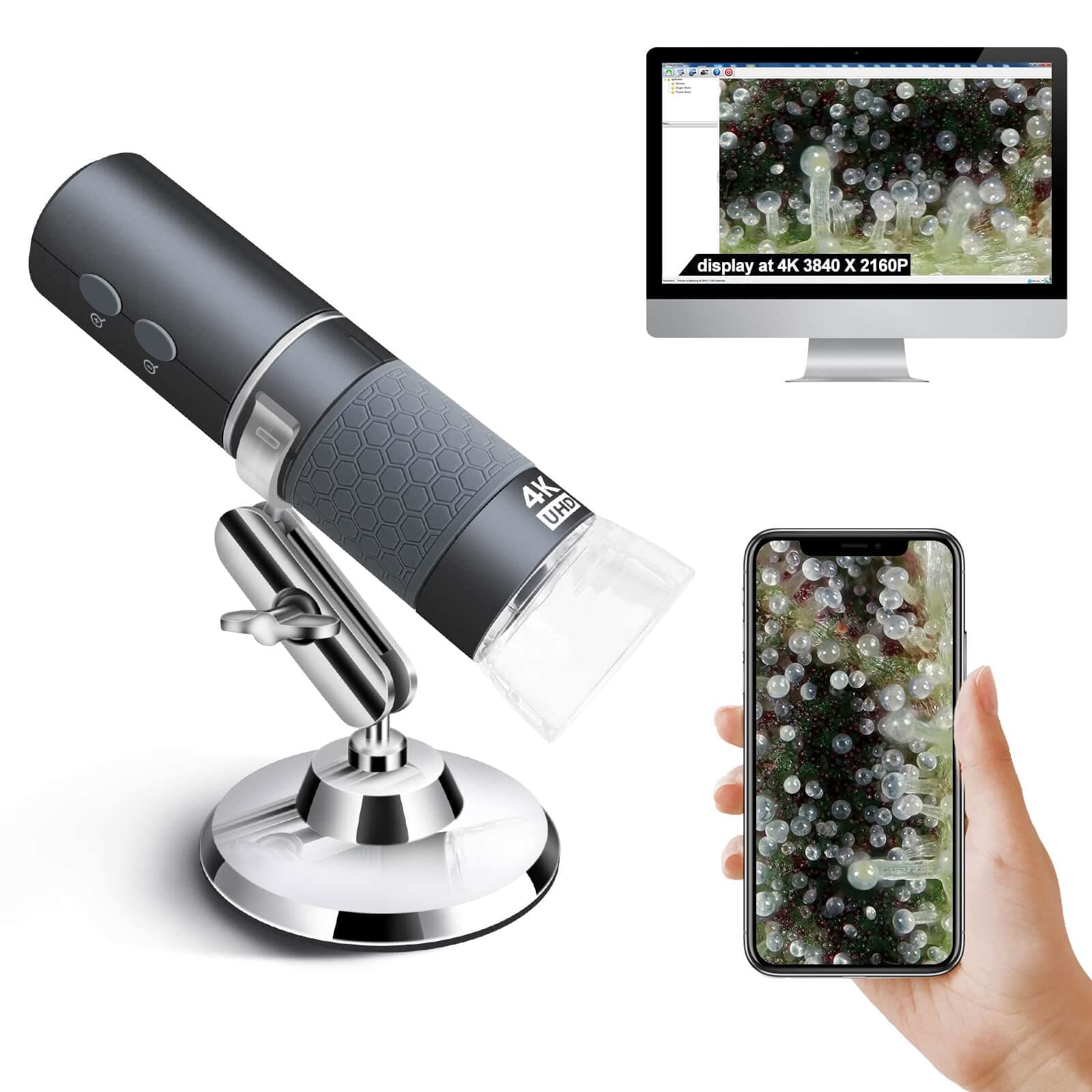
🔬 Elevate your vision—see what others miss with the world’s first 4K wireless microscope!
The Ninyoon 4K WiFi Microscope is a cutting-edge digital microscope offering 50-1000X magnification with ultra-HD 4K wireless streaming. Compatible with all major operating systems and devices, it features a wide-angle lens and long focal length for versatile use—from coin collecting to circuit inspection. Its ergonomic controls and stable stand make it ideal for professionals, educators, and hobbyists seeking precision and freedom from cables.


| ASIN | B09SNSPHXX |
| Best Sellers Rank | #117 in Camera & Photo Products ( See Top 100 in Camera & Photo Products ) #16 in Lab Handheld Digital Microscopes |
| Brand | Ninyoon |
| Built-In Media | Microscope Stand |
| Color | Grey |
| Compatible Devices | Laptop, Personal Computer, Smartphone, Tablet |
| Customer Reviews | 4.2 4.2 out of 5 stars (2,677) |
| Enclosure Material | Plastic |
| Item Weight | 160 Grams |
| Light Source Type | LED |
| Magnification Maximum | 1000 x |
| Manufacturer | Ninyoon |
| Manufacturer Part Number | Ninyoon-4K |
| Model Number | Ninyoon-4K |
| Objective Lens Description | Achromatic |
| Power Source | Battery Powered |
| Real Angle Of View | 120 Degrees |
| UPC | 748521049947 |
| Warranty Description | Lifetime Warranty |
E**R
This digital microscope connects wirelessly to your smartphone.
I purchased the the Jiusion Ninyoon 4K WiFi microscope a few weeks after buying the less expensive Jiusion 40-1000 endoscope. Both come with the same stand, which is not stable. On request, Jiusion sent me a replacement stand as well as an attractive case. My review of the Ninyoon 4K WiFi microscope assumes that the package includes the replacement stand, which is stable and easy to use. I will make some comparisons of the 2 microscopes since there is a price difference of about $18, the Ninyoon 4K WiFi being the more expensive of the two. Also, I will only discuss use of these microscopes with my Android phone and Windows 10-11 computers because I haven’t used them with Apple products. Both of these microscopes can conveniently be used with the native, Windows 10/11 camera app without additional software. In both cases, you simply plug the microscope into one of the computer's USB ports. Then choose the search icon at the lower left of the Windows screen, type the word "camera" in the search bar, and choose the microscope as your camera when the app opens. When using these microscopes on the computer with the stand, I found them to be comparable in image quality despite the reported difference in the focal length of the lenses. Note the two pictures of a dime. The first was taken with the Ninyoon 4K WiFi microscope at the top of the vertical pole on the stand mentioned above . The second was taken with the 40-1000 endoscope at the same height. Obviously, lowering either scope on the pole can provide greater magnification and a smaller field of view. There may be some applications in which one scope would provide a more useful image than the other, but for my purposes so far, looking at stamps and coins, the magnification and image quality of both is excellent. The Ninyoon 4K WiFi scope is a little longer than the 40-1000 endoscope, but I found both easy to handle. Similarly, I was able to use both microscopes on my Android phone, a late model Pixel. For the 40-1000 endoscope, a USB-GO adapter is required. The one provided by Jiusion didn’t work with my Pixel phone, which requires USB type C, but I had a type C adapter available and after installing the app recommended by Jiusion on my phone, the 40-1000 endoscope worked well. The Ninyoon 4K WiFi microscope was more fun to use with my Android phone since this microscope comes with a dedicated WiFi network. Charge the microscope, follow the instructions and you have a wireless connection from the microscope to your phone. (The WiFi is for microscope-to-phone only, not for microscope-to-computer). This allows more freedom and makes sharing easier if there is more than one viewer. The quality of the image over WiFi seemed just as good as with a wired connection. Other superior features of the Ninyoon 4K microscope: the focus wheel is larger and more accessible than the one on the 40-1000 endoscope. There are also more buttons for quick adjustment of power or magnification. I haven’t spent a lot of time trying to view objects with the microscope handheld, but I believe that the longer focal length of the Ninyoon 4K WiFi lens and of course the wireless connection make it the superior choice for that purpose. A quick comment on the use of these microscopes for soldering: these are digital microscopes. When you use them, you focus the microscope on an object and view the object on a screen. Obviously, you do not have a direct, binocular view. This means that neither of these digital microscopes would be suitable for soldering. On the other hand, if you want to look at the quality of your soldering job after it has been completed or examine a board in detail before you begin a soldering job, either of these microscopes will suffice. Provided the newer stand is included, I would give the Jiusion Ninyoon 4K WiFi microscope a 5-star rating. Although it costs almost twice as much as the 40-1000 endoscope, which is also sold by Jiusion, this difference is probably justified by its WiFi capability, improved focus wheel, and longer focal length of its lens.
L**F
Nifty wireless microscope - I have a bit to say :)
The next stage of microscope with wireless connectivity certainly does eliminate wires on the desk. Its magnification is impressive as 0.1mm distances can easily be seen on the smartphone screen. You have to connect your phone/tablet to the microscopes own broadcast WiFI signal. (Yes, switch off your current local WiFi to the microscope's WiFi signal.) Then run its WiFi Check app (the app's name is a bit misleading in that it is the software used for viewing and taking photos or even videos - not solely a connectivity checker). -These are not just dinky macro camera with digital zooming - it has significant magnification, although not biological cell-level -Battery power does not seem to be any reasonable problem -Informative indicating LEDs -Clear locating spacer aids quick placement and is removable for working room between 'scope and object when used with stand. -Stand often gets criticism, but it is satisfactory-to-good when actually used without haste - this is a portable microscope, so it really needs to not be stationary. -Protective cap - good for particular scenarios -Attention should be given to the smooth operation of the focus/magnification band dial (and without play) - wish it had a strip of vertical lines -Ring of subject-light LEDs surrounding the lens -Wheel lighting brightness adjustment - makes for variable lighting levels instead of pushbutton type (although auto-exposure pretty much counters any set lighting level) -Apple functionality, finally (WiFi Check software) -WiFi Check software on Android crashes when zooming after approx. 20 seconds (This happened repeatedly) -PC USB wired connection with XploView software. Crude but that's fine. Actually, any other camera software seems to work. (I did have a problem with faulty supplied USB cable, so I used another on I had.) The zoom buttons on the 'scope are not functional with this use. Images: 1: Fine hair - WiFI Check - Apple - x1.0 2: Fine hair - WiFI Check - Apple - x2.0 (maximum zoom) 3: Fine hair - XploView - Win10 - Far 4: Fine hair - XploView - Win10 - Near 5: One tenth millimeter grid - WiFi Check - Apple phone 6: Circuit x1 magnification - WiFi Check - Apple phone 7: Circuit x2 magnification - WiFi Check - Apple phone 8: Photo of circuit on film of photos #6 & #7 (1/64th inch ruler and 0.1mm grid spacing reference) I'm more pleased with this than I though I may be. The wireless image stream is very speedy (not any hit of stuttering). That may be at the cost of implementing compressed video, but the video image is quite useable. Although a smart TV can pick up and connect to its WiFi signal, it cannot stream the video, and it would certainly be the bomb if that could do that. This really needs to be incorporated into the microscope. Is quite an impressive amount of work put in to this. I would recommend it to someone looking for moderate microscope capability. Edit: The software has been updated (v3.05) that has made stable use on my Android phone. Rating changed from 4 to 5.
J**N
Good scope for the price
I want to start by saying that I like this scope. It's a good scope and you should buy it. It's easy to use. I connected it to my iPhone and my iPad in the length of time it took to read the directions, under a minute. It has very crisp sharp images. It's well worth the price. I use this for exactly what's show in the picture, looking at plant trichomes. However, it has some shortcomings. First and foremost is the notion that it does 50-1000X. It just doesn't. What they call the "zoom wheel" is in fact a focus wheel. If you have the scope setting on a flat surface, (like the included calibration image) you can get it to focus at only two magnifications. It is incredibly clear and high resolution at those two magnifications, but you can't just change the zoom level through the whole range. The zoom buttons are a digital zoom, allowing you to double the image size, but it doesn't change the optical zoom. The pictures below show this effect. Picture zooms changed by turning the focal wheel, but no other "zoom" levels are in focus. However, as you can see from the trichome pictures, it's a lot of zoom. Second, the stand is a waste. They should have forgone it and made the product cheaper, or given a better one. Lastly, and this may be a deal breaker for some, this connects to your phone or ipad via wifi network made by the scope. So, while you're using the scope, you are no longer connected to your real wifi. So, for me, that means no music streaming, the photos don't sync, etc, while the scope is in use. Not a huge deal, but could be a problem for some.
M**P
Den är fantastisk bra och prisvärd!
A**R
Ik gebruik de microscoop om planten op plagen te inspecteren en daarbij is het heel fijn dat hij draadloos is en vlot op een mobieltje kan worden aangesloten. Ook de verlichting werkt goed.
M**T
Observez les plantes et les insectes par contre le support pas très fiables
B**Z
La calidad de la imagen es buena, yo lo uso como analizador de la piel. Y la verdad que me a sorprendido la calidad de imagen por el precio que tiene. En cuando a conectarlo con el dispositivo es muuuuyyy fácil, tanto en el movil como tablet. Simplemente descargas la App, al abrirla sale una primera pestaña que pide que conectes el dispositivo a traves de red Wifi - "connecting WiFi camera", el dispositivo aparece en redes wifi al encenderlo. Incluso si te esperas unos segundos, sale una nueva pestaña, donde simplemente apretando el OK redirige directamente al apartado de WiFi para que seleciones el dispositivo, que aparece con el nombre de microscopio.
R**Z
MUY BUENO Y UTIL
Trustpilot
1 day ago
2 weeks ago