We remain fully operational. Our teams are working around the clock to ensure your deliveries continue safely.

DOWNLOAD THE APP


Copyright © 2025 Desertcart Holdings Limited
DOWNLOAD THE APP





Buy anything from 5,000+ international stores. One checkout price. No surprise fees. Join 2M+ shoppers on Desertcart.
Desertcart purchases this item on your behalf and handles shipping, customs, and support to Greece.
🚀 Elevate Your Projects with the Ultimate ESP32 Experience!
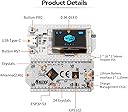
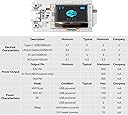
The MakerFocus ESP32 Development Board is a powerful, Arduino-compatible platform featuring a 0.96-inch OLED display and enhanced WiFi capabilities. With 8MB of FLASH memory, improved antenna design, and advanced power management, this board is perfect for innovative projects that require reliable connectivity and efficient energy use. Ideal for makers and developers looking to create smart devices and IoT applications.
| ASIN | B076KJZ5QM |
| Best Sellers Rank | #74,627 in Computers ( See Top 100 in Computers ) #1,143 in Single-Board Computers |
| Brand | MakerFocus |
| Built-In Media | 1 * ESP32 Development Board, 1 * Power Cord, 2 * Pin Headers |
| CPU Model | Tegra |
| Compatible Devices | Personal Computer, Arduino, OLED Display |
| Connectivity Technology | USB, Wi-Fi |
| Customer Reviews | 4.2 4.2 out of 5 stars (299) |
| Item Dimensions L x W x H | 5L x 2.5W x 0.1H centimeters |
| Item Weight | 0.01 Pounds |
| Manufacturer | MakerFocus |
| Memory Storage Capacity | 8 MB |
| Mfr Part Number | UZM173505AEVXI378 |
| Model Name | WiFi Kit 32 (V3) |
| Model Number | 8541612336 |
| Operating System | Arduino |
| Processor Brand | Espressif |
| Processor Count | 2 |
| Processor Speed | 2.4 GHz |
| RAM Memory Installed | 8 MB |
| RAM Memory Technology | LPDDR |
| Total Usb Ports | 1 |
| UPC | 190033879688 |
| Wireless Compability | 802.11abg |
A**M
Simple to use with arduino and fastled, has a ton of memory to run those big projects
W**Y
I am going to save you some time by repeating something another reviewer already stated "Use the pin labels on the bottom of the PCB". They noticed that the doc shows the device from the bottom. I also noticed the LEDs are on the opposite side in the picture. Maybe the picture was taken in selfie mode. I burned a day on this trying to figure out why my analog inputs were working but not the digital counterparts. I've ordered three of these in the last three months. They have all been the V3 board. The pin diagram (WIFI_Kit_32(New)) seems to have the correct analog pins labeled, but the GPIO pins are outright incorrect. I believe the problem is a bit deeper than just an inverted image. The GPIO pins still don't match inverted. I think their library is configured for the back silk screen labels, but the analog pins in the diagram I mentioned above are correct. so in short; use the diagram when using analog, and the back of the device when using digital. how fun!! otherwise these things are great for the price.
O**R
Fourth unit purchased and all working perfectly.
D**L
I give this 3 stars because when I unpacked it and set it up to test, I noticed that the bottom left corner of the OLED was broken off. I powered it on anyway to see if it worked. It partially worked ... the sample code was displaying text but it was missing lines. I assumed that I had handled it carelessly and wrote it off and ordered another. It arrived in one day (the other arrived in 2). When I removed it from the packaging (with much care this time), it ALSO had the bottom left corner broken off. It powered up OK but same sketchy display. While I like this format (OLED on WiFi board), I think it needs better shipping packaging, so two stars knocked off. I also ordered the LoRa version (x2) and they arrived undamaged and worked great. (All 4 devices were in an anti-static bag that was in a small yellow shipping envelope.The OLED doesn't have any support on the two bottom corners ... easy to get broken.) UPDATE: Seller has taken care of these broken devices and has indicated that the shipping packaging is changing, I REALLY like this ESP32 and OLED format so I have added back the 2 stars. Great customer focus and concern.
A**M
This board is pretty cool. I bought it for the integrated OLED diplay. Very satisfied with it despite the minor issues. If you are just starting out, you may want to pass this one up for a more seasoned board like a Huzzah. But if you like hunting down information and learning the hard way, buy it. The issues I have with this board are minor to me but worth noting. The library needs more work. if you #include heltec.h, their library for the board, and nothing else in your script other than say a basic "Hello World" to the Serial and upload your script, it will crash the device and cause it to endlessly reset. Remove heltec.h and the script runs fine. I tried grabbing their latest from their github and it's none better. Most of their examples don't work. Luckily, pretty much any ESP32/ESP8266 stuff will work with it. There are some nuances: There are only 2 PWM GPIO pins. There is no analogWrite. You can use ledcWrite and a function to set the duty cycle and it works good that way. Just need to remember to call your function, instead of just using analogWrite. Though you could probably do a pseudo duty cycle with digitalWrite and delay. The built-in OLED uses three GPIO pins. SCL is GPIO15, SDA is GPIO4, and reset is GPIO16. This makes those pins unable to be used for most other things. The only display library I managed to get to work flawlessly with the OLED display was the U8glib by olikraus. Both U8g2 and U8x8 worked just fine for me. The lib is available on github. Note that I didn't try more than a handful graphic libraries. U8glib worked and I didn't need to continue searching for another after that. This still leaves you around 20 GPIOs to use and of that amount, 8 are input only. The pins are also only 3.3v tolerant and may be damaged if you connect to 5v. The original pin out diagram they released was wrong. The side with GPIO pin 36 is on the RST button side and GPIO pin 21 is on the PRG button side. They have corrected it and the correct version is available on their github site but I also attached it to this review. You can see they just blurred the board in their updated diagram. The annoying flicker of the BAT LED. If you do not plug in a battery to the battery connector, located under the board, the BAT LED will flash constantly. There is no way to programmatically shut it off that I know of. If you know a way, please I'd love to hear from you in the comments. All in all, this is a very good project board if you have a little bit of knowledge and don't mind poking around looking for information. ADDENDUM: I wanted to add one more thing, and this is stating the obvious, I had to solder the header pins on to the board. A couple of tips I can pass along is go ahead and unscrew the four screws that hold the OLED in place so you can move it and more importantly the ribbon cable out of the way a bit. This should give you plenty of room to solder the pins without the risk of touching the ribbon cable with the soldering iron. Then just screw the four screws back in but don't tighten too much. Just snug them up should be fine. You can stick the header pins into a breadboard to hold them in place while you solder a pin on each end. Should be good to go for the rest. Mind the heat though. For whatever reason my soldering iron melted part of one plastic pin holder on the header. It still works. This was my mistake, not a design flaw.
Trustpilot
5 days ago
2 weeks ago