We remain fully operational. Our teams are working around the clock to ensure your deliveries continue safely.

DOWNLOAD THE APP


Copyright © 2025 Desertcart Holdings Limited
DOWNLOAD THE APP
Buy anything from 5,000+ international stores. One checkout price. No surprise fees. Join 2M+ shoppers on Desertcart.
Desertcart purchases this item on your behalf and handles shipping, customs, and support to Greece.
🎶 Your pocket-sized gateway to pro-level beats and live sets!
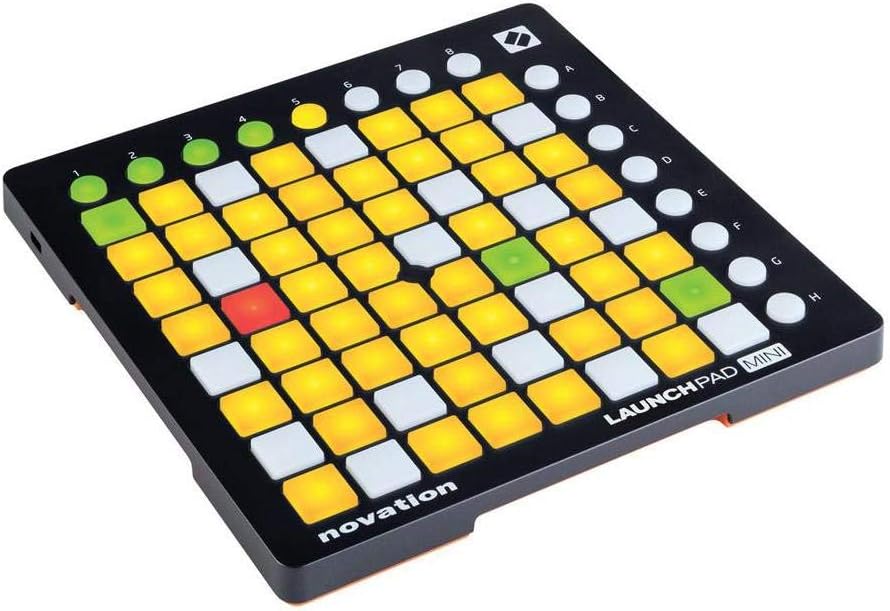
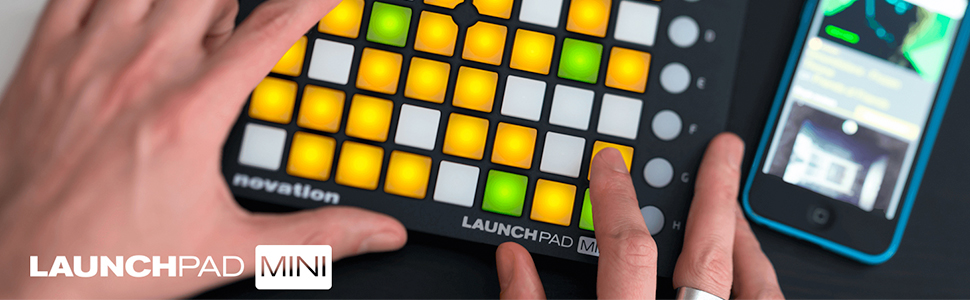
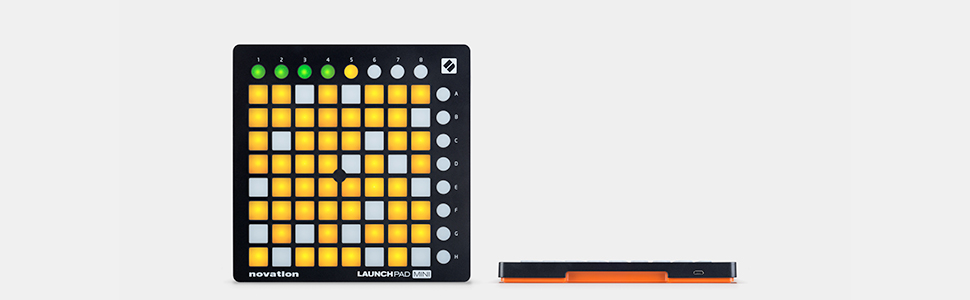
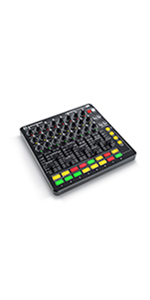
The Novation MK2 Launchpad Mini is a compact, USB-powered MIDI grid controller designed for Ableton Live and compatible with Mac, PC, and iPad. Featuring 64 multi-colored backlit pads, it offers intuitive clip launching, mixer control, and performance visuals. Lightweight and portable, it requires no drivers and includes Ableton Live Lite plus virtual instruments and samples, making it an ideal entry point for aspiring producers and live performers.







| ASIN | B00W5F3GJ0 |
| Additional Features | Portable |
| Best Sellers Rank | #57,308 in Musical Instruments ( See Top 100 in Musical Instruments ) #200 in Computer Recording MIDI Controllers |
| Brand Name | Novation |
| Color | Black |
| Compatible Devices | Mac, PC, iPad |
| Connectivity Technology | USB |
| Connector Type | USB |
| Control Method | Touch |
| Control Type | MIDI |
| Customer Reviews | 4.4 4.4 out of 5 stars (3,715) |
| Global Trade Identification Number | 00815301000440 |
| Hardware Interface | USB |
| Hardware Platform | USB-based x86 or ARM |
| Human Interface Input | Buttons |
| Included Components | User Manual |
| Instrument | digital audio workstation controller |
| Instrument Key | Any |
| Item Weight | 1.7 Pounds |
| Manufacturer | Novation |
| Material Type | Plastic, Rubber |
| Mixer Channel Quantity | 8 |
| Model Number | AMS-LAUNCHPAD-MINI-MK2 |
| Noise Control | None |
| Number of Keys | 64 |
| Platform | Mac, iOS |
| Product Style | Launchpad Mini MK2 |
| Size | Small |
| Supported Software | Ableton Live |
| Total USB Ports | 1 |
| UPC | 815301000440 657379026072 600599645882 |
| Unit Count | 1.0 Count |
| Warranty Description | 2 years. |
M**M
Great Buy!
Table of Contents: -Included -Important Notes -Pros and Cons -Ramble -Conclusion -Extra Notes -Extra Extra Notes -Upcoming Included: Launchpad Mini, USB connector, Ableton Live 9 Lite code, and Manual IMPORTANT NOTES: It's Ableton Live 9 LITE, and the upgraded version will run you a pretty penny (I believe over $300, I'll check this). You can do a lot with lite, but just know that it's not the fully unlocked version. Also, check Ableton live 9's minimum computer requirements just to make sure your computer can actually run it. If you don't know how to check, download the program and use the 30 day trail to see how it runs on your computer. Pros: Super fun, Good intro. to launchpads, Affordable, and Ableton Live 9 Lite code for free. Cons:Learning curve, Basically limited to 4 colors, hard to adjust sensitivity (if possible at all). Ramble: If you put in the time and effort, you will love this product. I've had it for 3 days and after looking up multiple guides, finding templates, and messing around with the program, I have a good grasp on what you do to have fun using this product. Also, you need to either read the manual or watch YouTube videos on what the numbers and letters do. Not knowing what these do WILL mess with outcome of your project. If you're looking for more colors for your projects (RGB spectrum), buy the $150.00 model of this product. However, I would start with this model if you are just starting, just to make sure you actually want to delve into the world of launchpads. I had no problems with the website or product which I've heard other individuals have had, so just know that it could happen to you and that you should try to be patient with Novation when filing a report. Conclusion: This is a great product. Buy it if you're interested in this field of music and enjoy it for what it is. If you know for sure you want to invest your time and money into launchpads, buy the $150.00 one so that you can make unbelievably cool light shows while playing music (also the interface is easier to understand with this model). Extra Notes: Watch YouTube videos 100% (especially over the setup), find an easy to understand template (I don't remember what template I used but i'll link it soon), and don't give up on learning it (It's difficult, but worth it). Extra Extra Notes: Sorry for being repetitive. Upcoming: I'll post a short video on what I can currently do/what it can do, I'll link a good template and a few important guides, and i'll post a picture of it.
S**Z
Big Issue (for me)
This is a good product so I don't want to leave it a negative rating, but I have some things to say that may be negative to some people. First off I only have one bad thing to say about launchpad itself. The buttons sometimes register zero or two hits, and although this doesn't happen that often, it can be a real pain if you're recording something when it does. The other thing I wanted to mention, is that the launchpad or the software (ableton) broke my computer. While I'm not sure if it was actually one of those two what caused this, I can't think of what else could have caused it. The first time (yes I say first cuz it happened twice) this happened was within a week or two simce I started using the launch pad, it completely broke my hard drive (and at that point I didn't suspect the launchpad to have caused it) so I got a new one and only had three things installed, steam, Adobe creative cloud, and ableton. Not even a week had gone by and the sane thing happened again, except this time I was able to go back to a previous point and restore what I had on my hard drive (although thanks to this now I can't download creative cloud, idk why). Considering I only had three things on my computer, two of which I'd had on my previous one for over a year, I'm 99% sure that either the launchpad or ableton was what killed my computer both times. Needless to mention I haven't used the launchpad since (and don't have ableton installed) for over a month and nothing has happened to my computer.
C**P
Works well as MIDI controller for Algoriddim djay Pro AI running on iPad, seems solid for live abuse
NOTE: I have not tried this with Ableton. I attached it instead to djay Pro Ai running on an iPad with a Pioneer DJ controller and a powered USB 4-port hub between the devices (so that Launchpad can get power as the iPad can't optimally provide that, see lights below for more). It works perfectly to trigger events in djay and receives MIDI messages back to the Launchpad from djay. This allows me to set up LED colors on the Launchpad to indicate loops that aren't playing and then change color to indicate loops that are when I trigger them (then switching colors back when I tab buttons to stop the loops). The button action is somewhat solid. The problem with these pad controllers is always the balance between too hard (but is less likely to stick or record two taps when you meant one) or too soft (which can be more comfortable to the touch but is too sensitive and accidentally registers double hits). This tends toward the softer side but is not terrible. Since the buttons are small (each button is less than an inch square), it's easy to miss and hit adjacent buttons. However, the small size of the entire unit is nice when you want to keep your rig tiny. It's also super light weight yet seems solid enough for live performance. Lights are plenty bright when powered by the hub or a laptop so dark or bright gigs are doable. Note that this has a special low powered/dimmer LEDs mode where it can be powered by just an iPad. I tried it once and it seems to work well. There's also a fairly robust iOS app dedicated to this controller that was fun to try out but too expensive to subscribe to for what it does. There's no lite version so you gotta pay monthly for the privilege.
N**.
Ottimo prodotto, consigliato. Spedizione abbastanza veloce e impaccaggio ottimo. Per quanto riguarda la qualitá è come la versione S ma più piccola e la potete portare dove volete. Se volete iniziare con il launchpad comprate questo.Io metto 5 stelle a questo prodotto per vari motivi: é uno strumento incredibile , molto molto bello. Oltretutto amazon come sempre eccellente in imballaggio e spedizione. Ma ahimè, se non hai delle buone basi non riuscirai mai a godere a pieno di questo oggettino. NON é per principianti , anche se di per sé l'apparecchio non é difficile da padroneggiare e bisogna usarlo obbligatoriamente al PC utilizzando Ableton live 9(nella confezione c'é il codice per scaricare la versione Lite).Certo, le canzoni non sono proprio facilissime da imparare ma con un po' di impegno si imparano facilmente. Per configurarlo ho dovuto vedere un palio di video su YouTube e poi ho subito imparato. Se avete un dubbio tra il mini e la versione più grande vi consiglio di comprare questo, perché pur essendo la versione mini è abbastanza grande.E' piuttosto complesso da far funzionare non lo conoscete bene come prodotto poiché le istruzioni allegate sono piuttosto scarse e scritte solo in inglese e se vi affidate al sito ufficiale trovereste solo informazioni in inglese senza alcuna spiegazione su come fare i primi passi per farlo funzionare per cui fate prima esperienza con qualche amico e poi acquistatelo.Vi lascio ad alcune foto del prodotto.
A**.
Launchpad con moltissime caratteristiche e funzioni, il meglio in circolazione, un po' difficile da configurare, ma una volta risolto questo "problema", diventa uno spettacolo utilizzarlo. Tasti molto più sensibili e anche molto più grande delle versioni più vecchie, il ché facilita molto il suo utilizzo. Si possono comporre e riprodurre canzoni, ovviamente però, non è facile per niente. Comunque sia, ottimo prodotto, consigliato per i più professionisti, chi ha già avuto a che fare con il launchpad, perché sono oltre 200 euro di strumento musicale, e quindi per chi è convinto di entrare in questo mondo.
M**I
Ich kann nur positives über das Launchpad berichten bis auf einen kleinen Punkt, da werde ich den Hersteller nochmal kontaktieren. Als Neuling (so wie ich) sollte man aber doch ein paar Kleinigkeiten beachten. Da komme ich später nochmal zur Sprache 1. Verpackung: Exzellent. Ist gut verpackt wie man es auch erwartet hat. Mit dabei ist einmal das Launchpad, ein orangenes Usb Kabel und eine Anleitung in Englisch + einen Code für die Downloadversion von der Musiksoftware Ableton 9 live Lite 2.Verarbeitung Das Launchpad ist sehr gut verarbeitet und leicht. Auf der Rückseite ist das pad gummiert, so daß das launchpad auf einem Untergrund nicht weg rutschen kann. 3. Bedienung Ein Neuling oder Anfänger sollte sich vorher sich etwas informieren, denn einfach in den USB rein stecken, launchpad verbinden, los geht's ist es leider noch nicht. Erst sollte das Pad beim Hersteller online registriert werden. Dies wird in der Anleitung Schritt für Schritt erläutert. Wenn man dann den Account erstellt hat, kann man den USB Treiber für Windows und auch andere Dinge für das Pad runterladen. Unteranderem ist dort auch möglich die Musiksoftware Ableton 9 live Lite runtergeladen. Wenn dann der USB Treiber drauf ist auf dem Rechner kann man dann das Pad anschließen. Wenn Ableton 9 live Lite installiert ist und registriert ist mit der Seriennummer, sollte dort in den Einstellungen das Pad eingestellt werden. Dies wird in der Anleitung auch erläutert. Man erkennt es daran wenn das Pad kurz von Ecke zur Ecke durchleuchtet das es erkannt wurde. Ein Firmewareupdate war bei mir nicht nötig, da die neuste Firmewareupdate drauf war. Fazit: Nachdem der USB Treiber bei mir in Windows 10 drüber gespielt war, konnte ich das Pad nach einen Kabelwechsel nutzen (da komme ich gleich auf den Negativpunkt). Allerdings bin ich persönlich kein Ableton Fan der ersten Stunde gewesen, da es mir zu schwer erschien Also hätte ich mein bisheriges Fl Studio dafür genutzt und kann nur sagen einfach Top! Sobald man weiss wie man etwas machen kann, kann man super tolle lightshows erstellen und auch richtig gut mit dem Pad Lieder produzieren. Wobei das mit der DAW bzw. mit der Musiksoftware Geschmackssache ist und jeder es für sich entscheiden soll, was man nutzt. Ich persönlich habe mit FL Studio gute Erfahrung gemacht, Ableton habe ich halb angerissen aber werde ich mir demnächst auch anschauen. Endfazit: Tolles launchpad! Top Empfehlung für den Einstieg in die Elektronische Musikproduktion. Es ist definitiv sein Geld wert, wenn man sich zwischen der kleinsten oder größten Variante des Launchpad nicht entscheiden kann. Aber leider habe ich ein defektes USB Kabel mitgeliefert bekommen das ich zwar selbstständig getauscht habe, aber ich es schon schade finde, da es ein neues Produkt war. Da ich mir denke: was wäre wenn ich nicht gleich ein Ersatz gehabt hätte? Aber das ist das kleinere übel ;) ich kann trotzdem sagen kauft euch das pad, wenn ihr in die Elektronische Musikproduktion + coole lightshows am Pad erstellen wollt ;) Ich werde bestimmt nochmal ein Update schreiben
R**S
My 6year old sun saw this launchpad on Amazon and insisted he wants it very much, so after 3-4 weeks I decided to buy it. He's using it on his Ipad, which was a bit challenging. The main issue is the adapter you're using to connect the 2 devices. I recommend using a lightning adapter with a USB port and a charging port. If the adapter is not connected to power, the launchpad won't work properly, even by setting it on low power mode. So after we bought a second adapter, with charging port, everything works great. I am playing with it too. They are offering a free app on Ipad.
B**D
Also das LaunchPad habe ich für meine Tochter (13) gekauft. Nach anfänglichen Startschwierigkeiten, das Gerät ist sehr komplex und hat sehr viele Einstellmöglichkeiten, ist es meiner Tochter dank vieler Tutorials im Netz gelungen mit dem Pad zu arbeiten und sie ist davon begeistert. Als Spielzeug für Kleinkinder ist das Teil sicherlich zu kompliziert. Wenn man sich aber im klaren darüber ist wozu das Teil gedacht ist und was man damit machen will, kann man es getrost kaufen. Was die Qualität angeht, es ist sehr solide verarbeitet und macht auf mich einen schon sehr professionellen Eindruck.
Trustpilot
3 weeks ago
1 month ago